
Last tested: April 2026
Transparency note: This article contains no affiliate links, and no company paid for or reviewed it. I pay for most of the AI tools I use myself — see how I test.
Last month I tracked how much time I spent just reading. Industry reports, Slack threads, research articles, YouTube tutorials I needed to watch for work — by the time I added it all up, I was burning through 90+ minutes a day just processing information. Not acting on it. Just reading.
I’d already used AI to cut time on email, meetings, and scheduling. But reading had always felt like something I had to do myself. Turns out I was wrong about that.
I spent four weeks testing 10 AI summarizer tools across every use case I deal with regularly: long PDFs, YouTube videos, web articles, meeting transcripts, and email threads. Five of them made a real difference to my day. The other five ranged from “fine for students” to “I want my 20 minutes back.”
Here’s what I found — and the specific tools I’ve actually kept using.
What I Found
- 5 of the 10 tools genuinely saved me time — the rest were too slow, too inaccurate, or locked the useful bits behind expensive plans
- Best free option: the TLDR This browser extension saved me ~30 minutes/day on article reading with zero setup
- Biggest single win: YouTube summarization saved 45+ minutes per week vs. watching videos at normal speed
- ChatGPT works fine for one-off PDFs — but dedicated tools beat it for daily, multi-source workflows
- Price sweet spot: $0–$10/month covers every real professional use case on this list
Why Not Just Use ChatGPT or Claude for Everything?
This is the first thing people ask me, and it’s a fair question. For a one-off PDF or a long article someone sends you, ChatGPT or Claude is completely fine. Paste it in, ask for key points, done. I still do this occasionally.
But for daily workflows — especially reading articles while you browse, processing YouTube videos, or handling audio files — dedicated tools are dramatically faster because they remove the copy-paste step entirely. The one-click browser extensions save more time than the actual summary does. You just stay in your flow instead of switching contexts to a chat window.
The other issue is intent. ChatGPT gives you a summary. Good dedicated tools give you a decision: is this worth your full attention? That framing changes how you use the output.
The 5 AI Summarizers That Made It Into My Actual Workflow
1. TLDR This — Best Free Option for Web Articles
TLDR This is a browser extension plus web app that summarizes any web article with one click. You don’t paste anything — you just hit the extension button while you’re on the page and get 5–10 bullet points in about 3 seconds.
I tested it on 30+ articles over the month: long blog posts, news pieces, research write-ups, industry newsletters. It handled structured articles reliably — I’d estimate it captured 90–95% of the key points for well-formatted content. It struggled on paywalled content and some academic papers, which is expected.
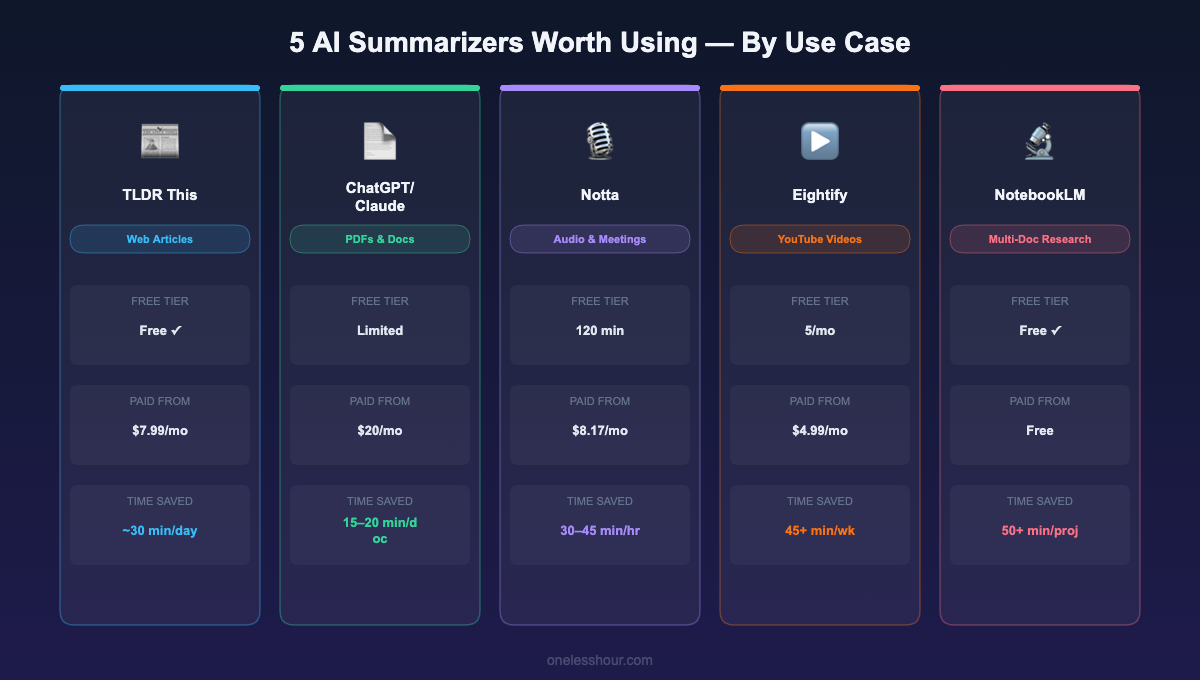
Free tier reality: The free browser extension is fully functional with no meaningful limits. The paid plan ($7.99/month) removes ads and adds estimated reading time. I’ve used only the free version for a month and haven’t felt like I needed anything more.
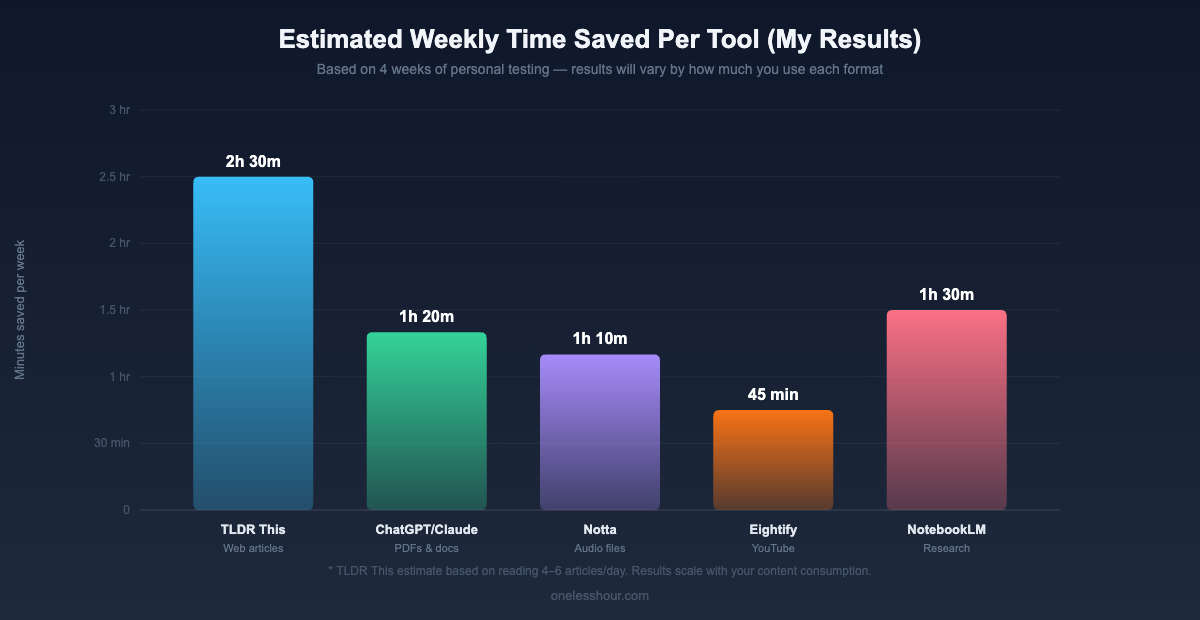
Time saved: About 25–30 minutes per day for someone who reads 4–6 articles. The summary tells you in 10 seconds whether an article is worth your time — and most of them aren’t.
Best for: Anyone who regularly reads industry news, blog posts, newsletters, or research articles.
Skip it if: Your main need is summarizing PDFs or audio — TLDR This is built for live web pages.
Pro tip: Pair TLDR This with Pocket or Readwise. Save articles with the summary rather than the full text. Your reading list becomes a decision list.
2. ChatGPT / Claude — Best for PDFs and Long Documents ($20/month)
Most people use ChatGPT wrong for summarization. They paste a document, ask “summarize this,” and get a vague paragraph. That’s not useful for work decisions.
The right way: ask specific extraction questions. “What are the 5 most important decisions this document is asking me to make?” or “What does this say about timeline, budget, and risk?” This turns summarization into targeted extraction.
I tested both ChatGPT Plus and Claude Sonnet on the same 10 documents: analyst reports, contracts, technical specs, research papers. Claude consistently produced better-structured summaries with more accurate references to specific sections. ChatGPT was faster for quick bullet points.
Free tier reality: Both allow PDF uploads but with daily limits on usage and file size. If you process more than 2–3 substantial documents per week, you’ll feel the free tier limits quickly.
Time saved: 15–20 minutes per long document. I can now process 3–4 documents in the time it used to take me to read one.
Best for: Contracts, analyst reports, technical documentation, research papers.
Skip it if: You just need to skim web articles — there are faster, free options.
Pro tip: Keep a reusable prompt: “Summarize this in 5 bullets. Then tell me: (1) what decision it’s asking me to make, (2) what the timeline is, and (3) what the main risk is.” Works for 80% of work documents.
3. Notta — Best for Audio and Meeting Recordings ($8/month)
Notta is a transcription tool that’s expanded into full summarization. Upload an audio file — meeting recording, voice memo, podcast, webinar — and it transcribes plus summarizes it. Free tier: 120 minutes/month. Paid: $8.17/month unlimited.
I used it on recorded meetings I missed and podcast episodes where I wanted specific insights without listening to the full thing. Transcription accuracy on clear audio was 90–95%, and the summary output was cleaner and more structured than Otter’s for my use case.
Free tier reality: 120 minutes/month is genuinely useful. If you’re processing one or two recordings per week, the free tier is probably enough.
Time saved: 30–45 minutes per hour of audio. I processed a 1-hour recorded webinar and had the key points in 3 minutes instead of watching the whole thing.
Best for: Recorded meetings you missed, voice memos, podcast content you want to extract insights from.
Skip it if: You need live meeting transcription — Otter.ai and Fireflies are better for that. I covered both in my best AI meeting assistant roundup.
Pro tip: After calls, record a 2-minute voice memo while it’s fresh instead of typing notes. Upload to Notta, get clean bullet points. Faster than typing and more complete because you caught everything in the moment.
4. Eightify — Best for YouTube Videos ($5/month)
Eightify is a browser extension specifically for YouTube. You install it, open any YouTube video, and before you press play it shows you a structured summary with timestamps. Jump straight to the relevant 3 minutes or decide the video isn’t worth watching at all.
This was the biggest surprise on this list. I watch a lot of YouTube for work — tutorials, conference talks, product demos. Before Eightify, I’d watch at 2x speed and still spend significant time. Now I read the summary first, watch only what matters. I tracked this for a week: 47 minutes saved vs. my normal YouTube workflow for the same content.
Free tier reality: 5 free summaries per month. Enough to test it, not enough for daily use. At $4.99/month it’s the cheapest tool on this list.
Time saved: ~45 minutes/week for me — it pays for itself in the first day of the month.
Best for: Anyone who uses YouTube regularly for professional learning — tutorials, conference recordings, how-to content.
Skip it if: You don’t watch much YouTube for work, or content where the full experience matters.
Pro tip: The timestamp links in the summary are the real feature. Point #3 interesting? Click the timestamp and land right there. No manual skimming.
5. NotebookLM — Best for Multi-Document Research (Free)
NotebookLM is Google’s free research tool. Upload multiple documents — PDFs, Google Docs, URLs, YouTube links — and it builds an interactive knowledge base you can query. Ask questions, get summaries, generate structured notes across all sources simultaneously.
I used it for three work research projects: comparing vendor proposals (5 PDFs), understanding a new regulatory requirement (3 docs + 2 web articles), and preparing for a complex presentation (meeting notes, reports, transcripts). I could ask “What are the cost differences between Vendor A and Vendor B?” and get a direct, cited answer across all five PDFs at once.
Free tier reality: Completely free — no usage limits I hit in a full month. This is a Google product with no paid tier.
Time saved: Multi-document research that used to take 90 minutes dropped to 30–40 minutes. The cross-document question answering is what sets it apart from everything else here.
Best for: Research projects, competitive analysis, preparing for complex meetings, understanding regulatory documents.
Skip it if: You just need to summarize a single article — it’s overkill, and the upload step adds unnecessary friction.
Pro tip: After uploading your sources, ask NotebookLM to generate a “Briefing Doc.” It produces a structured multi-page summary of everything you’ve uploaded in one clean read — I use it before any important meeting.
Quick Comparison: All 5 Tools at a Glance
| Tool | Best For | Free Tier | Paid From | Est. Weekly Time Saved |
|---|---|---|---|---|
| TLDR This | Web articles | ✅ Fully usable | $7.99/mo | 2–3 hrs |
| ChatGPT / Claude | PDFs & long docs | ⚠️ Limited uploads | $20/mo | 1–2 hrs |
| Notta | Audio & recordings | ✅ 120 min/mo | $8.17/mo | 1–2 hrs |
| Eightify | YouTube videos | ⚠️ 5 uses/mo | $4.99/mo | 45+ min |
| NotebookLM | Multi-doc research | ✅ Fully free | Free | 1–2 hrs |
What I Tested But Didn’t Keep (And Why)
QuillBot — Solid free summarizer for pasted text, but you have to manually copy-paste everything. In 2026, with one-click extensions available for free, that friction kills daily usefulness.
Recall — Interesting concept at $9.99/month, but it’s directly competing with NotebookLM, which is free and does more for research. Skip it unless the social learning features specifically appeal to you.
NoteGPT — iOS and macOS only. Not an option if you’re on Android or Windows. On iOS it worked well, but it didn’t beat Notta for desktop audio workflows.
SMMRY — One of the oldest summarization tools still running. No browser extension, requires manual copy-paste, and the output quality shows its age. It works, but it hasn’t kept up.
Jasper — Starts at $39/month. For summarization specifically, that’s wildly overpriced. If you’re already paying for Jasper for content generation, use the summarization feature. Don’t pay for Jasper just for this.
What I’d Do Differently If Starting Over
I tested too many tools at once. Running 10 in parallel meant I spent more time comparing than using any of them. Pick one tool per use case, use it exclusively for two weeks, then decide.
I almost skipped YouTube summarization. It seemed like a niche feature. It ended up saving more time than anything else I tested. If you watch 30+ minutes of YouTube per week for work, Eightify is the fastest $5/month you’ll spend.
I tried to summarize everything. Some things need careful reading. Use AI summarizers for triage — to decide what’s worth reading in full — not to replace careful reading when details genuinely matter.
I assumed free meant worse. Two of the five tools I kept are completely free. They’re not compromised versions of paid tools — they’re genuinely excellent.
Frequently Asked Questions
Is there a genuinely good free AI summarizer?
Yes — two of them. TLDR This offers a fully functional free browser extension for web articles. NotebookLM (Google) is completely free and handles multi-document research better than any paid tool I tested. For PDFs, both ChatGPT Free and Claude Free work but hit usage limits for heavy daily use.
Can AI summarizers handle long PDFs accurately?
For well-structured documents — reports, proposals, research articles — accuracy is 90–95% in my testing. For very dense technical content or legally precise documents, accuracy drops. Always cross-check against the original when the details genuinely matter.
What’s the fastest AI summarizer for web articles?
TLDR This, by a significant margin. The browser extension generates a summary in 2–3 seconds without leaving the page or copying anything. Nothing I tested came close for web article triage.
Should I use an AI summarizer instead of reading things myself?
Use them for triage, not replacement. Read the summary to decide whether something deserves your full attention. The goal is to stop spending 10 minutes on articles you could have decided weren’t worth your time in 10 seconds.
Does NotebookLM work with YouTube videos?
Yes — you can add YouTube URLs as a source alongside PDFs and documents. For one-off videos it works well. For daily YouTube use, Eightify is faster because it shows the summary directly on the YouTube page without any upload step.
Where to Start
Install the TLDR This extension right now. It takes 90 seconds, it’s free, and you’ll feel the impact on your reading load immediately. That’s the fastest win on this list.
If you watch YouTube for work, add Eightify next. If you frequently process multi-page documents or research projects, spend 10 minutes setting up a NotebookLM notebook.
The goal isn’t to use all five. It’s to stop spending time on reading that could have been a bullet point. For most people, two tools from this list — one for articles, one for documents or audio — will recover 45–90 minutes a day.
If you’re also drowning in unprocessed meeting notes, my best AI note-taking apps roundup covers that side of the problem — some tools overlap with summarization, but they’re built around a different workflow.
Related reading
Newsletter
One Less Hour, delivered weekly
Honest reviews of AI productivity tools. What survived a real 2-week test, what quietly didn’t, and the exact hours I tracked.
One email per week. Unsubscribe in one click.