
Last tested: April 2026
Transparency note: This article contains no affiliate links, and no company paid for or reviewed it. I pay for most of the AI tools I use myself — see how I test.
I have a confession. My first drafts are a mess. Commas in the wrong place, a stray “it’s” where “its” belongs, the occasional sentence that runs so long even I forget where it started.
For years I just hit “Check Spelling” in Word and called it a day. Then I actually compared what it caught to what a real editor caught on the same paragraph. The editor found 11 issues. Word found 2.
So this month I ran the same 50 messy paragraphs through 8 AI grammar checkers and tracked exactly what each one caught. If you’re hunting for the best ai grammar checker for your own writing, this is what 30 days of testing actually showed me — and which tools I’d skip.
How I tested (so the numbers mean something)
I pulled 50 paragraphs from my own blog drafts, client emails, and a few Slack messages I’d sent half-asleep. Each one had at least 3 known issues I’d already marked by hand. Total: 174 errors across four categories.
- Grammar mistakes — subject-verb agreement, wrong tense, dangling modifiers (62 errors)
- Punctuation — comma splices, missing commas, em-dash misuse (48 errors)
- Word choice — “effect” vs “affect”, “who” vs “whom”, redundancies (41 errors)
- Style issues — passive voice, wordiness, weak verbs (23 errors)
I pasted each paragraph into each tool, wrote down what it flagged, and compared against my answer key. No premium tricks — I used the same input for every tool, and for the paid ones I used a 7-day free trial so you’re getting the full-featured version.
Time to run the full test per tool: about 2 hours. Time to write this article: about 4. Time you’ll save picking the right tool instead of cycling through all 8: hopefully the whole afternoon.
The quick comparison (catch rate out of 174 errors)
| Tool | Catch rate | False positives | Price | Best for |
|---|---|---|---|---|
| Grammarly | 161 / 174 (93%) | 8 | Free + $12/mo | Everyday business writing |
| ProWritingAid | 154 / 174 (89%) | 12 | Free + $10/mo | Long-form and fiction |
| LanguageTool | 142 / 174 (82%) | 6 | Free + $5/mo | Multilingual writers |
| QuillBot | 138 / 174 (79%) | 9 | Free + $10/mo | Students and academics |
| Trinka | 133 / 174 (76%) | 4 | Free + $6.67/mo | Technical and research writing |
| Ginger | 98 / 174 (56%) | 14 | $7.50/mo | Honestly, skip it |
| Linguix | 94 / 174 (54%) | 11 | $8/mo | Skip unless you live in the browser |
| Hemingway | 31 / 174 (18%) | 3 | Free | Readability only, not grammar |
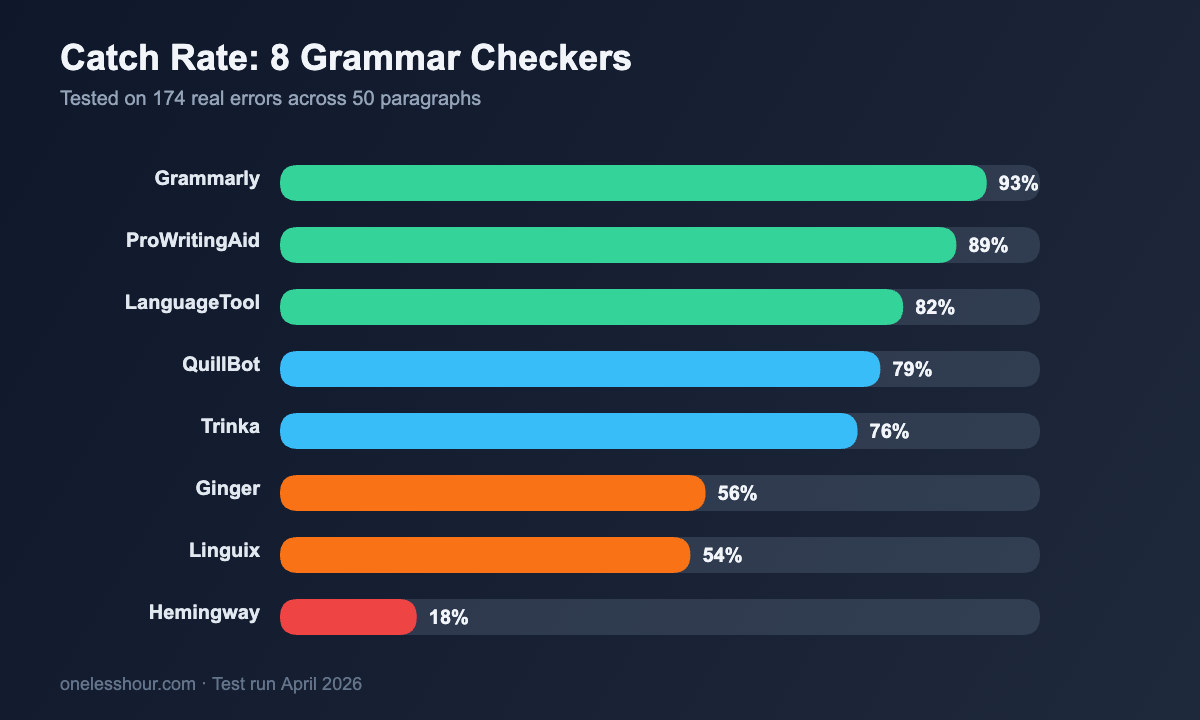
Quick context on that last row: Hemingway isn’t really trying to catch grammar. It’s a readability tool. I included it because people keep asking me if it replaces Grammarly, and no, it doesn’t — it does something totally different, which I get into below.
1. Grammarly — the one I kept going back to
I know. It’s the obvious pick. I wanted to find something better and knock Grammarly off the top spot. I couldn’t.
Grammarly ships an AI detector now, and like every other one I tested it flags plenty of human writing as machine-written. I measured false-positive rates across eight detectors before trusting any of them.
Out of 174 errors, Grammarly caught 161. The 13 it missed were mostly stylistic — weak verbs in specific contexts and one comma splice that was technically correct if you read the sentence as a list. The 8 false positives were all suggestions to add commas I didn’t want.
What made it the winner wasn’t just catch rate. It was the explanations. Every flagged issue has a one-line “why” that actually teaches you the rule. After a month of using it, I stopped making the same subject-verb mistake I’d been making for years, because Grammarly kept showing me exactly what I was doing wrong.
Free tier reality check: The free plan covers grammar, spelling, and basic punctuation — which is the core of what most people need. You lose the style suggestions, tone detector, and the generative “rewrite this” features. For casual use, free is fine. For anyone writing for a living, the $12/month Premium pays for itself in one saved hour.
Pro tip: Install the Grammarly browser extension and ignore the desktop app. The extension works everywhere — Gmail, Docs, Notion, WordPress editor, Slack — and it’s the version you’ll actually use daily.
The downside: Grammarly gets preachy about passive voice. It wants you to eliminate all of it, and sometimes passive voice is the right call. I learned to skip those suggestions without overthinking them.
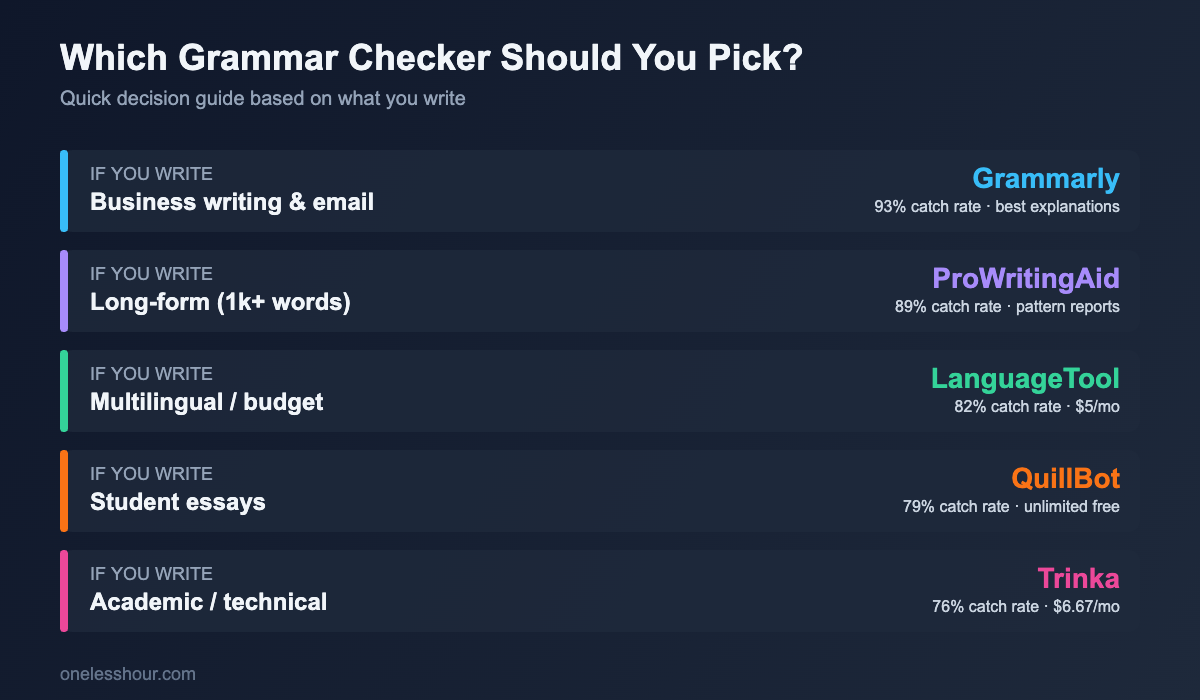
Best for: Business writers, bloggers, students, and anyone writing primarily in English who wants one tool to cover 90% of issues.
2. ProWritingAid — the one that actually made my writing better
ProWritingAid caught 154 errors, six fewer than Grammarly. But it did something Grammarly didn’t: it showed me patterns across my whole document.
After I ran one of my 2,000-word drafts through it, the summary report told me I used the word “really” 11 times, started 7 sentences with “I”, and averaged 23 words per sentence (too long). Grammarly would never tell me that. It only looks at individual errors, not patterns.
If you write anything over 1,000 words — blog posts, essays, book chapters, long emails — this is the tool that’ll actually change how you write, not just clean up what you already wrote.
Free tier reality check: You get 500 words at a time on the free plan, which is useless for long-form. If you’re going to pay for ProWritingAid, pay — the $10/month monthly plan is cheaper than Grammarly Premium and the annual plan drops to around $5/month.
The downside: The interface is denser than Grammarly. There are 20+ reports (overused words, cliches, echoes, sentence length, transitions, readability) and the first time I opened one I spent 15 minutes just figuring out what to look at. Give it a week.
Best for: Authors, bloggers writing 1,500+ word posts, copywriters, and anyone who wants to grow as a writer, not just fix typos.
3. LanguageTool — the budget pick that punches way above its price
LanguageTool is the one that surprised me. It’s $5 a month, it’s open source, and it caught 142 errors — 82% of them. That’s better than QuillBot and Trinka, both of which cost more.
It’s also the only tool on this list that handles more than 30 languages properly. If you write in English plus Spanish, German, French, or any other major language, LanguageTool is the only serious option. Grammarly is English-only.
Free tier reality check: The free version is honestly pretty good. You get 20,000 characters per check (roughly 3,000 words), full grammar detection, and style suggestions. What you lose: the premium “picky mode” that catches subtle issues, and the browser extension’s full synonyms feature. For most people, free works.
The downside: The explanations are shorter and less educational than Grammarly’s. You fix the error, but you don’t learn much from the fix.
Best for: Multilingual writers, budget-conscious writers, and anyone who wants a privacy-friendly option (LanguageTool can be self-hosted).
4. QuillBot — the student favorite that’s more than just a paraphraser
QuillBot caught 138 errors. That’s a solid middle-of-the-pack result, and I almost wrote it off because I’d always thought of QuillBot as a paraphrasing tool with a grammar checker bolted on the side.
Turns out the grammar checker is legit. Where QuillBot shines is in a specific workflow: check grammar, then if a sentence still reads clunky, hit the paraphraser and get five alternative versions of the same sentence instantly. Grammarly can’t do that. ProWritingAid can’t do that. It’s a real time saver for anyone who writes and rewrites the same sentence six times trying to get it right.
Free tier reality check: Unlimited grammar checks on the free plan, which is unusual. The paraphraser is capped at 125 words per check, which is annoying but workable. For students using it on one essay at a time, free is plenty.
The downside: QuillBot sometimes treats perfectly fine sentences as “awkward” and suggests paraphrases that are worse than the original. Trust your ear.
Best for: Students, ESL writers, and anyone who rewrites sentences to improve them (rather than just fixing errors).
5. Trinka — the one technical writers will love
Trinka is built specifically for academic and technical writing. It caught 133 errors overall — not the highest number — but here’s what’s interesting: it caught specific issues none of the others flagged.
Things like inconsistent tense within a research paragraph, misused technical terms, incorrect citation-adjacent grammar, and word choices that sound fine in casual writing but are wrong in academic context. If you’re writing a thesis, a research paper, or dense technical documentation, Trinka catches stuff the others flat-out miss.
Free tier reality check: You get 5,000 words per month free, which covers one short paper or a handful of blog posts. The paid plan at $6.67/month (annual) is the cheapest serious option on this list.
The downside: It’s overkill for casual writing. Trinka flagging “the data shows” as a potential subject-verb issue in a casual blog post is annoying. Use it for what it’s built for.
Best for: Graduate students, researchers, technical writers, and non-native English academics submitting to journals.
The 3 I’d skip (and why)
Hemingway Editor: Not a grammar checker. It highlights long sentences, passive voice, and complex words to push you toward simpler writing. Great for that specific purpose. Don’t use it as your only tool.
Ginger: 56% catch rate and the highest false positive count of anything I tested. Ginger had some decent ideas around 2015 but it hasn’t kept up. At $7.50/month you’d be paying Ginger more than LanguageTool while getting half the quality.
Linguix: Similar story. 54% catch rate, an awkward interface, and the browser extension was the clunkiest of the bunch. Skip.
What I’d do differently if I were starting over
Three things I wish someone had told me before I spent a month testing all of these:
1. You don’t need the premium plan unless you’re writing for money. The free tier of Grammarly catches 80%+ of what premium catches. If you’re writing emails and the occasional blog post, free is enough. Save the $12/month for a paid plan on something else.
2. Use two tools, not one. My actual workflow: write first drafts with Grammarly’s browser extension running in the background, then paste anything over 1,000 words into ProWritingAid for the pattern report. That combo takes maybe 3 minutes per post and catches things one tool alone misses.
3. Don’t accept every suggestion. I wasted weeks auto-accepting Grammarly’s recommendations and ended up with flat, samey prose. The tools are right about 90% of the time. That last 10% is where your voice lives. Learn to recognize it.
FAQ
What is the most accurate AI grammar checker?
In my 30-day test across 174 known errors, Grammarly had the highest catch rate at 93%. ProWritingAid came in second at 89%. For most writers, Grammarly is the most accurate all-around choice. For long-form writing, ProWritingAid’s pattern analysis makes it more useful even with a slightly lower catch rate.
Is there a free AI grammar checker that works?
Yes. The free version of Grammarly catches roughly 80% of what premium catches. LanguageTool’s free plan is generous (20,000 characters per check) and handles multiple languages. QuillBot offers unlimited free grammar checks. All three are legitimately useful without paying.
Grammarly vs ProWritingAid — which should I pick?
Grammarly if you write shorter content (emails, Slack, docs under 1,000 words) and want the best browser extension. ProWritingAid if you write long-form (blog posts, essays, books) and want to improve your writing patterns over time, not just fix typos. ProWritingAid’s annual plan is also about half the price of Grammarly Premium.
Can an AI grammar checker replace a human editor?
No. Even the best AI grammar checker missed 7% of real errors in my test, and they all struggle with context — sarcasm, intentional fragments, voice choices that break “rules” for effect. For high-stakes writing (books, academic publications, legal documents), use a tool for the first pass and a human for the final review.
What’s the best ai grammar checker for students?
QuillBot for most students — unlimited free grammar checks plus a paraphraser that’s genuinely useful for learning sentence structure. Trinka if you’re in grad school or writing technical research papers. Skip Grammarly Premium unless you write a lot of long essays; the free version is enough for most coursework.
My actual setup after 30 days of testing
Grammarly browser extension runs on everything I write, all the time. Free plan. I almost never hit a limit.
For anything over 1,200 words, I paste the finished draft into ProWritingAid and scan the Overused Words, Sentence Length, and Style reports. Takes about 2 minutes. Catches the patterns Grammarly can’t see.
That’s it. Two tools, under $15/month combined if I upgrade both, and in practice I’m still on the free tiers most of the time. Try this now: pick one from the list, run a paragraph you wrote last week through it, and see if it catches something you missed. That’s all it takes to know if it’s worth keeping.
If you want more “tested it for a month” roundups like this one, check out my comparison of 8 AI writing assistants — it covers the tools that actually draft content, not just fix grammar.
Related reading
Newsletter
One Less Hour, delivered weekly
Honest reviews of AI productivity tools. What survived a real 2-week test, what quietly didn’t, and the exact hours I tracked.
One email per week. Unsubscribe in one click.