
Last tested: April 2026
Transparency note: This article contains no affiliate links, and no company paid for or reviewed it. I pay for most of the AI tools I use myself — see how I test.
Every “ChatGPT vs Claude” article I read before doing this myself was basically the same: a spec sheet, a few vague opinions, and zero real examples. So I paid for both — ChatGPT Plus and Claude Pro — and ran them side by side for 30 days on the work I actually do. Writing. Coding. Research. Emails. Meeting summaries. Planning. All of it.
This article is the result. No affiliate-pumping, no hand-waving. Eight tasks, same prompts fed to both models, and a clear winner per category. I’ll tell you which one I’d keep if I could only pay for one (spoiler: it depends on your work, and I’ll be specific about why).
The setup — what I actually tested
The versions I used: ChatGPT 5.2 (the GPT-5 family default on ChatGPT Plus, $20/month) and Claude 4.6 Sonnet with Opus 4.6 available for harder tasks (Claude Pro, $20/month). Both are the current flagships as of April 2026.
For each task I wrote one prompt, pasted it into both models without changes, and judged the output on three things: quality, speed, and how much cleanup I had to do before using it. No cherry-picking — I used the first output each model gave me, no retries. That’s the real-world test.
Quick heads-up: this isn’t a benchmark comparison. If you want MMLU scores and throughput graphs, the official model cards are where to look. This is what a normal day of work looks like on each.
Task 1: Drafting a professional email
The prompt: “Write an email to a vendor declining their proposal politely but firmly. They quoted $12K for a 4-week project; our budget is $6K. Offer to revisit if scope narrows.”
ChatGPT 5.2: Clean, professional, got to the point in three paragraphs. Used a slightly stiff “I hope this message finds you well” opener but everything after was usable. I’d edit two sentences before sending.
Claude 4.6: Also three paragraphs, but the tone felt warmer and more human. It opened with “Thanks for the detailed proposal” instead of the fill-phrase intro, and it handled the budget pushback more diplomatically without losing the “no” signal. I’d send it as-is.
Winner: Claude. Both were competent, but Claude’s default tone needed less editing. For one-off emails, that’s what matters.
Task 2: Writing a 600-word blog post intro
The prompt: “Write a 600-word blog intro for a post titled ‘How I Cut My Weekly Planning Time in Half.’ Conversational voice, no clichés, hook the reader with a specific number in the first sentence.”
ChatGPT 5.2: Hit the word count exactly. Opened with “I used to spend 4 hours every Sunday planning my week.” Decent hook. But by paragraph two it drifted into generic territory — “productivity is a mindset” kind of filler. Would need a full rewrite of the middle.
Claude 4.6: Came in at 580 words. Opened with “Three Sundays ago I finally timed myself — 2 hours and 47 minutes just making a weekly plan.” Held the specific-and-personal tone through all six paragraphs. Still needed tweaks, but the voice was 80% of the way there. Maybe 10 minutes of editing instead of 30.
Winner: Claude. This gap is bigger than one task — Claude writes in a way that sounds like a human by default. For long-form content, that saves real editing time. If you care about voice in your writing, this alone is a reason to lean Claude.
If you’re still picking an AI writing tool for your blog or newsletter, my breakdown of 8 AI writing assistants goes deeper on this exact comparison with more examples.
Task 3: Debugging a Python script
The prompt: Pasted a 40-line Python script that was throwing a KeyError in a data pipeline and asked “Why is this breaking and how do I fix it?”
Debugging is where I leaned on ChatGPT hardest over the following months. I tracked 142 hours of it across real projects, including the three task types where it consistently made things worse.
ChatGPT 5.2: Correctly identified the KeyError was from a missing column in a pandas groupby. Gave me a one-line fix with .get() and explained the root cause. Clean, fast, correct.
Claude 4.6: Also identified the same root cause, but then went further — it pointed out that the same bug would recur in two other places in the script if the upstream data shape changed, and suggested a defensive pattern at the top. The extra context was genuinely useful.
Winner: Claude, narrowly. For simple bugs both are equal. For anything that benefits from seeing the broader code context, Claude consistently gave more useful suggestions over the 30 days. If you pair-program daily, that gap adds up.
Task 4: Summarizing a 30-page PDF
The prompt: “Summarize this PDF in 300 words, organized by the main arguments. Flag anything that sounds contested or overstated.”
ChatGPT 5.2: Generated a tidy 290-word summary with three main arguments. Missed the “flag anything contested” part of my prompt entirely, so I had to ask again to get the critical reading layer.
Claude 4.6: 305 words, same three main arguments, but it followed both parts of the prompt the first time. Flagged two claims as “presented without supporting citations” and one as “contested in the broader literature.” That’s the kind of critical reading I actually wanted.
Winner: Claude. Claude is better at following multi-part instructions without being reminded. If you write prompts with three or more requirements, Claude will respect all of them. ChatGPT tends to hit the first one and forget the rest.
Task 5: Quick factual research
The prompt: “What are the 2026 California minimum wage rates by employer size, and when did the latest update take effect? Please cite sources.”
For research specifically, neither of these is my first stop any more. I compared ChatGPT against Perplexity on the same set of lookups to work out which one actually saves time.
ChatGPT 5.2: Pulled current rates by employer size from a live browse, linked to the state labor agency page, and included the effective date. Took maybe 8 seconds. This is where ChatGPT’s browsing shines — it’s fast and the sources are typically the most authoritative ones.
Claude 4.6: Answered confidently but with outdated numbers from its training data, and only after I reminded it to verify did it use its web tool to correct itself. That extra step cost me 30 seconds and some mental overhead to double-check.
Winner: ChatGPT. For real-time factual research with sources, ChatGPT’s browsing feels snappier and more reflexive. Claude browses, but it’s not the default behavior. If you’re constantly looking up current info, ChatGPT is lower friction.
Task 6: Generating a visual or chart
The prompt: “Create an image of a clean dashboard layout showing four KPI tiles: revenue, signups, churn, and active users. Dark theme. Minimalist.”
ChatGPT 5.2: Generated the image natively in about 20 seconds. Clean layout, legible numbers, actually looked like a dashboard. Couldn’t export the layout as code, but as a visual it was usable for a mockup.
Claude 4.6: Doesn’t generate images natively. Instead it offered to write me HTML/CSS code that would render the dashboard, which I could then take a screenshot of. The code was clean and actually matched the layout I wanted — but it’s an extra step if you just want a picture.
Winner: ChatGPT, obviously. If you need images, ChatGPT wins by default because Claude can’t generate them. But if you need the actual layout code (which is often more useful than a raster image), Claude’s answer is more reusable. Depends what you’re doing.
Task 7: Brainstorming with pushback
The prompt: “I’m thinking of launching a paid newsletter about AI for non-technical readers. Give me the three weakest parts of this plan and a hard challenge to each.”
ChatGPT 5.2: Listed three risks but hedged almost every challenge with “of course, this could work if…” It felt like it didn’t want to push me back. By the third risk I was hunting for actual critique.
Claude 4.6: Pushed back harder. Called out that “AI for non-technical readers” is a saturated niche, asked what my distribution plan was in the first 90 days, and challenged whether I’d tested willingness to pay with any real audience. Uncomfortable to read — which is what I asked for.
Winner: Claude. Claude is noticeably better at giving real critical feedback when you ask for it. ChatGPT tends to soften pushback with hedges even when you explicitly request the opposite. If you use AI to pressure-test your thinking, Claude is the better sparring partner.
Task 8: Cleaning up a messy meeting transcript
The prompt: Pasted a 2,000-word raw transcript (lots of “um” and crosstalk) and asked “Give me a clean summary organized by decision, action item, and open question.”
ChatGPT 5.2: Returned a well-organized three-section summary. Caught all the decisions. Missed one action item that was implied rather than stated. Good overall.
Claude 4.6: Same structure, caught the implied action item ChatGPT missed, and also flagged that one “open question” was never actually resolved in the conversation. Both summaries were usable; Claude’s was more thorough.
Winner: Claude, slightly. Both handled this well. Claude’s edge was noticing the thing that wasn’t said — the implied commitment. For high-stakes meeting notes, that’s the difference between a summary and an actually useful record.
Running scoreboard — which one wins what
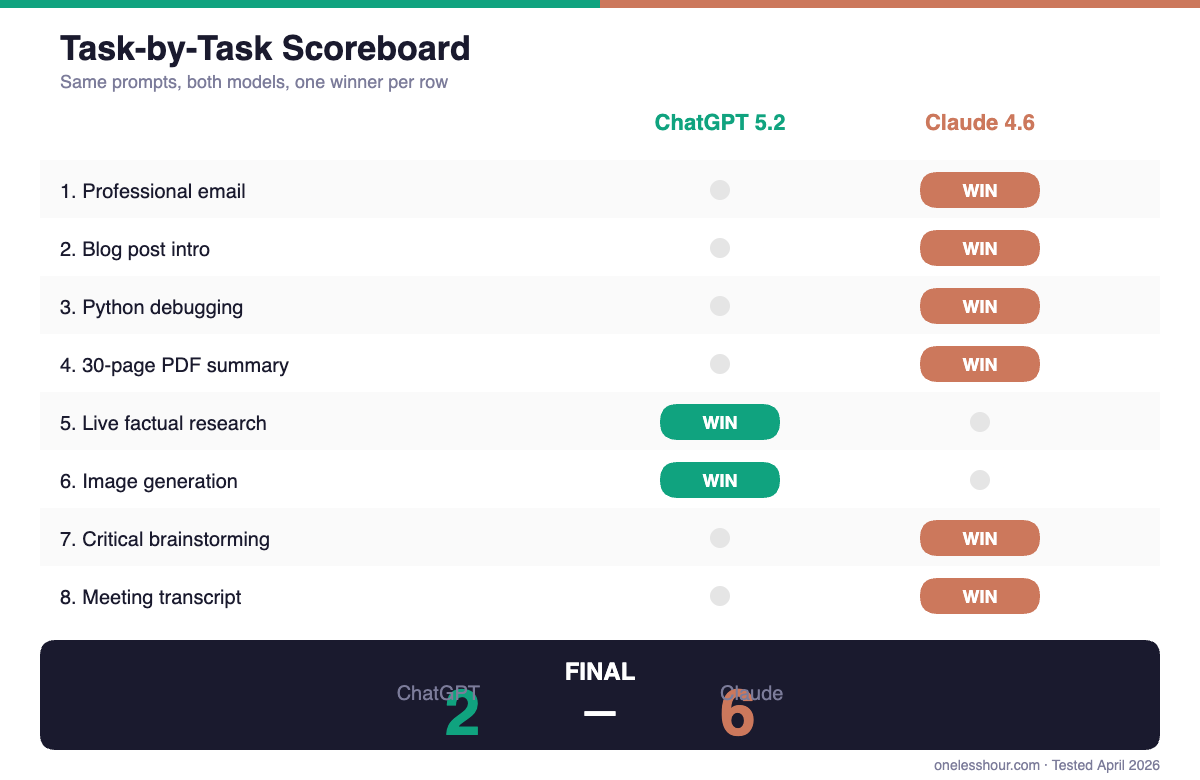
Tally after 8 tasks: Claude 6, ChatGPT 2. That makes it sound more lopsided than it is. The two ChatGPT wins were in categories where Claude literally can’t compete (image generation) or is a step slower (live web research). Pick your model based on the work you do most, not the final tally.
Pricing — basically a tie
Both plans I tested cost $20/month. ChatGPT Plus gives you GPT-5.2 plus image generation, browsing, and GPT-5o for faster responses. Claude Pro gives you Sonnet 4.6 with Opus 4.6 as a “smarter mode” for harder tasks. Higher tiers exist for both ($200/month ChatGPT Pro and Claude Max) but honestly the $20 plans handle 95% of what normal users need.
If $20 is too much and you’re on a budget, my roundup of AI tools under $10/month has a few alternatives that aren’t ChatGPT or Claude. Both free tiers are fine for casual use but you’ll run into limits fast.
What the Reddit threads won’t tell you
I read every “claude vs chatgpt reddit” thread I could find before I started this. Most of them agreed on two points: Claude is better at writing, ChatGPT is better at multimodal and integrations. That’s roughly accurate. What those threads miss is how much better Claude is at following multi-part instructions — which I think is the most underrated difference in daily use.
When you write a prompt like “do X, then Y, but flag if Z,” ChatGPT often hits X perfectly, skips Y, and never even mentions Z. Claude tends to do all three. Over a month that turned out to be the biggest quality-of-life difference for me — I stopped rewriting prompts to remind the model what I asked for.
The honest verdict: which one should you pay for?
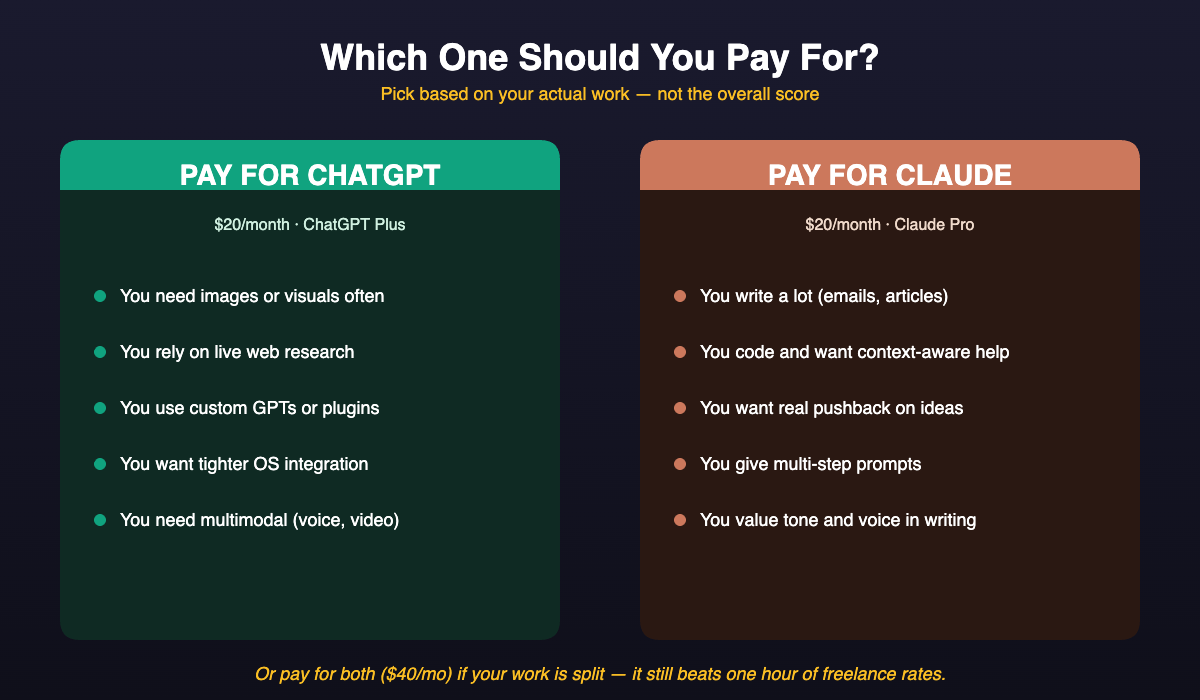
Pay for Claude if: You write a lot (emails, articles, proposals). You code daily and want a pair programmer that notices context. You use AI to pressure-test ideas. You give multi-step prompts and hate re-explaining. This is most knowledge workers.
Pay for ChatGPT if: You need to generate images or visuals often. You rely heavily on live web research as part of your workflow. You want tighter integrations with tools like custom GPTs, the app store, and plugins. You’re on Windows and want deep OS integration.
Pay for both if: Your work is split — I personally do. I use Claude for 80% of my text work and switch to ChatGPT specifically when I need an image or a fast browse. $40/month for two feels steep until you realize it still costs less than a single hour of freelance writing.
If you only know ChatGPT and want to get more out of it before switching, my ChatGPT prompting techniques guide will probably save you an hour a week by itself. Same for new Claude users: the multi-part prompt advantage I mentioned above only pays off if you actually write multi-part prompts.
Frequently asked questions
Is Claude or ChatGPT better overall in 2026?
For text work — writing, coding, analysis, reasoning — Claude 4.6 has a small but real edge in my 30-day test. For image generation, live web research, and ecosystem integrations, ChatGPT 5.2 wins. Neither is “better overall” — it depends on the mix of work you do.
Is Claude good for writing?
Yes — in fact, I’d say it’s the main reason to pick Claude. Its default voice sounds more human and it needs less editing out of the box. For emails, blog posts, proposals, and long-form content, it consistently saved me time compared to ChatGPT.
How much does Claude Pro cost vs ChatGPT Plus?
Both are $20/month for the consumer tier. Higher tiers exist — ChatGPT Pro and Claude Max are $200/month each with higher usage limits and access to the most advanced models. For most individual users the $20 plans are plenty.
Can Claude browse the web like ChatGPT?
Yes, Claude has web browsing, but it’s not as reflexive. Claude tends to answer from its training data first and only browses if you explicitly ask. ChatGPT browses more eagerly and with lower friction. If live information is important to you, ChatGPT is the lower-friction choice.
Which is better for coding: Claude Sonnet or ChatGPT?
In my testing, Claude 4.6 Sonnet was slightly better at catching broader context in code — noticing bugs beyond the line you asked about, suggesting defensive patterns, explaining the “why” not just the “what.” ChatGPT 5.2 is competent and fast for straightforward bug fixes. If you pair-program all day, I’d pick Claude.
Try both for a week — seriously
My honest advice: don’t pick based on this article, or any article. Pay for both for a week, run them against your real work, and see which one feels like less friction. You’ll know within 48 hours. Whichever one you default to without thinking about it is the right answer for you.
And if you’re still new to either, I wrote The Busy Person’s Guide to ChatGPT that walks through the first hour of real usage. Same approach would apply to Claude — just open it and throw your actual work at it.
Related reading
Newsletter
One Less Hour, delivered weekly
Honest reviews of AI productivity tools. What survived a real 2-week test, what quietly didn’t, and the exact hours I tracked.
One email per week. Unsubscribe in one click.