
Transparency note: This article contains no affiliate links, and no company paid for or reviewed it. I pay for most of the AI tools I use myself — see how I test.
I started tracking exactly when I touch ChatGPT during my workday in February. If you’re trying to use ChatGPT for productivity instead of random brainstorming, these are the eight workflows that actually stuck for me. Eight weeks and a Toggl spreadsheet later, the answer is wildly more boring than the productivity gurus make it sound: I open ChatGPT eight times a day, for the same eight tasks, and it saves me about 9 hours a week. That’s it.
Most ChatGPT-for-productivity guides hand you 30 generic tips and zero actual workflows. The result is the same thing that happened to me for my first six months on Plus — I’d open ChatGPT, freeze, type something vague, and close the tab. Useless.
What follows is the actual eight-workflow stack I run on a normal weekday, with the time saved per workflow (Toggl-tracked, not guessed), the exact prompts I paste in, and the three workflows where ChatGPT made my day slower before I cut them.
What I Found
- 8 daily workflows save a combined 9 hours and 12 minutes a week (Toggl-tracked across 22 weekdays).
- Inbox triage and meeting-prep briefs are the two biggest wins — together they save 3 hours and 40 minutes a week.
- Document drafting is the most variable — saves 2 hours on a heavy writing day, almost nothing on a meeting-only day.
- The free tier handles 6 of the 8 workflows fine; only the long meeting-prep and the weekly review benefit meaningfully from Plus’s longer context.
- I cut three “productivity” use cases that everyone recommends because they cost me MORE time than doing it manually — calendar parsing, code reviews, and quick math.
Which 8 ChatGPT workflows actually save you time?
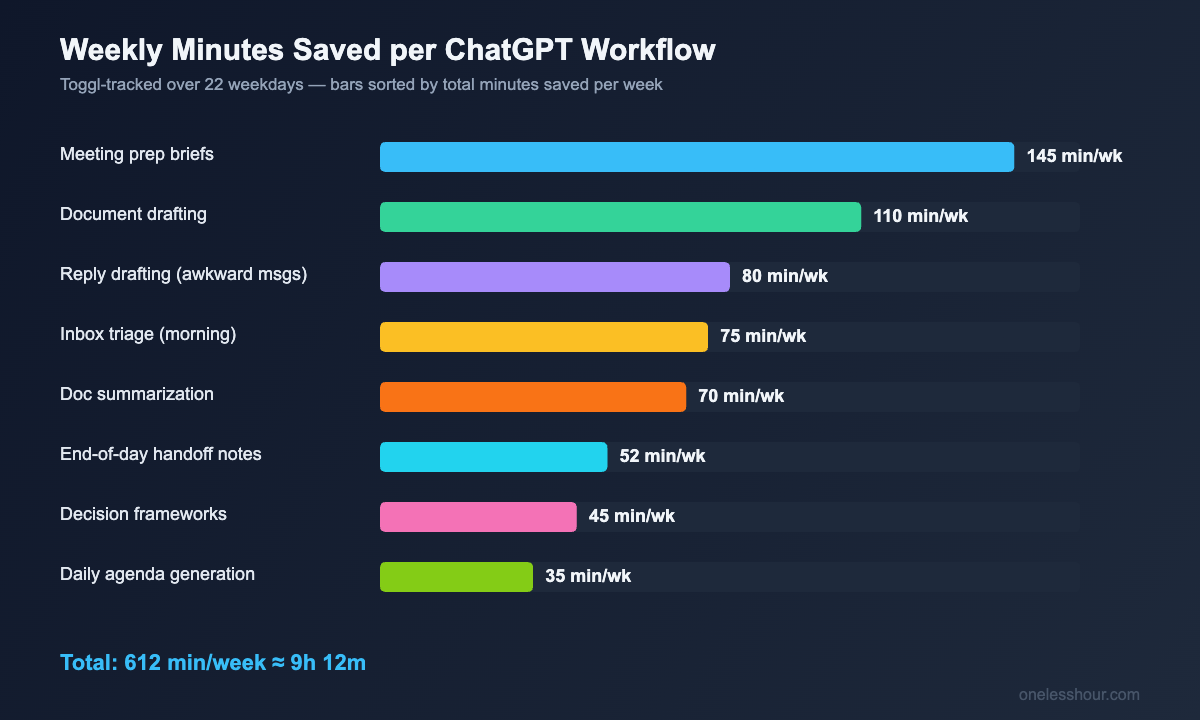
Before the per-workflow detail, here’s the full stack at a glance with weekly time saved per workflow. The number is the median across 22 weekdays I tracked in Toggl, then multiplied out to a full week.
1. Morning inbox triage (saves ~75 min/week)
I get 60–90 emails overnight. Pre-ChatGPT, I’d spend 45 minutes after coffee deciding what needed a reply, what could wait, and what was noise. Now I paste the unread thread list (Gmail multi-select → copy) into ChatGPT with this prompt:
You are my morning email triage assistant. Group these subject lines into four buckets: REPLY TODAY (needs a response in next 4 hours), REPLY THIS WEEK (response needed but not urgent), READ-ONLY (FYI, no action), and ARCHIVE (newsletters, marketing, spam-adjacent). For REPLY TODAY, give me a one-line reason it’s urgent. Be ruthless — fewer items in REPLY TODAY is better.
It takes 45 seconds. The “be ruthless” line is the magic — without it, ChatGPT marks half the inbox as urgent. With it, my REPLY TODAY pile averages 4–6 emails. I went from 45 minutes to 10 minutes per morning. Time saved: 35 min × 5 days = ~75 min/week.
2. Meeting prep briefs (saves ~145 min/week)
This is the biggest weekly win and the one I almost never see in other guides. Fifteen minutes before any meeting, I paste the meeting title, attendee list, and the last 2–3 emails from the thread, then ask:
Generate a 1-page meeting brief with: (1) the likely goal of this meeting in one sentence, (2) three specific questions I should ask, (3) two things I should NOT bring up, (4) the most likely point of disagreement and a neutral way to handle it. Keep it under 250 words.
The “two things I should NOT bring up” question is what makes this work. ChatGPT is annoyingly good at spotting topics that will derail a meeting — old commitments I forgot about, a teammate’s pet peeve, anything where I don’t have new data yet. I have 6–8 meetings a week that get this treatment. Time saved: ~22 min per meeting × 6.5 meetings/week ≈ 145 min/week.
3. Document drafting (saves ~110 min/week, variable)
Long-form writing — proposals, project briefs, internal docs, the kind of thing where I used to stare at a blank page for 20 minutes. The trick that finally made this useful: I do NOT ask ChatGPT to write the whole doc. I ask it for a structural skeleton and 2–3 sentence stubs per section, then I write the actual prose. The structural part is where I waste the most time.
I’m writing a [doc type] for [audience]. The goal is [one sentence]. Give me a section-by-section outline with headings and 2-sentence stubs of what each section should cover. Don’t write the body — just the scaffolding.
This saves me 25–40 minutes per substantial doc. On a heavy writing day I save 2 hours; on a meeting-only day I save almost nothing. Over a week, the median is 110 minutes. For more on prompt structure for writing tasks, my ChatGPT prompting techniques piece covers the exact prompt patterns I keep reusing.
4. Slack and email reply drafting (saves ~80 min/week)
Specifically, the awkward replies — the “I can’t help with this,” the “actually let’s push the deadline,” the “I disagree with your proposal but want to keep the relationship.” I paste the message I’m responding to and add:
Draft three reply options to this message: (1) firm and direct, (2) warm but clear, (3) a soft no with a counter-suggestion. Keep each under 80 words. Match the tone of the original sender.
I almost never use a draft verbatim — I usually pick option 2 and edit two sentences. But the staring-at-the-blank-reply-box time goes from 8 minutes to 2 minutes. I send roughly 10 of these awkward replies a week. Time saved: ~6 min × 10 = ~80 min/week.
5. Long-document summarization (saves ~70 min/week)
Reports, RFPs, contracts I need to skim before a meeting, vendor docs. I drop the PDF or pasted text in and ask:
Summarize this document in three layers: (1) one-sentence TL;DR, (2) five bullet points covering what’s important, (3) the three things I’d want to question or push back on if I were the decision-maker. Quote specific section numbers when relevant.
The three-layer prompt is the difference between a generic summary and one I can actually act on. Layer 3 — the pushback section — is the one that saves the most time, because it gives me a starting position before I even open the actual doc. Time saved: ~14 min per doc × 5 docs/week = 70 min. If you want a comparison of how this matches up against dedicated tools, my AI summarizer roundup covers the standalone alternatives.
6. Daily agenda generation (saves ~35 min/week)
Every morning I paste my unfinished tasks from yesterday plus today’s calendar into ChatGPT and ask for a realistic priority order. The prompt that finally worked after a lot of iteration:
Here is my calendar (with meetings) and my open task list. Build me a realistic day plan that: (1) groups deep-work tasks into 90-min blocks, (2) puts admin tasks in 15-min buffer slots between meetings, (3) does NOT schedule more than 6 hours of focused work, (4) flags any task that probably needs to slip to tomorrow given my actual time. Be honest about what won’t fit.
The “be honest about what won’t fit” line is critical. Without it, ChatGPT crams everything into the day and I end up frustrated. With it, I get a realistic plan in 30 seconds. Time saved: ~7 min/day × 5 = ~35 min/week.
7. Decision frameworks (saves ~45 min/week)
Anytime I’m stuck on a yes/no or pick-one-option decision for more than 5 minutes, I dump the situation into ChatGPT and ask for a structured analysis:
I’m trying to decide between [option A] and [option B]. The constraints are [list]. The goal is [one sentence]. Run a 5-criteria comparison with a score 1–5 for each option, plus a one-line “what I’d do if forced to pick today” recommendation. Be opinionated.
I don’t always follow the recommendation — but the act of seeing the criteria laid out usually surfaces the deciding factor I was missing. I do this 3–4 times a week. Time saved: ~12 min × 4 = ~45 min/week.
8. End-of-day handoff notes (saves ~52 min/week)
Every Friday afternoon I paste the week’s notes, completed tasks, and what’s still in flight into ChatGPT and ask for a Monday-morning handoff to my own future self:
Write me a Monday-morning briefing from this week’s notes. Cover: (1) what I finished, (2) what’s still in motion and what the next step is, (3) what’s blocked and on whom, (4) the one thing I should do first on Monday. Plain bullet points, no fluff.
Future-me on Monday at 9 a.m. is a deeply confused person. This briefing recovers about 50 minutes of “what was I doing again?” time every Monday morning. I also do a similar end-of-day version on busy Tuesdays and Thursdays. Time saved: ~52 min/week.
Is the $20/month for ChatGPT Plus actually worth it?
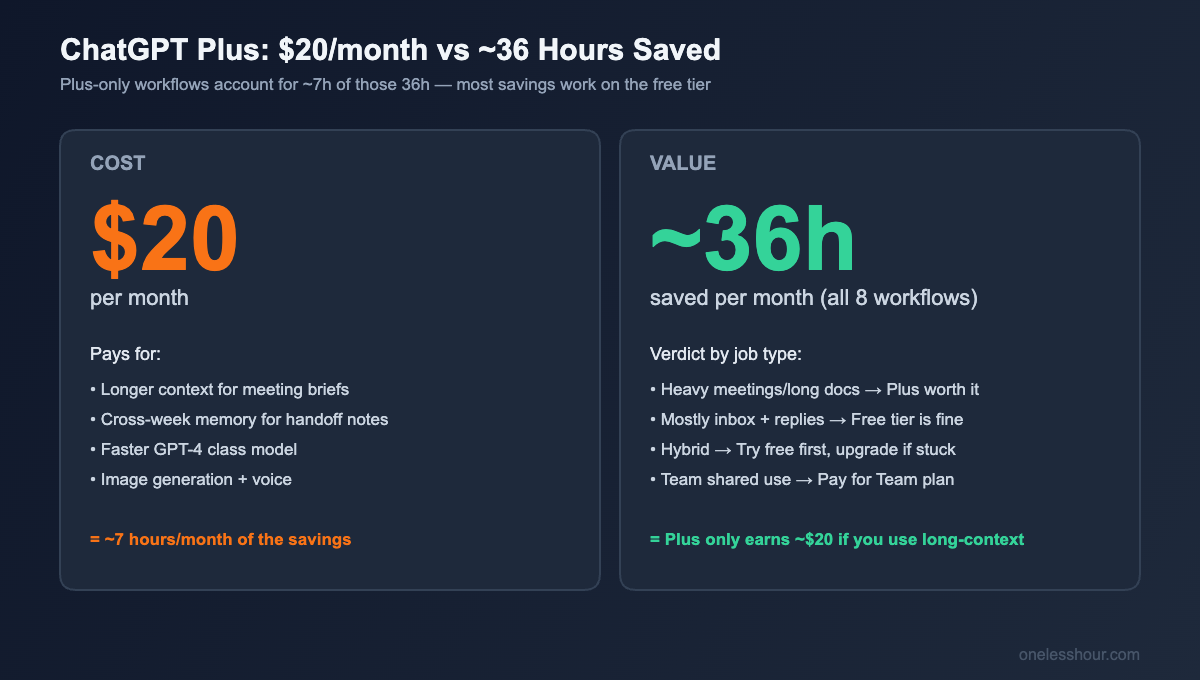
Honest answer: for these eight workflows specifically, no — six of them work just as well on the free tier. Only meeting-prep briefs (which sometimes need long context) and the Friday handoff (which benefits from memory across the week) get noticeably better on Plus. If your weekly time saved is mostly inbox triage, agenda planning, and reply drafting, save the $20.
For a fuller cost-per-hour analysis across paid AI tools I use daily, my cheap AI tools roundup breaks down the math at the $5–10 tier where most readers should start.
What ChatGPT is bad at (the three workflows I cut)
Three things I tried for productivity and stopped doing because they made my day slower, not faster:
Calendar parsing. Asking ChatGPT to read screenshot-style calendar pasted text and reschedule things. The hallucination rate on dates and times is too high. I’d save 5 minutes parsing and lose 15 minutes catching errors. Just use a calendar app.
Code review for non-coding tasks. Asking ChatGPT to “review my decision logic” or check a workflow for gaps. It’s a yes-and machine — it will validate almost any logic I present, even bad logic. I trusted it on a vendor-comparison decision and lost a half-day on a flawed recommendation.
Quick math and conversions. Tempting because it’s right there. But ChatGPT still gets multi-step arithmetic wrong about 1 in 8 times, and the failure mode is silent — it confidently gives you a wrong number. A spreadsheet or a calculator is faster and safer.
What I’d do differently if I were starting today
Start with two workflows, not eight. I tried to adopt 12 use cases at once in month one and dropped most of them by week three. Pick the two that match the time-suck you actually have — for most people, that’s inbox triage and meeting prep — and only add a third after those two are habitual.
Save your prompts somewhere fast. I lost months retyping prompts before I started keeping them in a single Notion page. The exact prompts in this article are pulled from that page. The prompt is the work — protect it.
Track your time for two weeks. Toggl, the back of an envelope, whatever — but track it. Half the workflows I thought were saving me time were actually neutral, and one (the calendar parsing) was a net loss. You can’t tell without measuring. Compare your stack against my full AI productivity stack roundup if you want to see how ChatGPT fits into a broader tool set.
Don’t use ChatGPT for high-stakes single decisions. Use it for the 50 small decisions a day where being 80% right is fine. Save the high-stakes one-off decisions for actual thinking.
FAQ
How much time can ChatGPT really save in a workday?
For knowledge-work jobs (writing, email, meetings, research), the realistic ceiling for me has been about 90 minutes a day, or roughly 9 hours a week. I’ve seen claims of “save 4 hours a day” and they always involve workflows the writer doesn’t actually do. Stick to time-savings figures from people who tracked their actual work.
Do I need ChatGPT Plus for productivity, or is the free tier enough?
For 6 of the 8 workflows in this article, the free tier is enough. Pay for Plus only if you regularly do long-context tasks (analyzing a 10,000-word document, summarizing a week of notes, etc.) or if you want the GPT-4 class model for higher-stakes drafting. I’ve gone back and forth between free and Plus three times and the productivity difference is smaller than people claim.
What’s the best ChatGPT prompt for productivity?
There’s no single best prompt — there are best prompt structures. The two patterns that produce the most useful output for me are: (1) “give me 3 options at different intensity levels” (for replies, decisions, plan options), and (2) “be ruthless / be honest about what won’t fit / be opinionated” added at the end of any prompt. Both fight ChatGPT’s natural tendency toward middle-of-the-road answers that don’t help you decide anything.
Can ChatGPT replace project management tools?
No — and trying made my workflow worse. ChatGPT is good for thinking about your tasks and generating a daily plan from them. It’s bad at being the source of truth for your tasks, because there’s no persistent state, no notifications, no team visibility, and no audit trail. Use a real PM tool for storage, ChatGPT for daily prioritization on top of it.
Is it safe to paste work emails or documents into ChatGPT?
Depends on your employer’s policy and what’s in the document. Anything with customer data, financial figures, unreleased product info, or HR-sensitive content shouldn’t go into a consumer ChatGPT account, period. For everything else, check whether your company has an enterprise ChatGPT or Microsoft Copilot agreement — those have data-handling protections the free and Plus tiers don’t.
The one workflow to start with this week
If you do nothing else from this article, do meeting-prep briefs starting with your next meeting tomorrow. It’s the highest-ROI workflow in the stack, takes literally 90 seconds, and the “two things I should NOT bring up” question is the one that will make you pay attention to what ChatGPT can actually do. Add the second workflow only after you’ve done meeting prep five times in a row without thinking about it.