

I used to treat ChatGPT like a magic 8-ball. Ask a question, get an answer, close the tab. Then I started experimenting with how I structured my prompts — and the difference was night and day. Not “slightly better” different. More like “this just did in 30 seconds what used to take me 45 minutes” different. These ChatGPT tips and tricks completely changed how I work.
Transparency note: This article contains no affiliate links, and no company paid for or reviewed it. I pay for most of the AI tools I use myself — see how I test.
After six months of daily use across writing, research, planning, and client work, I’ve narrowed it down to 8 prompting techniques that actually move the needle. Each one below includes the exact prompt I use so you can copy and try it right now. These are the ChatGPT tips and tricks I wish someone had shown me on day one.
1. The “Interview Me First” Technique
This single technique improved my output quality more than anything else. Instead of trying to write a perfect prompt, I flip the script and let ChatGPT figure out what it needs to know. Try it right now at chat.openai.com.
The prompt:
“I want to [your goal]. Before you start, interview me. Ask me the 5 most important questions you’d need answered to produce an excellent result. Ask them one at a time and wait for my response before asking the next one.”
Why it works: You probably don’t know what information ChatGPT needs to give you a great answer. But ChatGPT does. When I used this for writing a proposal for a freelance project, it asked me about my client’s industry, their biggest pain point, my unique approach, the project timeline, and the budget range. I hadn’t thought to include half of those details. The resulting proposal was specific enough that the client said it was the most thoughtful pitch they’d received.
Where I use this daily: Project proposals, blog post outlines, email campaigns, and any task where I’m not sure what “good” looks like yet.
2. The “Before and After” Rewrite
Most people ask ChatGPT to write things from scratch. But I get dramatically better results using it as an editor on my own rough drafts. The key is being specific about what needs improving.
The prompt:
“Here’s my draft: [paste text]. Rewrite it to improve [specific thing: clarity / persuasiveness / flow / conciseness]. Keep my voice and main points intact. Show me the before and after for the sections you changed, with a brief explanation of why each change improves the text.”
Why it works: Asking for the before/after comparison forces ChatGPT to make deliberate, explainable changes instead of just rewriting everything in its own generic style. You keep your authentic voice while getting editorial-quality feedback. I tested this by sending the same draft through two approaches — “rewrite this email” versus the before/after method above. The generic rewrite sounded like it came from a corporate template. The before/after version sounded like me, but sharper.
Where I use this daily: Client emails, LinkedIn posts, article intros, and any writing where my voice matters more than speed.
3. The “Contrarian Advisor” Framework
ChatGPT is hardwired to agree with you. If you ask “is this a good idea?”, it’ll almost always say yes with minor caveats. That’s useless when you need honest feedback. Here’s how to get around it.
The prompt:
“I’m about to [describe your plan]. Act as a brutally honest advisor who’s seen hundreds of similar attempts fail. Your job is to: 1) Identify the 3 biggest risks I’m probably not thinking about. 2) Tell me which of my assumptions is most likely wrong. 3) Suggest one specific change that would significantly increase my odds of success. Don’t be encouraging — be useful.”
Why it works: The framing “don’t be encouraging — be useful” gives ChatGPT permission to actually push back. I used this before launching a new service offering for a client, and it identified a pricing problem I’d completely overlooked — the price point was too low to attract the premium clients we were targeting, which would actually signal low quality in that market. That one insight saved us from launching with the wrong positioning.
Where I use this daily: Business decisions, content strategy, pricing, and any situation where confirmation bias could cost me.
4. The “Structured Output” Method
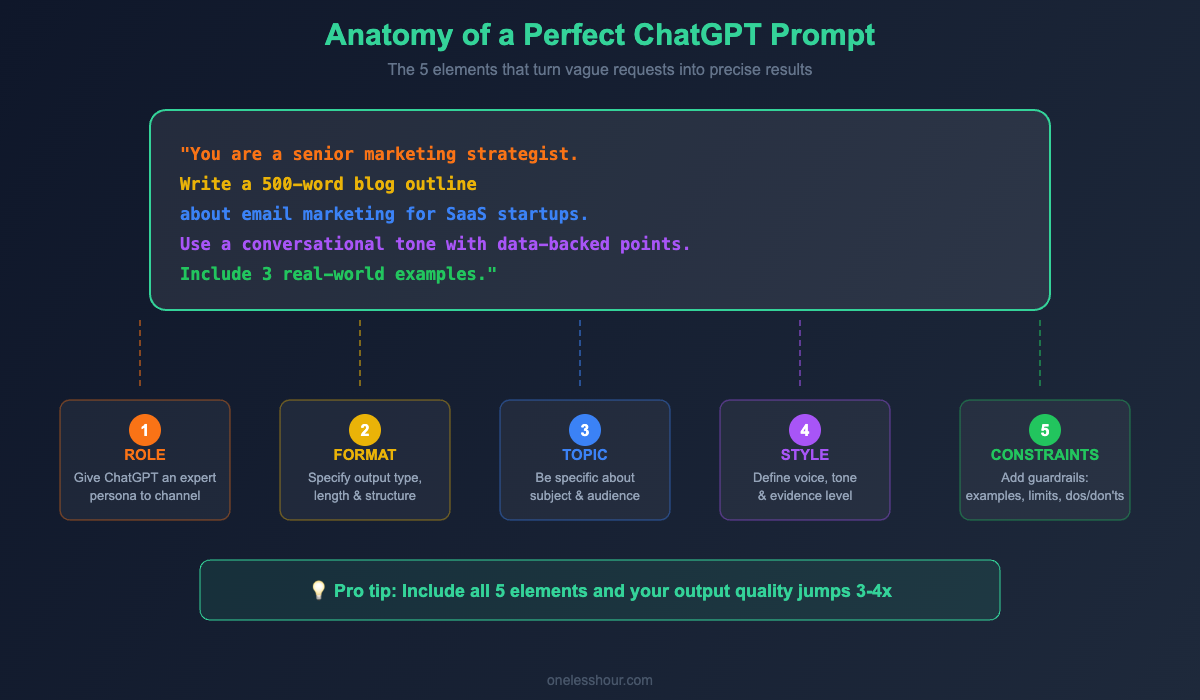
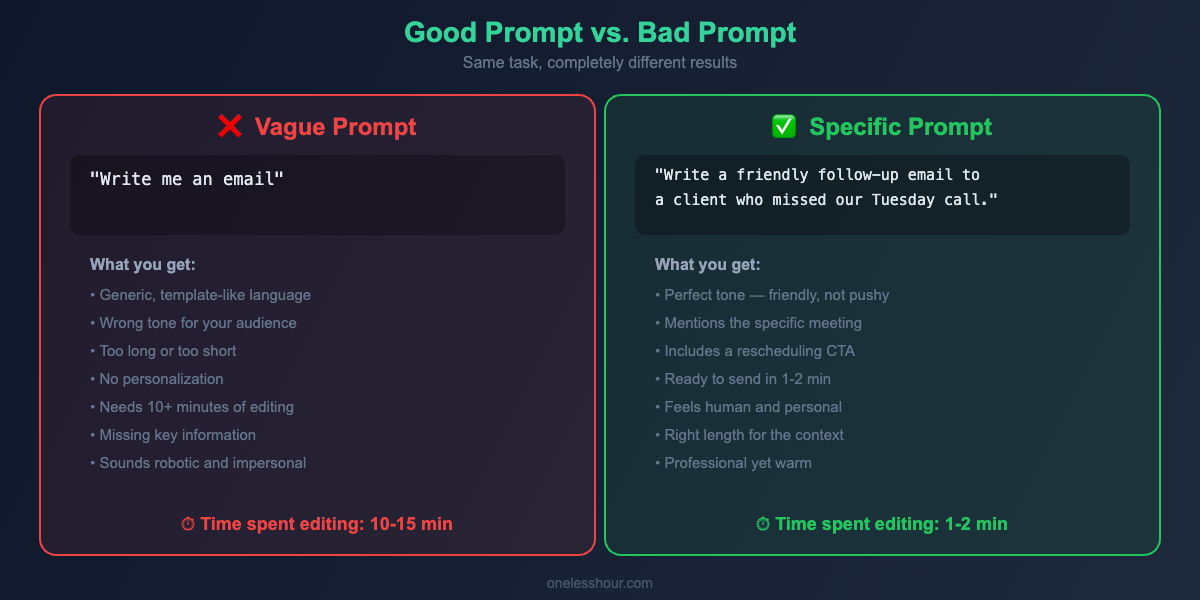
Vague prompts produce vague results. The fastest way to get usable output is to tell ChatGPT exactly what format you need — down to the sections, length, and structure.
These patterns carry into longer writing work too. The six writing jobs I hand to ChatGPT daily all lean on the same structure.
The prompt:
“Create a [deliverable type] about [topic]. Structure it as follows:
– Section 1: [what this should cover] (2-3 paragraphs)
– Section 2: [what this should cover] (bullet points, max 5)
– Section 3: [what this should cover] (1 paragraph)
Tone: [conversational/professional/technical]. Audience: [who’s reading this]. Total length: [word count].”
Why it works: When I need a weekly client update email, I don’t ask ChatGPT to “write a client update.” I specify: opening paragraph summarizing progress, 3-5 bullet points of completed items, one paragraph on next week’s priorities, and a closing question to keep the conversation going. The difference? The structured version is ready to send in one pass. The generic version needs 3-4 rounds of editing.
Where I use this daily: Client updates, meeting agendas, content briefs, social media batches, and any recurring deliverable.
5. The “Chain of Thought” Conversation
This one changed how I think about complex tasks. Instead of one massive prompt, break it into a conversation where each step builds on the last.
The prompt sequence:
Message 1: “I’m writing a blog post about [topic]. Give me 5 possible angles, each one sentence. Focus on angles that haven’t been covered to death already.”
Message 2: “I like angle #3. Now outline the post with H2 headings. For each section, write one sentence describing what that section should accomplish for the reader.”
Message 3: “Expand section 2 into full paragraphs. Use a specific example to illustrate the main point.”
Message 4: “Now write the intro. Hook the reader in the first sentence with a surprising fact or a relatable frustration. Don’t start with a question.”
Why it works: Each message is simple, focused, and gives you a checkpoint to steer the direction. If the outline feels off, you fix it before wasting time on a full draft. I used to spend 20-30 minutes re-prompting because my one-shot prompt produced something off-target. With the chain approach, I spend 5 minutes across 4-5 messages and the final output is exactly what I need.
Where I use this daily: Blog posts, strategy documents, any content longer than 500 words.
6. The “Template Bank” System
If you’re typing similar prompts every week, you’re wasting time. I keep a simple note with prompt templates for my recurring tasks, and I just swap in the specifics each time.
Example template (LinkedIn post):
“Write a LinkedIn post about [TOPIC]. Structure: Hook line that creates curiosity (under 15 words) → 2-sentence personal context → 3 key insights as short paragraphs (not bullet points) → One-line takeaway → Question to drive comments. Tone: Professional but not corporate. Length: 150-200 words. Do NOT use emojis, hashtags, or the phrase ‘here’s the thing’.”
Why it works: I have templates for LinkedIn posts, cold outreach emails, meeting summaries, weekly reports, and content briefs. Each one took 10 minutes to refine, but saves me 5-10 minutes every single time I use it. Over a month, that’s hours back. The key is being specific about what you don’t want — notice I exclude emojis, hashtags, and overused phrases. Those negative constraints are just as important as the positive instructions. For more on building prompt libraries, Zapier’s ChatGPT prompts collection is a solid starting point.
Where I use this daily: Literally everything that repeats. If I do it twice, I make a template.
7. The “Explain It Back to Me” Learning Hack
This technique turned ChatGPT from an answer machine into a genuine learning tool. Instead of asking it to explain something, I explain it myself and ask ChatGPT to find the gaps.
The prompt:
“I’m going to explain [topic] as I understand it. Point out anything I’ve got wrong, anything I’m oversimplifying, and any important nuances I’m missing. Then explain those gaps in simple language. Here’s my understanding: [your explanation].”
Why it works: When I was learning about SEO for this blog, I wrote out my understanding of how Google ranks content and asked ChatGPT to poke holes. Turns out I had a completely wrong mental model about backlinks — I thought more links always meant better ranking, when in reality link quality and relevance matter far more than quantity. That correction saved me from wasting weeks on the wrong link-building strategy. OpenAI’s own prompt engineering guide confirms that structured prompts consistently outperform vague ones.
Where I use this daily: Learning new skills, preparing for presentations, fact-checking my assumptions before sharing them publicly.
8. The “Mega-Prompt” Combo
Once you’re comfortable with individual techniques, combine them into a single powerful prompt. This is where the real time savings stack up.
The prompt:
“Act as an experienced [relevant role]. I need a [deliverable] about [topic].
Context: [2-3 sentences about your situation]
Audience: [who will read this]
Goal: [what this should accomplish]
Structure the output as:
– [Section 1]: [description]
– [Section 2]: [description]
– [Section 3]: [description]
Constraints: Keep it under [length]. Use [tone]. Include specific examples. Don’t [thing you want to avoid].
Before you write, tell me if you need any additional context to produce an excellent result.”
Why it works: This prompt combines role-setting, structured output, constraints, and the interview technique into one message. That last line — “tell me if you need additional context” — is the safety net. It gives ChatGPT permission to ask clarifying questions without requiring the full back-and-forth of technique #1. I use variations of this mega-prompt for about 70% of my daily ChatGPT tasks, and it consistently produces output that needs minimal editing.
The #1 ChatGPT Tips and Tricks Mistake That Wastes Time
Before I wrap up these ChatGPT tips and tricks, here’s the one mistake I see people make constantly: they accept the first output. ChatGPT’s first response is a draft, not a final product. Every technique above works better when you treat the conversation as iterative. Got a decent response? Follow up with “make the examples more specific” or “cut this down by 30% without losing the key points.” Two rounds of refinement almost always produces something dramatically better than one.
Frequently Asked Questions About ChatGPT Tips and Tricks
Do these ChatGPT tips and tricks work with the free version?
Yes, every single technique above works on ChatGPT’s free tier. Better prompting improves results regardless of which model you’re using. That said, if you use ChatGPT daily for work, the paid plan’s faster responses and longer conversations will save you additional time.
Do these same prompts work with other AI tools like Claude or Gemini?
Absolutely. These are prompting principles, not ChatGPT-specific tricks. I regularly use variations of these same techniques with Claude and Google Gemini. The “Interview Me First” and “Contrarian Advisor” techniques actually work especially well with Claude, which tends to give more nuanced critical feedback.
How long does it take to see a real time savings?
Most people notice a difference immediately with the Structured Output method — your first try will be noticeably better. The bigger time savings compound over a week or two as you build up your Template Bank and develop a feel for chain-of-thought conversations. I tracked my own time for a month and found that these techniques saved me roughly 12-15 hours over 4 weeks, with most of that coming from better first drafts that needed less editing.
What are the best ChatGPT tips and tricks for work?
The most practical daily work uses are: drafting and editing emails, creating meeting agendas and summaries, writing first drafts of reports and presentations, brainstorming ideas and strategy, analyzing data and creating summaries, proofreading documents, and breaking down complex projects into actionable tasks. The techniques in this article apply to all of these use cases.
Start With Just One of These ChatGPT Tips and Tricks
Don’t try to overhaul how you use ChatGPT overnight. Pick the one technique above that maps to your biggest daily time sink and commit to using it for every relevant task. These ChatGPT tips and tricks work best when you build them into your routine.
Use it for one week. Once it feels natural, add another. Within a month, you’ll have a personal system that consistently saves you hours — and you’ll wonder how you ever used AI without it.
Want more AI productivity techniques? Check out our guide on the best free AI productivity apps for 2026 and our step-by-step tutorial on automating your daily tasks with AI.
Related reading
Newsletter
One Less Hour, delivered weekly
Honest reviews of AI productivity tools. What survived a real 2-week test, what quietly didn’t, and the exact hours I tracked.
One email per week. Unsubscribe in one click.