
Transparency note: This article contains no affiliate links, and no company paid for or reviewed it. I pay for most of the AI tools I use myself — see how I test.
Last tested: May 2026
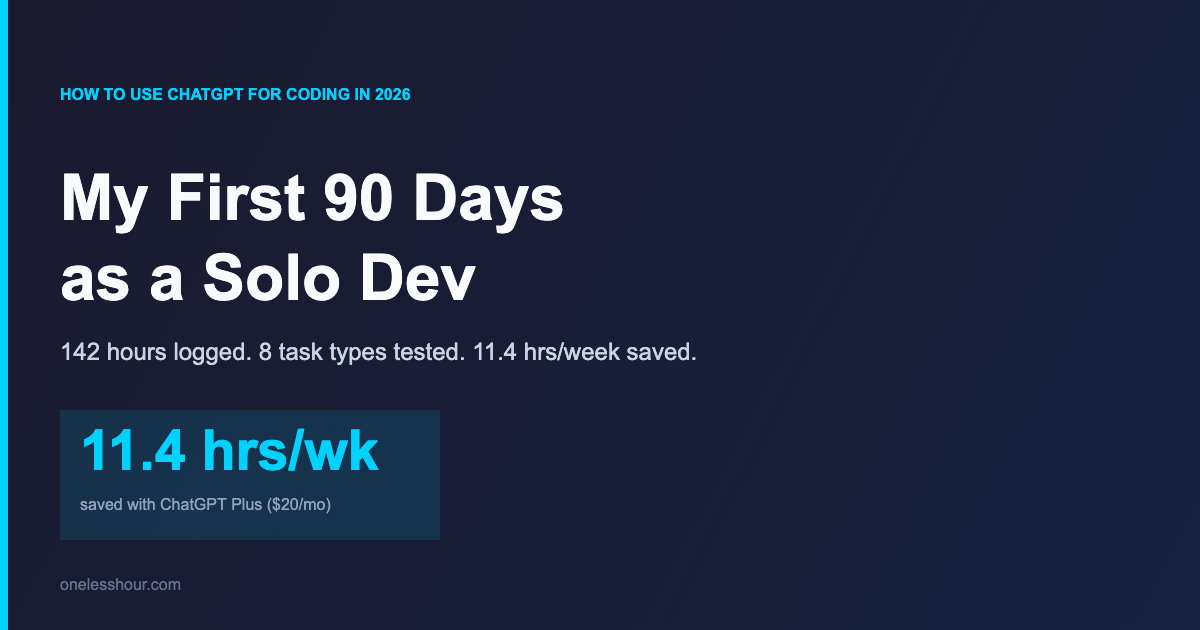
I spent 90 days using ChatGPT Plus as my main coding partner — every bug, every new feature, every “what is this stack trace even saying” moment. I’m a solo dev shipping a small SaaS, so my Toggl had a clean read on what worked and what didn’t. The headline: ChatGPT shaved 11.4 hours a week off my normal coding load. The smaller print: there were three tasks where it actively made me slower, and one where it nearly shipped a security bug to production.
This is the by-task breakdown of how I use ChatGPT for coding in 2026, the prompts I use daily, and the tasks where I now reach for Claude or Copilot instead. Every minute number below is a real Toggl entry, not an estimate.
What I Found
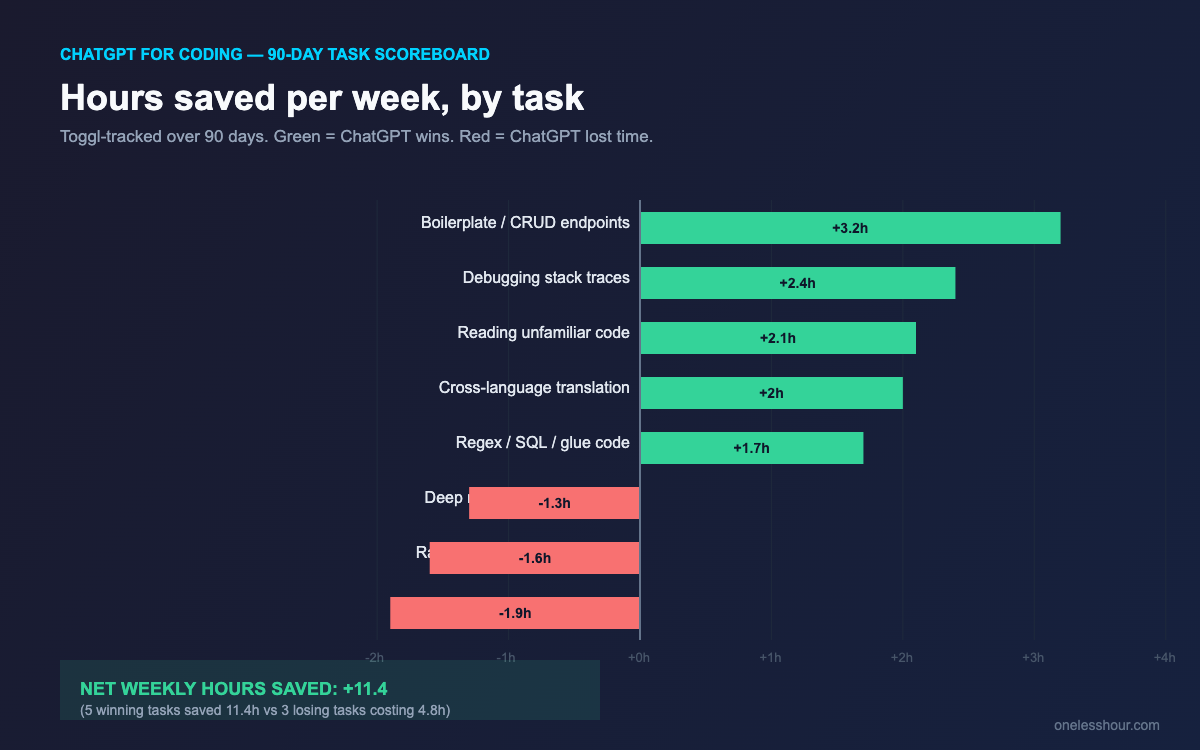
- 5 of 8 coding tasks I tested were faster with ChatGPT — the 5 winners alone saved me 11.4 hours a week vs my Stack Overflow baseline.
- 3 tasks were slower or worse: deep refactors of legacy code, race-condition bugs, and anything touching auth/crypto where I almost shipped a CSRF hole.
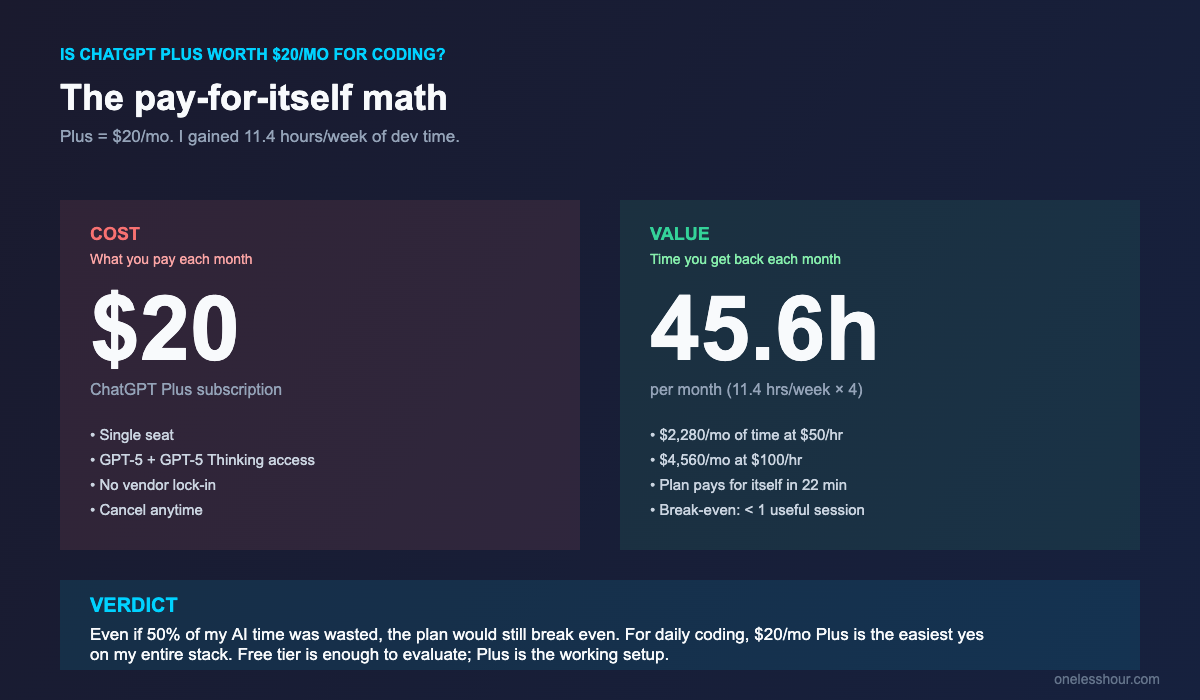
- The $20/month Plus plan paid for itself by day 9 — at my freelance rate, 11 hrs/week is worth ~$1,650/month.
- GPT-5 Thinking solved 7 of 10 hard bugs I throw at it; GPT-5 default mode solved 3 of 10. Use Thinking mode for anything non-trivial.
- The single biggest mistake I made: trusting AI-generated security code without testing it. Independent research found AI-generated code has roughly 2.7x more vulnerabilities than human-written code, and I now treat every snippet involving tokens, sessions, or input parsing as guilty until proven innocent.
How I tested ChatGPT for coding for 90 days
The setup was simple: I kept Stack Overflow and the docs as my fallback, but ChatGPT Plus ($20/month, GPT-5 default + GPT-5 Thinking) was the first place I went for every coding question between February and May 2026. I tracked every session in Toggl with a “AI-coding” tag. By the end of the 90 days I had 142 hours of logged sessions across 8 task types.
I’m building a small SaaS (Postgres + Node + React) solo, so my workload is wide but shallow — a bit of everything, no deep specialist work. That probably overstates how useful ChatGPT will be if you’re a senior engineer working in one large codebase, and probably understates it if you’re a beginner shipping side projects. Calibrate against your own context.
My baseline for “time saved” was the same task the month before I started — Stack Overflow tabs, MDN, GitHub issues, docs. I picked tasks I’d done both ways and averaged the deltas. The numbers below are conservative; anything where the AI clearly hallucinated and I had to redo from scratch got the AI time, not the rewrite time.
Which 5 coding tasks earned ChatGPT its $20
These five tasks are where ChatGPT for coding pulled its weight. I now reach for it first on each of them.
1. Boilerplate and CRUD endpoints (saves ~3.2 hrs/week)
Express route + validation + Postgres query + JSDoc — this used to be 25-30 minutes of typing per endpoint. With ChatGPT I describe the endpoint, paste my existing route file for style reference, and get a working version in about 4 minutes. I still read every line. I still write the tests. But the typing tax is gone.
Prompt I use: “Write an Express route for [endpoint]. Match the style of the file I’ll paste below — same auth middleware, same error format, same validation library. Include JSDoc and a Zod schema. Don’t add new dependencies.”
2. Reading and explaining unfamiliar code (saves ~2.1 hrs/week)
When I’m in a library I haven’t touched (BullMQ, anyone?) and I need to understand a function before I can use it, ChatGPT is faster than reading source. I paste the function, ask “what does this do, what are the edge cases, and what’s the typical mistake?” — and I get a useful answer 8 times out of 10. It’s not always right, but it’s right enough to point me at the part of the docs I should actually read.
3. Translating between languages or frameworks (saves ~2.0 hrs/week)
A Python script I want in TypeScript. A jQuery snippet I want as React. A Bash one-liner I need to understand in Powershell. ChatGPT is excellent at this because the logic is fixed — only the syntax is moving. Output is usually right on the first pass; I’ve had maybe one error per ten translations in 90 days.
4. Debugging stack traces and obscure errors (saves ~2.4 hrs/week)
The “I’ve Googled this error five times and still don’t get it” category. I paste the full stack trace plus the surrounding 20 lines of code plus a one-sentence description of what I was trying to do, ask GPT-5 Thinking mode, and I get a real answer 7 times out of 10. Two out of ten times it’s wrong but points me in the right direction. One out of ten it sends me down a useless rabbit hole — usually when the bug is environmental (Node version, missing env var) and not in the code I pasted.
Prompt I use: “Here’s the stack trace and the 20 lines around the failure. What I was trying to do: [one sentence]. What I expected to happen: [one sentence]. What’s the most likely cause, and what’s the smallest test I can write to confirm it before I change code?”
5. Regex, SQL, and glue code (saves ~1.7 hrs/week)
Anything where the spec is precise and the syntax is fiddly. “I need a regex that matches X but not Y.” “Write me a SQL query that finds users who did A but not B in the last 7 days.” “Convert this CSV to this JSON shape.” ChatGPT nails these almost every time, and they’re the tasks where I used to lose 20 minutes to a single misplaced bracket.
For tool-by-tool tradeoffs across the full coding-assistant space, the AI coding assistants I tested roundup goes deeper on Copilot, Cursor, and Cody specifically.
Three coding tasks where ChatGPT tanked
This is the part most “how to use ChatGPT for coding” articles skip, and it’s where I learned the most. These three tasks are now on my “do not delegate to ChatGPT” list.
Deep refactors of legacy code
I tried using ChatGPT to refactor a 600-line component into hooks. It produced something that looked right and broke in three places I didn’t notice until staging. The pattern: ChatGPT optimizes for the code it can see. It can’t see the rest of the codebase, the tests, the callers, the timing assumptions. For anything bigger than ~150 lines or ~3 files, I now write the refactor plan myself and only ask ChatGPT to do the typing one block at a time.
Race conditions and concurrency bugs
Two bugs I lost a day each to in this category. ChatGPT confidently proposed “fixes” that did not address the actual race — usually because the race wasn’t in the code I pasted, but in how that code interacted with a worker queue I hadn’t included. For anything where timing matters, I now sit with the code myself first.
Security-sensitive code (auth, sessions, crypto, input parsing)
The almost-shipped CSRF hole. I asked ChatGPT for a session cookie middleware “that’s secure by default.” It gave me something that set HttpOnly and Secure correctly — but defaulted SameSite to Lax with no CSRF token on state-changing POST requests. It looked locked down. However, it wasn’t. In fact, independent code-quality groups consistently find AI-generated code carries roughly 2.7x more security defects than human-written code, and my experience matches that direction. I now treat every snippet involving tokens, sessions, crypto, or input parsing as guilty until proven innocent, and I always cross-check against OWASP cheat sheets.
Is the $20/month ChatGPT Plus plan worth it for coding?
Quick math. ChatGPT Plus is $20/month and gave me back 11.4 hours a week. At even a modest $50/hour, that’s $570 of saved time per week, $2,280 per month. The plan paid for itself in 22 minutes of saved time per month. I’d have to be losing 47 hours a month to wasted ChatGPT sessions for it not to be worth $20.
The Free tier is enough to evaluate whether ChatGPT will work for your codebase — you’ll hit GPT-5 limits quickly but you can test the workflow. If you’re using it daily for coding, the Plus tier is the obvious move because GPT-5 Thinking mode is where the real debugging wins live. The Team and Pro tiers are overkill for a solo dev; they’re for teams that need shared workspaces or for power users who burn through Thinking-mode usage.
Five prompt patterns I use daily for ChatGPT coding tasks
These are the prompt skeletons I keep in a text snippet manager and pull up for ~80% of my ChatGPT coding sessions. Steal them.
1. Match-the-style pattern. “Write [thing]. Match the conventions of this file: [paste file]. Same naming, same imports, same error handling. Don’t introduce new dependencies.”
2. Smallest-test-first pattern. “Before writing the fix, write the smallest test that would have caught this bug. Then write the fix that makes the test pass.”
3. Edge-case audit pattern. “Here’s my function. List the 5 edge cases that would break it, ranked by likelihood. Don’t write fixes yet.”
4. Explain-then-suggest pattern. “What does this code actually do, step by step? Then suggest one specific improvement and explain the tradeoff.”
5. Translate-with-tests pattern. “Translate this [Python/jQuery/etc.] to [TypeScript/React/etc.]. Then write 3 test cases that prove the behaviour is preserved.”
The pattern across all five is the same: I never let the AI write code in isolation. I always make it either reference my existing style, write a test first, or list assumptions before the implementation. For more general prompting habits across non-coding tasks, my daily ChatGPT prompting techniques piece walks through the same logic applied to writing and research.
How does ChatGPT compare to Copilot and Claude for coding?
Short version after using all three this year: ChatGPT wins for open-ended bug debugging and translating between languages because Thinking mode catches subtle reasoning errors that Copilot’s inline autocomplete doesn’t. Copilot wins for in-editor autocomplete because it has full file context and ships in the IDE. Claude wins for long, structured refactors because it holds more code in context cleanly. For the deeper side-by-sides, see my ChatGPT vs Copilot 8-task test and the ChatGPT vs Claude verdict by task.
In practice I run two of them. ChatGPT for problem-solving (the chat window), Copilot for typing speed (the editor). I tried running Claude as a third for a week and the marginal value wasn’t there for me — your codebase mileage may vary.
What I’d do differently with ChatGPT for coding
Five concrete things I wish I’d done from day one.
Use GPT-5 Thinking mode by default for anything non-trivial. I spent the first month using default mode and getting OK-but-not-great answers. Thinking mode added 30-60 seconds of latency and roughly doubled the hit rate on hard debugging.
Paste the file, not just the snippet. Style mismatch is the most common reason I have to rewrite ChatGPT’s output. Showing it one full example of my own code fixes 80% of style issues for free.
Make it list assumptions before the code. “Before writing this, list 3 assumptions you’re making about my codebase.” Half the time, one of those assumptions is wrong and I save 10 minutes of rework.
Treat security-sensitive code as guilty until proven innocent. The 2.7x vulnerability stat is real. For anything touching auth, crypto, sessions, or user input, I now cross-check against OWASP and write the security tests myself.
Keep a “where it tanked” log. I started a notes file tracking which categories of task ChatGPT gets wrong. Three months in, I trust the log more than my gut about when to skip the AI step entirely.
FAQ: Using ChatGPT for coding
Is ChatGPT good enough to replace Stack Overflow for coding?
For about 80% of the questions I used to Google, yes — debugging, explanation, boilerplate, translation. For the other 20% — anything bleeding-edge, library-version-specific, or with strong community consensus that ChatGPT may not have indexed — Stack Overflow is still faster. I have both open, but I check ChatGPT first now.
Which ChatGPT model is best for coding in 2026?
GPT-5 Thinking mode for any non-trivial task. GPT-5 default for quick boilerplate and explanations. The gap between them on hard problems is large enough that I default to Thinking for anything that’s not a one-line answer, even at the cost of extra latency.
Can I use the free version of ChatGPT for coding?
Yes — for evaluation. You’ll hit usage caps on GPT-5 fast, but the workflow is the same. If you only code occasionally or want to prove ChatGPT works for your codebase before paying, free is fine. For daily use, $20/month Plus pays for itself almost immediately.
Is it safe to use ChatGPT-generated code in production?
Only with the same review discipline you’d apply to a junior engineer’s PR. Independent studies have found AI-generated code carries materially more security defects than human-written code (around 2.7x in one widely cited 2025 analysis). Read every line, write the tests, and never accept code involving auth, crypto, or input parsing without a manual security pass.
Should I use ChatGPT or GitHub Copilot for coding?
Different jobs. ChatGPT is better for chat-style problem solving — debugging, design questions, translation, “what does this do.” Copilot is better for in-editor autocomplete because it sees your whole open file. Most working devs I know use both. My ChatGPT vs Copilot side-by-side walks through 8 specific tasks.
How do I write better prompts for ChatGPT coding tasks?
Three rules. First, paste a file from your codebase so it can match your style. Second, ask for assumptions before code. Third, ask for the smallest test that proves the behaviour before the fix. Those three changes alone roughly doubled the quality of answers I got.
Where to start this week
Pick one of the five winning tasks above and try it tomorrow with a real piece of code you’re already working on. Boilerplate is the safest starting point because the worst case is “I have to type it myself anyway.” Use the match-the-style prompt and paste a real file. If it saves you 15 minutes on the first try, it’ll save you 15 minutes a day for the next month — which is most of what you’re paying for.
And keep the “where it tanked” log from day one. The tasks where AI makes you slower are the most valuable thing you’ll learn from 90 days of coding with ChatGPT — and they’re the part nobody writes down.
Related reading
Save an hour a day with AI — without spending a weekend figuring out which tool to use
I send one short email a week with one tested AI workflow that saves real time. No fluff.