
Transparency note: This article contains no affiliate links, and no company paid for or reviewed it. I pay for most of the AI tools I use myself — see how I test.
| Test period | 4 weeks, April–May 2026 |
| Plan tested | Free tier only — no trials, no credit card |
| Cost incurred | $0 |
| Real work done | 15 articles, ~30 emails, 40+ social captions |
| Tools compared | 8 |
| Next re-test | November 2026 |
I spent a month writing everything for this blog with free AI writing tools — no paid plans, no trials, no card on file. Fifteen full articles, a backlog of emails, and a stack of social captions, all run through the free tiers of eight different tools.
The reason was simple. Every “best free AI writing tools” list I read described the free tiers as if they were just smaller versions of the paid ones. They are not. Some free tiers are genuinely useful for daily work. Others run out in about three days of real writing, or quietly cap you at 125 words per request, which no marketing page mentions up front.
So I tracked the whole thing in Toggl: which tool I reached for, how long each task took, and where each free tier hit a wall. This is the honest verdict — what eight free AI writing tools can actually do, and where they fall apart once you push them with real work.
What I Found
- ChatGPT Free and Claude Free were the only two I could write full articles with all month — the other six hit hard limits within days.
- Copy.ai’s free plan gives 2,000 words a month. That covered roughly two articles before it locked me out.
- QuillBot’s free tier caps rewrites at 125 words per request, which makes it useless for anything longer than a paragraph.
- Across the month, free tools saved me about 3.5 hours a week — mostly on first drafts and outlines, not finished copy.
- No single free tool does both strong writing and SEO well. The workflow that worked was using two or three together.
How did I actually test these free AI writing tools?
I gave every tool the same five jobs: a long-form article draft, a section rewrite, an email, a batch of social captions, and a round of editing. Same prompts, same source notes, same week. Then I logged the time in Toggl and noted the exact moment each free tier stopped me — a word cap, a daily message limit, a paywalled feature.
One rule mattered most: I only counted a tool as “usable for daily work” if I could do a normal day of writing without hitting a wall. A free tier that handles one task beautifully and then locks for the month is a demo, not a tool. That distinction is the whole point of this review, and it is the part most roundups skip.
Which free AI writing tool is the best all-rounder?
ChatGPT Free is the one I kept coming back to. As of April 2026 the free tier includes GPT-4o access, so the quality gap with the paid plan is smaller than it used to be. I drafted outlines, rewrote clunky paragraphs, and brainstormed angles with it — a full article outline took about four minutes instead of the twenty it takes me cold.
The catch: there is a daily message cap that tightens during busy hours, and when you hit it you get bumped to a lighter model mid-task. On two of my heavier writing days I ran out around mid-afternoon. It is still the best free all-rounder, but plan your big drafting sessions for the morning.
Claude Free is the one I trust with actual prose. Where ChatGPT is a strong generalist, Claude writes sentences that need less editing afterward — less of the stiff “AI voice,” better rhythm, fewer throwaway phrases. For the intro and closing of an article, where tone matters most, Claude’s draft saved me a real editing pass. Its free tier also throttles by usage rather than a hard word count, so a normal writing day fit inside it.
My month-long verdict: draft structure and bullet points in ChatGPT Free, then move the parts that need a human voice — intros, transitions, closings — into Claude Free. That two-tool handoff is the closest a free stack gets to a paid writing assistant.
If you want the paid side of this comparison, I broke down the subscription options in my guide to the best AI writing assistant, and the head-to-head detail in ChatGPT vs Claude.
What if you already live in Google or Microsoft?
Google Gemini earns its place purely on location. It sits inside Google Docs, Gmail, and Drive, so there is no copy-paste shuffle. I used it to summarize research and rough out email replies without leaving the doc I was already in. The free limits are generous enough for that kind of light, in-context help. The writing itself is competent but plain — fine for a draft, not for the final version.
Microsoft Copilot is the same idea for the Office crowd. If your day runs through Word and Outlook, the free Copilot tier handles drafting and rewriting right where you work, with no meaningful word cap. I do not write in Word, so I used it less — but if you do, it removes the same friction Gemini removes for Google users.
Neither one is a reason to switch ecosystems. But if you are already in one, the free tier is a genuine time-saver and costs you nothing to turn on.
Are the dedicated AI writing apps worth it on the free plan?
This is where the free-tier reality check gets sharp. Copy.ai produces tidy short-form marketing copy — product descriptions, ad lines, social hooks — and its templates are quick. But the free plan gives you 2,000 words per month. In real use that lasted me about two articles’ worth of snippets before it locked. As a monthly tool it is more of a sampler than a workhorse.
Rytr was the fastest at spitting out a first draft, and its free tier gives you roughly 10,000 characters a month — call it 1,500 to 2,000 words. That is enough to test it properly, not enough to rely on it. The output also needs the most editing of anything I tested; it is a starting point, not a finished paragraph.
QuillBot is the one whose free limit surprised me most. It is built for rewriting and paraphrasing, and it is good at it — but the free tier caps each rewrite at 125 words. For tightening a single sentence or a short paragraph, fine. For reworking a full section, you are feeding it in tiny chunks and stitching the results together, which costs more time than it saves.
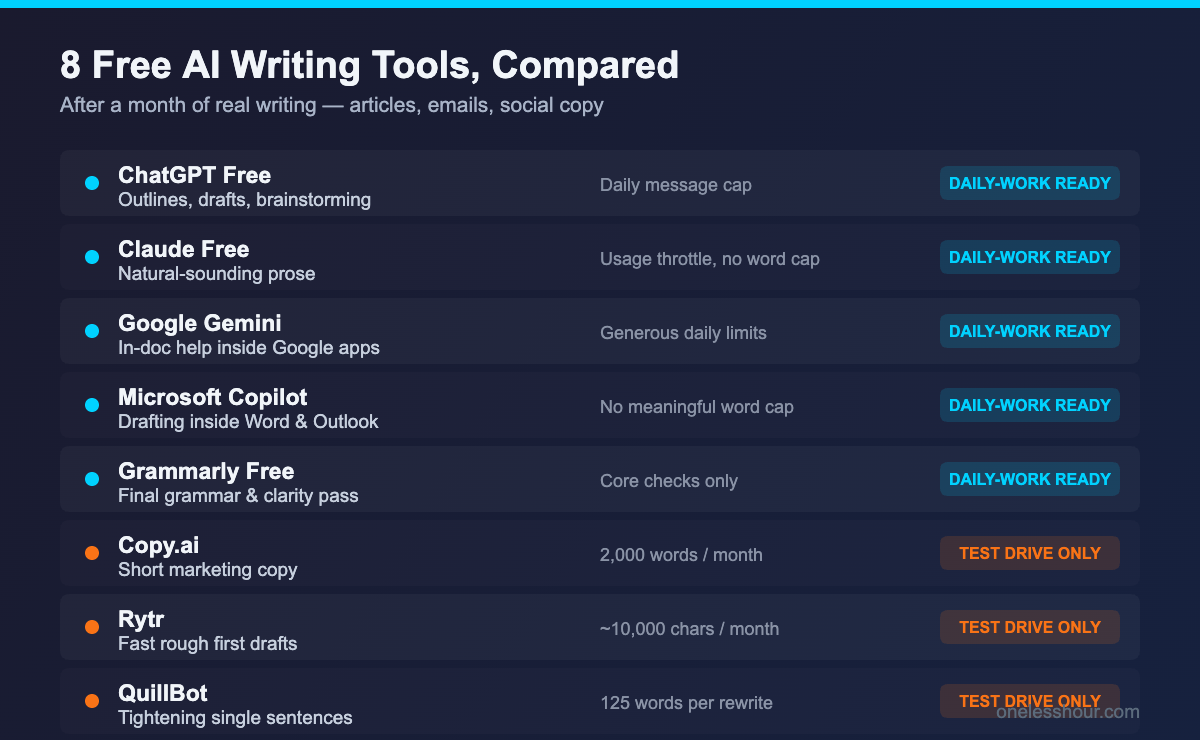
| Tool | Free tier limit | Best free use | Daily-work ready? |
|---|---|---|---|
| ChatGPT Free | Daily message cap (varies) | Outlines, drafts, brainstorming | Yes |
| Claude Free | Usage throttle, no word cap | Natural-sounding prose | Yes |
| Google Gemini | Generous daily limits | In-doc help inside Google apps | Yes (light use) |
| Microsoft Copilot | No meaningful word cap | Drafting inside Word/Outlook | Yes (light use) |
| Copy.ai | 2,000 words/month | Short marketing copy | No — runs out fast |
| Rytr | ~10,000 characters/month | Fast rough first drafts | No — trial-sized |
| QuillBot | 125 words per rewrite | Tightening single sentences | No — too small |
| Grammarly Free | Core checks only | Final grammar and clarity pass | Yes (editing only) |
Do you still need Grammarly on the free plan?
Grammarly Free is not a writing tool in the drafting sense — it is the cleanup crew. The free version catches the grammar, spelling, and clarity errors that AI drafts still leave behind, and it does it inline while you work. I ran every article through it as the last step before publishing, and it reliably caught the small stuff: a doubled word, a missing comma, a sentence that ran too long.
The free tier holds back the tone and full-rewrite suggestions, but for a final proof pass you do not need those. If grammar is your main worry, I compared the options in detail in my best AI grammar checker review — but for most people the free Grammarly tier is enough to close out a draft.
The free tier reality check
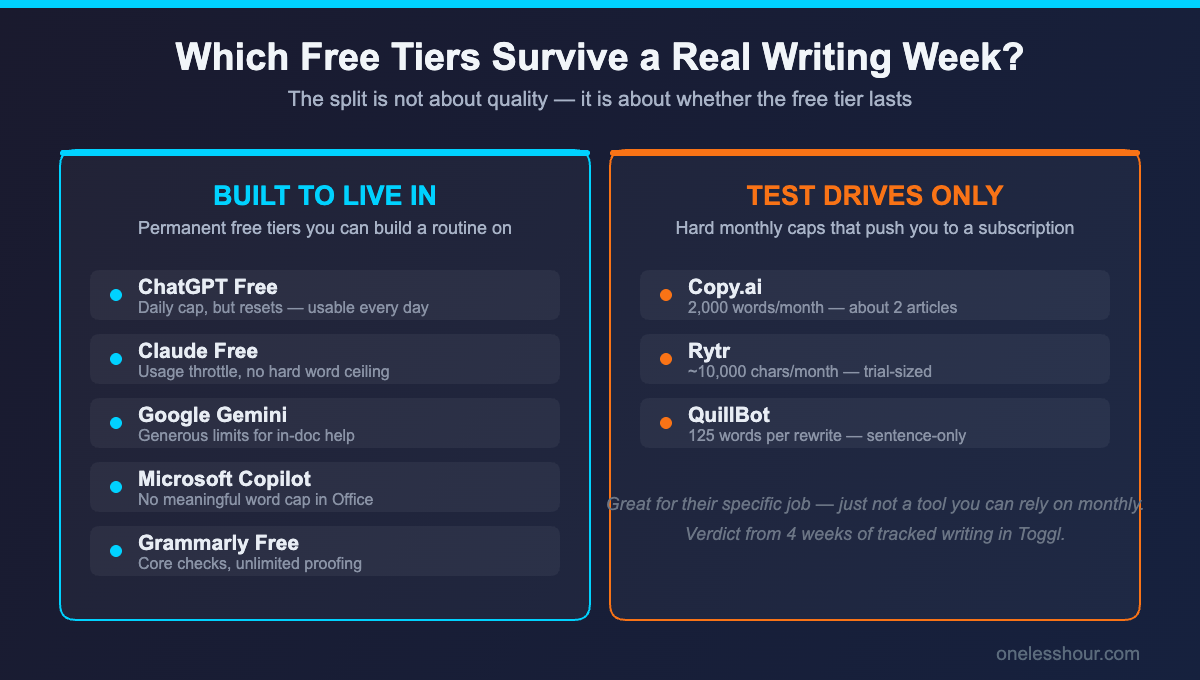
Here is what a month of real use taught me that the marketing pages do not say. The free tools split cleanly into two groups, and the line is not about output quality — it is about whether the free tier survives a normal week.
ChatGPT, Claude, Gemini, Copilot, and Grammarly all have permanent free tiers built around usage limits you can actually live inside. Copy.ai, Rytr, and QuillBot have free tiers built around hard monthly caps that are really there to push you toward a subscription. Both are valid business models — but only the first group is a tool you can build a routine on.
One more thing worth knowing: OpenAI added sponsored suggestions to the ChatGPT free tier this year. They show up as the occasional recommended option in answers. It did not change my workflow, but if you have not seen it before, that is what it is.
What I’d do differently
A few mistakes cost me time, and they are easy to avoid if you know about them up front.
- I burned Copy.ai’s word budget on throwaway tests. By the time I had a real caption to write, the month’s 2,000 words were gone. If you use it, save it for the copy that ships.
- I tried to draft full sections in QuillBot. The 125-word cap turned one rewrite into six. It is a sentence tool, not a section tool — treat it that way.
- I expected free AI drafts to be publishable. They are not. They are scaffolding. The free tools saved me time on structure and first drafts, not on finished writing — the same lesson I learned building my blogger tool stack.
- I ran big drafting sessions in the afternoon. ChatGPT’s free cap is tighter during peak hours. Move heavy work to the morning and you rarely hit it.
- I ignored the in-app tools at first. Gemini inside Google Docs removed a copy-paste step I had been doing manually for weeks.
Frequently asked questions
What is the best free AI writing tool overall?
ChatGPT Free is the best all-rounder — it now includes GPT-4o access and handles outlines, drafts, and brainstorming well. If you care most about natural-sounding prose, Claude Free edits down faster. Most people get the best results using both together.
Are free AI writing tools good enough to publish with?
Not on their own. In a month of testing, every free tool produced useful scaffolding — outlines, rough drafts, rewrites — but nothing publish-ready without a human editing pass. They save time on structure, not on finished copy.
Which free AI writing tools have no word limit?
ChatGPT, Claude, Google Gemini, and Microsoft Copilot all run on usage throttling rather than hard monthly word caps, so a normal writing day fits inside them. Copy.ai (2,000 words/month), Rytr (~10,000 characters/month), and QuillBot (125 words per rewrite) all have firm caps.
Do free AI writing tools require a credit card?
None of the eight tools here needed a card for the free tier. ChatGPT, Claude, Gemini, Copilot, Grammarly, Copy.ai, Rytr, and QuillBot all offer permanent free plans you can use without entering payment details.
Can a free AI writing tool replace a paid subscription?
For light or occasional writing, yes — a ChatGPT-plus-Claude free stack covers a lot. For heavy daily output, the free tiers’ limits start to pinch, and a single paid plan is usually worth it. I cover the affordable paid options in my roundup of AI tools under $10 a month.
Where to start today
If you do one thing after reading this, set up the two-tool handoff: draft your structure and bullet points in ChatGPT Free, then move the parts that need a human voice into Claude Free, and run the result through Grammarly Free before it goes live. That stack costs nothing, never hits a hard wall in a normal week, and gave me back about 3.5 hours every week.
The dedicated apps — Copy.ai, Rytr, QuillBot — are worth a look for their specific jobs, but treat their free plans as test drives, not tools. And if you reach the point where the free limits are slowing you down more than helping, that is the signal to look at a paid plan. Until then, free is genuinely enough — just not in the way the roundups make it sound.