
Transparency note: This article contains no affiliate links, and no company paid for or reviewed it. I pay for most of the AI tools I use myself. See how I test.
I’m not a teacher. I test AI tools for a living. But teaching might be the most time-starved job there is — the actual teaching ends at 3pm, and then the second shift of planning, grading, and emails eats the evening.
So I spent two weeks stress-testing ChatGPT for teachers — running the lesson-planning, grading, and email tasks that steal your evenings through it. The goal was never to automate teaching; it’s not a robot’s job to teach your kids. It was to claw back the repetitive admin so you can go home at a reasonable hour.
Here are the seven that actually gave time back, the exact prompts, and one privacy rule you cannot skip. Steal the prompts. Keep the judgment for yourself.
1. First-draft lesson plans
A blank lesson-plan template is a time sink. A rough draft you can fix is a five-minute job. Give it the specifics.
Create a 45-minute lesson plan for [GRADE] [SUBJECT] on [TOPIC]. Include a warm-up, a main activity, a quick check for understanding, and an exit ticket. Align it to [STANDARD, e.g. Common Core RL.6.2]. Keep it practical for a class of 28.
Try this now: generate one for tomorrow’s lesson, then rip out the parts that don’t fit your class. Editing a draft beats building from scratch every time.
2. Differentiation in seconds
This is the one that made teachers I showed it actually gasp. Differentiating a text for three reading levels by hand takes an hour. It takes ChatGPT about 20 seconds.
Rewrite this passage at three reading levels: below grade, at grade, and above grade for [GRADE]. Keep the same key facts and vocabulary words in each. Here’s the passage: [PASTE]
To make it concrete, here’s one science sentence at three levels:
- Below grade: “Plants use sunlight to make their own food.”
- At grade: “Plants turn sunlight, water, and carbon dioxide into energy through photosynthesis.”
- Above grade: “In photosynthesis, chloroplasts convert light energy into chemical energy, releasing oxygen as a byproduct.”
Three access points, one core idea. A struggling reader and an advanced one sit in the same room learning the same thing — and that used to keep you at your desk until 6pm.
3. Quizzes and worksheets
Generating practice questions is repetitive work that ChatGPT is reliably good at — as long as you check the answer key.
Write a 10-question quiz on [TOPIC] for [GRADE]: 6 multiple choice, 3 short answer, 1 extended response. Include an answer key and mark the difficulty of each question. Avoid trick questions.
Pro tip: ask it to tag each question to a specific learning objective. You’ll spot instantly whether your assessment actually covers what you taught.
4. Rubrics that don’t take an hour
Rubrics are essential and soul-crushing to build. Give ChatGPT your criteria and it handles the tedious part — writing a clear descriptor for every level and category. You just adjust the wording.
Build a 4-level rubric (Exceeds, Meets, Approaching, Beginning) for a [GRADE] [ASSIGNMENT TYPE]. Use these criteria: [LIST YOURS]. Write the descriptors in plain language a student and parent could both understand.
5. The parent emails you dread
The tough parent email — the one you rewrite five times to get the tone right — is exactly where ChatGPT helps most. It’s a first draft you’ll edit, never a send-it-blind.
Help me write a calm, professional email to a parent about [SITUATION, no names]. Tone: warm but firm, solution-focused, not defensive. Keep it under 150 words. I’ll add the specific details myself.
Notice the “no names” in that prompt. That’s not optional — it’s the rule in the next section.
6. Feedback and comment banks
Report-card season is a slog of writing the same encouraging-but-honest comment 30 different ways. Build a bank once.
Write 15 report-card comment starters for a [GRADE] student who is [strong / improving / struggling] in [SUBJECT]. Specific and constructive, no empty praise. I’ll personalize each one.
7. Explain a hard concept five ways
When a student just isn’t getting it, you need a fresh analogy on the spot. This is a brilliant on-demand idea generator.
Explain [TRICKY CONCEPT] five different ways for a [GRADE] student: one analogy, one real-world example, one simple diagram description, one story, and one hands-on activity.
Pro tip: keep the best explanations in a running doc. Over a term you’ll build a personal teaching playbook worth more than any prompt.
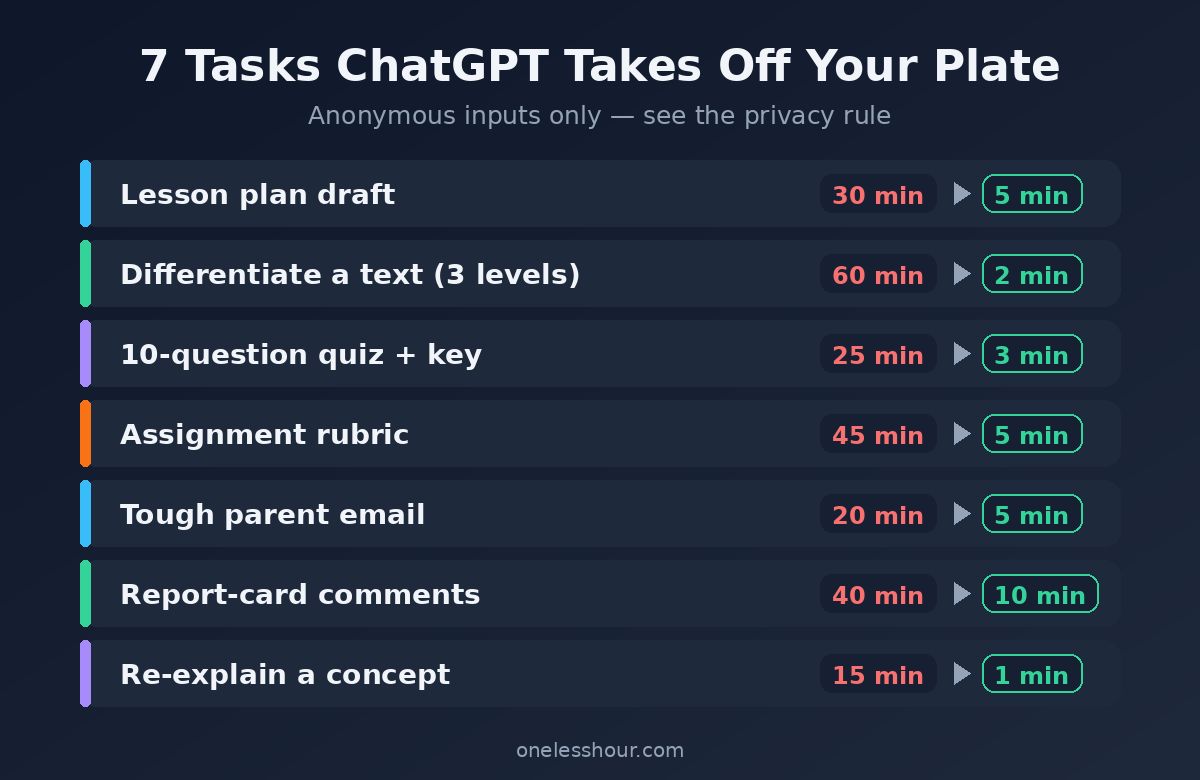
The seven tasks at a glance
| Task | Old time | With ChatGPT |
|---|---|---|
| Lesson plan draft | ~30 min | ~5 min |
| Differentiate a text (3 levels) | ~60 min | ~2 min |
| 10-question quiz + key | ~25 min | ~3 min |
| Assignment rubric | ~45 min | ~5 min |
| Tough parent email | ~20 min | ~5 min |
| Report-card comments | ~40 min | ~10 min |
| Re-explain a concept | ~15 min | ~1 min |
Put it together: a 20-minute Sunday reset
The real win isn’t any single prompt — it’s chaining a few so Sunday-night prep stops eating your Sunday night. Here’s the sequence I’d run:
- Minutes 0-5: Draft next week’s lesson plans (prompt 1), one quick message per day.
- Minutes 5-10: Differentiate the week’s key reading into three levels (prompt 2).
- Minutes 10-15: Spin up the quiz and rubric you’ll need (prompts 3 and 4).
- Minutes 15-20: Draft the two parent emails you’ve been putting off (prompt 5), names left out.
Twenty minutes, and the week’s admin skeleton is done. You still edit every piece — but you’re editing, not building from a blank page at 9pm. That’s the whole promise: one less hour of prep, handed back to you.
The one rule you can’t skip: student privacy
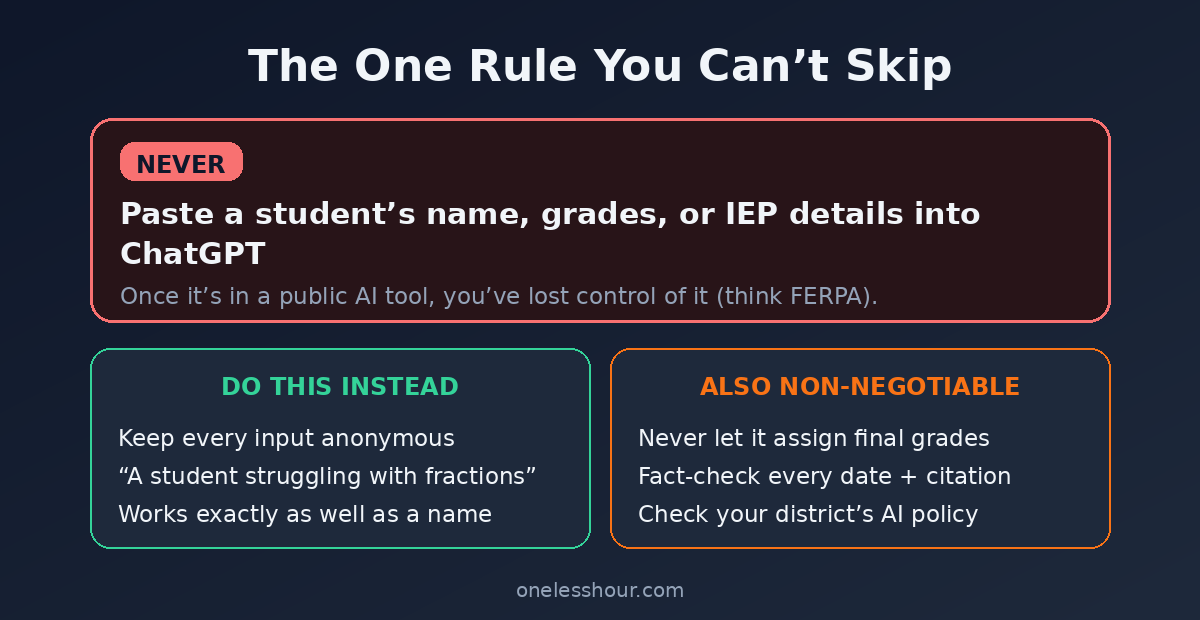
Never paste a student’s name, grades, IEP details, or anything identifying into ChatGPT. Once it’s typed into a public AI tool, you’ve lost control of it, and depending on your district and laws like FERPA, that can be a serious violation.
Keep everything anonymous. “A student who is struggling with fractions” works exactly as well as a name. Here’s the rest of the honest list:
- Never let it assign final grades. Use it to draft feedback, not to judge a child’s work. That’s your job and your professional call.
- Fact-check everything. It confidently invents historical dates, science details, and citations. Verify before it reaches students.
- Check your district policy first. Some schools have AI rules or approved tools. Ask before you build a workflow around it.
The downside: used carelessly, ChatGPT can hand a student wrong information or put you on the wrong side of a privacy policy. Skip it for anything involving real student data, and treat every fact as a draft until you’ve checked it.
Frequently asked questions
Is ChatGPT free for teachers?
Yes — the free tier runs every prompt here with room to spare. There’s no separate teacher plan you need to buy. A paid plan only helps with very heavy daily use, which most prep won’t reach.
Can ChatGPT grade student work?
It can suggest feedback, but it should not assign final grades. It misjudges nuance, can be inconsistent, and grading is a professional responsibility that shouldn’t be outsourced. Use it to draft comments, then decide the mark yourself.
Is it OK to use ChatGPT for teaching?
Using it for prep — plans, quizzes, rubrics, email drafts — is widely accepted and a real time-saver. The lines to respect are student privacy, fact-checking, and your district’s policy. Stay inside those and it’s just a faster way to do the admin.
Will ChatGPT help my students cheat?
They already have access, so the better move is designing around it — in-class writing, process-based grading, and questions that ask for personal reasoning. The same tool that saves you time can be taught as a skill rather than banned.
What’s the best ChatGPT prompt for teachers?
The differentiation prompt in section 2 is the single highest-impact one — it turns an hour of rewriting into seconds. But the real time savings come from chaining several together, like the 20-minute Sunday reset above.
Start with the task you hate most
Don’t overhaul everything this week. Pick the one job that eats your Sunday — grading comments, lesson plans, that differentiation grind — and run just it through a prompt above. Anonymous inputs only. See how much of your evening comes back.
Once you’ve got the hang of prompting, it pays off across every tool. Start with my ChatGPT prompting techniques, and if you want to go beyond ChatGPT, here are the best free AI tools for teachers I’ve tested.