
LAST TESTED: May 2026
Transparency note: This article contains no affiliate links, and no company paid for or reviewed it. I pay for most of the AI tools I use myself — see how I test.
This Cursor vs Windsurf test started with a rule I break constantly: stop tool-hopping and just ship. So when half my dev friends started swearing that Windsurf had quietly passed Cursor, I didn’t want another five-minute trial that proves nothing. I committed to something harder.
For two weeks I used Cursor as my only code editor — no falling back to VS Code, no peeking at anything else. Then I uninstalled it and ran the next two weeks in Windsurf alone, on the same side project: a Next.js and Supabase dashboard with about 18,000 lines of code that I know well enough to notice when an AI edit is subtly wrong.
I tracked every session in Toggl. By the end I had four weeks of real time data, a clear sense of where each tool actually earns its $20 a month, and two moments where one of them nearly cost me an afternoon. Here’s the honest Cursor vs Windsurf verdict, broken down by task — including the parts the spec-sheet comparisons skip.
Cursor vs Windsurf: What I Found
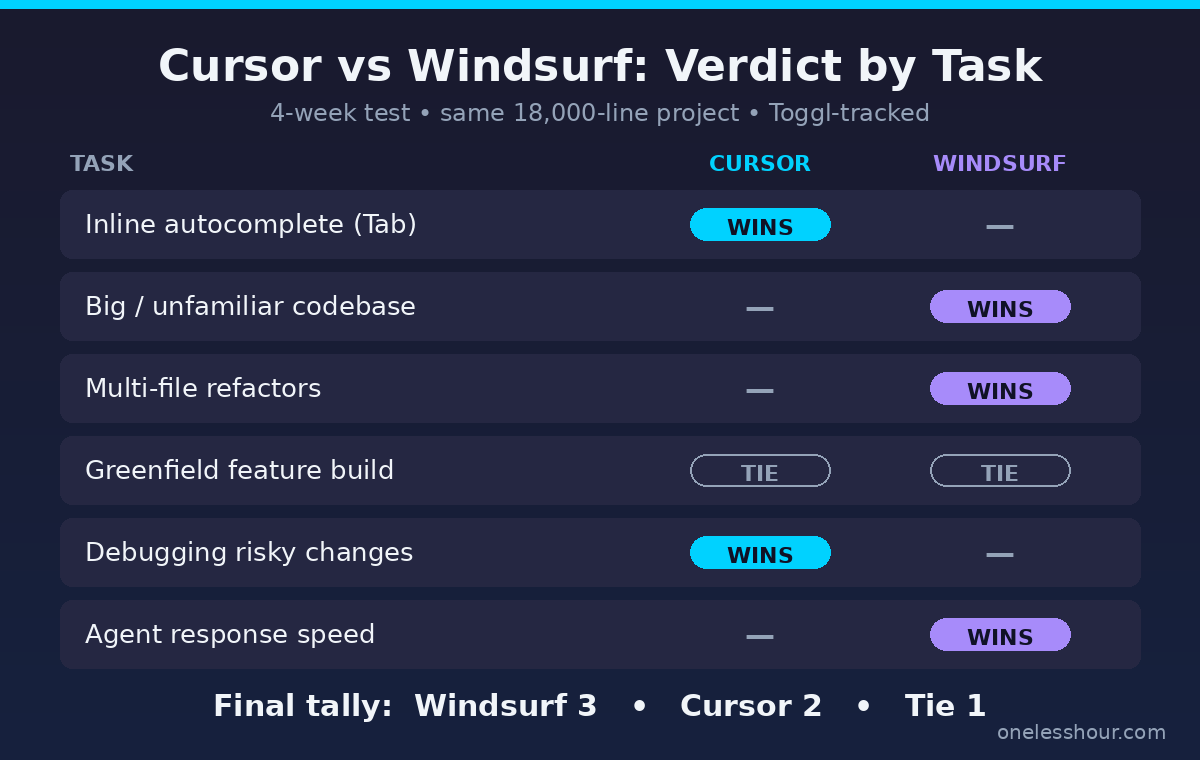
- Across six task types, Windsurf won 3, Cursor won 2, and one was a tie — neither tool is a blowout.
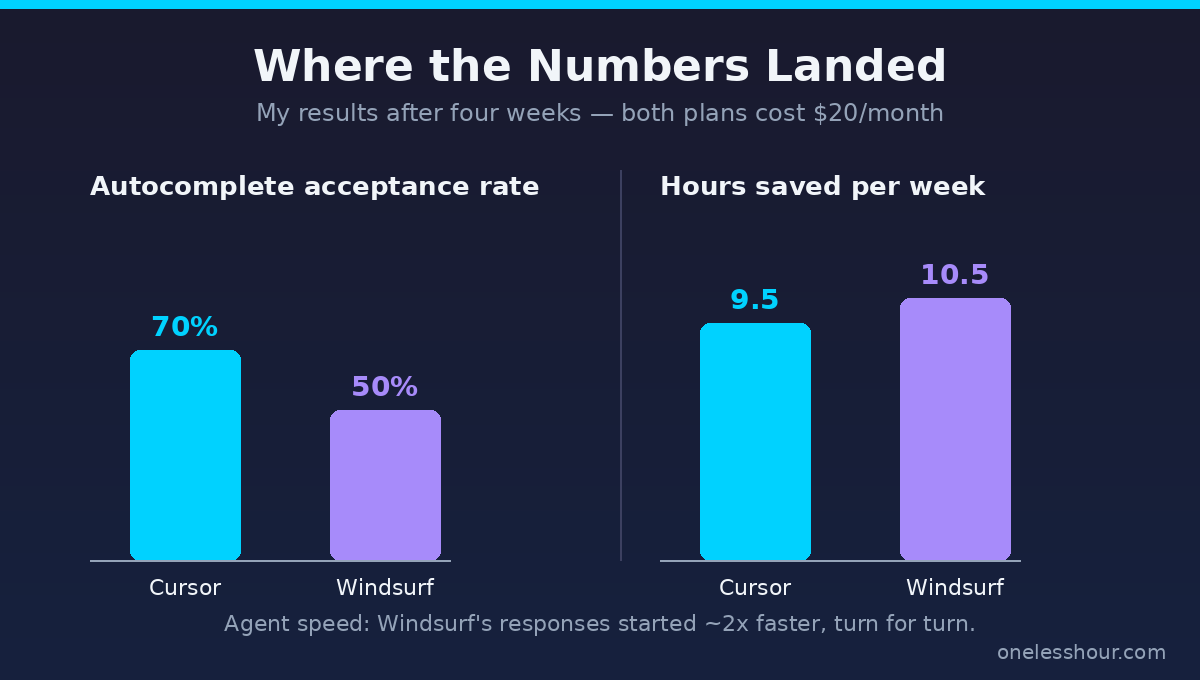
- Cursor’s inline autocomplete (Tab) was noticeably better — I accepted roughly 7 in 10 suggestions vs about 5 in 10 in Windsurf.
- Windsurf saved me the most time on the messy work: large refactors and finding my way around the codebase, where its automatic context pulled the right files without me tagging anything.
- Windsurf’s agent felt about twice as fast to respond day to day, which adds up when you run it dozens of times.
- Both cost $20/month now — Windsurf raised Pro from $15 to $20 in March 2026, erasing its old price advantage.
- The real deciding factor for a lot of people isn’t features: Cursor is VS Code only, while Windsurf runs inside JetBrains and 40+ other IDEs.
How I tested this
- Test period: 4 weeks (two weeks per tool), April–May 2026
- Plan tested: Pro on both — $20/month each
- Cost incurred: $40 (one month of each)
- Hours saved/week: ~9.5 (Cursor) and ~10.5 (Windsurf)
- Tools compared: Cursor and Windsurf, on the same 18,000-line Next.js + Supabase project
- Next re-test: November 2026
How I tested Cursor vs Windsurf
Most comparisons you’ll find run both tools side by side for an hour and call it a review. The problem is that you never settle into a tool in an hour. You don’t hit the rate limits, you don’t learn the keyboard flow, and you don’t find out what annoys you on day nine.
So I made each one my only editor for a full two-week sprint. Same machine, same project, same types of work each week: building new features, refactoring old code, fixing real bugs from my issue tracker, and reading through parts of the codebase I’d forgotten. I logged each session in Toggl and tagged it by task type so I could compare like for like.
Two things this setup gave me that an hour-long test can’t: I hit Cursor’s request limits and Windsurf’s daily quotas in normal use, and I got past the honeymoon phase where everything new feels better just because it’s new. If you want the full rundown of how I run these tests, it’s on my review methodology page.
Cursor vs Windsurf: which one writes better code as you type?
This is the thing you feel every single minute, so it matters more than any benchmark. Cursor’s inline autocomplete — the gray text that finishes your line or your next few lines — is the best I’ve used. It’s powered by the Supermaven engine Cursor acquired, and it shows. By my own rough count I accepted around 70% of its suggestions on this project. The multi-line edits where it predicts your next change a few lines down were right far more often than they had any business being.
Windsurf’s Tab completion is good, but a step behind. I accepted maybe 50% of what it offered, and it was more likely to suggest something plausible-but-wrong that I’d start accepting before catching it. One thing to know: Windsurf’s Tab completion is unlimited on every plan, including the free one, and never eats into your quota. So the gap isn’t about cost — it’s just acceptance quality.
Winner: Cursor. If you spend most of your day writing fresh code line by line, this difference alone is reason enough to pick it.
Cursor vs Windsurf: which one handles a big, unfamiliar codebase better?
Here’s where they split hard. In Cursor, when I want the agent to change something across files, I tag the relevant files with @ so it has context. That’s fine when I know exactly which files matter. When I don’t — say I’m fixing a bug whose cause lives three layers away — I either guess at the files or let it search, and the results get vaguer.
Windsurf’s Cascade agent reads the whole codebase automatically and pulls in the relevant pieces using retrieval, so I rarely tag anything. On a 200-file project that’s a real difference. Twice during my Windsurf weeks it traced a bug to a file I’d have never thought to open, fixed it, and explained why — without me feeding it a single path. On a refactor that touched seven files, Cascade found all seven; in Cursor I’d tagged five and missed two.
The rough rule I landed on: if you can name the files, Cursor’s control is an asset. If you can’t, Windsurf’s automatic context saves you the guessing.
Winner: Windsurf — both for big multi-file refactors and for navigating code you don’t have memorized.
Is one of them actually faster?
Yes, and it surprised me. Windsurf ships its own SWE-1.5 model, which the company claims runs roughly 13x faster than Claude’s Sonnet 4.5 at near-frontier quality. I can’t verify the multiplier, but the felt difference is real: Windsurf’s agent typically started returning code in a couple of seconds, where Cursor more often left me watching a spinner.
It sounds minor until you run the agent forty times a day. Those few seconds each turn, plus the times Cursor paused to ask whether it should proceed, added up to real friction by Friday. Cursor’s caution is sometimes the right call — more on that below — but on pure speed, Windsurf won the week.
Winner: Windsurf.
What about debugging and risky changes?
This is where Cursor’s slower, ask-first style flips from annoyance to feature. Cursor’s agent pauses more often to confirm before it edits, and it keeps changes tighter and easier to review. Windsurf’s Cascade is aggressive by default — it acts first and asks less. Great for momentum, less great when it rewrites three files to fix a one-line bug.
On a tricky auth bug in my Supabase layer, Cursor walked me through its reasoning, made one targeted change, and waited. Windsurf fixed the same class of bug faster but also “helpfully” refactored a helper function I hadn’t asked it to touch, which I had to revert. For debugging legacy code where a wrong edit is expensive, I trusted Cursor more.
Winner: Cursor.
How much do they actually cost?
For years, the easy answer was “Windsurf’s cheaper.” That ended in March 2026, when Windsurf moved Pro from $15 to $20 a month — exactly matching Cursor Pro. So at the individual level you’re now choosing on features, not price.
| Plan | Cursor | Windsurf |
|---|---|---|
| Free | Limited agent use, basic autocomplete | 5 Cascade sessions/day, unlimited Tab |
| Pro (individual) | $20/mo | $20/mo (was $15 until Mar 2026) |
| Teams | $40/seat/mo | $40/seat/mo |
| Top tier | Usage-based above limits | Max plan $200/mo |
The free tiers tell a more interesting story. Windsurf gives you unlimited Tab autocomplete forever plus five Cascade agent sessions a day — enough for real work if you mostly want completions and the occasional agent run. Cursor’s free tier limits agent use more tightly. If you’re broke and want the most useful free AI editor, Windsurf is the better free ride.
On Pro, I hit the gotchas. Cursor’s fast-request allowance ran down once during a heavy refactor day and dropped me into slower responses until it reset. Windsurf’s free quota of five Cascade sessions vanished in a single focused morning before I upgraded. Neither is a dealbreaker on the paid plan, but plan for them if you lean hard on the agent.
The ROI math is almost silly either way. Cursor saved me about 9.5 hours a week on this project; Windsurf about 10.5. At $20 a month — roughly $5 a week — that’s around 53 cents per hour saved with Cursor and 48 cents with Windsurf. I’ve never thought twice about the subscription. For more on which paid AI tools clear that bar, I keep a running list of the AI productivity tools worth paying for.
Where Cursor vs Windsurf each wasted my time
No tool is free. Here’s the honest cost of each, because the friction is where you actually lose hours.
Cursor’s tax is the file tagging. In a big project, forgetting to @-tag the right files gives you confident, generic edits that don’t fit your code. I lost about 40 minutes one afternoon to an agent that “fixed” something using a pattern from a file it had never seen, because I hadn’t given it the right context. Once you build the habit it’s fine — but it’s a habit you have to build.
Windsurf’s tax is the review overhead. Because Cascade acts first and broadly, I spent more time reading diffs to make sure it hadn’t changed something I cared about. Twice it touched files outside the scope of what I asked. The speed it gives you on the way in, it partly takes back on the way out when you’re checking its work.
This is the same trade-off I found when I compared Cursor against GitHub Copilot — the more aggressive the agent, the more review it demands.
The JetBrains question that decides it for some people
Here’s the single fact that ends the debate for a chunk of developers: Cursor is a VS Code fork and only runs as VS Code. Windsurf ships plugins for JetBrains — IntelliJ, PyCharm, WebStorm, Rider — plus 40-some other editors.
If you live in PyCharm or IntelliJ and have no intention of switching, Cursor isn’t an option at all and Windsurf wins by default. That’s not a knock on Cursor’s quality — it’s just that “best autocomplete” doesn’t matter if the tool won’t run in your editor. Windsurf also carries enterprise compliance certifications like FedRAMP and HIPAA, which matters if you’re in a regulated shop where that’s a hard requirement.
Cursor vs Windsurf: which should you actually pay for?
After four weeks, I don’t have a single winner — I have a clear split by who you are.
- Pick Cursor if you’re already a VS Code developer, you write a lot of fresh code line by line, and you want the best autocomplete and tighter control over what the agent changes.
- Pick Windsurf if you work in JetBrains, you spend a lot of time in large or unfamiliar codebases, or you want a faster agent and the more useful free tier.
- Either is fine if you mostly want an AI sidekick for a small project — at $20 each, the difference is real but small, and you won’t regret either.
I went back to Cursor as my daily driver after the test, because I’m a VS Code person and that autocomplete is hard to give up. But it was close, and if I were starting in PyCharm I’d be on Windsurf without a second thought. If you’re still deciding whether an AI editor earns its place at all, my roundup of the best AI coding assistants covers the wider field, and my notes on using ChatGPT for coding cover what you can get done without a dedicated editor.
What I’d do differently
If I ran this test again, I’d change three things. First, I’d start tagging files in Cursor from day one instead of learning the habit the hard way — most of my early Cursor frustration was self-inflicted. Second, I’d turn down Cascade’s autonomy in Windsurf earlier, so it asked before sweeping edits; the setting exists, I just found it late. Third, I’d test both against a teammate’s unfamiliar repo, not just my own, because the automatic-context advantage Windsurf has gets bigger the less you know the code.
Frequently asked questions
Is Windsurf better than Cursor in 2026?
It depends on your work. In my four-week test Windsurf won on large-codebase navigation, multi-file refactors, and raw agent speed, while Cursor won on inline autocomplete quality and careful, reviewable edits. For VS Code developers who write a lot of new code, Cursor still feels better day to day. For JetBrains users or anyone deep in unfamiliar code, Windsurf is the stronger pick.
Do Cursor and Windsurf cost the same?
As of May 2026, yes — both Pro plans are $20 a month and both Teams plans are $40 per seat. Windsurf raised its Pro price from $15 to $20 in March 2026, which removed the price advantage it used to have. Windsurf’s free tier is more generous, with unlimited Tab autocomplete and five agent sessions a day.
Can Cursor run inside JetBrains IDEs like PyCharm?
No. Cursor is a standalone fork of VS Code and only runs as its own VS Code-based editor. If you need an AI coding tool inside PyCharm, IntelliJ, WebStorm, or Rider, Windsurf is the one that supports them — it offers plugins for JetBrains and dozens of other IDEs.
Which one is better for beginners?
Windsurf has a gentler on-ramp because its automatic context means you don’t have to learn how to feed the agent the right files. Cursor rewards a bit of setup — once you learn to tag files and trust the autocomplete, it’s fast, but the first few days have more friction. If you want to start producing without learning a workflow, Windsurf is friendlier.
Is the free version of either tool usable?
Windsurf’s free tier is the more useful of the two: unlimited Tab autocomplete on every plan plus five Cascade agent sessions per day. That’s enough for light daily use or a small project. Cursor’s free tier is tighter on agent usage. If budget is the deciding factor, start on Windsurf free and upgrade only if you hit the agent ceiling.
Should I switch if I already use GitHub Copilot?
Not automatically. If Copilot fits your workflow and you live in an editor it supports, the gains from switching are real but incremental. The bigger jumps come from the agent features both Cursor and Windsurf build their products around. I broke down that exact decision in my Cursor vs Copilot comparison, which is worth reading before you cancel anything.
If you take one thing from four weeks of testing: don’t pick on the feature list, pick on your editor and your work. Open whichever one runs where you already code, give it a real week instead of an hour, and watch your own acceptance rate. That number will tell you more than any review — including this one.
Get the next test in your inbox
Every week I write up one AI tool honestly: what it costs, what it’s good at and where it falls short. Subscribe here and skip the trial-and-error.