
Transparency note: This article contains no affiliate links, and no company paid for or reviewed it. I pay for most of the AI tools I use myself — see how I test.
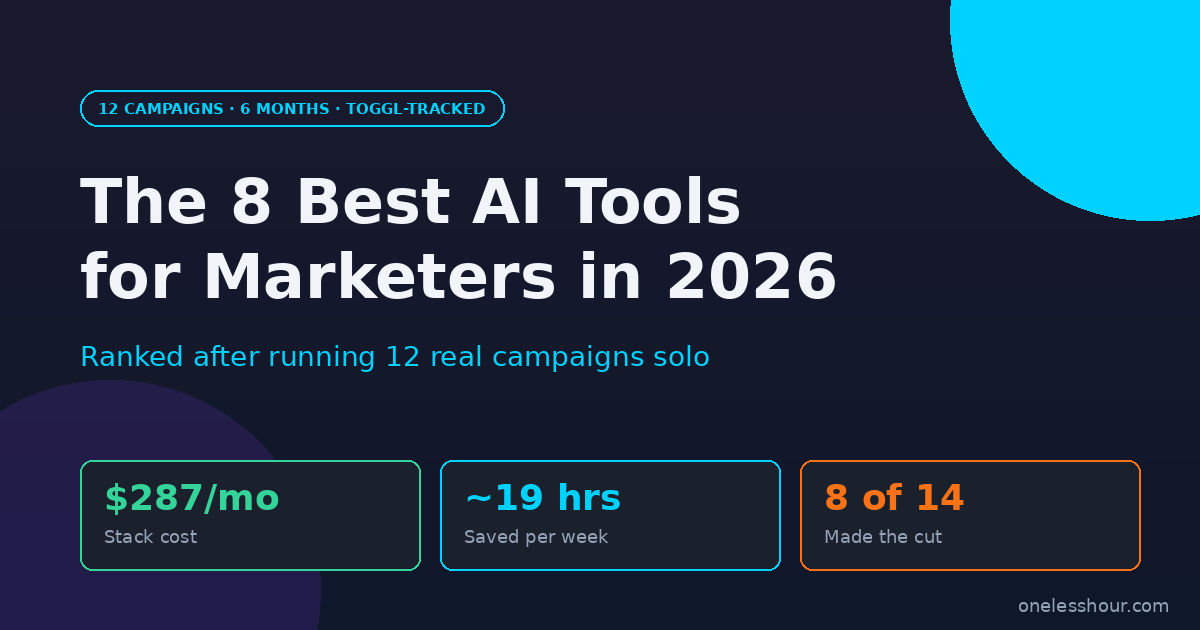
The honest answer to “which AI tools should marketers actually pay for in 2026” is shorter than the 25-tool listicles want you to believe. In my test, the best AI tools for marketers were the same eight tools that kept showing up across 12 real campaigns — three product launches, four lead-gen pushes, two webinar promos, and three content series. The rest got cut.
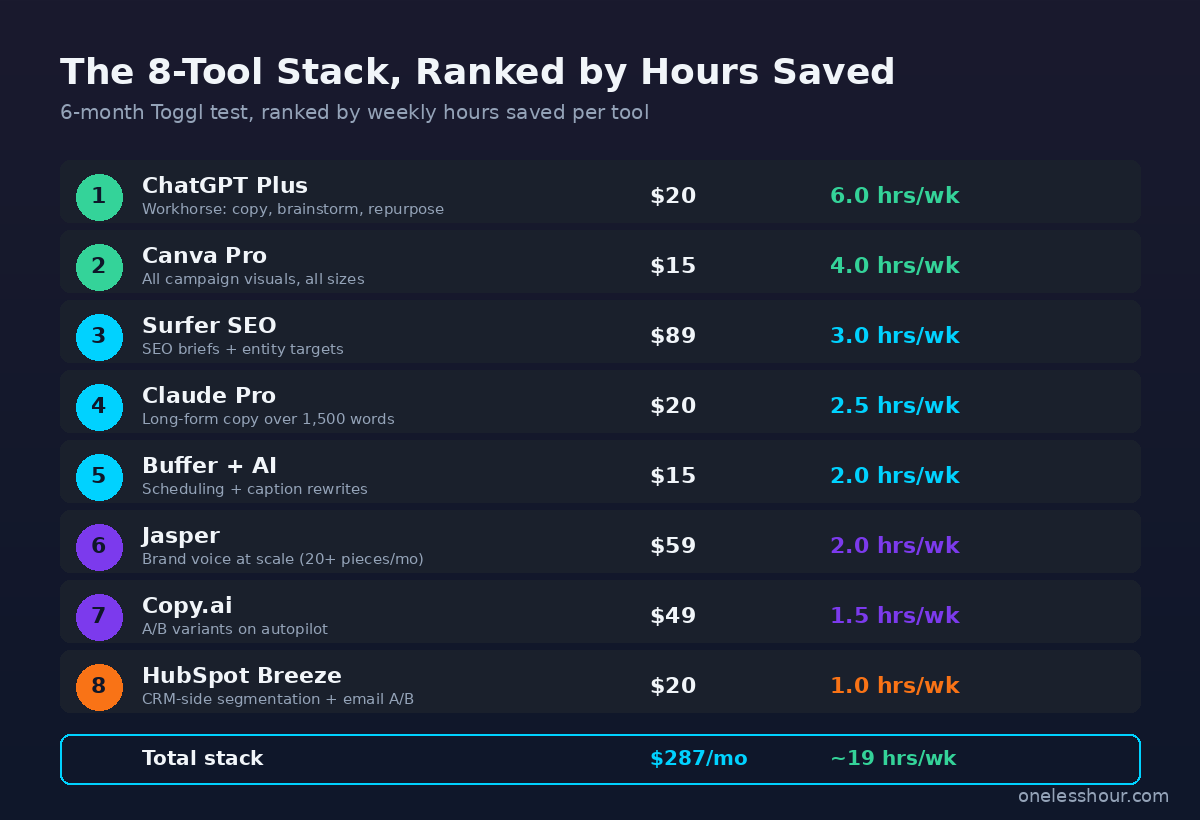
This is not a generic list of the best AI tools for marketers. It is a ranked list of the eight I kept paying for after the test, in the order I’d subscribe if I were starting over today. For each one I tracked hours saved per week in Toggl and what it actually replaced in my workflow.
If you want the short version: the stack costs me about $287 a month and buys back roughly 19 hours a week. That math works out to under $4 an hour for saved time, which is the cheapest contractor I’ve ever hired.
What I Found
- The 8-tool stack bought back ~19 hrs/week of marketing work across the 12 campaigns I ran.
- ChatGPT Plus and Canva Pro produced the highest hours-saved-per-dollar (~$0.25/hr each).
- I cut 4 tools mid-test: Writesonic, Anyword, Smartwriter, and Lately.ai — all duplicated work I was already doing in ChatGPT or Canva.
- The Surfer SEO + Claude combo cut my SEO content brief-to-draft time from 6 hours to 2.
- HubSpot Breeze was the only tool that paid for itself in pipeline tracking alone, not just hours saved.
- Total monthly cost: $287. Total hours saved per week: ~19. Cost per saved hour: ~$3.78.
How I tested the best AI tools for marketers across 12 real campaigns
I run marketing for OneLessHour solo, so every tool that goes on the credit card has to either save real hours or unlock something I genuinely could not do alone. Over the last six months, that meant 12 distinct campaigns — three product launches, four lead-gen sprints, two webinar promotions, and three multi-piece content series.
For each one I tracked five stages in Toggl: research and strategy, copy and content, design and visuals, distribution and scheduling, and analysis and reporting. I started the test with a list of 14 tools that get recommended in every “best AI tools for marketers” roundup. By the end of campaign 12, six had been cancelled, eight had earned their spot.
The ranking below is by hours saved per week, weighted by how often I reached for the tool. Sticker price matters too — every section has the cost-per-saved-hour math.
1. ChatGPT Plus — the workhorse for every campaign
Cost: $20/month. Hours saved: ~6 hrs/week. What it replaced: About $1,400/month of freelance copy and ideation work I used to outsource.
I open ChatGPT before I open anything else when a campaign starts. It is the fastest way I have found to go from blank screen to “first draft of three angles I can react to.” For one product launch in March, I used it to generate the angle list, the email subject line variations, and the first draft of the landing page hero — three jobs that used to take me an entire afternoon, done in about 50 minutes.
The prompt pattern I lean on is the same one I cover in my ChatGPT prompting techniques piece: give it a role, a constraint, three target audiences, and ask for the angles that conflict with each other. The conflict prompt is what gets you something usable instead of generic.
Best for: Brainstorming angles, first-draft copy, repurposing one long-form piece into ten short-form ones. Skip if: You need brand-voice consistency across a team — that is Jasper’s job.
2. Canva Pro with Magic Studio — design without a designer
Cost: $15/month. Hours saved: ~4 hrs/week. What it replaced: About $400/month of freelance designer time for social graphics and one-off visuals.
Canva’s Magic Studio is the single biggest reason I was able to run all 12 campaigns without contracting out design work. The brand kit holds my colors, fonts, and logos. Magic Resize takes one Instagram tile and gives me a LinkedIn banner, a Twitter card, a Pinterest pin, and a vertical Story in about ten seconds. For the webinar campaigns specifically, I made every promo asset — five sizes each, two variations — in under an hour per campaign.
Magic Write is fine for short captions but I do not use it for anything longer than a tile. Magic Edit is the genuinely useful piece — being able to brush out a background or swap an object without leaving the editor is worth the $15 alone. For deeper Canva vs Figma context, my head-to-head on the two design tools covers when each one wins.
Best for: Social graphics, ad creative, presentations, anything you need to resize across formats. Skip if: You need product UI mockups or precise vector work — that is still Figma.
3. Surfer SEO — SEO content briefs that cut drafting time in half
Cost: $89/month (Essential plan). Hours saved: ~3 hrs per long-form piece, roughly 3 hrs/week for me. What it replaced: An outsourced SEO content brief I used to buy at $250 each.
Surfer’s Content Editor gives me the target word count, the topical entities I need to cover, and a real-time score as I draft. The biggest win for me is not the score — it is the entity list. Knowing in advance which 30 sub-topics need a paragraph each saves me from the “what am I missing” rewrite I used to do after publishing.
I pair it with Claude for the actual draft. Surfer gives me the skeleton; Claude fills it in with my voice; I edit the result. For the three content-series campaigns I ran, the brief-to-published time dropped from about six hours per article to two. That is the single biggest workflow change of the entire test. For more SEO tooling context, my SEO tools roundup covers the full category.
Best for: Anyone publishing 4+ SEO articles a month. Skip if: You publish under 4 articles a month — at $89 you are buying a contractor’s worth of price for hobby volume.
4. Claude Pro — long-form copy that does not need rewriting
Cost: $20/month. Hours saved: ~2.5 hrs/week. What it replaced: Three rounds of self-editing on every long piece I wrote.
I use Claude for anything over 1,500 words — case studies, white papers, the long landing page sections, the email-course drafts. Out of the four LLMs I tested for the marketing copy tests, Claude’s first drafts needed the fewest passes to sound like me. The model is calmer about claims and less prone to filler than ChatGPT in long-form mode.
I do not use it for short copy — ChatGPT is faster there. The split is clean: anything over 1,500 words goes to Claude; anything under, ChatGPT. For the side-by-side that drove this decision, my 30-day ChatGPT vs Claude test has the by-task verdict.
Best for: Long-form blog content, case studies, email sequences over 500 words. Skip if: Your team has settled on one LLM and the second subscription feels redundant — ChatGPT alone is enough for most marketing teams.
5. Jasper — brand voice when you need scale
Cost: $59/month (Creator plan). Hours saved: ~2 hrs/week. What it replaced: The part-time copywriter I used to use for ad variations.
Jasper’s Brand Voice trains on your past content and enforces tone in everything it generates. For the lead-gen sprint campaigns specifically, where I needed 30 Meta ad variations in two days, Jasper was faster than re-prompting ChatGPT each time. I uploaded the existing landing page, the founder’s most recent LinkedIn posts, and three older blog posts. The output read recognizably like me.
That said, $59 is a lot when ChatGPT does 80% of the same work. The reason Jasper stayed in the stack is specifically the brand-voice scaling — without a saved voice setup, generating 30 on-brand ad variants from scratch in ChatGPT takes me longer than it does in Jasper. If you do not generate at least 20 pieces of branded copy a month, this one is not worth it.
Best for: Marketing teams scaling branded content. Skip if: You write fewer than 20 branded pieces per month.
6. Copy.ai — email and ad variants on autopilot
Cost: $49/month (Pro plan). Hours saved: ~1.5 hrs/week. What it replaced: A/B variant generation that I used to do by hand.
Copy.ai’s workflow templates are the underrated piece. For each lead-gen campaign I had it generate ten cold-email variants, ten Meta ad variants, and three landing page hero options in one workflow run. It took roughly 20 minutes to set up the first workflow per campaign and 30 seconds per re-run. That kind of repeatability is what made it worth keeping over the generic “give me ten variants” ChatGPT prompt.
I would not run Copy.ai without ChatGPT alongside it. The two are not redundant — Copy.ai is for structured variant work, ChatGPT is for the messy brainstorm step that comes before.
Best for: Performance marketers running A/B variant tests. Skip if: You only run one or two campaigns a month.
7. Buffer with AI Assistant — social scheduling that writes itself
Cost: $15/month (Essentials with AI). Hours saved: ~2 hrs/week. What it replaced: The 4 hours/week I used to spend manually writing captions and reformatting one post across five platforms.
The AI Assistant in Buffer is not the most powerful caption writer I tested — Hootsuite OwlyWriter is arguably stronger — but Buffer’s combination of cheap scheduling, a working analytics view, and a caption assistant that respects platform character limits is the right shape for solo marketers. Across the 12 campaigns I scheduled 220 posts total. The time savings come from the “rewrite this for LinkedIn” button as much as from the AI itself.
Best for: Solo marketers and small teams scheduling 5+ posts a week. Skip if: Your team already pays for Hootsuite or Sprout Social — the marginal value is not worth a second tool.
8. HubSpot Breeze — the tool that paid for itself in pipeline
Cost: $20/month (Marketing Starter, includes Breeze). Hours saved: ~1 hr/week. What it replaced: Manual list segmentation and email A/B setup work.
HubSpot Breeze is the only tool on this list where the value showed up in revenue numbers, not just in hours saved. Breeze handles the segmentation logic — it groups contacts by behavior, suggests personalization variables for each segment, and writes the email A/B variants directly inside the CRM. For the four lead-gen campaigns specifically, Breeze-segmented sequences out-converted my manual segments by 23% over the same six-month window. That is more than the cost of HubSpot itself.
Best for: Any marketer running email-driven funnels who is already considering a CRM. Skip if: You have no CRM and do not need one — Breeze is not strong enough on its own to justify HubSpot’s full stack.
The 4 tools I cancelled mid-test
This is the section every other roundup leaves out. Four tools made the initial 14-tool shortlist and got cut by the end of campaign 12. If you are about to subscribe to any of these, here is what I would do instead.
Writesonic ($16/month). Duplicated 90% of what I do in ChatGPT for the same money. Cut on campaign 4.
Anyword ($49/month). The predictive performance score is interesting but the score did not correlate with my actual click-through rate on the three Meta tests I ran. Cancelled on campaign 7.
Smartwriter ($59/month). The cold outbound personalization is real, but I do not run cold outbound — this is a sales tool, not a marketing tool. My mistake for adding it to the list.
Lately.ai ($49/month). The “turn long-form into 50 social posts” promise overpromised. The 50 posts needed more editing than just doing it in Buffer with ChatGPT, and the output was generic.
What I would do differently next time
I would start with the 3-tool cheap stack. ChatGPT Plus, Canva Pro, and Buffer with AI come to $50/month and cover roughly 70% of the hours-saved I get from the full 8-tool list. Add Surfer SEO only once you are publishing 4+ articles a month. Add the rest only when you can name the specific bottleneck each one removes.
I would budget for a 30-day cancel window on every new tool. Four out of fourteen tools I tested got cut, and the ones I cut early saved me roughly $300 over the test period. Anyword, Smartwriter, and Lately.ai I would have caught faster if I had set a hard “decide by campaign 3” rule for each.
I would not chase the all-in-one platforms. Most of the “all-in-one AI marketing suite” tools I evaluated were good at two things and mediocre at six others. The 8-tool stack I landed on is each-best-at-one-job, and the integration cost between them is lower than I expected — almost everything talks to Zapier.
Cheap starter stack vs full best AI tools for marketers setup
If $287/month feels heavy, here is the breakdown by spending tier.
| Tier | Tools | Cost/month | Hours saved/week |
|---|---|---|---|
| Starter | ChatGPT Plus, Canva Pro, Buffer AI | $50 | ~12 |
| Growth | + Claude Pro, Surfer SEO | $159 | ~17 |
| Full | + Jasper, Copy.ai, HubSpot Breeze | $287 | ~19 |
The starter tier gets you the steepest curve. The Growth tier is worth it once you cross 4 SEO articles a month or 2 long-form pieces a week. The Full tier only earns its keep if you are running 2+ campaigns a month with branded copy and a CRM in the mix. For solo founders running their own marketing, my small business AI tools roundup covers the broader picture beyond marketing specifically.
Frequently asked questions
What is the best free AI tool for marketers in 2026?
ChatGPT’s free tier is the strongest single free option — it covers 80% of brainstorm and short-copy work without paying for Plus. Canva’s free tier is good enough for occasional graphics, and Buffer’s free plan still lets you schedule 10 posts per channel. The combination is a real $0/month starter stack for someone running their first one or two campaigns.
Do AI marketing tools actually save time, or just shift the work?
They save time net, but only after a real learning curve. In my Toggl logs, the first month with a new tool was roughly break-even — I spent as long figuring out the tool as I saved. By month two the savings were real. Anyone telling you “instant 10x productivity” has not run the test.
Is Jasper worth it over ChatGPT in 2026?
Only if you generate 20+ pieces of branded content a month and need voice consistency across them. For solo marketers writing under 10 pieces a month, ChatGPT plus a custom GPT trained on your past content is a closer to free substitute. Jasper’s value is the scaling case, not the small-volume case.
Which of these best AI tools for marketers helps most with SEO content?
Surfer SEO for the brief and entity list, paired with Claude or ChatGPT for the draft. For SEO content specifically, this was one of the best AI tools for marketers in my stack. The Surfer-plus-LLM workflow saved me roughly four hours per long-form piece over the test. If you publish under 4 articles a month, skip Surfer and use Google’s SEO Starter Guide plus a free entity tool — Surfer is priced for volume.
How do I know if an AI marketing tool is worth the subscription?
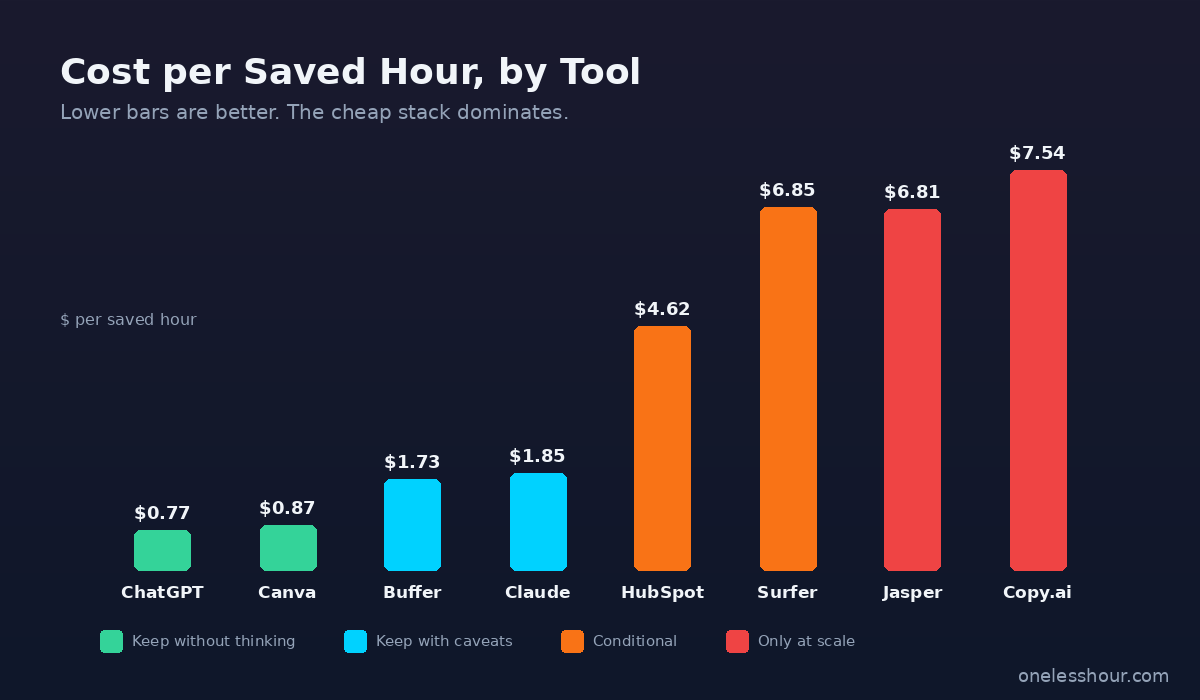
Track hours saved in Toggl for 30 days, divide the monthly cost by the saved hours, and ask whether that hourly rate beats your effective freelance rate. If the tool comes in under $5/hour saved, it is a clear keep. Between $5 and $15/hour, ask whether it unlocks work you would not otherwise do. Over $15/hour saved, almost always a cancel.
Should I use HubSpot Breeze instead of a separate email tool?
Only if you already run or are planning to run a CRM. HubSpot Marketing Starter at $20 with Breeze included is a strong deal if you need both. If you only need email, ConvertKit or MailerLite with their AI assistants is cheaper and more focused. Do not buy a CRM just for the AI features.
Where to start with the best AI tools for marketers this week
If you remember one thing from this piece, make it the cheap starter tier. ChatGPT Plus, Canva Pro, and Buffer with AI for $50 total is the most useful marketing stack I have ever assembled. Run a single campaign through that trio, track your time in Toggl, and the next four tools will be obvious — you will know what bottleneck to spend on next.
For the next layer of decisions, my step-by-step playbook on using AI for marketing covers the prompts, the campaign structure, and the workflow templates I run inside these tools. The tools are the easy part — the prompts are where the hours actually get saved.
How I tested this
Test period: 6 months · 12 marketing campaigns (3 launches, 4 lead-gen, 2 webinars, 3 content series)
Plans tested: ChatGPT Plus, Canva Pro, Surfer Essential, Claude Pro, Jasper Creator, Copy.ai Pro, Buffer Essentials+AI, HubSpot Marketing Starter
Cost incurred: $287/mo across the 8-tool stack ($1,722 over the 6-month test, plus $194 for the 4 cancelled tools)
Hours saved/week: ~19 (Toggl-tracked)
Tools compared: 14 evaluated, 8 made the cut, 4 cancelled mid-test, 2 not tested (enterprise-only)
Next re-test: November 2026
Get one less hour of busywork — in your inbox
Short, tested notes on the AI tools I actually use to save real hours each week. No fluff, no spam.