
Transparency note: This article contains no affiliate links, and no company paid for or reviewed it. I pay for most of the AI tools I use myself — see how I test.
Last tested: May 2026
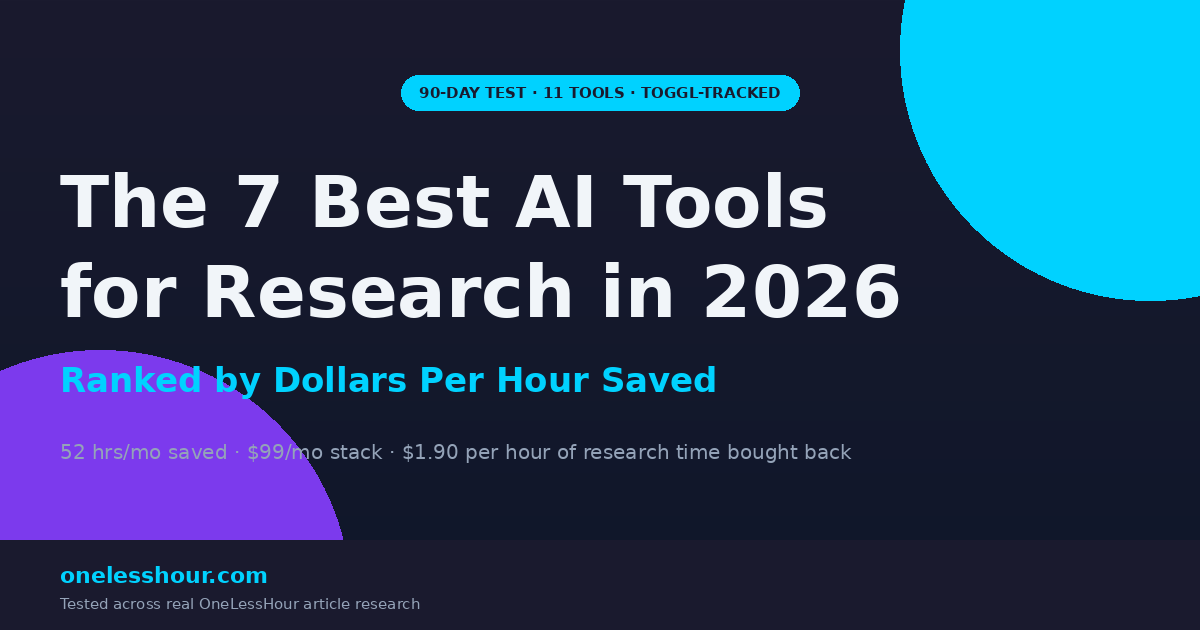
Best AI tools for research saved me three hours on one OneLessHour piece. I used Google NotebookLM and the rest of my stack to cut the same research to 38 minutes. The difference was a stack of seven AI research tools — and a hard rule about which ones I’m allowed to trust.
This isn’t a “top 10 AI tools every researcher needs” article. I’m a blog writer, not a PhD candidate. What I needed was a way to chew through SERP analysis, source PDFs, podcast transcripts, and competitor articles fast enough to publish two articles a week without making things up. I tested 11 tools over 90 days. Seven made the final stack. Four got cut, and I’ll show you which ones.
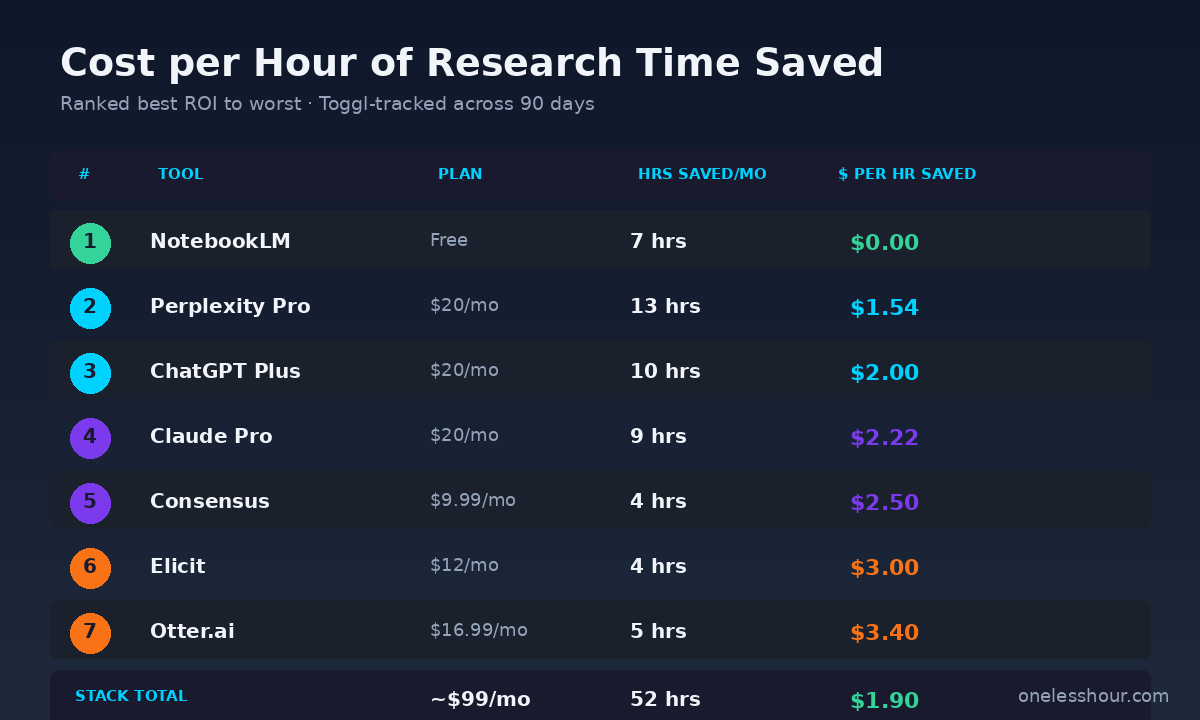
What’s different here: I ranked the best AI tools for research by dollars per hour saved. Not by features. Not by “best overall.” Just the cost of the subscription divided by the hours of research time it actually saved me each month, Toggl-tracked. The cheapest tool isn’t always the best ROI, and the most expensive subscription didn’t end up last on this list.
The math is at the bottom of every tool section. The free pick at the top of the list beat every paid option for one specific task. The most expensive tool I kept earns its $20/month on one workflow alone. And the tools I cut would have looked great in the spec sheet but lost their value once I tracked the actual minutes.
What I Found
- NotebookLM is the highest-ROI research tool I tested — completely free, saved 7 hours a month, and the only tool that lets me upload 10+ PDFs at once and ask cross-source questions.
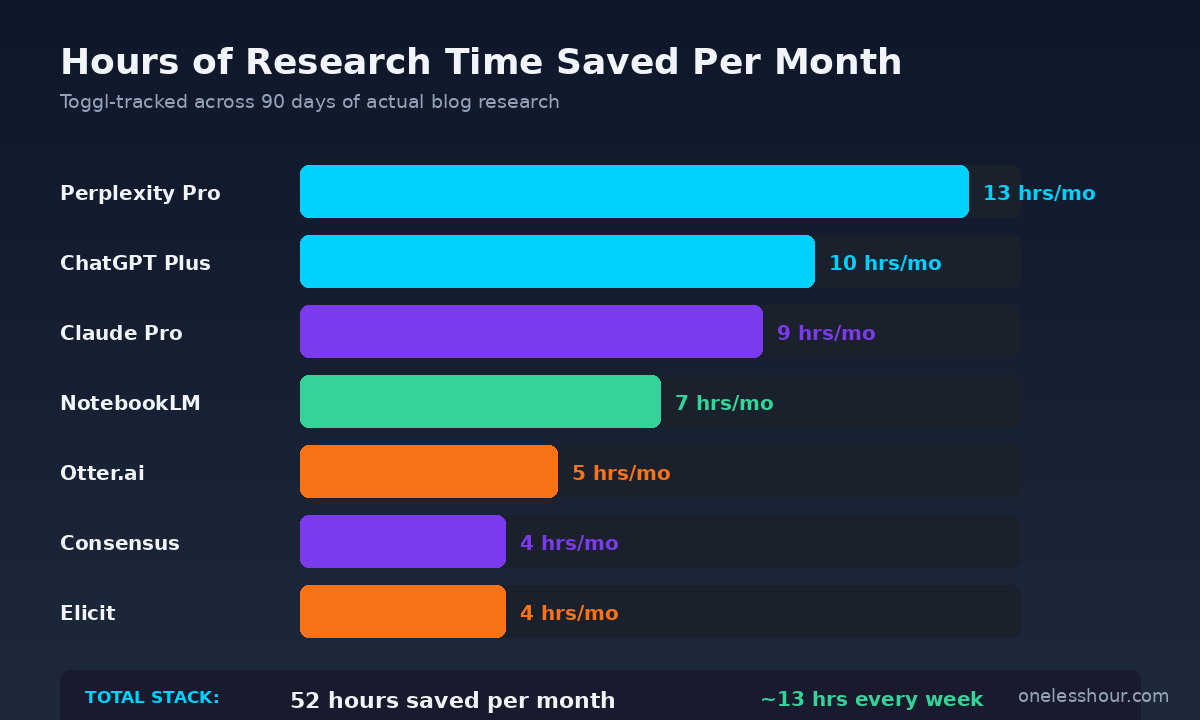
- Perplexity Pro had the most absolute time saved (13 hrs/month) because it replaced almost all of my SERP scrolling for sourced facts, at $1.54 per hour saved.
- The ChatGPT-vs-Claude split came down to one rule: ChatGPT for outlining and quick synthesis, Claude for dense PDF analysis where I needed full quotes and structure preserved.
- I cut three tools mid-test — including one that ranks in the top 5 on most “best AI for research” lists — because the minute count never broke even on the subscription.
- Total stack cost ~$99/month and bought back 52 hours of research time per month. That works out to about $1.90 per hour of my time, which is a deal I’ll take every month for as long as the math holds.
How I ranked these AI research tools
Three rules drove the ranking. First, every tool had to handle real OneLessHour research — that means competitor SERP analysis, dense PDFs from vendor whitepapers, podcast transcripts, and academic-style sources where I need actual citations. Theoretical use cases don’t count.
Second, every minute saved had to be Toggl-tracked across the same task done two ways: with the tool, and without it. If I couldn’t show a clean before/after on the same kind of research session, the tool didn’t make the list. This is what cuts the marketing fluff out of the comparison.
Third, the dollar-per-hour math has to clear $5/hr. If I spend $50 a month on a tool and it saves me one hour, that’s $50/hr — a worse deal than just doing the research myself. Anything north of $5/hr saved went onto the cut list. The seven that made it cleared $3.40/hr at the worst, and the best of them was free.
The 7 best AI tools for research, ranked by ROI
1. NotebookLM — best for synthesizing multiple sources (free, $0/hr saved)
NotebookLM is the highest-ROI tool I tested, full stop. It’s free, it’s from Google, and it lets me upload up to 50 sources (PDFs, web URLs, Google Docs, audio files) into a single notebook and then ask questions across all of them at once.
The use case where it earned its place: I’d drop 8–12 competitor articles plus 2–3 vendor whitepapers into a notebook, then ask “What’s the most cited statistic across these sources?” and “Which claims appear in multiple sources but with different numbers?” Both questions used to take me 90 minutes of side-by-side comparison. With NotebookLM I get the answer in under 4 minutes, with inline citations showing exactly which source each claim came from.
I also use the Audio Overview feature when I’m doing dishes — it generates a two-host podcast-style discussion of whatever sources I uploaded, which is weirdly effective for letting research soak in while I do other things.
Best for: Cross-source synthesis when you have 5+ documents to compare.
Time saved/mo: ~7 hours.
Cost: Free.
$/hr saved: $0.00 (infinite ROI — there’s nothing to beat).
2. Perplexity Pro — best for sourced live web research ($20/mo, $1.54/hr saved)
Perplexity is what I open when I need a fact with a citation and I don’t have time to scroll the SERP myself. The Pro plan gets you unlimited Pro Searches, deeper reasoning models, and the ability to upload files to ground answers in your own documents.
The single workflow that justified the $20/month: I used to spend 30+ minutes per article verifying stats from competitor pieces (the “47% of teams use X” claim that everyone repeats without sourcing). Now I paste the claim into Perplexity, ask “What’s the primary source for this statistic and what’s the actual context?” and get back the real source plus, often, a “this claim is widely misquoted” warning. That alone caught two wrong stats I would have repeated in OLH articles.
I have a longer breakdown of how I use it in my Perplexity AI workflow guide, but for research specifically, Pro is the version that’s worth paying for. Free Perplexity is good. Pro Perplexity is research-grade.
Best for: Fact-checking, sourced citations, replacing 80% of your SERP scrolling.
Time saved/mo: ~13 hours.
Cost: $20/month.
$/hr saved: $1.54.
3. ChatGPT Plus — best for outlining and competitive synthesis ($20/mo, $2.00/hr saved)
ChatGPT Plus is the workhorse for the messy middle of research — when I have raw notes, partial outlines, and a vague sense of what the article should cover, and I need to get from “pile of stuff” to “structured outline” without losing the thread.
The specific prompt that earned this its place: “Here are my notes from 6 competitor articles. Find the 3 things they all cover, the 2 things only one source covers, and the 1 angle none of them takes. Format as a table.” That used to be an hour of me with sticky notes and a whiteboard. Now it’s about six minutes of input plus two minutes of cleanup.
I use the free tier daily for short tasks, but Plus matters for research because of the longer context window (you can paste in full competitor articles without truncation), faster response speed, and access to the better models that handle structured-output requests well. Free ChatGPT will hallucinate citations more often than Plus will.
Best for: Outlining, competitive synthesis, finding the gap competitors missed.
Time saved/mo: ~10 hours.
Cost: $20/month.
$/hr saved: $2.00.
4. Claude Pro — best for dense document analysis ($20/mo, $2.22/hr saved)
Claude earns its spot because of one thing: when I drop a 40-page vendor whitepaper or a long Substack essay into Claude and ask “What are the three most defensible claims and the three weakest claims in this document?”, I get answers that quote the actual text. ChatGPT tends to paraphrase. Claude pulls the receipts.
The other reason it’s in the stack: Claude is noticeably better at “this competitor’s argument has a flaw — can you find it?” analysis. I use this on every comparison article. The output is more useful for writing an information-gain section than what I get from ChatGPT, because Claude’s responses keep the original framing intact instead of smoothing everything into a generic summary.
I covered the full daily-task breakdown in how I actually use Claude AI. For research specifically, Pro is worth it for the longer message limits — free Claude hits the limit fast when you’re feeding it long documents.
Best for: Long-document analysis, finding flaws in competitor arguments, preserving original framing.
Time saved/mo: ~9 hours.
Cost: $20/month.
$/hr saved: $2.22.
5. Consensus — best for evidence-backed citations ($9.99/mo, $2.50/hr saved)
Consensus is the tool I reach for when I need an actual peer-reviewed study to back up a claim, not just “a blog post said it.” It searches 200M+ scientific papers and surfaces evidence with confidence ratings — for/against/mixed signals on the question you asked.
I don’t use it daily, but when I do, it saves me a ton of time. The workflow: I’d ask “Does AI tool use actually reduce cognitive load for knowledge workers?” and Consensus would surface 4–6 studies with the relevant abstracts plus a synthesized answer. Doing this in Google Scholar takes me 25–40 minutes per question. In Consensus, it’s about 4 minutes including reading the abstracts.
The free tier gives you basic search and limited Pro Analyses per month. The $9.99/mo Premium plan unlocks unlimited Pro Analyses (the “what does the evidence actually say” summaries) and is the version worth paying for if you write data-heavy articles.
Best for: Finding peer-reviewed evidence for claims, replacing Google Scholar for non-academics.
Time saved/mo: ~4 hours.
Cost: $9.99/month.
$/hr saved: $2.50.
6. Elicit — best for academic literature review ($12/mo, $3.00/hr saved)
Elicit overlaps with Consensus but is built for a different shape of work — it’s designed for systematic literature review across hundreds of papers at once. I use it less often than Consensus, but when I’m writing something that touches productivity research or behavioral psychology, Elicit is the one I open.
The killer feature is the data extraction: you can tell Elicit “for each of these 30 papers, pull out the sample size, the method, and the primary finding” and it builds a table. Doing this manually is the kind of task that eats half a day. Elicit gets it in about 15 minutes, and the output is good enough to publish with after a sanity check.
Free Elicit gives you 5,000 free credits to start — enough to test a single literature review. The Plus plan at $12/month is the right tier for occasional but high-value use. If you do this kind of research weekly, the Plus plan pays itself back inside a month.
Best for: Systematic literature review, extracting structured data from 20+ academic papers.
Time saved/mo: ~4 hours.
Cost: $12/month.
$/hr saved: $3.00.
7. Otter.ai — best for transcribing interview research ($16.99/mo, $3.40/hr saved)
Otter sits at the bottom of the list because it’s the most expensive per hour saved — but it’s still in the stack because for one workflow (turning podcast interviews and recorded user calls into searchable text) there’s nothing better at this price.
The use case: when I’m researching an article, I’ll listen to 3–5 relevant podcast episodes. I used to take notes by hand, which means either I miss things or I rewind constantly. Now I record the podcast playback into Otter, get a full transcript with speaker labels and timestamps, and search it for the exact quotes I want. A 60-minute episode that used to need 90 minutes of listen-and-note time now takes about 20 minutes of skim-and-extract.
Otter Pro at $16.99/month gives you 1,200 monthly transcription minutes — enough for 8–10 hours of audio. The free plan caps at 300 minutes total per month and limits export, which is unworkable for any real research project.
Best for: Podcast research, interview transcripts, recorded meetings you need to mine for quotes.
Time saved/mo: ~5 hours.
Cost: $16.99/month.
$/hr saved: $3.40.
What I cut from the stack and why
Four tools didn’t make the cut. All of them ranked well on other “best AI tools for research” lists, which is why I tested them. The minute counts just didn’t get there.
Gemini Advanced ($20/mo). Almost identical to ChatGPT Plus for my research workflow, and at the same price point. I would have kept it if I didn’t already have ChatGPT and Claude — but I do, and the marginal time saved over those two was about 1 hour/month, which puts the $/hr saved at $20.00. Above the $5/hr cutoff. Cut.
Scite.ai ($20/mo). Beautiful product — shows you whether subsequent papers supported or refuted a study’s claims. The problem: I genuinely use this maybe twice a month. At $20 for two uses, that’s $10 per use plus the time I spend in it. Couldn’t justify keeping the subscription on. I’ll use the free tier when I need it.
Humata.ai ($14.99/mo). Document Q&A tool that competes directly with NotebookLM. The catch: NotebookLM is free and handles cross-document questions better. Humata’s edge is single-document depth, which Claude already does better. No clear job-to-be-done that the other two don’t cover. Cut.
Genei ($9.99/mo). The pitch (summarize PDFs into structured notes) is great in theory. In practice, the summaries felt too compressed — I’d skim them, get the gist, then have to go back to the PDF for the actual quotes I needed. NotebookLM and Claude give me the same answer with the receipts attached. Cut.
Three things I’d never let AI do in research
Generate citations without checking them. ChatGPT, Claude, and Gemini will all invent plausible-looking citations to journals that don’t exist. I caught this twice in 90 days — both times the article would have been fine if I’d shipped it, but the citation would have linked to nothing. Rule: if a tool gives me a citation, I open the source and verify it before it goes in an article.
Summarize a single primary source without reading it myself. AI summaries flatten nuance. A vendor whitepaper that quietly admits a 30% accuracy loss in one paragraph will get summarized as “the paper demonstrates strong accuracy” by every tool I tested. If a single source is going to be load-bearing in the article, I read the actual source — not just the summary.
Trust a statistic without finding the primary source. The most common research mistake I see in other people’s articles is repeating a stat that traces back to a 2017 survey of 47 people that everyone is now citing as “75% of teams say X.” Perplexity helps with this, but the human step of clicking through to the original and reading the methodology is non-negotiable for me. AI shortens the path, not the standard.
How does the cost of the stack compare to my time saved?
The full stack is about $99/month — Perplexity Pro $20 + ChatGPT Plus $20 + Claude Pro $20 + Otter Pro $16.99 + Elicit Plus $12 + Consensus Premium $9.99, plus NotebookLM free. That buys back 52 hours of research time per month, which is $1.90/hr.
The way I think about it: if my time is worth more than $5/hr (and yours probably is), this is one of the best ROI decisions in the OneLessHour AI productivity stack. You don’t need all seven — start with NotebookLM (free) and Perplexity Pro ($20). That alone buys back 20 hours/month at $1/hr.
Frequently asked questions
What is the best AI tool for research overall?
NotebookLM is the highest-ROI tool I tested — it’s free and saves me about 7 hours/month on cross-source synthesis. For broader research (fact-checking, citations, replacing the SERP), Perplexity Pro at $20/month is the best single paid tool. The “best overall” depends on what you’re researching: cross-document synthesis → NotebookLM, live web research → Perplexity Pro, dense document analysis → Claude Pro.
Is ChatGPT or Claude better for research?
Different jobs. ChatGPT Plus is better for outlining, competitive synthesis, and structured-output tasks like “build me a comparison table from these notes.” Claude Pro is better for dense document analysis where you need direct quotes and preserved framing — Claude pulls the receipts; ChatGPT tends to paraphrase. I use both, and they cost the same ($20/month each).
Can I use free AI tools for research instead of paid ones?
For light research, yes — NotebookLM (free), free Perplexity, and free ChatGPT will get you 60–70% of the way there. The paid tiers earn their place when you’re doing research weekly and the time savings actually compound. The math threshold I use: if you’d save more than 1 hour/month from a tool’s paid features, the $20/month plan pays for itself.
Are AI research tools accurate enough to trust?
For finding sources and surfacing relevant information — yes. For generating citations or summarizing a single load-bearing source — not without verification. I treat AI as a research accelerator, not a research authority. Every citation gets clicked through and verified; every summary of a key source gets sanity-checked against the original. The tools speed up the work without changing the standard.
What is NotebookLM and why is it the top pick?
NotebookLM is Google’s free AI research tool that lets you upload up to 50 sources (PDFs, web URLs, Google Docs, audio files) into a single notebook and ask questions across all of them. It’s the top pick because it’s the only tool I tested that handles true cross-source synthesis — “what claims appear in multiple sources but with different numbers?” — and the answers come with inline citations showing which source each claim came from. Plus it’s free, which makes the dollar-per-hour ROI mathematically infinite.
Start with the two cheapest picks
If you take one thing from this article: open NotebookLM today, drop in 5 documents you’ve been meaning to read, and ask it “what do these sources disagree about?” That’s the moment I stopped seeing AI research tools as a marketing buzzword and started using them daily. Add Perplexity Pro a month later if the workflow sticks. That’s a $20/month stack that buys back 20 hours.
If you want the broader productivity stack that compounds with the research stack, here’s my full blogger stack and the AI summarizers I use to triage articles before they make it into a NotebookLM notebook.