
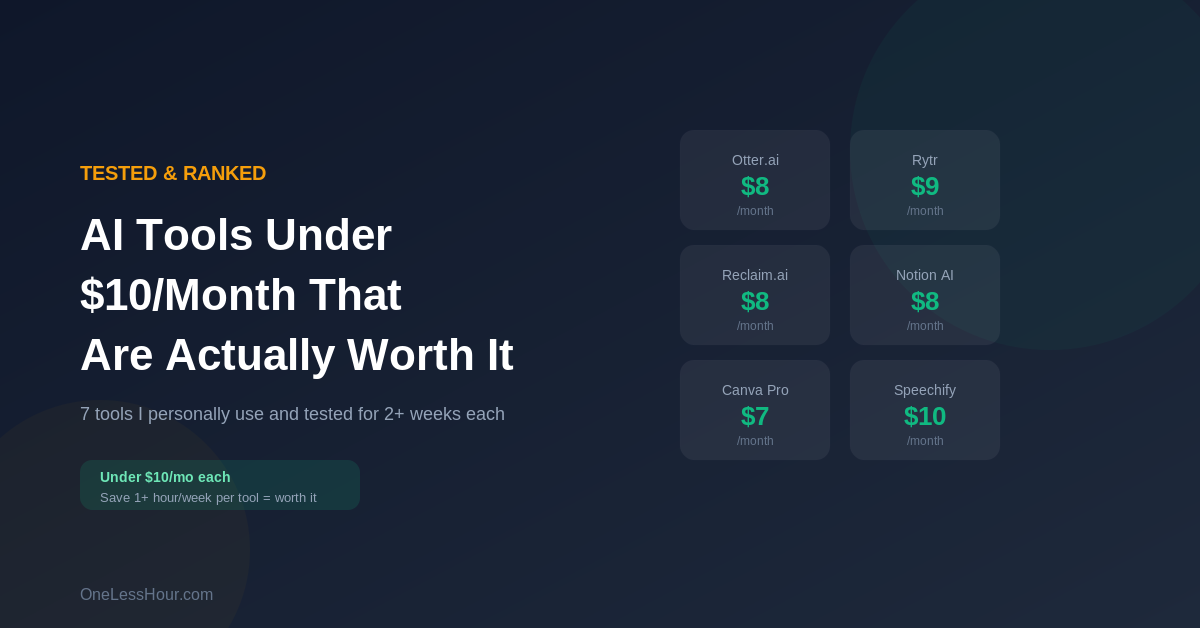
Last tested: April 2026
Transparency note: This article contains no affiliate links, and no company paid for or reviewed it. I pay for most of the AI tools I use myself — see how I test.
Free AI tools get you surprisingly far. I covered that in my guide to saving 3 hours a day with free tools. But there’s a level above free that’s worth knowing about — affordable AI tools at or near $10/month that solve specific problems so well they pay for themselves in saved time within the first week.
I’ve tested dozens of paid AI tools over the past few months. Most aren’t worth it. Some are just wrappers around ChatGPT that charge you for a slightly different interface. But these 7 best budget AI tools genuinely deliver more value than they cost, and each one addresses a specific need that free tools don’t cover as well.
My criteria for this list:
- About $10/month or less when I picked it (prices re-checked October 2026; four have since gone up)
- Saves at least 30 minutes per week (so it pays for itself in time value)
- Does something free tools can’t do as well
- I’ve personally used it for at least 2 weeks
Pro tip: Don’t subscribe to everything at once. Start with one tool, use it for a full week, then decide if it’s worth keeping before adding another.
1. Otter.ai Pro — $8.33/month (billed annually)
What it does: Automatically joins your meetings, transcribes everything, and generates summaries with action items. It’s one of the most reliable AI productivity tools for anyone who spends time in meetings.
Why the free tier isn’t enough: The free plan gives you 300 minutes per month. If you have more than about 10 meetings a month, you’ll run out. The Pro plan gives you 1,200 minutes and adds features like custom vocabulary (so it spells your company’s product names correctly) and the ability to search across all your past transcripts.
What I actually use it for: Every meeting gets auto-transcribed. After the meeting, I have a searchable record of everything discussed. No more “wait, what did we agree on last Thursday?”
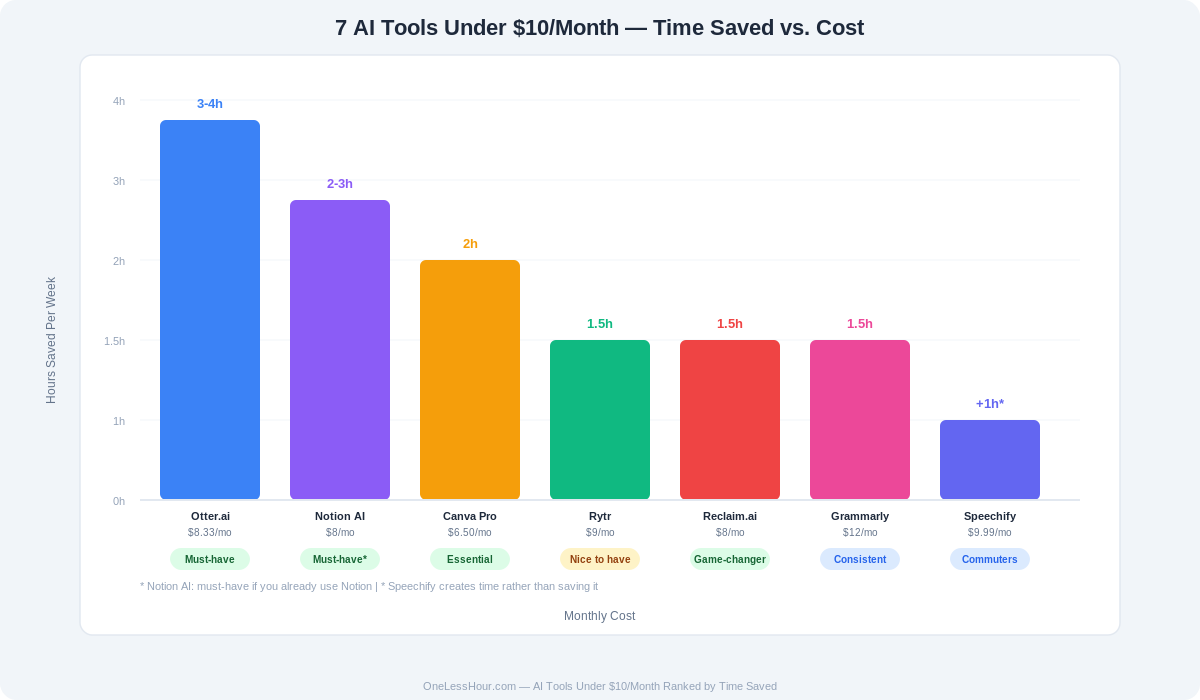
Time saved: 30-45 minutes per day if you have 2+ meetings
Worth it if: You have regular meetings and hate taking notes
Skip it if: You have fewer than 5 meetings per month (free tier is plenty)
Verdict: This was the first AI tool I actually paid for. Instant ROI. Try Otter.ai →
Pro tip: Set up custom vocabulary on day one. Add your company name, product names, and team members’ names. The transcription accuracy jumps significantly.
2. Rytr — $7.50/month (billed yearly)
What it does: AI writing tool specifically designed for short-form content — social media posts, ad copy, email subject lines, product descriptions, and similar bite-sized writing tasks.
Why not just use ChatGPT? You could. But Rytr is faster for quick content because it has built-in templates for specific formats. Instead of explaining what you want each time, you pick a template (like “LinkedIn post” or “product description”), fill in a few fields, and get polished output instantly.
What I actually use it for: When I need 5 LinkedIn post variations or 10 email subject lines quickly. It’s faster than prompting ChatGPT because the templates eliminate the setup.
Time saved: 20 minutes per day if you create regular content
Worth it if: You create social media content, marketing copy, or product descriptions regularly
Skip it if: Your writing needs are mostly long-form (use ChatGPT or Claude free tiers instead)
Verdict: Not essential, but the speed boost is real if you write short content daily. Try Rytr →
3. Reclaim.ai — $10/month (billed yearly; $12 monthly)
What it does: AI-powered calendar management. It automatically finds time for your tasks, habits, and priorities by analyzing your calendar and protecting focused work time from being booked over.
Why this matters for busy people: You probably have the experience of planning to work on something important, then having meetings fill every gap in your day. Reclaim defends your time by automatically scheduling “task blocks” and moving them around as your calendar changes.
What I actually use it for: I tell it my priorities (deep work, exercise, email processing) and how much time each needs per week. It schedules them around my meetings and adjusts daily. I stopped manually managing my calendar entirely.
Time saved: 15-20 minutes per day on calendar management, plus you actually complete your priorities because time is protected
Worth it if: Your calendar is chaotic and you struggle to find time for focused work
Skip it if: Your days are relatively structured already
Verdict: Quietly life-changing. You don’t notice how much mental energy goes into calendar management until something else handles it. Try Reclaim.ai →
Pro tip: Start with just 2-3 habits (like “deep work” and “email processing”). Let Reclaim learn your patterns for a week before adding more.
4. Notion AI — now part of Notion Business ($20/month)
October 2026 update: Notion no longer sells AI as an $8 add-on. The Free and Plus plans include only a trial of Notion AI, and the full AI features (Notion Agent, AI Meeting Notes) are on the Business plan at $20 per member per month. That takes it out of the under-$10 range. I’ve left my notes here for anyone already on Business.
What it does: Adds AI capabilities to your Notion workspace — summarize pages, generate content, answer questions about your notes, fill in database properties automatically.
Why it’s worth paying for: If you already use Notion for notes, projects, or knowledge management, the AI add-on makes everything faster. Ask it “what were the key decisions from last month’s project updates?” and it searches all your notes and gives you the answer.
What I actually use it for: Summarizing my meeting notes, drafting project briefs from my existing notes, and the Q&A feature — being able to ask questions across hundreds of pages of notes is incredibly powerful for knowledge workers.
Time saved: 20-30 minutes per day
Worth it if: You already use Notion (or are willing to start)
Skip it if: You don’t use Notion and don’t want to learn a new tool
Verdict: The best AI add-on to an existing tool I’ve tried. But only worth it if you’re already in the Notion ecosystem. Try Notion AI →
5. Grammarly Pro — $12/month (slightly over $10, but worth mentioning)
What it does: Goes beyond basic grammar checking to analyze tone, clarity, and engagement. Rewrites sentences to be more concise. Detects if your writing sounds too passive, too formal, or too wordy.
Why the free tier isn’t enough: Free Grammarly catches spelling and basic grammar. Premium catches the things that make writing good versus okay — wordiness, weak phrasing, inconsistent tone, and unclear sentences. The difference is noticeable.
What I actually use it for: Every important email, blog post, and document runs through it. The “tone detector” alone has saved me from sending emails that sounded harsher than I intended.
Time saved: 15 minutes per day plus fewer misunderstandings from unclear writing
Worth it if: You write emails, documents, or content regularly and your writing represents your professional image
Skip it if: Most of your communication is verbal or informal
Verdict: The most mature AI writing tool on the market. Not flashy, but consistently useful. Try Grammarly →
6. Canva Pro — $180/year for one person (about $15/month)
What it does: AI-powered design with Magic Design (generates complete designs from a text prompt), background removal, image enhancement, brand kit management, and massive template library.
Why the free tier falls short: Free Canva is great for basic graphics. But Pro’s AI features save enormous time: describe what you need and it generates a complete design you can tweak. Background removal alone saves 10 minutes per image. The brand kit ensures everything looks consistent without manually matching colors every time.
What I actually use it for: Blog feature images, social media graphics, and occasional presentations. I went from spending 30 minutes per graphic to under 5 minutes.
Time saved: 25 minutes per graphic created
Worth it if: You need visuals regularly — blog, social media, presentations
Skip it if: You rarely need graphics or have a designer on your team
Verdict: If you create any visual content, this is non-negotiable. The ROI is immediate. Try Canva Pro →
Pro tip: Set up your Brand Kit immediately — add your colors, fonts, and logo. Every template will auto-apply your branding, saving even more time on consistency.
7. Speechify — $139/year (about $11.58/month; $29 monthly)
What it does: Converts text to natural-sounding speech. Upload articles, documents, PDFs — anything text-based — and listen to it as a podcast-quality audio narration.
Why it’s useful for busy people: You can “read” documents while commuting, exercising, or doing chores. Turn your morning walk into a learning session by listening to that 20-page report you didn’t have time to sit down with.
What I actually use it for: Long articles and reports I need to review. I convert them to audio and listen during my commute. It doubled the amount of content I can consume per week without adding any extra screen time.
Time saved: Doesn’t save time directly, but adds 30-60 minutes of productive “reading” time to dead time you already have
Worth it if: You have a commute or regular time where you can listen but can’t read
Skip it if: You prefer reading and have enough desk time
Verdict: A different kind of productivity tool — it doesn’t save time, it creates it by converting dead time into useful time. Try Speechify →
The “Stack” I Actually Recommend
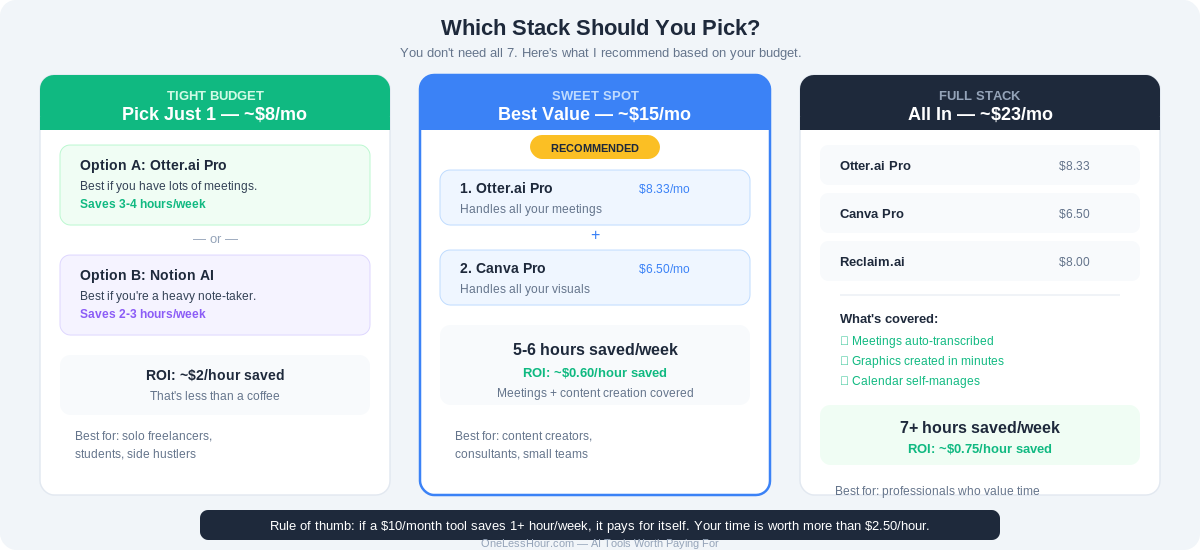
You don’t need all 7. Here’s what I’d recommend based on your budget:
If you’re on a tight budget (pick just 1): Otter.ai Pro if you have lots of meetings, or Rytr if you write short content every day. Either one costs under $10/month and delivers immediate value.
If you can spend about $25/month (sweet spot): Otter.ai + Canva Pro. This covers meetings and visual content — two of the biggest time sinks for most professionals. This is the stack I recommend for most people.
If you can go all in (about $33/month): Add Reclaim.ai to the above. Your calendar, meetings, and content creation are all automated. At 7+ hours saved per week, you’re paying roughly $1 per hour saved.
Quick Comparison Table
| Tool | Price | Best For | Time Saved/Week | Verdict |
|---|---|---|---|---|
| Otter.ai Pro | $8.33/mo | Meeting notes | 3-4 hours | Must-have |
| Rytr | $7.50/mo (yearly) | Short-form writing | 1.5 hours | Nice to have |
| Reclaim.ai | $10/mo (yearly) | Calendar management | 1.5 hours | Big time-saver |
| Notion AI | $20/mo (Business plan) | Note-taking, Q&A | 2-3 hours | Must-have if you use Notion |
| Grammarly Pro | $12/mo | Writing quality | 1.5 hours | Consistently useful |
| Canva Pro | ~$15/mo ($180/yr) | Visual content | 2 hours | Essential for content creators |
| Speechify | ~$11.58/mo ($139/yr) | Listen to documents | Creates extra time | Great for commuters |
The Bottom Line
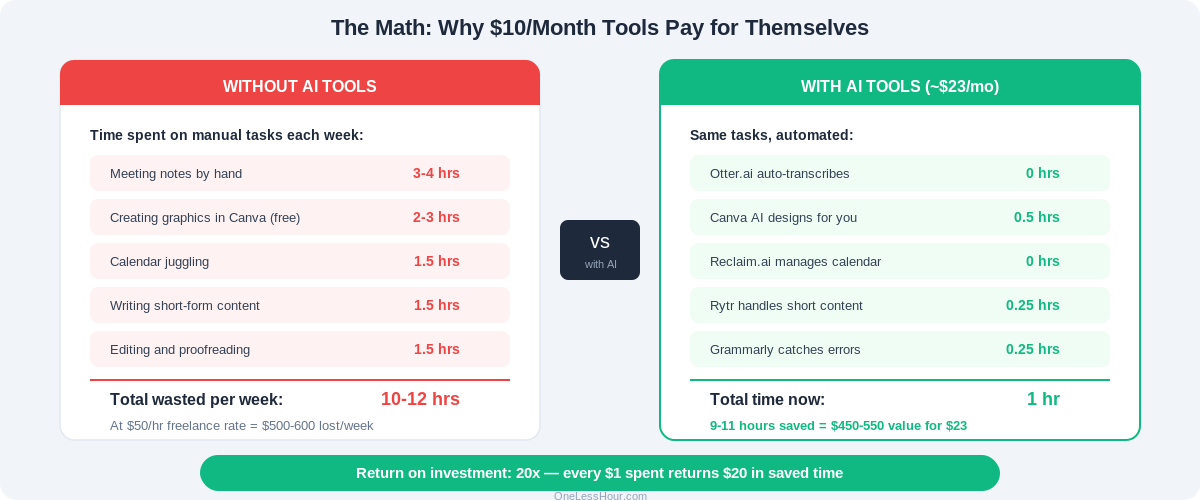
Free AI tools handle maybe 70% of what most people need. These paid AI subscriptions cover the remaining 30% — and that 30% often represents the tasks that eat the most time.
My rule of thumb: if a $10/month tool saves you more than 1 hour per week, it’s worth it. Your time is worth more than $2.50 per hour.
Start with one. Use it for a full week. If it saves you time, keep it. If it doesn’t, cancel. Every tool on this list has a free trial or money-back guarantee.
If you haven’t tried free AI tools yet, start with our beginner’s guide to ChatGPT — it covers 10 things you can try in your first hour, all free.
FAQ
Can I use free AI tools instead of these? For many tasks, yes. ChatGPT and Claude both have generous free tiers. This list is specifically for tools that do something free alternatives can’t do as well — or that save enough extra time to justify the cost. Start free, upgrade when you hit limits.
Which single tool gives the best ROI? Otter.ai Pro, if you have regular meetings. Nothing else gives you 3-4 hours back per week for $8/month. If you don’t have meetings, Canva Pro is the answer if you create any visual content.
Are these tools safe for work? Yes, all tools on this list have enterprise-grade security and privacy policies. That said, always check your company’s IT policies before using any third-party tool with work data. When in doubt, ask your IT team.
Do I need all 7 tools? No. Most people need 2-3. Start with the “sweet spot” stack (Otter.ai + Canva Pro for about $23/month) and add others only when you feel a specific need.
Will these prices go up? Possibly — AI tools are still figuring out their pricing. Many offer annual plans that lock in current rates. If you find a tool valuable, the annual plan is usually worth the commitment.
What about [other tool]? I’ve tested dozens of tools. These 7 made the cut because they consistently delivered value over weeks of use. If there’s a tool you think I should test, let me know.
Prices re-checked on each vendor’s pricing page on October 10, 2026. Prices change often, so check before you subscribe.
Written by the OneLessHour team — freelancers who test every AI tool so you don’t have to. More about us →
This article is part of the OneLessHour series. Next up: ChatGPT vs Claude vs Gemini — which free AI assistant actually saves the most time?
Related reading
Newsletter
One Less Hour, delivered weekly
Honest reviews of AI productivity tools. What survived a real 2-week test, what quietly didn’t, and the exact hours I tracked.
One email per week. Unsubscribe in one click.