
Last tested: April 2026
Transparency note: This article contains no affiliate links, and no company paid for or reviewed it. I pay for most of the AI tools I use myself — see how I test.
Every week there’s a new AI tool promising to “revolutionize your workflow.” I downloaded over 30 of them last month to find out which ones actually deliver — and which ones are just ChatGPT wrapped in a different interface with a waitlist.
The results were pretty lopsided. Most free AI apps are either too limited to be useful, too complicated to be worth learning, or solving a problem nobody actually has. But seven of them genuinely changed how I work, and I still use all of them daily.
Here’s what made the cut — and more importantly, exactly how I use each one to save time.
What I Looked For (and What Disqualified Most Apps)
Before the list, here’s how I filtered. An AI productivity app had to meet three criteria to make this list: the free tier had to be genuinely usable for daily work (not just a 3-day trial), it had to solve a real recurring problem (not a novelty), and it had to save me at least 15 minutes per week. That last one eliminated about half the tools I tested — they were cool but didn’t actually save meaningful time.
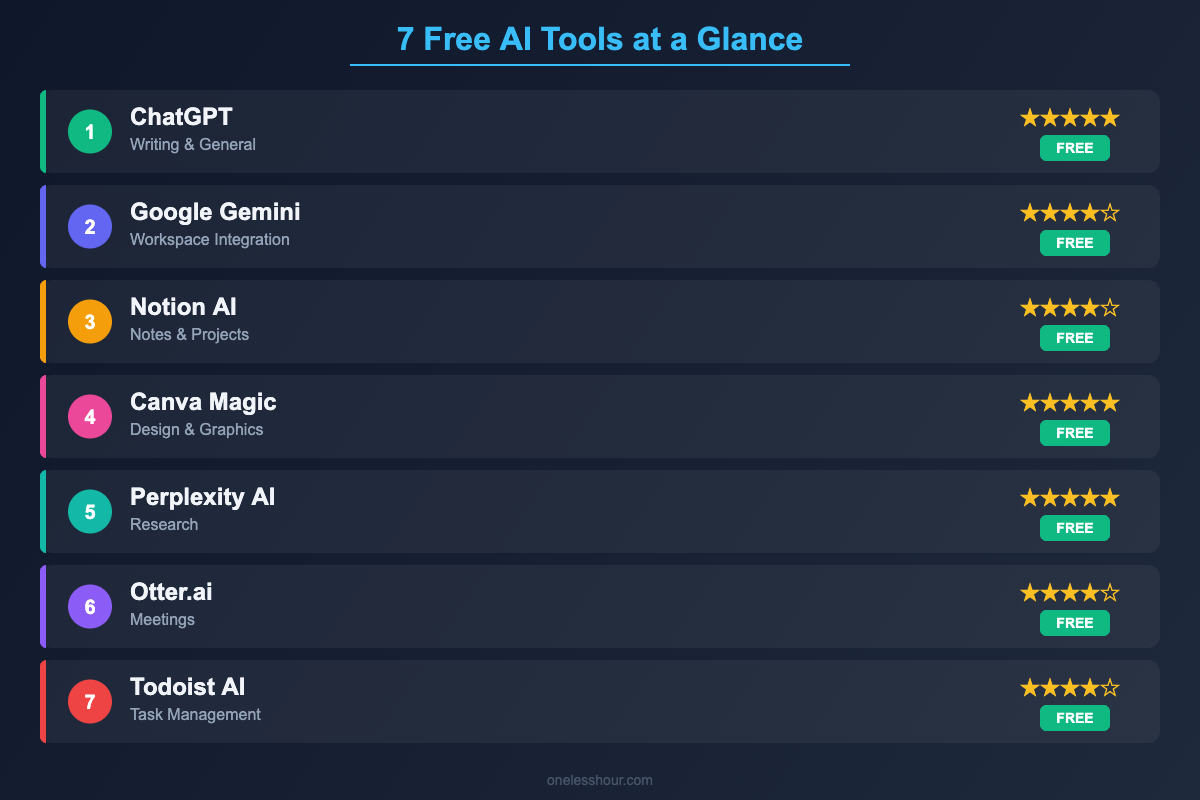
1. ChatGPT — The Swiss Army Knife (That’s Actually Sharp)
What it replaced: Googling + drafting emails from scratch + brainstorming on paper
I know, obvious pick. But most people seriously underuse ChatGPT’s free tier. I use it as a writing editor (not writer), a brainstorming partner, and a first-pass researcher. The key is how you prompt it — generic questions get generic answers, but structured prompts get output I can actually use. If you haven’t explored ChatGPT beyond basic Q&A, our guide to ChatGPT prompting techniques covers the methods that made the biggest difference for me.
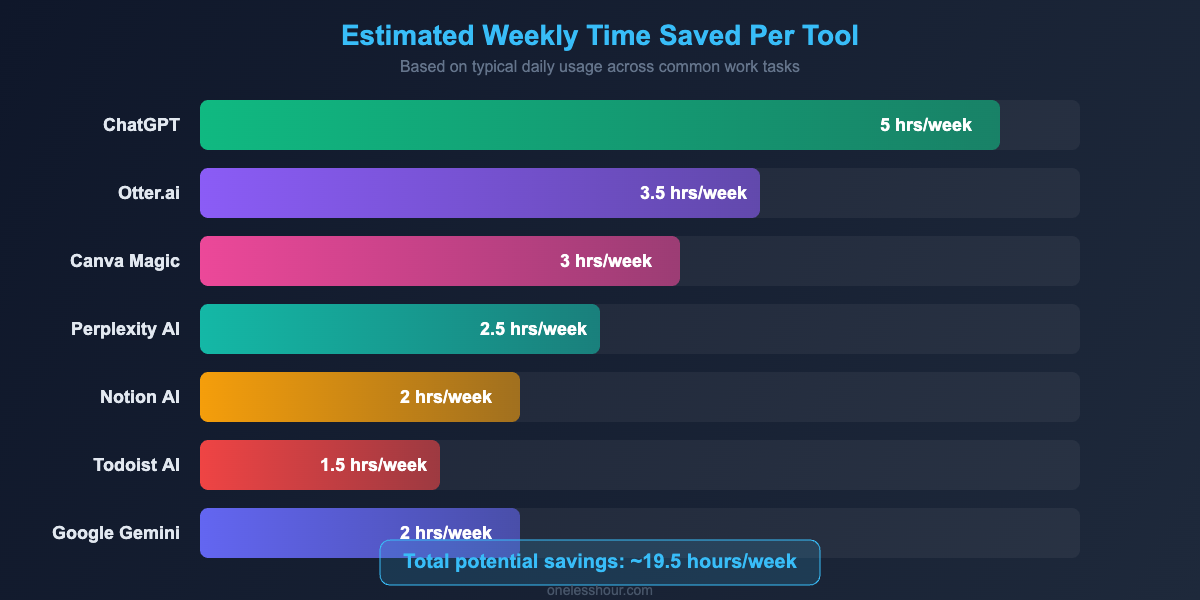
Time saved per week: 2-3 hours
Free tier reality check: GPT-4o mini is available with generous limits. You’ll hit the GPT-4o daily cap if you’re a heavy user, but the mini model handles 80% of tasks well enough.
Best for: People who write a lot — emails, reports, content, proposals.
2. Perplexity AI — Research Without the Tab Explosion
What it replaced: Opening 15 browser tabs to research a single topic
A lot of this tab-wrangling can be handled inside the browser itself rather than in a separate app. I tested more than twenty AI Chrome extensions and kept seven.
This is the tool that surprised me most. Perplexity is an AI search engine that reads sources for you and gives you a cited, synthesized answer. The difference from regular search is that you get actual answers with links to verify them, instead of a list of pages you have to read yourself. I tested it against traditional Google research for a blog post about AI automation tools. Google: 25 minutes across 12 tabs. Perplexity: 8 minutes, with source links I could dive deeper into if needed.
Time saved per week: 1-2 hours (more if you do heavy research)
Free tier reality check: Unlimited quick searches, 5 Pro searches per day. The quick searches handle most questions. Save your Pro searches for complex, multi-layered questions.
Best for: Anyone who researches topics regularly — writers, marketers, students, consultants.
3. Notion AI — Your Notes, But Smarter
What it replaced: Manually organizing notes + creating action items from meeting notes
I was already a Notion user before they added AI, so this one was an easy integration. The AI features I use most: summarizing long meeting notes into action items, generating quick first drafts inside my project pages, and using the Q&A feature to search across all my notes. The last one is underrated — when you have hundreds of notes, being able to ask “what did we decide about the pricing strategy in Q1?” and getting an actual answer is a game-changer.
Time saved per week: 1-2 hours
Free tier reality check: You get limited AI queries per month on the free plan. The base Notion features (notes, databases, project management) are fully free and excellent even without AI. If you hit the AI limit, the paid plan is worth it for heavy users.
Best for: People who already take notes digitally and want to get more out of them.
4. Otter.ai — Meetings on Autopilot
What it replaced: Frantically scribbling notes during calls + missing things
Here’s my honest take: if meetings are a big part of your day, Otter.ai is probably the highest-impact tool on this list. It joins your Zoom, Google Meet, or Teams calls automatically, transcribes everything in real-time, and generates a summary with action items. The part that actually matters is the after-meeting summary. Instead of spending 10 minutes writing up notes, I get a structured recap within seconds of hanging up. I’ve also caught things in transcripts that I missed during the live conversation — details that would’ve fallen through the cracks otherwise.
Time saved per week: 1-3 hours (depending on meeting load)
Free tier reality check: 300 minutes of transcription per month, 30 minutes per conversation. That’s enough for about 2-3 meetings per week. Heavy meeting-goers will outgrow it, but it’s plenty to see if it works for you.
Best for: Anyone in 3+ meetings per week. Project managers, consultants, and team leads will get the most value.
5. Canva Magic Studio — Design Without a Designer
What it replaced: Hiring a designer for simple graphics + spending 45 minutes on a single social post
Canva was already good before AI. Now it’s absurd. Magic Design generates complete layouts from a text description. Magic Write handles copy directly in your designs. Background removal is one click. I create all my blog graphics, social media posts, and simple presentations in Canva now, and the AI features cut my design time roughly in half. The biggest time-saver is Magic Design for social media — describe the post you want, pick from 5-6 generated options, tweak for 2 minutes, done.
Time saved per week: 1-2 hours (if you create visual content regularly)
Free tier reality check: 50 Magic Write uses per month. The design templates and basic editing are unlimited on free. You’ll feel the limits if you’re creating content daily.
Best for: Small business owners, social media managers, and anyone who creates visual content without a dedicated designer.
6. Google Gemini — The Google Ecosystem Glue
What it replaced: Manually pulling info across Gmail, Docs, and Calendar
If you’re deep in the Google ecosystem, Gemini has one killer advantage over every other AI tool: it can access your Gmail, Google Docs, Drive, and Calendar. That means you can ask it things like “summarize the emails from Sarah this week” or “find the document where we discussed the Q2 budget.” No other free AI tool can do this. The AI itself is comparable to ChatGPT for most tasks, but the integration layer is what makes it uniquely useful for Google Workspace users.
Time saved per week: 30 minutes to 2 hours (depends on how much you use Google Workspace)
Free tier reality check: Full access to Gemini 2.0 Flash. The Advanced model and deeper Workspace integration require a subscription. But the free version handles most tasks well.
Best for: Teams and individuals already living in Google Workspace. If you use Outlook and Microsoft, look at Copilot instead.
7. Todoist with AI Assist — Task Management That Thinks
What it replaced: Staring at a vague to-do item for 10 minutes trying to figure out the first step
The AI feature I use most in Todoist is task breakdown. Give it something big and vague like “prepare quarterly review presentation” and it generates specific subtasks: gather Q3 metrics, outline key achievements, identify areas for improvement, create slides, rehearse timing. It’s not revolutionary, but it eliminates that paralysis you get when a task feels too big to start. I’ve also found the AI-suggested due dates surprisingly reasonable — it considers your existing workload when suggesting when to schedule tasks.
Time saved per week: 30-60 minutes
Free tier reality check: Up to 5 active projects, AI assist with daily usage limits. For personal productivity, the free plan is enough. Teams or power users will want the paid version.
Best for: People who struggle with breaking big tasks into actionable steps, or who put off tasks because they feel overwhelming.
Tools That Didn’t Make the Cut (and Why)
A few notable mentions that fell short of my criteria. Jasper AI — the free tier is too limited for real use. Copy.ai — decent for marketing copy, but ChatGPT handles the same tasks with more flexibility. Grammarly’s AI features — useful, but the free AI tier barely does anything beyond what the regular free Grammarly already offers. Bing Copilot — solid tool, but the response quality was inconsistent enough that I couldn’t rely on it for work tasks. Writesonic — great marketing, underwhelming output quality compared to just using ChatGPT directly.
How to Actually Adopt These Without Overwhelm
The worst thing you can do is install all seven today. Here’s the approach that actually works: identify your single biggest time-waster from this past week. Meetings? Start with Otter.ai. Email and writing? Start with ChatGPT. Research? Perplexity. Visual content? Canva. Use that one tool for two weeks until it’s second nature, then add the next one. I adopted these tools over about 8 weeks and the gradual approach is the only reason they actually stuck.
Frequently Asked Questions
Are these AI tools really free, or is it a limited trial?
All seven have permanent free tiers — not trials. The free versions have usage limits (like Otter’s 300 minutes/month or ChatGPT’s daily message cap), but they’re generous enough for most individual users. I used the free tiers for the entire testing month and only hit limits on Otter and Canva’s AI features.
Which one free AI tool should I start with?
ChatGPT, if you’ve never used AI tools before. It’s the most versatile and has the gentlest learning curve. If you already use ChatGPT, I’d recommend Perplexity for research or Otter for meetings — both deliver obvious, immediate time savings.
Do I need to be technical to use these?
Not at all. Every tool on this list works through a simple interface — you type what you need in plain English. The learning curve is more about forming new habits than understanding technology. If you can use Google, you can use these.
Ready to take your productivity further? Learn how to automate your daily tasks with AI or discover advanced ChatGPT prompting techniques that save hours every week.
Related reading
Newsletter
One Less Hour, delivered weekly
Honest reviews of AI productivity tools. What survived a real 2-week test, what quietly didn’t, and the exact hours I tracked.
One email per week. Unsubscribe in one click.