
Before I found the right AI tools for freelancers, I wasted hours every week. Last month I tracked every hour I worked for two weeks. Forty-three hours billed to clients. But I logged 67 hours of actual work time. The extra 24 hours? Proposals that went nowhere, research rabbit holes, chasing invoices, writing LinkedIn posts, and answering the same kinds of emails over and over again. When I finally got serious about finding the right ai tools for freelancers — tools like ChatGPT — that number dropped fast.
Here’s what’s brutal about freelancing: you don’t have a team. You are the team. Every hour you spend on admin, marketing, or client communication is an hour you’re not billing — or resting. That math only works if you find ways to make the non-billable stuff faster.
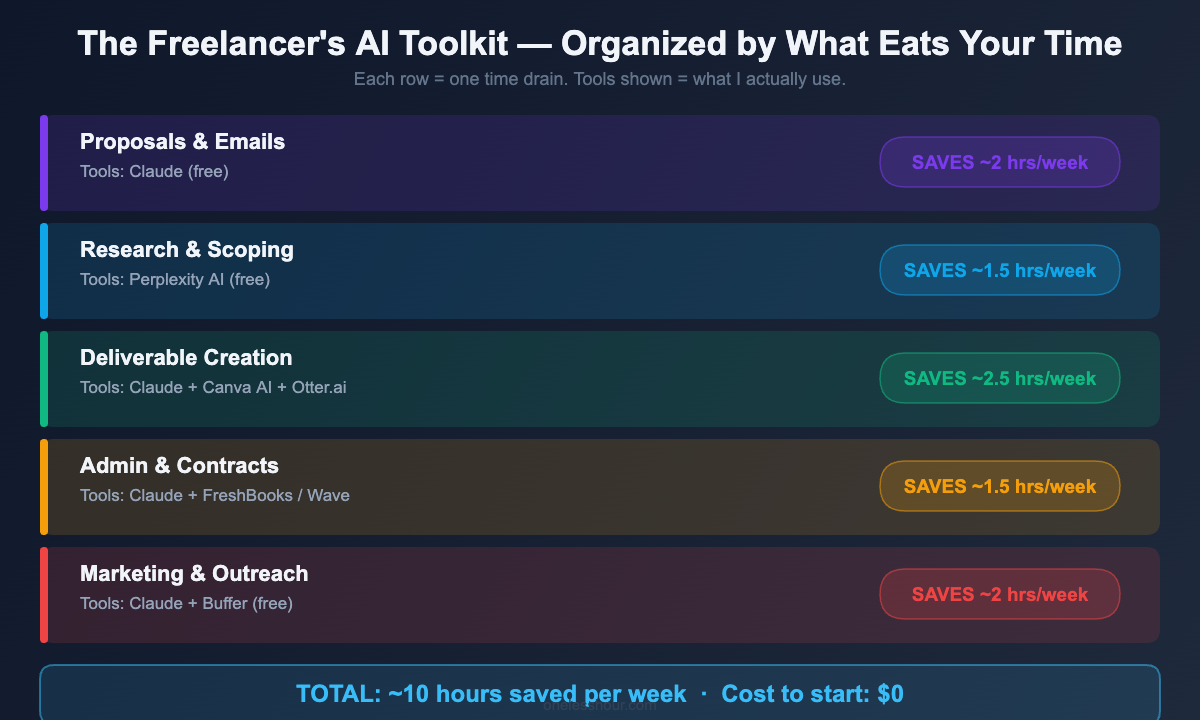
AI tools for freelancers have completely changed that equation for me. But not in the way most “best AI tools” articles explain it. The tools that actually helped weren’t the ones I expected — and they’re organized around tasks, not categories. Here’s the exact breakdown of what eats freelancers’ time, and the AI fix I found for each one.
The 5 Time Drains AI Actually Fixes for Freelancers
Before I get into the tools, here’s the honest framing: most “AI tools for freelancers” articles list 15+ apps with no sense of priority. That’s not helpful when you’re already stretched thin. So I’m organizing this by the five tasks that ate the most of my non-billable time — in order of how much time I got back.
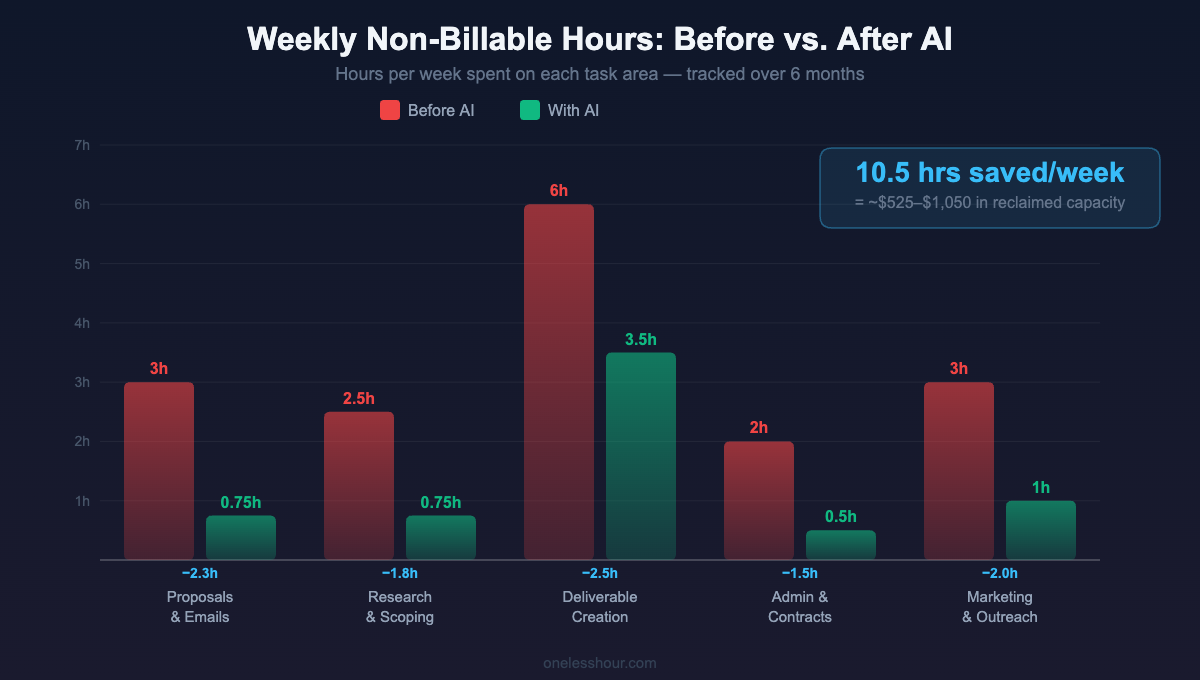
1. Proposals & Client Emails (~3 hrs/week → now ~45 min)
This was my biggest time sink before AI. Every proposal felt custom, every client intro email needed to be warm but professional, every scope clarification required careful wording. I was spending 2-3 hours a week just on words that weren’t billable.
Now I use Claude (free tier handles this well) as my first draft engine. I feed it the project brief, my service list, and a few notes on the client — and it produces a proposal draft in about 90 seconds. I spend 10 minutes editing instead of 45 minutes writing from scratch. Total time for a full proposal: under 20 minutes.
The trick isn’t just “write me a proposal.” Here’s the prompt template that actually works:
“You’re helping me write a freelance proposal for [client name], a [company type] who needs [project description]. My relevant experience includes [2-3 specific past projects]. My rate is [X]. Write a 300-word proposal that leads with the client’s problem, shows I understand their business, and ends with a clear call to action for a discovery call. Tone: confident but not salesy.”
I keep 4-5 versions of this prompt for different service types (design, writing, consulting, development). Takes 5 minutes to set up once, saves 30+ minutes per proposal after that.
For client emails specifically, I use Grammarly ($12/month) to polish drafts — not for grammar, but for tone. The “Adjust tone” feature catches when I sound passive-aggressive when tired (it happens) before the client does.
Pro tip: Build a “swipe file” of your best proposals in a Google Doc. Paste it into Claude before asking for new drafts. The AI output gets dramatically better when it has examples of what “good” looks like for your voice.
Time saved: ~2 hours/week. Free to start (Claude free tier + Grammarly free tier handle 80% of this).
2. Research & Project Scoping (~2.5 hrs/week → now ~45 min)
Every project starts with research. For me it’s usually: understand the client’s industry, benchmark their competitors, find relevant examples, and sometimes validate a technical approach. That used to mean 2+ hours of browser tab chaos per project.
I switched to Perplexity AI for all research tasks six months ago and haven’t looked back. It’s a search engine with an AI layer on top — you ask it a question, and instead of ten blue links, you get a structured answer with cited sources you can actually verify.
What makes it better than ChatGPT for research: every claim has a citation. When I’m scoping a project for a client in fintech, I can’t afford to put hallucinated “facts” in my brief. Perplexity’s answers are sourced in real-time from the web, not from a training dataset that might be 18 months stale.
The free tier (10 searches/day) is enough if you’re doing targeted research. The Pro tier ($20/month) is worth it if research is core to your work — you get unlimited searches, deeper sources, and the ability to upload documents for analysis.
What this won’t do: Replace primary research or interviews. If you need to understand why users behave a certain way, Perplexity can’t tell you that. It surfaces what’s publicly documented, not what’s unknown.
Pro tip: Use Perplexity’s “Focus” modes. Switch to “Academic” for research papers, “Social” for Reddit/forum sentiment, and default for general questions. This alone triples the relevance of results.
Time saved: ~1.5-2 hours/week. Free tier handles most needs.
3. Actual Deliverable Creation (~6 hrs/week → now ~3.5 hrs)
This is the trickiest category, because “deliverable creation” is the billable work — and you don’t want AI to just do it for you and produce generic output. What you do want is AI handling the parts that slow you down: first drafts, repetitive sections, reformatting, and visual polish.
For written deliverables (reports, blog posts, copy, documentation), I use Claude for first drafts. My workflow: outline → rough draft in Claude → heavy editing in my own voice → final polish. The edit still takes real skill and judgment. But I’m editing a 70% draft instead of writing from zero — that alone cuts my writing time roughly in half.
For visual work, Canva AI (built into Canva Pro, $15/month) does two things I actually use day-to-day: Magic Design generates slide layouts from a text description, and the background remover saves me from the 20-minute Photoshop detour I used to take for client-facing images.
I also use Otter.ai for client calls (free tier: 300 min/month). Instead of typing notes during a call, I let Otter transcribe, then paste the transcript into Claude and ask: “Pull out all action items, client decisions, and open questions from this meeting transcript.” I get a formatted summary in 20 seconds. This used to take 30 minutes post-call.
Speaking of note-taking — if you’re not already using an AI note tool, I did a deep comparison of the best ones. The winners surprised me. Check out the full AI note-taking app breakdown here.
Skip it if: Your deliverables require highly specialized expertise where generic AI output would be obvious (legal docs, medical content, highly technical engineering). The editing overhead in those cases often exceeds the drafting savings.
Time saved: ~2-3 hours/week, depending on deliverable volume.
4. Admin, Invoicing & Contracts (~2 hrs/week → now ~30 min)
This is the category that almost no “AI tools for freelancers” article covers, and it’s the one that makes me the most frustrated when I’m deep in it. Chasing invoices, writing contract clauses, formatting statements of work — none of it is billable, all of it is necessary.
I handle the contract/SOW side with AI prompts in Claude. I have a master freelance contract template (I had a lawyer review it once — worth every penny). When I need a project-specific SOW, I paste my template into Claude and say: “Based on this base contract, write a Statement of Work for [project]. Scope: [X]. Timeline: [Y]. Deliverables: [Z]. Keep the same legal language but fill in the project specifics.” Done in 5 minutes instead of 45.
For invoicing, I use FreshBooks (~$17/month) which has AI-assisted time tracking and auto-recurring invoices. The AI features are modest — mainly smart categorization and late payment reminders — but they eliminated the weekly “did I invoice everyone?” panic.
If FreshBooks is too much, the free tier of Wave does invoicing and basic accounting for $0. No AI features, but the automation alone (auto-reminders, payment tracking) saves significant mental overhead.
Pro tip: Use Claude to draft your late payment follow-up emails. Give it the invoice details and how many days overdue, and tell it to write something firm but professional. I’ve found the AI drafts are actually less passive-aggressive than what I write when I’m annoyed about an unpaid invoice.
Time saved: ~1.5 hours/week. FreshBooks or Wave are the main tools; Claude handles the ad hoc writing.
5. Marketing Your Freelance Business (~3 hrs/week → now ~1 hr)
LinkedIn, cold outreach, portfolio updates, testimonial requests — this is the marketing work that most freelancers either neglect (leading to feast-famine cycles) or spend way too much time on. I used to spend Sunday mornings writing LinkedIn posts. Now I spend 20 minutes.
My LinkedIn workflow: at the end of each week, I note 3-4 things that happened — a client win, a lesson learned, a tool I discovered, a mistake I made. On Sundays, I open Claude and say: “Turn these notes into a LinkedIn post in a conversational, first-person voice. Max 200 words. No hashtag spam. End with a question to drive comments.” I write one post per week this way. Takes 20 minutes total including editing.
For cold outreach, AI helps with the first draft, but I always rewrite the first two sentences manually. Those sentences have to sound like me reaching out to them — not a template. The rest of the email (explaining what I do, why I’m reaching out, the CTA) can be AI-assisted because it’s largely the same structure each time.
For learning the right prompting techniques to make all of this faster, I wrote a full guide on the ChatGPT prompting techniques I actually use every day — most of them work in Claude too.
What I dropped: I tried Taplio ($49/month) for LinkedIn scheduling. The AI content suggestions were generic and the cost didn’t justify the marginal time savings over just using Claude. Stick with Claude + a free scheduler like Buffer for the same result at a fraction of the price.
Time saved: ~2 hours/week. Most of this is free (Claude + Buffer free tier).
The Tools I Tried and Dropped (And Why)
Every “best tools” article tells you what to add. Nobody tells you what to cut. Here’s what I tested and stopped using:
Jasper AI ($49/month): Great for high-volume marketing copy. Overkill if you’re a solo freelancer who needs occasional drafts. Claude does 90% of what Jasper does at a fraction of the price (or free). Skip it unless you’re doing content at serious scale.
Notion AI ($10/month add-on): The AI features sound appealing but I found myself doing 80% of the work myself anyway because the suggestions needed heavy editing. Worth it only if you’re already deep in the Notion ecosystem and doing lots of document summarization.
Copy.ai (free → $49/month): Tried it for cold emails. The outputs were noticeably templated — I could spot the “AI wrote this” pattern after two months. Clients can too. Reverted to using ChatGPT/Claude with more specific prompts.
Midjourney ($10/month): Only worth it if visual creation is your deliverable. If you’re a copywriter, consultant, or developer, you don’t need AI image generation. Canva AI handles the occasional image need at no extra cost if you’re already on Canva Pro.
The Freelancer’s Minimum Viable AI Stack
If you’re just starting with AI tools — or you’re watching your expenses carefully — here’s the minimum viable stack by budget:
| Budget | Tools | Time saved/week |
|---|---|---|
| $0/month | Claude free, ChatGPT free, Perplexity free (10 searches/day), Grammarly free, Wave (invoicing) | ~4 hrs |
| ~$20/month | Claude Pro OR ChatGPT Plus, Perplexity free, Grammarly free, Wave | ~7 hrs |
| ~$45/month | Claude Pro, Perplexity Pro, Canva Pro, FreshBooks Lite | ~10+ hrs |
My honest recommendation: start at $0 for 30 days. Build the habits first. The free tiers are more capable than most people expect — especially Claude and Perplexity. Once you have a clear sense of where you hit the limits, upgrade only those specific tools.
These AI tools for freelancers work best when you pick the right one per task. For a deeper dive into which free AI tools are actually worth your time, I covered the full landscape in How to Save 3 Hours a Day Using Free AI Tools — including which “free” tools are actually free versus which ones bait-and-switch you after 7 days.
How Much Time Can You Actually Expect to Save?
Realistic numbers, based on my own tracking over six months (and talking to other freelancers who’ve made similar changes):
If you bill 20-25 hours/week: Expect to save 4-6 non-billable hours/week. That’s roughly an extra $400-600 in billable capacity, or one full day back for rest.
If you bill 30-40 hours/week: The savings scale differently — you’re more likely to use AI to maintain quality while handling more volume. Expect 6-10 hours saved, mostly in admin and delivery.
What surprised me most: the biggest gains weren’t from the flashiest AI tools. They came from eliminating the switching cost — the mental overhead of context-switching between tasks. When AI handles the transition work (summarizing a call before writing a follow-up, drafting a proposal before I edit it), the cognitive load drops significantly even beyond the raw time numbers.
Frequently Asked Questions
What is the best free AI tool for freelancers?
Claude’s free tier is the most capable free AI assistant for freelancers doing proposal writing, email drafting, and document work. Perplexity AI’s free tier (10 searches/day) is the best free option for research tasks. Both have meaningful free tiers without the daily message caps that make ChatGPT’s free version frustrating.
Do I need to pay for AI tools to see real results as a freelancer?
No — the $0 stack I listed above saves roughly 4 hours/week based on my own numbers. That said, if your billing rate is $50+/hour, a $20/month Claude Pro subscription pays for itself if it saves you even one billable hour per month. The math usually favors upgrading sooner than most freelancers expect.
Will AI tools make my freelance work look generic?
Only if you use AI output without editing it. The freelancers I’ve seen struggle with AI are the ones who use it as a replacement for their judgment rather than a first-draft engine. I treat every AI output as a rough draft that I edit heavily. The voice, the strategic decisions, the client-specific nuance — that’s still mine. The AI just eliminates the blank page problem.
How do I start using AI tools for freelancing without getting overwhelmed?
Pick one task — not one tool. Start with proposals or client emails, since those have an obvious before/after. Use Claude free for two weeks on just that task. Once you’ve saved 30 minutes in week one, adding the next tool feels natural rather than overwhelming. Adding 5 tools at once is how people end up using none of them.
Are AI tools for freelancers replacing human freelancers?
In some commodity categories (basic copywriting, data entry, simple design), yes — the market for that work has contracted. But for freelancers who offer strategic thinking, specialized expertise, or strong client relationships, AI is more of an efficiency multiplier than a replacement. The freelancers I know who are thriving in 2026 are the ones who learned to use AI before their clients did.
The one thing to do today: Open Claude (claude.ai — free account) and paste in your last proposal or SOW. Ask it: “Rewrite this to be 30% shorter and more confident, keeping the same core offer.” See how long it takes and what you’d change. That experience is worth more than reading any tool list.
And if you want to see how AI fits into a full workday — not just proposals but hour by hour — I broke down exactly how I use AI at work from 9am to 5pm. The results from six months of tracking are in there too.
Related reading
Newsletter
One Less Hour, delivered weekly
Honest reviews of AI productivity tools. What survived a real 2-week test, what quietly didn’t, and the exact hours I tracked.
One email per week. Unsubscribe in one click.