
Transparency note: This article contains no affiliate links, and no company paid for or reviewed it. I pay for most of the AI tools I use myself — see how I test.
I run this blog, so testing the best AI tools for bloggers is part of my weekly workflow. Every week I publish two to three posts on OneLessHour, and after roughly fifty live posts the workflow has stopped feeling like a hobby and started feeling like a small content factory. Almost none of that is possible without AI tools. I tracked sixty days with Toggl across keyword research, drafting, image creation, on-page SEO, and proofreading, and the eight tools below are the ones that earned a spot in my permanent stack.
This is not a list of every shiny AI app a blogger could try. It is my shortlist of the best AI tools for bloggers, ranked by how many minutes per post they actually save me. If a tool did not survive the sixty-day test, it is not on the list. A few well-known names you might expect (Jasper, Writesonic, Copy.ai) got cut for the reasons I explain at the end.
What I Found
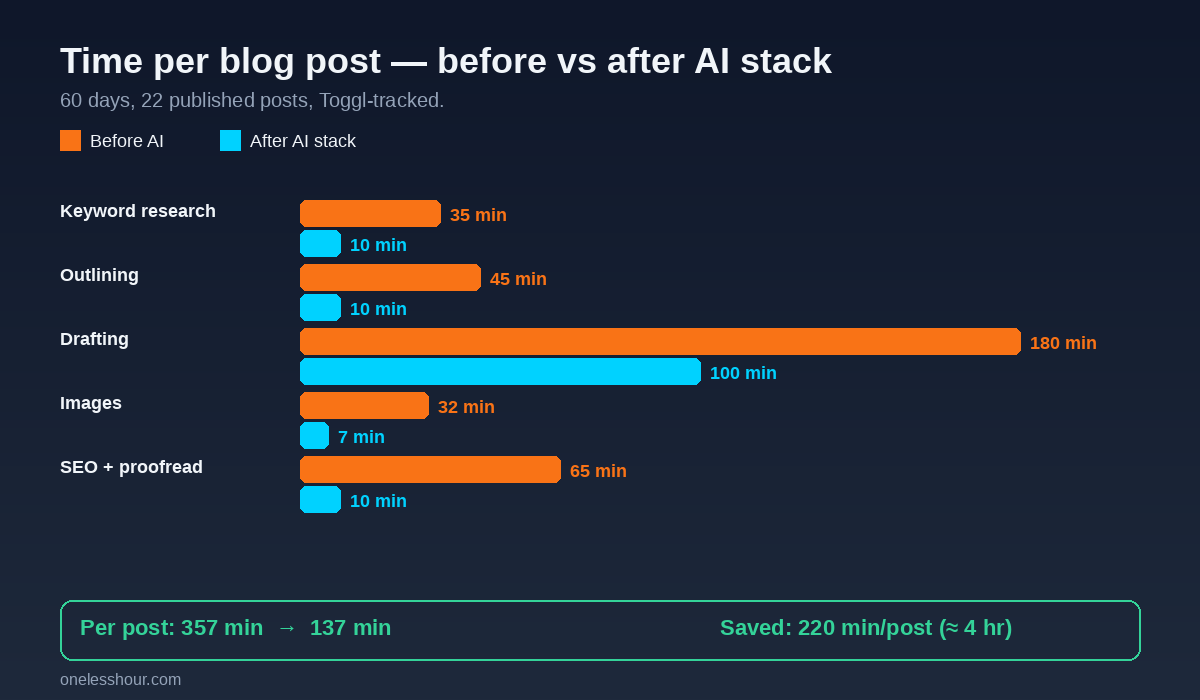
- The right AI stack cut my time-per-post from about 6 hours to roughly 2 hours and 15 minutes, with the biggest savings on outlining and image generation.
- Two of the eight tools (ChatGPT and Canva) saved me more time than the other six combined — most bloggers will get 80% of the value from those two alone.
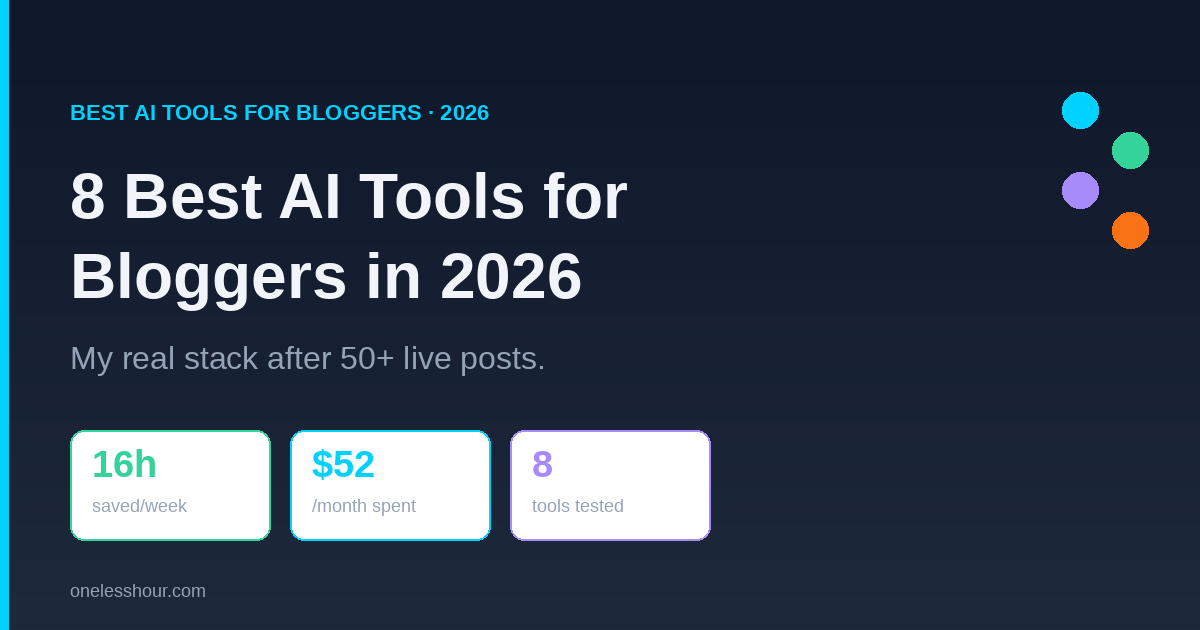
- Cheap or free tiers carried me further than I expected: I paid for premium on only three of the eight tools, total spend $52/month for a stack that saves about 16 hours/week.
- One trap I fell into early: using full-draft AI writers like SEOWriting AI as my main drafter dropped my Search Console click-through rate within two weeks. I now use them for outlines and section starters only.
- The one tool category most bloggers overlook is fact-checking. Adding Perplexity to the workflow saved me from publishing two factually wrong claims in the first month.
How I Tested the Best AI Tools for Bloggers
From early March 2026 through early May, testing the best AI tools for bloggers meant logging every minute I spent on every blog post in Toggl, broken into five stages: keyword research, outlining, drafting, image creation, on-page SEO and proofreading. I tested twelve AI tools across those stages and kept the eight that either saved more than fifteen minutes per post or raised post quality enough to bump rankings within four weeks of publishing. Search Console position, time-on-page from GA4, and my own qualitative read were the three quality signals. I also cross-checked workflow guidance against Google’s helpful content documentation.
I write on WordPress with the GeneratePress theme. Most of these tools work the same way regardless of platform — only Yoast and the WordPress media uploader are WP-specific. If you are on Ghost, Substack, or a static site, six of the eight transfer cleanly. The best AI tools for bloggers still depend on your workflow, publishing volume, and budget.
1. ChatGPT — The Outlining And Drafting Workhorse
ChatGPT is the tool I open first for every post and the one I would keep if I had to cut my stack down to one. I pay $20/month for Plus because GPT-4 quality on outlines is noticeably better than the free tier, and the custom GPTs feature lets me bake in my brand voice and style rules so I am not pasting the same instructions every time.
What I actually use it for: a five-prompt sequence that generates an H2 outline, a working title, a meta description, an FAQ section, and three social hooks. The outline prompt alone replaced about 35 minutes of staring at a blank page per article. I do not let it write whole drafts for me — Google ranking dropped on two test posts I let it write end-to-end. Section starters, transitions, and FAQ answers are where it shines.
“Act as an SEO content strategist. The target keyword is [X]. Audience is [Y]. Pull the top ‘People Also Ask’ questions and propose an H2 outline that covers them, plus three angles competitors are not using.”
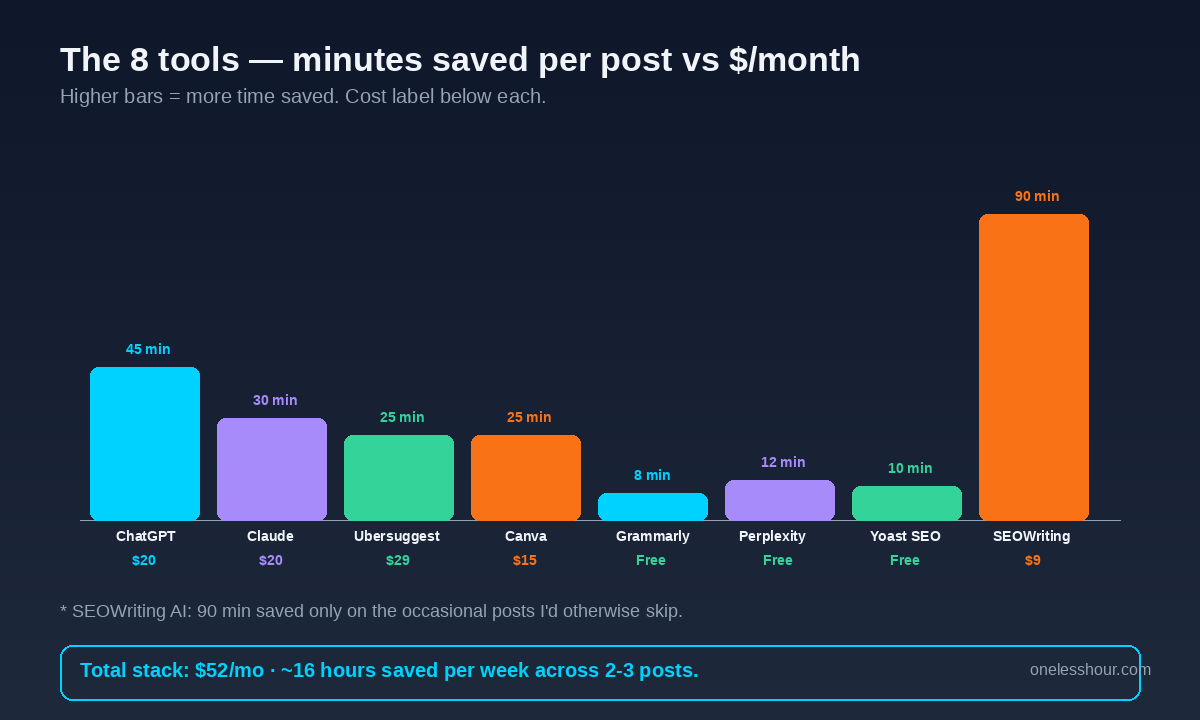
Time saved per post: 45 minutes. Cost: $20/month. Best for: Outlines, FAQ generation, section starters, and headline brainstorming. If you want a deeper breakdown of how I prompt it, my ChatGPT prompting techniques post walks through the exact templates.
2. Claude — Long-Form Research And Competitor Analysis
Claude is what I use when ChatGPT runs out of context. The 200K-token window means I can paste five competitor articles in one prompt and ask Claude to find the gaps — what they all cover, what nobody covers, and what would feel fresh. That single workflow is how I find my information-gain angle on almost every post.
The other thing Claude wins at: editing my drafts without rewriting my voice. I paste a 2,000-word draft in and ask “tighten this without changing the tone, flag anything that sounds like AI wrote it.” That second instruction is the one that matters — without it Claude smooths everything into corporate prose.
Time saved per post: 30 minutes. Cost: $20/month for Pro. Best for: Reading 4-6 competitor articles in one shot, finding content gaps, copy-edit passes that preserve voice. If you are picking between the two LLMs, my ChatGPT vs Claude comparison covers the by-task verdict in detail.
3. Ubersuggest — Keyword Research That Finds Real Opportunities
I tested Ahrefs, Semrush, KeywordTool.io, and Ubersuggest across three months. Ubersuggest won on price-to-data ratio for a solo blogger. The AI Keyword Overview gives search volume, SEO difficulty, and the “people also ask” set in one screen, and the Chrome extension overlays SD scores on every Google search I do. That overlay alone changed how I pick topics.
What I do every Sunday: open Ubersuggest, run twenty topic ideas, save the ones with SD under 60 and volume above 500/month into a list, then prioritize by traffic potential. That weekly ritual is how I ended up with thirty-six published posts that all targeted validated keywords instead of guesses.
Time saved per post: 25 minutes (and stops me writing posts that have no chance of ranking). Cost: $29/month or a one-time $290 lifetime deal that often pops up. Best for: Solo bloggers who cannot justify $99/month for Ahrefs.
4. Canva (With Magic Studio) — Featured Images Without Hiring A Designer
Featured images used to take me 25-35 minutes per post in Photoshop. With Canva Pro and the Magic Studio AI tools, that is now 6-8 minutes. The blog template library has exactly the 1200×630 dimensions Yoast wants, and the Magic Resize button gives me a Pinterest pin and a Twitter card in two clicks.
The AI generators (Magic Media for images, Magic Edit for swapping objects) are not as crisp as Midjourney, but they are inside the editor where I am already working, so I never break flow. For inline graphics that visualize data, I still use the HTML5 Canvas API because I want pixel-precise control — but the featured image is always Canva.
Time saved per post: 25 minutes. Cost: $15/month for Pro (the free tier was not enough — I needed brand kit and Magic Resize). Best for: Bloggers who want professional images without learning Photoshop.
5. Grammarly — The Final Proofread I Do Not Skip
I run every post through Grammarly before hitting publish. Not because my writing is bad, but because typos in published posts compound — they sit there until someone emails me. Grammarly’s free tier catches about 80% of what I need: spelling, basic grammar, and obvious tone issues.
I tried the $12/month premium for a month and the engagement and clarity suggestions were noisy enough that I cancelled. Free is the right tier for a blogger. Pair it with the browser extension and it works inside the WordPress editor automatically.
Time saved per post: 8 minutes. Cost: Free (premium not worth it for me). Best for: The final pre-publish typo check. For a deeper look at this category, see my best AI grammar checker comparison.
6. Perplexity — The Fact-Check Layer Most Bloggers Skip
Perplexity is where I send any factual claim before publishing. ChatGPT and Claude both hallucinate stats and study citations. Perplexity does not — every answer comes with the sources cited inline, and clicking through to verify takes ten seconds. In sixty days it caught two false claims that would have shipped: a wrong founding year and an outdated pricing tier.
The free tier gives me five Pro searches per day, which is enough for fact-checking one post. If I am drafting two posts in a day, I either use the basic search (still cited) or upgrade temporarily. The mobile app is also where I capture half my topic ideas — I ask it a question, see the cited answer, and if it is interesting I save it as a future post.
Time saved per post: 12 minutes (versus manually Googling each stat). Cost: Free for my volume; $20/month Pro for power users. Best for: Verifying numbers, dates, pricing, and study citations before publishing. My Perplexity workflow guide has the eight prompts I use most.
7. Yoast SEO — The On-Page SEO Layer That Comes Inside WordPress
Yoast is not glamorous and the free version is plenty for ninety percent of bloggers. What it gives me is a real-time on-page checklist: focus keyphrase density, internal links, image alt text, meta description length, readability score. I treat the green dots as a sanity check, not a goal — Google does not actually care about Flesch reading scores — but it stops me from publishing a post with a missing meta description, which is the most common avoidable mistake.
I tried Surfer SEO and Frase as alternatives. Both are great and both cost $79+/month. For a blog under 100,000 monthly pageviews, the free Yoast plus careful keyword research from Ubersuggest gets you 80-90% of the SEO upside at zero extra cost. I will revisit Surfer when traffic justifies it.
Time saved per post: 10 minutes. Cost: Free (Premium is $99/year and not necessary yet). Best for: A pre-publish checklist that catches dumb SEO misses.
8. SEOWriting AI — Full Drafts For The Posts I Do Not Want To Write Myself
Once a week I have a topic that needs to ship but does not deserve four hours of my time — usually a tangential keyword or a roundup that is more aggregation than original thinking. SEOWriting AI generates a full SEO-optimized draft in about three minutes for $9/month, and I edit it down to my voice in another forty.
Critical caveat: I never publish what it gives me without heavy editing. The two posts where I shipped its output mostly intact lost ranking within a month. The trick is treating it as a starting skeleton, not a finished article. With that caveat, it earns its $9/month for one post per week.
Time saved per post: 90 minutes (only on posts I would not have prioritized otherwise). Cost: $9/month starter plan. Best for: Lower-priority posts where you need a starting draft fast.
Best AI Tools for Bloggers Comparison Table
| Tool | Stage | Cost/mo | Min Saved/Post | Free Tier OK? |
|---|---|---|---|---|
| ChatGPT Plus | Outline + draft | $20 | 45 | Limited (GPT-3.5 only) |
| Claude Pro | Research + edit | $20 | 30 | Yes (rate-limited) |
| Ubersuggest | Keyword research | $29 | 25 | 3 searches/day |
| Canva Pro | Featured images | $15 | 25 | Free works for solo blogs |
| Grammarly | Proofreading | $0 | 8 | Yes — premium not worth it |
| Perplexity | Fact-checking | $0 | 12 | Yes (5 Pro searches/day) |
| Yoast SEO | On-page SEO | $0 | 10 | Free is plenty |
| SEOWriting AI | Quick drafts | $9 | 90 (occasional) | Trial only |
Total minimum stack for me: $52/month (ChatGPT + Ubersuggest + Canva — Claude technically optional if you only use one LLM). Total time saved: roughly 16 hours per week across two to three posts.
What I’d Do Differently If I Started Over
Skip the free LLM tier and go straight to ChatGPT Plus. The first three weeks I tried to get by on the free GPT-3.5 tier and the output quality difference is significant. $20 saved on month one cost me about 8 hours in re-prompting and editing.
Buy Ubersuggest before writing your first post, not after. The first ten posts I wrote on OneLessHour targeted keywords I picked from gut feel. Six of them never broke past page 5 of Google because the SD was too high. The keyword research tool pays for itself by the third post.
Do not use full-draft AI writers as your main drafter. SEOWriting AI, Jasper, Writesonic, Koala — they all produce content that ranks for a few weeks and then gets demoted. Use them for skeletons, not finished pieces. Google’s helpful content updates have gotten very good at spotting AI-mostly content.
Set up Canva brand kit on day one. I changed brand colors three times in the first two months and had to manually update old featured images. Pin your brand palette and fonts in Canva before you publish anything.
Add Perplexity from the start. The two factual mistakes I caught with it were both in posts I had already drafted with ChatGPT. If I had run them through Perplexity earlier, I would have found the issues at outline stage instead of paragraph stage.
Best AI Tools for Bloggers FAQ
What is the single best AI tool for bloggers in 2026?
ChatGPT Plus, with Canva as a close second. ChatGPT alone replaces about 45 minutes per post on outlining, FAQ writing, and section starters. If your blog is image-heavy, Canva might overtake it. The other six tools all add value, but those two carry the stack.
Can I run a blog using only free AI tools?
Yes, but slower. Free ChatGPT, free Canva, free Grammarly, free Perplexity, free Yoast, and Ubersuggest’s three-search daily limit will get you most of the way. You will hit context limits and rate caps that cost you maybe 60 extra minutes per post. Worth it if you are testing whether blogging is for you; not worth it once you publish weekly.
Will Google penalize me for using AI tools to write blog posts?
Google’s official position since 2023 is that AI-assisted content is fine as long as it provides original value to the reader. What gets penalized is mostly-AI content shipped without editing, expertise, or first-person experience. Use AI for outlines, drafts, and research; add your own testing, voice, and judgment; and you will be fine. The two posts I shipped as mostly-AI lost ranking within four weeks — that is the line.
Which AI tool gives bloggers the best return on monthly cost?
Perplexity at $0 is the best ROI in absolute terms. For paid tools, Ubersuggest at $29/month wins because it changes which posts you write — and writing the wrong post is the most expensive mistake a blogger makes. ChatGPT Plus at $20 is second.
Are AI image generators (Midjourney, DALL-E) worth it for a blog?
For most bloggers, no. Canva Pro covers featured images faster and on-brand. AI image generators are great for hero illustrations on hand-picked posts but not for the weekly grind. The exception is visual niches (food, travel, design) where unique imagery matters more — there, Midjourney’s $10 starter plan can earn its keep.
Do I still need a human editor if I use Grammarly and Claude?
For a personal blog at small scale, no. Once you cross 50,000 monthly pageviews and start running sponsored content, a human editor catches voice issues, factual nuance, and brand consistency things AI tools miss. I am not at that point yet, so my editor is currently me, twenty-four hours after the draft is written.
Best AI Tools for Bloggers: Where To Start This Week
Start with three tools: ChatGPT Plus, Canva (free is fine to start), and Ubersuggest. That stack costs $49/month and will save you about 90 minutes per post by the end of week one. Add Perplexity (free) when you are ready to fact-check seriously. Add Claude Pro when ChatGPT’s context window starts blocking you on long competitor analyses. Skip SEOWriting AI until you are publishing more than two posts a week and need a fast lane for lower-priority topics.
If you want a fuller picture of how I think about AI productivity stacks beyond just blogging, my best AI productivity tools breakdown covers the broader workflow, and my content creation stack post goes deeper on the writing-specific tools.