
Transparency note: This article contains no affiliate links, and no company paid for or reviewed it. I pay for most of the AI tools I use myself — see how I test.
The first week I used Perplexity AI, I used it like a fancier Google. I’d type three keywords, skim the answer, move on. Then a colleague showed me how she was using it for competitive research — I watched her condense two hours of work into eight minutes. That was the moment I realized I’d been doing it completely wrong.
Now I use Perplexity AI every single day. It saves me around five hours per week — mostly on research that used to mean opening a dozen browser tabs, reading half of each, and trying to synthesize everything in my head. This guide covers how to use Perplexity AI the way I actually use it: not the feature list, but the workflow that makes the time savings real.
I won’t just describe what Perplexity can do — plenty of articles already do that. Instead, I’ll show you my exact process, the prompts I rely on daily, and the three mistakes I made early on that cost me more time than they saved.
What I Found
- Pro Search mode — not basic search — is where the real time savings live. Basic queries work fine for simple facts; Pro Search is where research actually accelerates.
- Focus Modes (Academic, Social, Video) change the quality of results dramatically depending on what you need.
- The free tier is genuinely useful, but I hit the 5-Pro-Search-per-4-hours limit within a week of serious use.
- Follow-up questions in the same thread compound the savings — context carries over automatically, so you build depth without repeating yourself.
- Perplexity is not a ChatGPT replacement. It is bad at creative writing and excellent at research. They solve different problems.
What is Perplexity AI, and how is it different from Google or ChatGPT?
Perplexity AI is an AI-powered answer engine. You ask it a question in plain English, it searches the live web, reads multiple sources, and returns a direct answer with numbered citations you can click and verify. That’s the core loop.
Where it differs from Google: Google returns a list of links and makes you do the reading. Perplexity reads the links and gives you the answer. For research questions — “what’s the current pricing for X,” “how do A and B compare,” “what are practitioners actually saying about Y” — this is dramatically faster. For navigating to a specific website you already know, Google is still faster.
Where it differs from ChatGPT: ChatGPT is a language model with a knowledge cutoff. When I asked it about a tool that launched three months ago, it confidently described the old version. Perplexity searches the live web for every answer, so its information is current. The trade-off is that ChatGPT is significantly better at creative writing, coding help, and long-form generation. Perplexity excels at anything that requires knowing what is actually true right now. For a head-to-head model comparison, I covered this in my ChatGPT vs Claude breakdown.
How do you get started with Perplexity AI?
Go to perplexity.ai. You can use it immediately without an account, but sign up anyway — it takes two minutes and unlocks saved searches, Collections, and context that persists across sessions.
Once you’re in, resist the urge to search the way you search Google. The biggest mistake I made at first was keyword queries. “Best CRM 2026” returns something usable. But “What are the best CRMs for a 10-person B2B sales team that uses HubSpot and needs something under $50/user?” returns something genuinely useful. Specificity unlocks quality.
Three things to configure before your first serious session:
- Pick a Focus Mode before searching. The default is Web, which works fine for general queries. For research papers, switch to Academic. For real user opinions, switch to Social. More on this below.
- Sign into Pro if you’ll use it regularly. Free gives you 5 Pro Searches per 4 hours — sounds like a lot until you’re deep in a research session.
- Create your first Collection. Think of it as a project folder. Save every useful search to the right Collection, and your research stays organized and resumable weeks later.
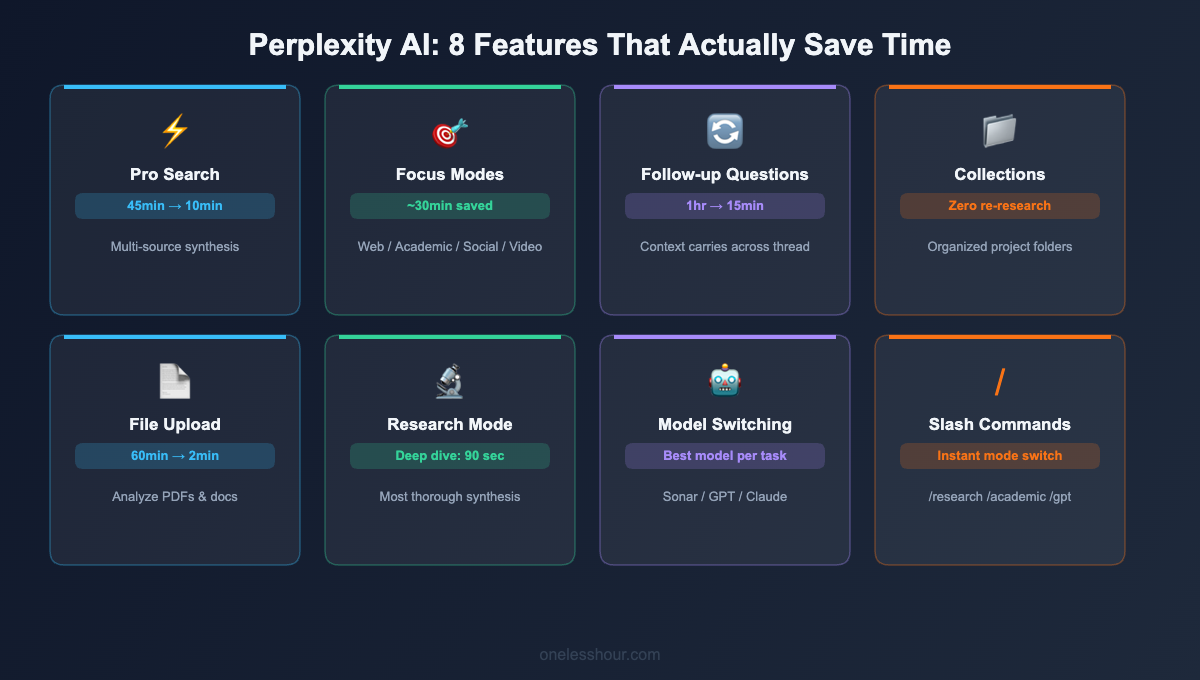
The 8 Perplexity AI features I actually use every day
1. Pro Search — the mode that actually saves time
Standard search does a quick single-pass scan. Pro Search (the lightning bolt icon) runs multiple sub-queries, reads more sources, and synthesizes a deeper answer. For anything non-trivial, the difference is substantial.
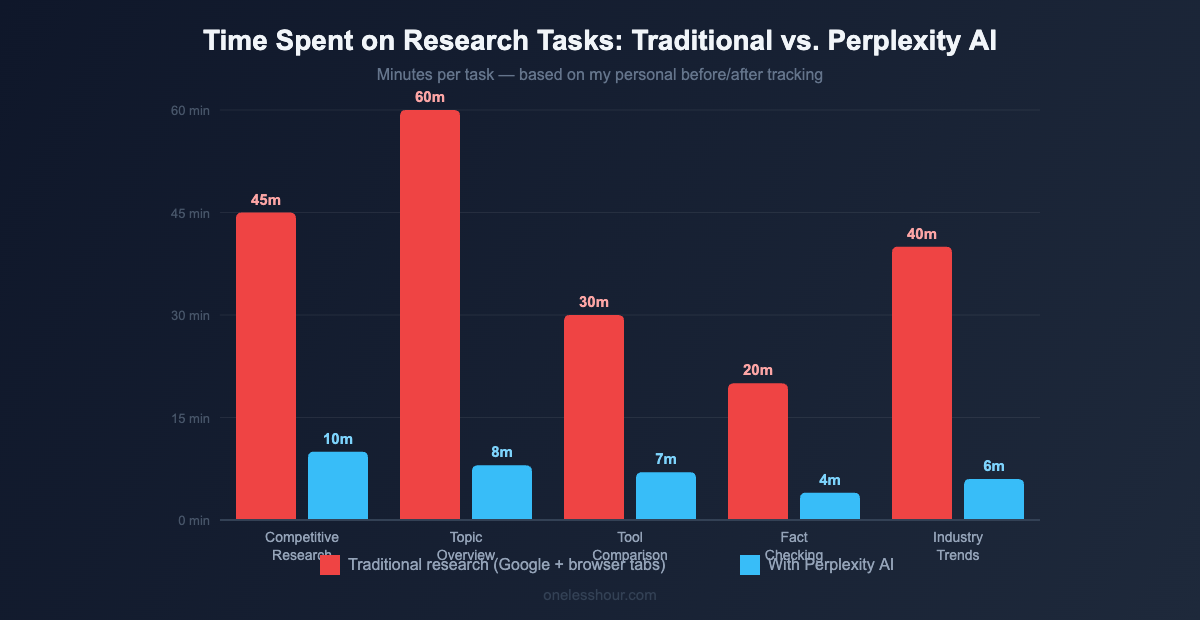
Time saved: I used to spend 45 minutes doing competitive research for an article. Pro Search gets me there in under 10.
Prompt I use: “Compare [Tool A] vs [Tool B] for [specific use case]. Include current pricing, key differentiators, and what reviewers consistently complain about. Cite your sources.”
2. Focus Modes — tell Perplexity where to look
This is the most underused feature I see people skip. Focus Modes control where Perplexity searches, and the result quality shifts dramatically depending on which you choose:
- Web: The default. Good for most general queries.
- Academic: Searches peer-reviewed papers and scholarly sources. Use this whenever you need data you can actually cite with confidence.
- Social: Searches Reddit, Twitter/X, and forums. This changed how I research software tools. When I want real user opinions — not marketing pages — Social Mode surfaces the actual conversations.
- Video: Searches YouTube. Use when you want a tutorial or walkthrough instead of a written explanation.
The one I use most: Social Mode when evaluating software. The gap between what a product homepage says and what actual Reddit users say is often dramatic.
3. Follow-up questions — the feature that compounds
Most people search once and move on. Perplexity keeps full context within a thread — you can follow up without re-explaining your original question. This is where the time savings stack up fast.
My research workflow: start broad, drill down through 5–8 follow-ups in a single thread. By the end, I have the equivalent of an hour-long research session compressed into 15 minutes.
Example thread: “What are the main AI scheduling tools in 2026?” → “Which of these have a free tier?” → “What do users complain about with Reclaim.ai specifically?” → “Is there a better alternative for someone primarily using Google Calendar?”
Each follow-up narrows the answer without losing prior context. This is where Perplexity beats raw Google searches by a significant margin. For a broader look at structuring AI workflows like this, see my guide on how I actually use AI at work, hour by hour.
4. Collections — so your research doesn’t disappear
Before Collections, every search I ran was disposable. I’d find something useful, not save it, and lose it forever. Collections fixed this.
Create one Collection per project (I currently have “Article Research,” “Tool Reviews,” and “Competitor Analysis”). Save every useful search to the right folder. Two weeks later, you can come back, pick up exactly where you left off, and continue asking follow-up questions — the context is preserved. For anyone working on multiple projects simultaneously, this is worth setting up on day one.
5. File upload and analysis
Upload a PDF, spreadsheet, or document and ask Perplexity questions about it. I use this primarily for summarizing research papers, extracting key data from competitor reports, and getting the main takeaways from long documents before deciding whether to read the whole thing.
Free users get limited file uploads. Pro users get significantly more. For anyone who regularly reads PDFs as part of their work, this feature alone tends to justify the Pro price.
6. Research Mode (Pro only)
Research Mode is like Pro Search but more thorough. It reads more sources, takes 60–90 seconds, and produces a longer, more detailed response with better synthesis. Use it when starting a new project or when you need to understand the full landscape of a topic before writing or deciding anything.
I use Research Mode at the start of every article I write. Ninety seconds of processing gives me a foundation that used to take an hour to build manually.
7. Model switching (Pro)
Pro users can switch between Perplexity’s own Sonar model, GPT-5.2 from OpenAI, and Claude from Anthropic. The default Sonar model is fast and handles most tasks well. I switch to Claude when I want more balanced, nuanced analysis on complex topics. I use GPT when I need a more structured, direct response.
8. Slash commands
Typing “/” in the search bar opens a command menu. The most useful: /research to activate Research Mode, /academic to jump to Academic Focus, and model shortcuts like /claude and /gpt for Pro subscribers. These save a few clicks, but more importantly they shift how you think about Perplexity — from a search box to a configurable research environment.
When should you use Perplexity instead of Google or ChatGPT?
| Task | Perplexity | ChatGPT | |
|---|---|---|---|
| Research needing a synthesized answer | ✅ | ||
| Comparing tools or options with sources | ✅ | ||
| Real user opinions (Reddit/forums) | ✅ Social Mode | ||
| Current events or recent product changes | ✅ | ||
| Navigating to a specific website | ✅ | ||
| Finding a local business or service | ✅ | ||
| Creative writing or brainstorming | ✅ | ||
| Help with code or debugging | ✅ | ||
| Long-form document generation | ✅ |
The short version: use Perplexity when you want an answer. Use Google when you want a link. Use ChatGPT when you want a thinking partner or a writer.
I put that question to a proper test rather than leaving it to feel. Here is the side-by-side on which one wins by task type.
What I’d do differently if I were starting over
Stop using keyword queries immediately. Perplexity rewards conversational, specific questions. Every week I spent running keyword-style queries was wasted potential.
Set up Collections on day one. I lost months of useful research by not saving it. Now every project gets a Collection from the start.
Stop expecting Perplexity to replace ChatGPT. They serve different purposes. Early on I kept being frustrated that Perplexity wasn’t as good at writing or brainstorming. That’s like being frustrated a screwdriver isn’t a hammer. Once I stopped comparing them, I used both more effectively.
Use Social Mode earlier for tool research. Product pages always make everything sound excellent. Reddit does not. For any buying decision or tool evaluation, Social Mode should be the first stop — not the afterthought.
Try Pro before concluding the free tier was enough. I stayed on free for two months thinking it was fine, but I was rationing Pro Searches in a way that made me slower. Upgrading removed that friction.
Frequently Asked Questions
Is Perplexity AI free to use?
Yes. The free tier includes unlimited basic searches and 5 Pro Searches per 4-hour window — no credit card required. For casual use, free is genuinely sufficient. If you’re doing research-heavy work and regularly hit the Pro Search limit, the $20/month Pro plan typically pays for itself in time saved within the first week.
How is Perplexity AI different from ChatGPT?
Perplexity searches the live web and cites its sources, making it better for current-information research. ChatGPT relies on training data with a knowledge cutoff and is better for creative writing, coding, and extended back-and-forth reasoning. Most people doing both types of work use both tools — they’re complementary, not competing.
Can Perplexity AI get things wrong?
Yes. It can misread a source or cite something that doesn’t fully support the claim. This is exactly why the citations exist — click them. For anything important, verify at the original source rather than trusting the synthesis alone. The citations are the accountability mechanism; using them is part of the workflow, not optional.
Is Perplexity Pro worth $20/month?
If you regularly hit the free tier’s Pro Search limit, yes. Unlimited Pro Searches, model switching, Research Mode, and expanded file uploads are all genuinely useful for research-intensive work. If you rarely hit the limit, free is probably sufficient — try it for a week before deciding.
How do I use Perplexity AI for research effectively?
Use Pro Search instead of basic search. Ask specific questions in plain English rather than keywords. Run 5–8 follow-up questions in a single thread to drill deeper without losing context. Save useful threads to a Collection. Verify claims by clicking citations. For academic sources, use Academic Focus Mode. For real user opinions on software, use Social Focus Mode.
Start with one concrete research task you have today
Pick a research task you actually need to do this week — something that currently involves opening 10 browser tabs. Do it in Perplexity instead: use Pro Search, ask a specific question, run 3–4 follow-ups in the same thread. Time yourself both ways.
That one comparison usually does more to explain the value than any feature list could. Once you’ve seen the difference firsthand, you’ll know exactly which parts of your week Perplexity belongs in.
For more on building an AI stack that saves measurable time across your whole workday, check out The Best AI Productivity Tools in 2026 — that’s where Perplexity fits within the broader workflow I use every day. And if you’re still getting started with AI prompting in general, the ChatGPT prompting techniques guide covers prompt structures that translate directly to Perplexity too.
Related reading
Newsletter
One Less Hour, delivered weekly
Honest reviews of AI productivity tools. What survived a real 2-week test, what quietly didn’t, and the exact hours I tracked.
One email per week. Unsubscribe in one click.