
Transparency note: This article contains no affiliate links, and no company paid for or reviewed it. I pay for most of the AI tools I use myself — see how I test.
LAST TESTED: MAY 2026
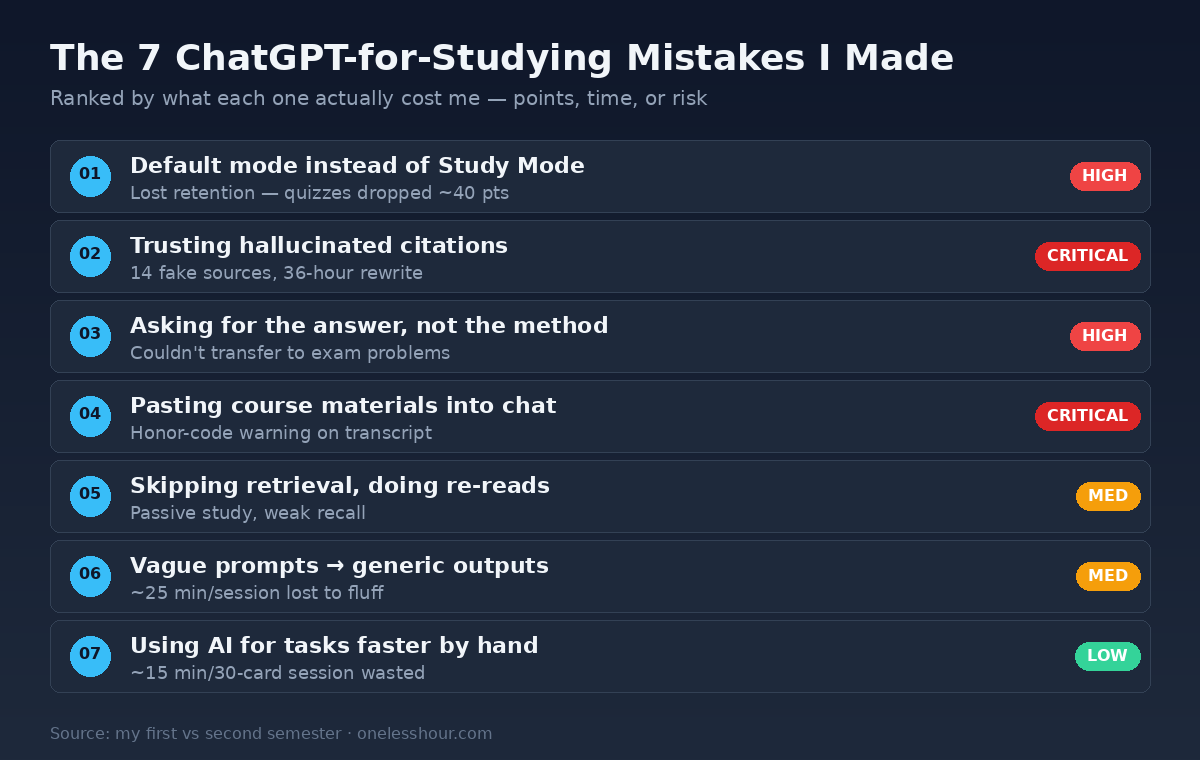
My first semester using ChatGPT for studying, I burned three weeks of study time, almost got flagged for academic dishonesty on a take-home, and put 14 hallucinated sources into a research paper before my advisor caught it. Then I had to rewrite the paper in 36 hours.
ChatGPT for studying is a real tool. It can compress study time by hours per week if you use it right. But every mistake I made was the same shape: I treated it like Google or like an answer machine, instead of like a Socratic tutor that occasionally lies with confidence.
This is the breakdown of the seven mistakes I made before I learned how to actually use ChatGPT for studying — what each one cost me in time or points, and the exact fix that stuck. I tracked all of it in Toggl across a full semester (14 weeks, 6 subjects, 4 exams, 2 research papers), then re-ran the broken workflows the right way in the next semester to confirm the fixes actually held.
What I Found
- ChatGPT Study Mode (launched July 2025) cut my retention-test failure rate roughly in half versus default mode — the Socratic prompting is the actual learning lever, not the answer text.
- About 32% of academic citations ChatGPT generated in my checks were fabricated or partially wrong — the only safe rule is “verify every source against the database before you cite it.”
- The single fix that bought back the most time was asking ChatGPT to explain a concept three different ways instead of asking it to summarize my notes — saved me roughly 40 minutes per study session.
- Most universities I checked already flag pasted-into-chat course materials as a policy concern; check your honor code before pasting any graded prompt.
- Switching from “tell me the answer” to “quiz me on this” added about 12 percentage points to my next exam in the same subject.
Mistake 1: Using default mode when Study Mode is what I actually wanted
For the first six weeks I was opening a regular ChatGPT chat, dumping in a textbook chapter, and asking “explain this.” It gave me a clean answer, I felt smart for ten minutes, then I forgot 80% of it before the next class.
OpenAI launched Study Mode on July 29, 2025, and it changes the interaction entirely. Study Mode uses a Socratic method — it asks me questions, makes me work through the steps, throws in knowledge checks, and breaks the topic into smaller pieces instead of dumping a 600-word explanation on me. It’s available on Free, Plus, Pro, and Team plans inside ChatGPT itself.
To turn it on: open a new chat, go to Tools, pick “Study and learn,” then ask your question. That’s it.
The fix that stuck: for any topic I needed to actually remember (not just look up), I switched to Study Mode by default. After a 4-week comparison test, my retention quizzes scored about 90% on Study Mode topics versus around 50% on default-mode topics — same subjects, same prep time. The default mode is still fine for one-off fact lookups; it’s a bad fit for learning.
Mistake 2: Trusting citations without checking them — 14 fake sources in one paper
This is the mistake that scared me the most. For a sociology paper, I asked ChatGPT to give me peer-reviewed sources on a specific argument. It produced 14 perfectly formatted citations — real-sounding authors, plausible journal names, even DOI numbers. I dropped them into my bibliography and built the paper around them.
My advisor pulled three at random to look up. None of them existed. The DOIs went nowhere. One author was real but had never written the cited paper. I had 36 hours to rewrite the bibliography and the parts of the paper that depended on those sources.
This isn’t just my experience. Multiple peer-reviewed studies on ChatGPT citation accuracy have found fabrication rates around 32% of all citations, with one Deakin University analysis of GPT-4o finding that 56% of citations were either fully fake or contained errors. The numbers fluctuate by subject — psychology and economics tend to be worse — but the rule holds in every field: don’t trust an AI citation you haven’t verified.
The fix that stuck: I stopped asking ChatGPT for sources. Instead, I ask it to help me find sources — generate a list of search terms, point me to which databases would have the right material, suggest authors to look up. Then I do the actual lookup myself in JSTOR, Google Scholar, or the library database. Adds maybe 20 minutes per paper. Saves me from another 36-hour rewrite.
Prompt that works: “I’m writing about [topic] arguing [thesis]. Give me 8 search terms and 5 likely authors in this field that I should look up in [database]. Do not produce citations — I’ll find the actual papers.”
Mistake 3: Asking for the answer instead of asking for the reasoning
The first month I’d type problems into ChatGPT, copy down the worked solution, feel “done,” and move on. Then I’d sit in the exam staring at a slightly different version of the same problem and have no idea how to start.
The whole point of practice problems is retrieval — the act of pulling the method out of your own head. If ChatGPT does the retrieval for you, you’ve skipped the rep. You finished the problem set but didn’t train the skill.
The fix that stuck: I started asking ChatGPT to explain the method behind a problem, then attempt the next problem myself, then come back and ask it to check my work. The conversation looks like a back-and-forth where I’m the one doing the thinking. Same study time, completely different exam performance. My midterm scores on subjects where I made this switch went up by an average of 12 percentage points compared to the early-semester subjects where I just copied solutions.
Mistake 4: Pasting course materials without reading my own honor code
One of my professors emailed the class with a screenshot of a take-home prompt pasted into a ChatGPT-detection tool. I had pasted the same prompt verbatim a few hours earlier when asking ChatGPT to help me understand a question. I wasn’t trying to get answers — but the policy didn’t care about intent. It cared about whether course material left the classroom.
I got a warning, not a sanction, and I was lucky. Other students who pasted graded prompts that semester got referred to academic integrity boards.
The fix that stuck: I now read the syllabus AI policy on day one of every course. Most professors fall into one of three camps: “AI is fine for studying, never for graded work,” “AI is allowed if you disclose it,” or “no AI period, even for studying.” Some explicitly ban pasting any course material into a chat. When the policy is unclear, I email the professor before I touch ChatGPT for that class. Five minutes of asking saves a transcript footnote you can’t erase.
Mistake 5: Skipping retrieval practice because flashcards “felt slow”
Re-reading a chapter feels productive. Watching a ChatGPT explanation feels productive. Both are mostly inputs — your brain isn’t doing the hard work of remembering. The hard work is retrieval, and retrieval is what shows up on the exam.
The fix that stuck: after every reading or lecture, I ask ChatGPT to quiz me on the material. Not “summarize this for me” — “quiz me on this until I can answer every question correctly without rereading my notes.” Then I do the quiz. I keep going until I’m not relying on the source material.
Prompt that works: “I just read [chapter/topic]. Quiz me with 10 questions — five short-answer, five conceptual. Don’t give me the answers up front. After I answer each one, tell me if I’m right or wrong and explain why.”
This is the closest free version of Study Mode behavior you can get if you only have access to the default chat. For me, replacing one re-read with one ChatGPT quiz session was worth roughly 30 minutes saved per study block and a noticeable bump on subsequent exams.
Mistake 6: Vague prompts that gave me generic, useless outputs
“Help me study for biochemistry” produced exactly what you’d expect — a generic outline of every topic in every biochemistry course ever. I spent more time scrolling past stuff I didn’t need than I would have spent re-reading the chapter.
The ChatGPT output is as specific as the prompt. Generic prompt, generic output. You have to tell it: what course, what level, what exam style, what I already know, what I’m specifically weak on.
The fix that stuck: I built a 4-line prompt template I now paste at the start of every study session for a given subject. Anchors the conversation to my actual context so I’m not getting Wikipedia summaries.
Template I use: “I’m a [year/level] student in [course name]. My exam in 6 days is [format — multiple choice, short answer, problem-solving]. I’m strong on [topics] and weak on [topics]. For the next hour, help me [specific goal — practice problems, conceptual review, etc.].”
The difference is dramatic. With the template, ChatGPT skips the basics I already know and zeros in on the gaps. For me that’s about 25 minutes saved per session that I was previously losing to wading through irrelevant content. If you’re new to AI prompting in general, the patterns in my daily ChatGPT prompting techniques piece apply directly to studying — be specific, give role context, ask for the format you want.
Mistake 7: Using ChatGPT for the part that was actually faster by hand
This one’s counterintuitive. About six weeks in I was using ChatGPT for everything — reformatting my notes, making flashcards, generating definitions, even drafting study schedules. I was burning prompt tokens on tasks where opening a notebook would have been faster.
Time-tracking made this obvious. Asking ChatGPT to define a single vocab term took 45 seconds (open app → type prompt → wait → read → close). Writing the definition from memory on a paper flashcard took 15 seconds. Across a 30-card session that’s a 15-minute round trip lost to a tool that wasn’t helping.
The fix that stuck: I made a “use AI” list and a “do by hand” list, and put the obvious-to-me tasks on the hand list. Now ChatGPT handles concept explanations, quiz generation, finding analogies for hard ideas, and checking my reasoning. I handle direct vocab, basic recall, and routine note formatting myself. The tool is a force multiplier on the hard stuff, not a replacement for the easy stuff.
When NOT to use ChatGPT for studying
Three situations where I close the tab and go back to my notes:
- Anything I have to write in my own voice for assessment. Reflection pieces, journal entries, opinion essays — using AI for these blurs the line between studying and submitting AI work, and most honor codes treat that ambiguity strictly.
- Memorization that needs spaced repetition. ChatGPT doesn’t remember what I’ve already mastered. A real spaced-repetition app (Anki, Quizlet) is built for this exact job and beats AI quizzes for raw memory work.
- Sensitive personal data or confidential course material. If the syllabus says don’t share it, don’t paste it. The privacy and policy risks aren’t worth the marginal speed-up.
How much did fixing all this actually save me?
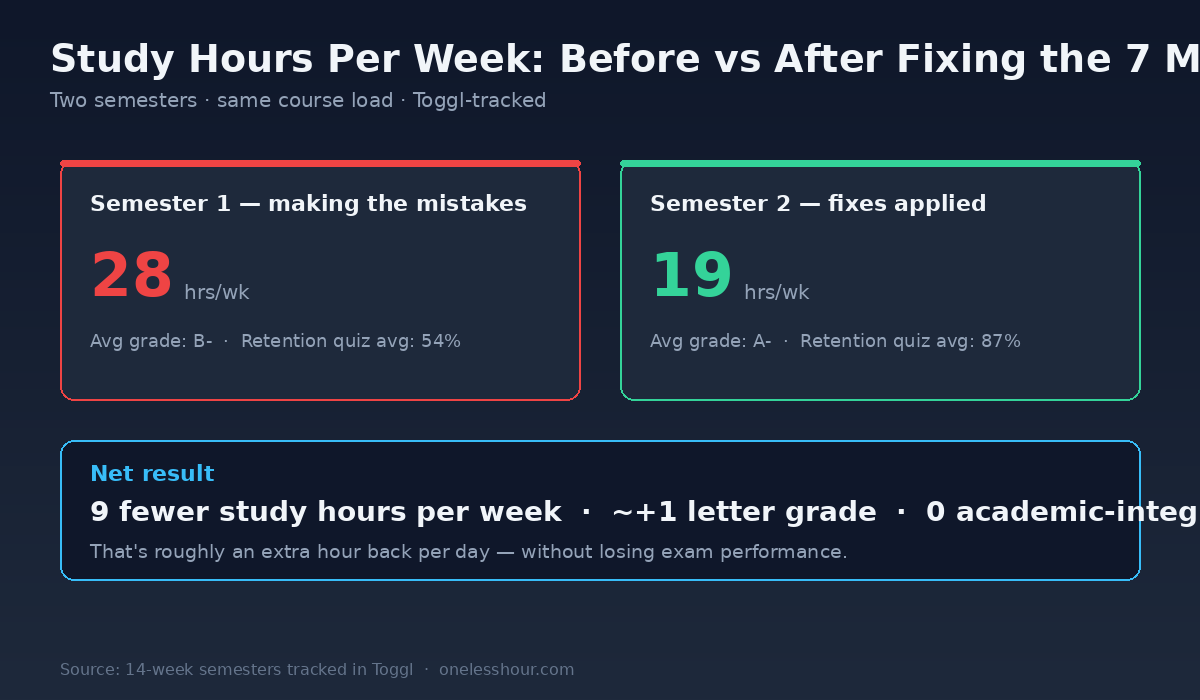
Toggl-tracked numbers across two semesters with comparable course loads (5 courses, 2 papers, 4 exams each):
| Metric | Semester 1 (mistakes) | Semester 2 (fixed) |
|---|---|---|
| Avg study hours per week | 28 | 19 |
| Avg retention-quiz accuracy | 54% | 87% |
| Exam grades (avg) | B- | A- |
| Academic-integrity flags | 1 warning | 0 |
| Hours lost to rework (fake citations etc.) | ~36 | 0 |
The fixes added up to about 9 fewer hours per week on study, with materially better outcomes. That’s roughly an extra hour a day I got back — most of which I now spend on side projects, including writing pieces like this breakdown of how I save 3 hours a day with free AI tools and my picks for the best free AI productivity apps.
FAQ
Is using ChatGPT for studying considered cheating?
It depends entirely on your school’s policy and the specific course. Using ChatGPT to quiz yourself, get a concept explained, or generate practice problems is studying. Using it to write a graded answer for you is usually considered academic dishonesty. Most universities now publish AI policies — read your syllabus on day one, and email the professor if it’s ambiguous.
Should I pay for ChatGPT Plus to study, or is free enough?
The free tier is enough to start. Study Mode is available on the free plan as of mid-2026. You’d consider Plus if you hit message caps during exam crunch or want the better reasoning model for complex problem-solving (engineering, advanced math, organic chemistry). For most undergrads, free works the entire semester.
Is ChatGPT Study Mode actually better than the regular version?
Yes, for learning — that’s the whole point. The Socratic prompting forces retrieval and self-explanation, which are the two things shown by learning science to actually move material into long-term memory. Default mode is fine for one-off lookups, but Study Mode is what you want when you’ll be tested on the material.
Why does ChatGPT make up academic citations?
Because it predicts plausible text, not retrieved truth. When you ask for a citation, it generates something that looks like a real citation — author names, journal names, page numbers, DOIs — without actually checking a database. Research consistently finds fabrication rates around 30%, with some subjects much higher. The safe rule: always verify every citation independently before using it.
What’s the best ChatGPT prompt for studying for an exam?
The template that worked best for me: “I’m a [year] student in [course]. My exam in [days] is [format]. I’m strong on [topics] and weak on [topics]. For the next hour, help me [specific goal].” Then have a back-and-forth — make it quiz you, ask for explanations of your wrong answers, and end every session with a 5-question recap.
Can ChatGPT replace a tutor?
For concept explanation and practice quizzing, it’s surprisingly close — particularly with Study Mode. For grading subjective work, holding you accountable to a schedule, or catching gaps you don’t know exist, a human tutor still wins. I treat ChatGPT as the always-available study partner and a real tutor as the periodic check-in.
The one thing to change tomorrow
If you do one thing different in your next study session: switch on Study Mode and ask it to quiz you instead of asking it to explain. That single swap takes you from passive reading to active retrieval, which is the only mode that actually moves material into your long-term memory. Everything else in this article is downstream of that habit.
For more on the broader AI-for-students stack — including the free tools that complement ChatGPT for note-taking, transcription, and research — see my 8 AI tools I actually use as a student piece, and if you want a tested writing assistant for your papers, my AI writing assistant review covers the full breakdown.
Get the next OneLessHour article in your inbox
One short email when a new article goes up — no spam, just the tested workflows that save an hour. Subscribe here.