
Transparency note: This article contains no affiliate links, and no company paid for or reviewed it. I pay for most of the AI tools I use myself — see how I test.
Last Tuesday I timed myself. Between 9 AM and 5 PM, I spent 2 hours and 47 minutes on tasks that required zero creative thinking: sorting emails, reformatting a report, writing a meeting recap nobody would read, and copying data between spreadsheets. That’s 35% of my workday gone before I touched anything that actually mattered.
Sound familiar? Most knowledge workers lose 2-4 hours daily to repetitive busywork. I spent the last three months rebuilding my workday around AI tools — not replacing my job, but eliminating the parts that were wasting my time. The result: I now finish my actual work by 3 PM most days, and the quality hasn’t dropped. If anything, it’s improved because I have more energy for the work that matters.
Here’s exactly how I use AI at work, hour by hour, with the specific tools, prompts, and workflows I rely on daily. No vague advice about “leveraging AI” — just the practical stuff that works.
My AI-Powered Workday: Hour by Hour
Before I walk through the specific techniques, here’s what a typical day looks like now versus three months ago. The shift wasn’t overnight — I added one AI workflow per week over about eight weeks until the whole system clicked.
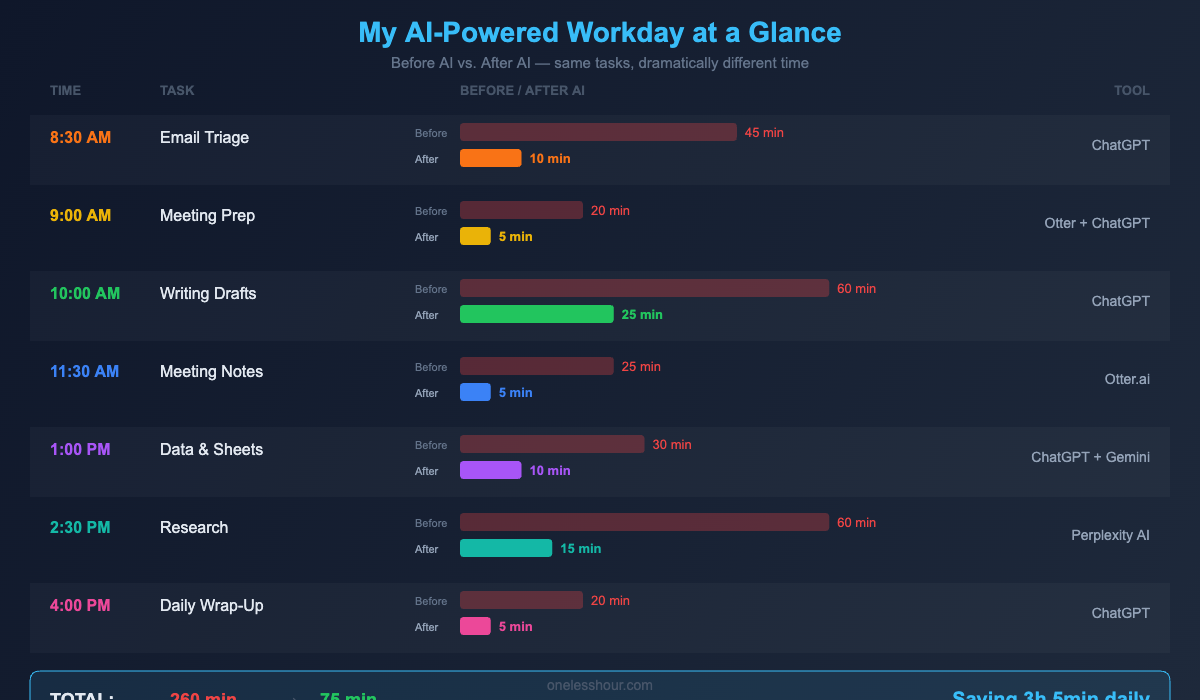
8:30 AM — The Morning Briefing (10 Minutes Instead of 45)
My old morning routine: open email, scroll through 30-50 messages, flag the important ones, read through Slack channels I missed, check my calendar, mentally plan my day. That took 40-45 minutes and left me feeling behind before I started.
Which assistant you point at this matters less than people assume, but it is not nothing. I tested six chatbots and four saved me real time daily.
Now I use ChatGPT as my morning briefer. I paste my unread email subjects and first lines (I use a simple Gmail filter to forward a daily digest) and ask it to categorize them:
“Here are my unread emails from overnight. Categorize them as: URGENT (needs response today), IMPORTANT (this week), FYI (just read), and SKIP (newsletters/promotions I can ignore). For the URGENT ones, draft a 2-sentence response I can edit.”
This takes about 3 minutes. I scan the categorization, tweak the draft responses, and I’m done with email triage in 10 minutes flat. The draft responses aren’t perfect, but they’re 80% there — I just adjust the tone or add a specific detail.
Time saved: ~30 minutes/day
Tool: ChatGPT (free tier works fine)
Best for: Anyone who gets 20+ emails per day
9:00 AM — Meeting Prep That Actually Prepares You (5 Minutes)
I used to spend 15-20 minutes before each meeting re-reading old notes, context-switching, and trying to remember where we left off. Now I use Otter.ai’s meeting summaries from previous sessions plus a quick ChatGPT prompt:
“Based on these meeting notes from last week [paste notes], what are the 3 open action items, any decisions that were made, and what topics will likely come up in today’s follow-up? Give me bullet points I can glance at in 60 seconds.”
I walk into every meeting now with a mental cheat sheet. Colleagues have actually commented that I seem more prepared — the irony is I’m spending a fraction of the time on prep.
Time saved: ~15 minutes per meeting (I have 2-3 daily)
Tools: Otter.ai + ChatGPT
Best for: Meeting-heavy roles (managers, PMs, consultants)
10:00 AM — Writing First Drafts in Half the Time
Reports, proposals, internal updates, client emails — writing is probably where AI saves me the most time, but only because I learned to use it correctly. Here’s what doesn’t work: asking ChatGPT to “write a report about Q1 sales.” You’ll get generic garbage that takes longer to fix than writing from scratch.
What works is using AI as a drafting partner, not a ghostwriter. My workflow:
Step 1: I brain-dump my raw thoughts, bullet points, and data into a prompt. Messy is fine — that’s the point.
Step 2: I tell ChatGPT exactly what I need: “Turn these rough notes into a 500-word internal update for my team. Tone: professional but not stiff. Structure: what happened, why it matters, next steps. Include the specific numbers I gave you.”
Step 3: I edit the output for accuracy and voice. This takes 5-10 minutes instead of 30+ minutes of staring at a blank page.
The key insight: AI is terrible at creating something from nothing, but excellent at organizing and polishing YOUR raw material. Feed it your thinking, and it structures it. That’s where the magic is. If you want to dig deeper into prompting technique, our ChatGPT prompting guide covers the exact frameworks I use daily.
Time saved: ~45 minutes/day on writing tasks
Tool: ChatGPT or Google Gemini
Best for: Anyone who writes more than 3 emails or documents per day
11:30 AM — Meetings Run Themselves (Sort Of)
I stopped taking meeting notes six weeks ago and nothing bad happened. Otter.ai records and transcribes every call automatically. After the meeting, it generates a summary with action items, decisions, and key discussion points.
But here’s the part most “use AI for meetings” articles skip: the real value isn’t the transcription. It’s the searchability. Last week a colleague said “didn’t we discuss the vendor pricing issue in that meeting three weeks ago?” I searched Otter, found the exact conversation in 30 seconds, and pulled up the context. Before AI, that answer would have been “I think so? Let me check my notes… actually I’m not sure.”
Time saved: ~20 minutes per meeting (notes + follow-up)
Tool: Otter.ai (free tier: 300 min/month — enough for most people)
Best for: Anyone in 3+ meetings per day
1:00 PM — Data Work Without the Spreadsheet Headaches
I’m not a data analyst, but like most knowledge workers, I spend time wrestling with spreadsheets. Formatting reports, creating pivot tables, writing formulas — tasks I know HOW to do but that eat up disproportionate time.
Now I describe what I need in plain English to ChatGPT:
“I have a spreadsheet with columns A (employee name), B (department), C (Q1 hours), D (Q2 hours). I need a formula that calculates the percentage change between Q1 and Q2 for each person, and conditional formatting that highlights anyone with more than 15% increase in red.”
It gives me the exact formula, explains it, and tells me how to apply the conditional formatting. What used to require a 10-minute Google search and Stack Overflow rabbit hole now takes 2 minutes.
For bigger data tasks, Google Gemini’s integration with Google Sheets is even better — you can ask it questions about your data directly within the spreadsheet. “Show me which department had the highest overtime hours last quarter” and it generates the answer with a chart. If you haven’t explored how AI tools can automate your repetitive tasks, that guide walks through the full setup.
Time saved: ~20 minutes/day
Tools: ChatGPT for formulas, Google Gemini for Sheets integration
Best for: Anyone who touches spreadsheets weekly
2:30 PM — Research in Minutes, Not Hours
When I need to research a topic — competitor analysis, market trends, background for a presentation — I used to open 15 browser tabs and spend an hour reading, comparing, and synthesizing. Now I start with Perplexity AI.
Perplexity is different from ChatGPT for research because it cites its sources in real-time. I can ask “What are the top 3 CRM platforms for small teams under 20 people, with pricing comparison as of 2026?” and get a sourced answer in 30 seconds. I still verify the key claims, but the initial research phase shrinks from 60 minutes to about 15.
The trick is knowing when to use which tool. ChatGPT is better for brainstorming and writing. Perplexity is better for facts and current information. Google Gemini is better for anything that lives in your Google Workspace. Using the wrong tool for the job is why some people say “AI doesn’t actually save me time.” It does — if you match the tool to the task. Our review of the best free AI apps breaks down exactly which tool wins for each use case.
Time saved: ~30 minutes per research task
Tool: Perplexity AI (free tier is generous)
Best for: Anyone who does research, competitive analysis, or presentation prep
4:00 PM — End-of-Day Wrap-Up (The Part Nobody Talks About)
Here’s a workflow I haven’t seen in any other “AI at work” guide: the end-of-day brain dump. At 4 PM, I spend 5 minutes telling ChatGPT everything I worked on, what’s unfinished, and what’s on my mind for tomorrow:
“Here’s what I did today: [brain dump]. Organize this into: 1) What I completed 2) What’s in progress with next steps 3) What I should prioritize tomorrow morning based on deadlines. Also flag anything I might be forgetting.”
This gives me a clean handoff to future-me. Monday mornings used to start with 20 minutes of “wait, where was I?” Now I glance at Friday’s wrap-up and I’m productive within 5 minutes. It also reduces that anxious “am I forgetting something?” feeling that follows me home.
Time saved: ~15 minutes/day (mostly recovered from tomorrow’s startup time)
Tool: ChatGPT
Best for: Everyone. Seriously, this one is universal.
The Honest Parts: Where AI Made Things Worse
I’d be lying if I said every AI experiment worked. Here’s what failed or backfired:
Using AI for sensitive emails. I drafted a response to a frustrated client using ChatGPT. It was technically fine but felt… hollow. The client could tell. Emotionally nuanced communication still needs your human voice. I now only use AI for routine emails, never for anything relationship-critical.
Over-automating and losing context. I set up so many automations at once that I stopped understanding my own workflows. When something broke, I couldn’t debug it because I’d forgotten why I’d set it up that way. Now I add one new AI workflow per week maximum and document why each one exists.
The quality-check tax. Harvard Business Review’s research is right — AI doesn’t always reduce total work time. It shifts the work from “creating” to “checking.” If you don’t trust-but-verify AI outputs, you’ll eventually send something embarrassing. I now budget 2-3 minutes to review every AI-generated output before it leaves my hands.
Tool fatigue. I tried using 8 different AI tools simultaneously. It was exhausting. Three tools is the sweet spot for most people: a general-purpose chatbot (ChatGPT), a meeting tool (Otter.ai), and a research tool (Perplexity). Add more only when you’ve mastered those three.
The Complete AI Toolkit: What to Use When
| Task | Best Tool | Free Tier? | Time Saved |
|---|---|---|---|
| Email drafting & triage | ChatGPT | Yes (GPT-4o mini) | 30 min/day |
| Meeting notes & summaries | Otter.ai | Yes (300 min/mo) | 20 min/meeting |
| Research & fact-checking | Perplexity AI | Yes (5 searches/day) | 30 min/task |
| Spreadsheet formulas | ChatGPT or Gemini | Yes | 20 min/day |
| Writing first drafts | ChatGPT | Yes | 45 min/day |
| Design & visuals | Canva Magic Studio | Yes (limited) | 30 min/task |
| Task planning | ChatGPT | Yes | 15 min/day |
How to Start This Week (Without Overwhelm)
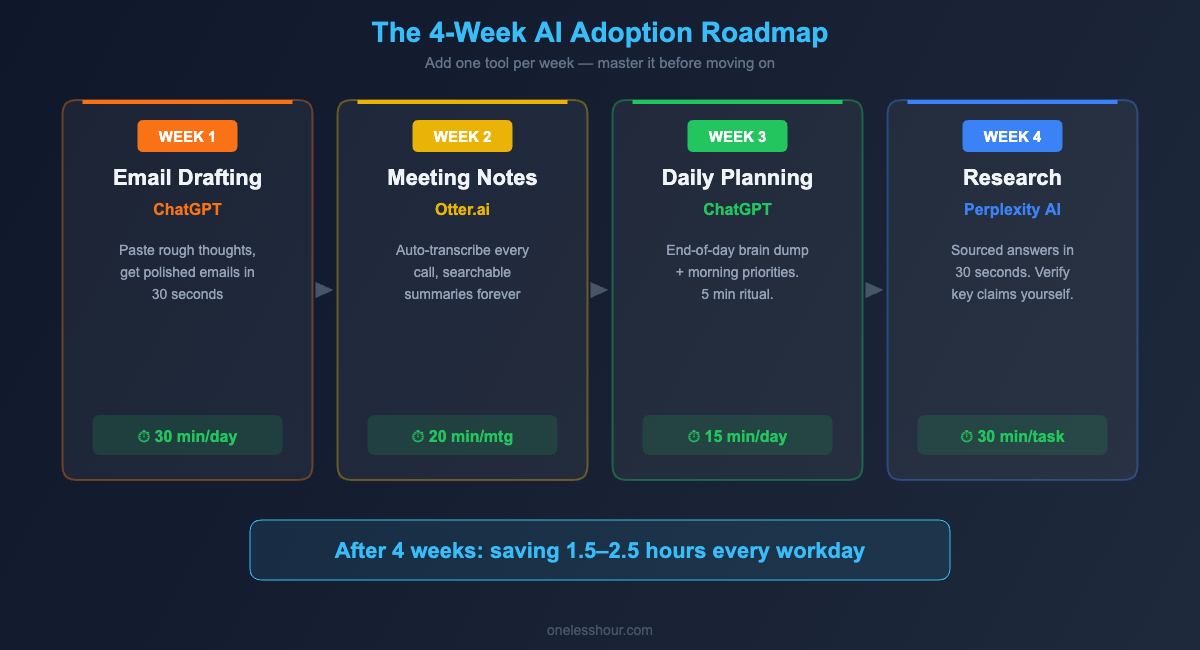
Don’t try to adopt everything at once. I made that mistake and it backfired. Here’s the sequence that worked for me:
Week 1: Just use ChatGPT for email drafting. Every time you start typing a non-trivial email, paste your rough thoughts into ChatGPT first and let it create a draft. Do this for 5 days straight until it feels automatic.
Week 2: Add meeting summaries with Otter.ai. Install it, let it run during every meeting, and start using the auto-generated summaries instead of your own notes.
Week 3: Start using the end-of-day brain dump workflow. This takes 5 minutes and the ROI is immediate.
Week 4: Add Perplexity for research tasks. By now you’ll have a feel for when AI helps and when it doesn’t, so you’ll naturally use it in the right spots.
By the end of month one, you should be saving 1.5-2.5 hours per day. That’s not a marketing claim — it’s what I measured by tracking my time for two weeks before and after.
Frequently Asked Questions
Is it ethical to use AI at work?
Yes, with transparency. Most companies now encourage AI use — a 2026 Microsoft survey found 78% of knowledge workers use AI tools at work, and 65% of managers explicitly approve. The ethical line is claiming AI-generated work as entirely your own (especially in academic or creative contexts) versus using it as a tool that helps you do your job better. If you’re unsure, ask your manager. Most will appreciate your honesty and your initiative.
Is using AI at work cheating?
No more than using spell check, Google, or a calculator is cheating. AI is a tool that amplifies your existing skills. The person who can effectively direct AI to produce great work is demonstrating judgment, communication skills, and strategic thinking. The key is that you understand, verify, and take responsibility for the output.
What if my company hasn’t approved AI tools?
Start with your company’s IT or security policy. Many organizations restrict which AI tools can be used due to data privacy concerns — and that’s reasonable. Never paste confidential company data into a public AI tool without approval. If your company hasn’t addressed AI yet, you could propose a pilot program: “I’d like to test ChatGPT for email drafting for two weeks and measure the time savings. Can we discuss data security guidelines first?”
How much time can AI realistically save at work?
Based on my tracking and published research: 1.5-3.5 hours per day for typical knowledge workers, depending on how much of your day involves writing, meetings, email, and data tasks. The Harvard Business Review notes that some of this time gets reinvested into quality-checking AI outputs, so the net savings are closer to 1-2.5 hours for most people. Still significant — that’s an extra day of productive work per week.
Will AI replace my job?
Probably not, but it will change your job. The pattern across every industry is the same: AI automates specific tasks within a role, not entire roles. The people at risk aren’t those whose jobs involve AI-automatable tasks — it’s those who refuse to learn how to use AI while their peers become 2x more productive. Learning to use AI at work isn’t just a productivity hack; it’s career insurance.
Your One-Hour Challenge
Right now, open ChatGPT and paste in the last email you spent more than 5 minutes writing. Ask it: “Rewrite this email to be clearer and 30% shorter while keeping the same tone.” Compare the result to your original. If you save even 3 minutes on one email, multiply that by every email you’ll write this week. That’s the moment it clicks — and that’s how most people start using AI at work for real, not because someone told them to, but because they saw the result with their own eyes.
Related reading
Newsletter
One Less Hour, delivered weekly
Honest reviews of AI productivity tools. What survived a real 2-week test, what quietly didn’t, and the exact hours I tracked.
One email per week. Unsubscribe in one click.