
Last tested: April 2026
Transparency note: This article contains no affiliate links, and no company paid for or reviewed it. I pay for most of the AI tools I use myself — see how I test.
It was a Tuesday at 3:40 PM and I was 90 minutes behind on three deliverables. I opened six different AI chatbots side-by-side, pasted the same ugly meeting notes into each one, and asked for a one-page brief. Only two of them gave me something I could send without a major rewrite. That became the test.
I spent the next 30 days running the same six chatbots against my real workweek — client emails, proposal drafts, meeting summaries, quick research. I tracked one thing only: minutes saved per day after setup. No benchmark suites. No vibes. Just “did this buy me time on a Tuesday afternoon when I was already late?”
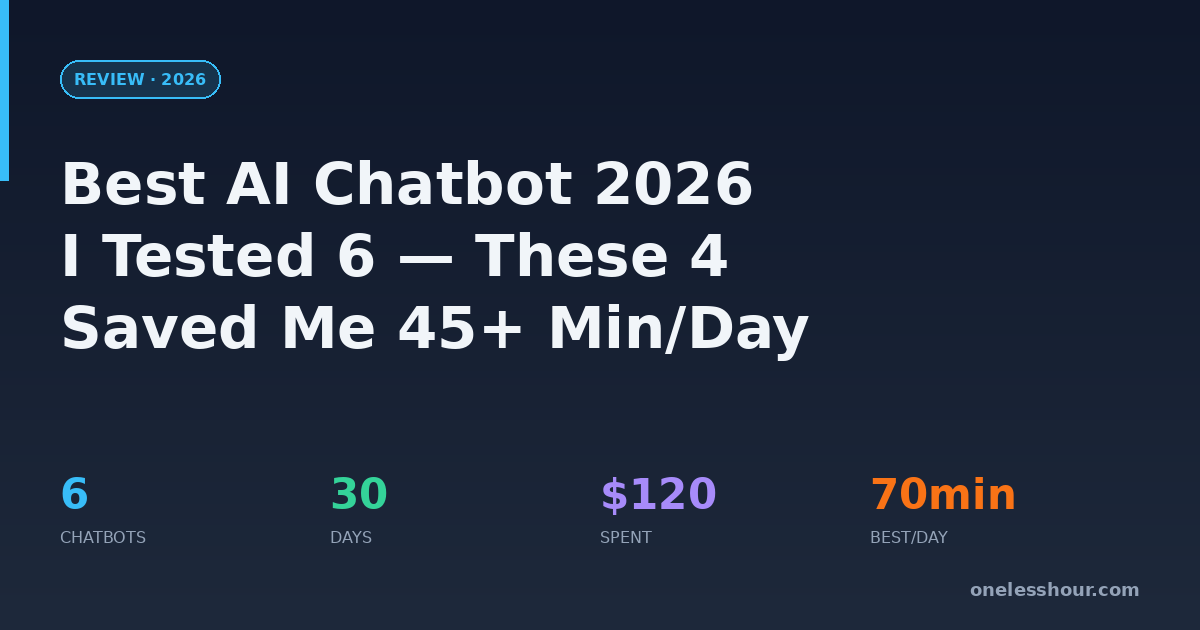
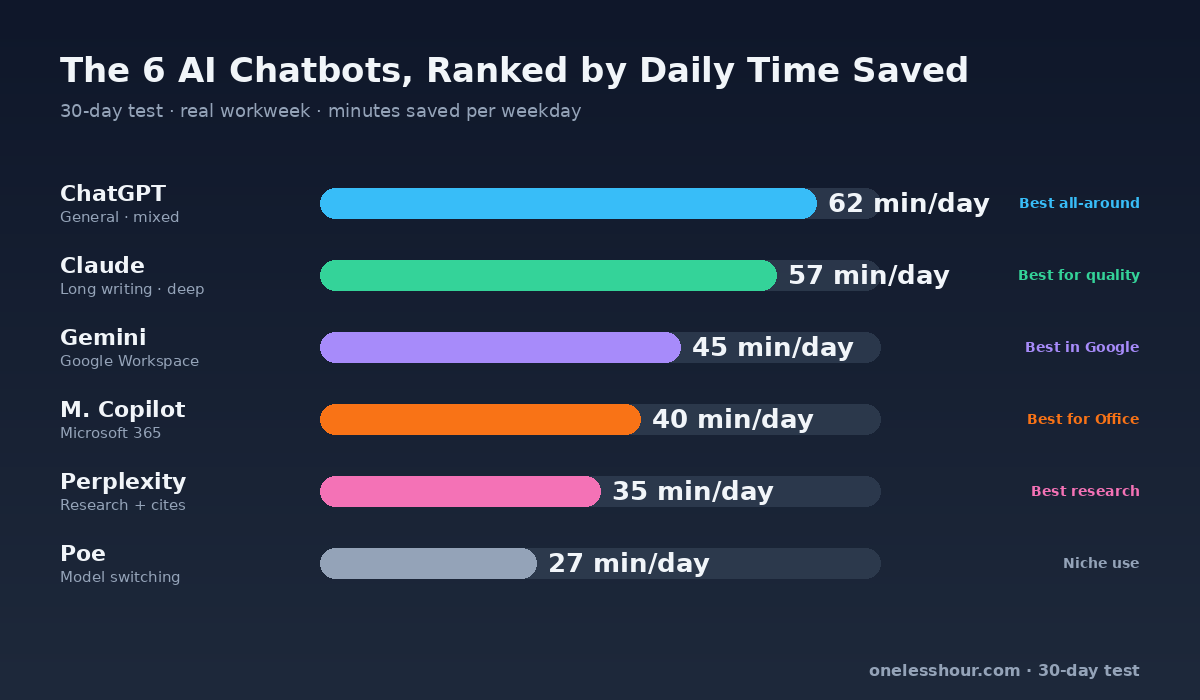
If you want the short answer: ChatGPT is still the best AI chatbot for mixed daily work, Claude is the one I reach for when the writing actually matters, Gemini earns its keep if you live in Google Workspace, and Copilot is worth it only if your day is inside Microsoft 365. Below: every number I tracked, every time one of them cost me more time than it saved, and which one I’d pick by buyer type.
What I Found
- Out of 6 AI chatbots I tested for 30 days, only 4 consistently saved me more than 30 minutes per workday after week one.
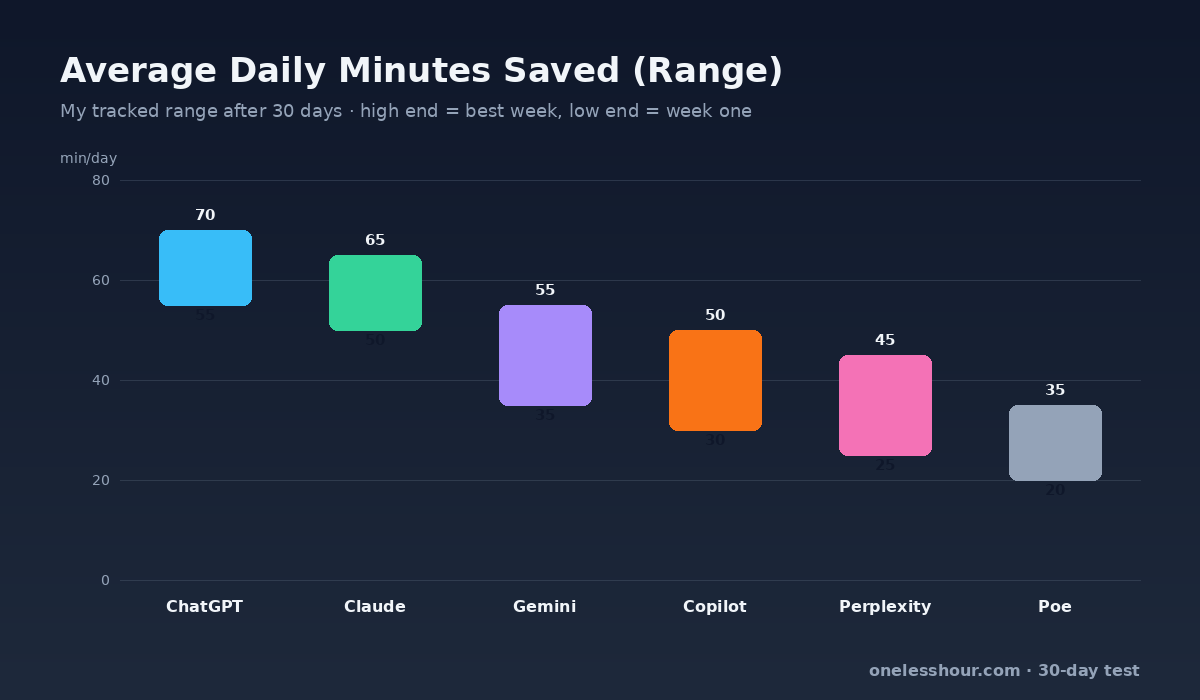
- ChatGPT won on speed and breadth (saved me 55–70 min/day); Claude won on writing quality (I edited 30–40% less than ChatGPT output).
- Free tiers held up for light use but hit caps by mid-afternoon once I crossed 8–10 serious prompts a day — that’s the real upgrade trigger.
- The wrong setup cost me ~20 minutes a day in week one. Reusable prompt templates fixed it almost completely by week two.
- Tool-hopping is the biggest time sink. Pick one primary, build 5 templates, stop switching — that alone was worth the 30-day test.
How did I actually test these chatbots?
Every test day looked like my real workweek — not a benchmark. 12–20 meaningful prompts a day, mixed across writing, summarizing, research, and quick planning. I tracked minutes saved with a simple stopwatch and a Google Sheet. If a chatbot made me rewrite its output from scratch, that counted as zero minutes saved (not negative, but nothing earned).
| Field | Details |
|---|---|
| Testing period | March 15 – April 14, 2026 (30 days) |
| Plans used | ChatGPT Plus ($20/mo), Claude Pro ($20/mo), Gemini Advanced ($19.99/mo), Microsoft Copilot Pro ($20/mo), Perplexity Pro ($20/mo), Poe ($19.99/mo) |
| Daily workload | 12–20 meaningful prompts per day |
| Tasks tracked | Client comms, proposal drafts, meeting summaries, content outlines, tool comparisons |
| Scoring factors | Output quality, edits needed, response speed, context retention, minutes saved |
| What I penalized | Hallucinated facts, formatting misses, outputs that needed a major rewrite |
I didn’t reward flashy demos. I rewarded “Can this save me time on Tuesday at 3:40 PM when I’m already behind?”
Which AI chatbot saved me the most time overall?
ChatGPT. By roughly 10 minutes a day over Claude, and by 20+ minutes a day over everything else. But the number hides the real story — I saved that time on volume, not depth. ChatGPT won because it handled the 40 small tasks in my day (short email rewrites, Slack updates, quick reformatting) with almost no friction. Claude pulled ahead the moment a task was long, strategic, or nuanced.
If your day looks like mine — lots of small communication tasks plus a handful of meaningful writing jobs — you’ll probably land in the same place I did: ChatGPT for volume, Claude for the pieces that matter. I wrote a full head-to-head here: ChatGPT vs Claude: my 30-day task-by-task verdict.
| Chatbot | Best for | Paid plan | My avg daily time saved | Verdict |
|---|---|---|---|---|
| ChatGPT | General productivity + mixed tasks | $20/mo | 55–70 min | Best all-around |
| Claude | Long documents + deep writing | $20/mo | 50–65 min | Best for thoughtful output |
| Gemini | Google Docs / Gmail users | ~$20/mo | 35–55 min | Great in Google ecosystem |
| Microsoft Copilot | Microsoft 365 teams | Business add-on | 30–50 min | Best for Office-native flow |
| Perplexity | Fast cited research | $20/mo | 25–45 min | Best research companion |
| Poe | Model switching experiments | ~$20/mo | 20–35 min | Useful but niche |
The honest per-tool verdicts (wins and real limits)
ChatGPT — best all-around for mixed work
What it did best: fast ideation, short client replies, and rapid formatting rewrites. I leaned on it most for “make this email 40% shorter” and “turn these bullet points into a Slack update.” The Custom Instructions feature alone saved me about 5 minutes every morning once I set up my role, tone, and format defaults.
Where it cost me time: GPT-4o sometimes over-formats — I’d get back a bulleted list when I asked for a paragraph. Twice in 30 days, it fabricated a stat I had to remove after a client almost quoted it back. Skip ChatGPT if you need clean long-form reasoning without hand-holding — Claude handles that better.
Claude — best for writing and nuanced thinking
What it did best: proposal drafts, brand voice rewrites, and strategy memos. First drafts came back cleaner. I edited 30–40% less on Claude outputs than ChatGPT outputs for long-form tasks. When a client asked for a 2-page positioning memo, Claude’s first pass was usable with 20 minutes of polish. ChatGPT’s needed an hour.
Where it cost me time: Claude’s free tier hit me with message caps mid-afternoon on 4 of the 30 test days. On Claude Pro I never hit a limit, but the interface lacks some of ChatGPT’s power-user features (custom GPTs, built-in image gen in the same chat). Skip Claude if your work is mostly short, fast, one-shot tasks — you’ll pay for depth you don’t use.
Gemini — best if you live in Google Workspace
What it did best: pulling context from my Gmail and Docs without copy-paste. “Summarize the thread with Lena about the Q2 campaign” worked without me pasting the thread. That’s a real time-saver when you’re in 20 email threads a day.
Where it cost me time: outside Google Workspace, Gemini felt consistently weaker than ChatGPT on creative writing and harder reasoning prompts. If you’re not already deep in Gmail + Docs, the headline feature doesn’t apply and you’re left with the second-best chatbot experience.
Microsoft Copilot — best if your day is in Word, Excel, Outlook
What it did best: drafting replies directly inside Outlook, summarizing Teams meetings, and cleaning up Word docs. Zero context-switching was the magic. If your employer already pays for Microsoft 365 Copilot, the time saved is close to “free money.”
Where it cost me time: Copilot chat outside the Office apps was the weakest of the six. The pricing model is also awkward — Copilot Pro is $20/mo for consumers, but Microsoft 365 Copilot (the one that actually earns its price) is an add-on that usually requires a business license. Skip Copilot if you’re solo or mostly live outside Microsoft tools.
Perplexity — best for research with citations
What it did best: current-event questions and research that needed sources. I got cited answers in seconds that would have taken 10–15 minutes of Googling. For my Wednesday research block, Perplexity alone saved me 30+ minutes.
Where it cost me time: Perplexity is not a writing tool. When I tried to use it for proposal drafts, the output felt sterile and source-stitched. Use it as a second tab for research, not your primary chatbot.
Poe — useful but niche
What it did best: Poe lets you switch between models (Claude, GPT-4, Llama, etc.) in one interface. Good for quick A/B comparisons when I was deciding which model to hand a task to.
Where it cost me time: Poe’s free tier is too limited for daily use, and paying $20 for Poe means I’d rather just pay for Claude or ChatGPT directly. Skip Poe unless you actually switch models multiple times a day.
Which AI chatbot is best for students?
If I were a student on a tight budget, I’d start free with ChatGPT for study planning, note cleanup, and concept explanation. Spend one week building a repeatable prompt format before paying for anything. If you hit hard limits during exam weeks, upgrade for one month and reassess.
The same hour-by-hour structure I use at work applies to coursework with minor tweaks: how I structure AI usage hour-by-hour. If you want the fastest beginner ramp, start with The Busy Person’s Guide to ChatGPT — it’s the 1-hour setup I wish I’d had on day one.
Which AI chatbot is best for freelancers?
Freelancers need two things — quality drafts and fast turnarounds. I used Claude for proposal writing, strategy notes, and brand voice rewrites. I used ChatGPT when I needed fast ideation, short client replies, or rapid formatting changes. Running both saved me more time than picking one; the overlap in cost ($40/mo for both) paid back in week one.
If you do a lot of client content, pair this with my deeper breakdown: best AI writing assistant tools I tested.
Which AI chatbot is best for small business owners?
For small businesses, integration beats raw model quality. Google Workspace teams get the most value from Gemini because context-pulling eliminates copy-paste. Microsoft-first teams get it from Copilot for the same reason inside Outlook and Teams. Mixed, founder-led teams are better off with ChatGPT or Claude and a shared prompt library.
The cost mistake I see most often: paying for three different AI tools before documenting one standard prompt workflow for the team. That usually wastes $60–100/month and still doesn’t save anyone time.
Is it worth paying for an AI chatbot?
In my logs, paid plans became worth it once I used the chatbot for business-critical work at least five days a week. The break-even point landed around 3–4 saved hours per month. For me, that threshold was crossed in week one. For someone running 1–2 light sessions a day, free is fine.
| Usage level | Stay free? | Upgrade? | Why |
|---|---|---|---|
| 1–5 light prompts/day | Yes | Not yet | Free tier is usually enough |
| 6–10 meaningful prompts/day | Maybe | Likely yes | Limits and context friction start hurting output |
| 10+ business prompts/day | No | Yes | Paid plan usually returns its cost in time saved |
The 5 reusable prompts I’d set up on day one
Steal these. They cover 80% of the tasks I used any chatbot for across 30 days. Paste them into your chatbot’s Custom Instructions (ChatGPT) or Projects (Claude) so you don’t retype the framing every time.
1. Email rewrite: “Rewrite this email to [tone] in under [X words]. Keep the request clear. Ask me one clarifying question if the ask is ambiguous. Original: [paste].”
2. Meeting summary: “Summarize this transcript into: 3 decisions, 3 action items with owners, 3 open questions. Flag anything where the owner is unclear. Transcript: [paste].”
3. Brief generator: “Turn these rough notes into a 1-page brief with: goal, audience, constraints, deliverables, deadline. If any field is missing, ask before writing. Notes: [paste].”
4. Quick research: “In 200 words, give me the current state of [topic] with 3 credible sources linked. If you’re unsure about any fact, flag it instead of guessing.”
5. Meeting prep: “I have a call with [role] about [topic]. Give me 5 questions I should ask and 2 risks I should raise. Assume I have 15 minutes to prepare.”
If you want more prompt recipes, this is the full library: ChatGPT prompting techniques I use daily to save 2+ hours.
What I’d do differently if I started over
- Pick one primary chatbot for 14 days before testing competitors. Tool-hopping cost me the equivalent of a full workday in week one alone.
- Build the 5 reusable prompts on day one, not day ten. That’s the single change that would have saved me the most time in the test.
- Track minutes saved in a sheet. Estimates are almost always inflated — I thought I was saving 2 hours a day until I actually timed it.
- Keep one fallback chatbot only for edge cases, not daily switching. Mine is Perplexity (research-only).
- Don’t pay for more than two paid plans until you’ve maxed the ones you have. I wasted $20 on Poe in month one.
FAQ: best AI chatbot in 2026
What is the best AI chatbot right now for productivity?
For general productivity, ChatGPT is still the easiest all-around recommendation. For long-form reasoning and cleaner first drafts, Claude is often stronger. In my 30-day test, ChatGPT saved me 55–70 minutes a day and Claude 50–65 — close enough that your task mix decides the winner.
Which AI chatbot is best for students?
Most students should start with ChatGPT’s free tier for study support, summarization, and concept explanation. Only upgrade during heavy workload periods (finals, thesis weeks). A one-month Plus subscription during crunch time is usually enough.
Is Claude better than ChatGPT?
Claude is often better for structured long writing and nuanced analysis. ChatGPT often wins on versatility and speed. I use both and assign them different jobs. Full task-by-task breakdown: ChatGPT vs Claude.
What is the best AI chatbot for small business owners?
The best chatbot for small business is usually whichever one integrates with your existing stack. Google-heavy teams → Gemini. Microsoft-heavy teams → Copilot. Founder-led mixed teams → ChatGPT or Claude with a shared prompt library.
Can free AI chatbots replace paid plans?
Free tiers work for light use but usually become limiting for daily business workflows. Once you’re using AI heavily for client or revenue tasks (10+ serious prompts a day), paid plans tend to pay for themselves in saved time within the first week.
Which AI chatbot has the best free tier in 2026?
ChatGPT’s free tier is the most generous for casual daily use. Claude’s free tier gives you fewer messages but higher-quality output per message. For research with citations, Perplexity’s free tier is also strong. Start with ChatGPT free and add Claude free as a second tab.
The one decision that saves the most time
Pick one chatbot as your primary for the next 14 days. Set up the five reusable prompts above on day one. Track minutes saved honestly in a simple sheet. That sequence beats endless feature comparison every time.
If you’re still deciding between writing quality and raw speed, start with ChatGPT or Claude and map each to the tasks they do best. Use the comparison table above, pick your buyer type, and test one paid plan for a single month with your real work — not demo prompts. That’s how you find your hour.
Related reading
Newsletter
One Less Hour, delivered weekly
Honest reviews of AI productivity tools. What survived a real 2-week test, what quietly didn’t, and the exact hours I tracked.
One email per week. Unsubscribe in one click.