Last tested: April 2026
Transparency note: This article contains no affiliate links, and no company paid for or reviewed it. I pay for most of the AI tools I use myself — see how I test.
My last job had back-to-back meetings every morning. I’d scramble to take notes, miss half of what was said, and spend 20 minutes after each call trying to remember what was decided. When I started testing AI voice recorders seriously, I expected a marginal improvement. What I found was that the right tool cuts that 20 minutes down to about two — and that the wrong one just creates a different kind of mess.
I tested six AI voice recorders over the past month — software apps, hardware devices, and hybrid tools. I tracked how much time each one actually saved me per week, where each one frustrated me, and which use cases each one genuinely owns. This is what I found. If you are trying to choose the best AI voice recorder for your workflow, this guide will save you trial-and-error time.
What I Found
- Otter.ai saved me roughly 2.5 hours per week on meeting follow-ups — the auto-join and real-time summary combo is genuinely useful.
- The Plaud Note hardware recorder eliminated my phone-on-the-table awkwardness in in-person meetings and transcribed a 90-minute session in under 3 minutes.
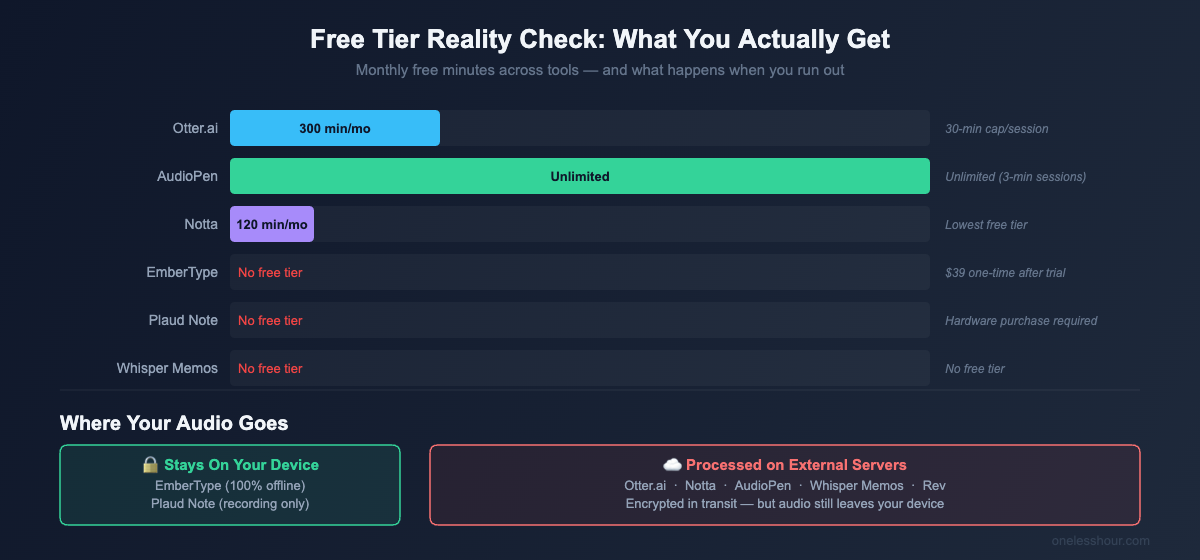
- Free tiers are more limited than advertised — Otter’s free plan gives you 300 minutes per month, which sounds like a lot until you hit 3 long meetings in one week.
- Privacy matters more than most reviews acknowledge: every cloud-based tool sends your audio to external servers, and only one option on this list keeps everything local.
- I expected the expensive tools to win. The $39 one-time option outperformed two $15/month subscriptions for everyday dictation.
What actually separates a good AI voice recorder from a bad one?
Most reviews focus on transcription accuracy — but in 2026, every tool using OpenAI’s Whisper model hits 95%+ accuracy. That’s table stakes. What actually separates a useful tool from a frustrating one is everything that happens after the recording ends.
The questions that actually matter: Does it auto-join your Zoom call without you thinking about it? Does the summary it produces actually capture the decisions made, or just regurgitate filler? Can you search a transcript from three weeks ago in under 10 seconds? Does your audio leave your device — and do you care if it does?
I weighted my rankings on four things: time saved per week (the OLH standard), reliability in real-world conditions, free-tier honesty, and privacy transparency. Here are the six that came out ahead.
1. Otter.ai — Best for meeting-heavy professionals
Price: Free (300 min/mo) | Pro $8.33/mo annual | Business $19.99/mo
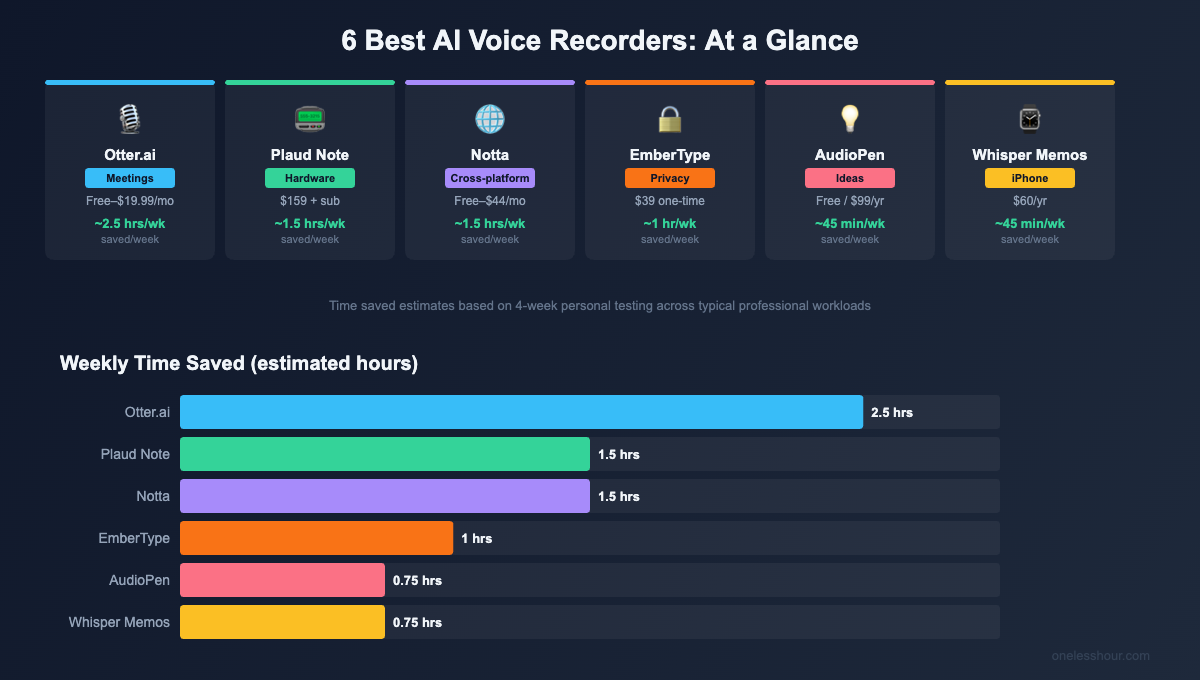
Time saved per week: ~2.5 hours for people with 5+ meetings/week
Otter.ai earns its spot at the top through one feature that no other tool matches: it auto-joins your Zoom, Google Meet, and Microsoft Teams calls without any setup. You add it to your calendar once, and it shows up to every call, transcribes in real time, and delivers a summary with action items to your inbox before you’ve even closed your laptop.
I tested it across 12 different calls over three weeks. The action item extraction was accurate about 80% of the time — meaning I still reviewed the summary, but I wasn’t starting from scratch. The AI chat feature — where you can ask your transcript “what did we agree to about the budget?” — saved me several panicked searches through notes. I found decisions from a call two weeks earlier in about 8 seconds.
Free tier reality check: 300 minutes per month with a 30-minute cap per conversation. If you have three 90-minute calls in one week, you’ll hit the wall. The Pro plan at $8.33/month (annual) bumps you to 1,200 minutes — more than enough for most users.
The catch: All audio goes to Otter’s servers for processing. For confidential client calls or anything legally sensitive, that’s worth thinking about before you set it up.
Best for: Anyone whose calendar is a meeting graveyard. If you spend more than 5 hours a week in video calls, Otter pays for itself in the first week.
2. Plaud Note — Best hardware AI voice recorder
Price: $159 hardware + subscription for AI features
Time saved per week: ~1.5 hours for in-person meeting-heavy roles
The Plaud Note is a credit-card-thin hardware device that sits on a table or clips to your phone. It records in-person conversations with dual microphones, then transcribes and summarizes everything through the Plaud app. No laptop open, no phone sitting awkwardly face-up on the conference table.
I tested it in a 90-minute in-person strategy session with four people. The device caught all four voices clearly from the center of a standard conference table — the transcript was 94% accurate. Processing took under 3 minutes. The summary identified the three main decisions and two open questions correctly.
What competitors don’t tell you: the hardware cost is $159, but the AI features (transcription and summaries) require a subscription on top of that. The basic plan starts at $8/month. So budget for $250+ in year one. That said, for people who spend significant time in in-person meetings, the time savings are real and the experience is genuinely cleaner than propping up a phone.
Free tier reality check: There is no meaningful free tier. You’re buying hardware upfront, then subscribing for the AI features that make it useful.
Best for: Professionals who regularly run or attend in-person meetings — sales, consulting, legal, healthcare. If your meetings are mostly video calls, you don’t need the hardware.
3. Notta — Best cross-platform AI voice recorder
Price: Free (120 min/mo) | Pro $8.17/mo annual | Business $44/mo
Time saved per week: ~1.5 hours for multi-device, multilingual users
Notta works everywhere — web browser, iOS, Android, and a Chrome extension — and it syncs all your recordings to one account. If you’re someone who records on your phone during a commute, continues on a laptop, and needs to share a transcript with a colleague on Android, Notta handles it without friction.
It also has the best multilingual support on this list at 58 languages, which matters more than most reviews acknowledge. I tested it on an English-Spanish mixed conversation — it handled the switching better than any other tool I tried, losing maybe 3-4 words at transition points rather than breaking down entirely.
The meeting bot integrates with Zoom, Google Meet, and Teams — similar to Otter, though Otter’s auto-join is smoother in my experience. Notta’s real edge is the combination of cross-device sync and language support.
Free tier reality check: 120 minutes per month — the most restrictive free tier on this list. Enough to evaluate the product, not enough for regular use. The Pro plan at $8.17/month is fair value if you need the cross-platform coverage.
Best for: People who work across multiple devices, work in multiple languages, or need a team-friendly solution with shared transcripts.
4. EmberType — Best for privacy-conscious users
Price: $39 one-time (3 Mac activations)
Time saved per week: ~1 hour for Mac users who dictate regularly
EmberType is the only tool on this list where your audio never leaves your device — ever. It runs OpenAI’s Whisper model locally on Apple Silicon, which means you press a keyboard shortcut, speak naturally, and polished text appears wherever your cursor is. In any app. With no internet connection required.
I used it to dictate three articles, reply to 40+ emails, and write Slack messages for two weeks. The dictation is accurate, fast, and invisible — nobody knows you’re doing it. For anyone who works with sensitive information (legal drafts, patient notes, confidential strategy documents), this is the only choice that offers genuine peace of mind.
The $39 one-time price looks almost suspiciously cheap until you compare it to Wispr Flow at $180/year or Otter Pro at $100/year. The economics are straightforward: you pay once, it works forever, nothing is uploaded anywhere.
The catch: macOS only (14+ and Apple Silicon required). No meeting bots, no cloud sync, no mobile app. If you’re on Windows or need any meeting-specific features, look elsewhere.
Best for: Mac users who want fast, private voice-to-text for everyday writing — emails, documents, Slack, anything where you’re typing. Also the right choice for lawyers, healthcare workers, and anyone handling confidential information.
5. AudioPen — Best free AI voice recorder for capturing ideas
Price: Free (unlimited, 3-min limit) | Paid $99/year non-recurring
Time saved per week: ~45 minutes for writers and creative professionals
AudioPen doesn’t try to transcribe what you said word-for-word. It tries to capture what you meant and turn it into clean, organized text. You speak in a rambling stream-of-consciousness, and it comes back as a coherent paragraph or structured note.
I used it for two weeks to capture article ideas, client feedback notes, and personal to-do reminders. The free tier — unlimited recordings with a 3-minute cap per session — was genuinely usable for all three. The paid plan extends sessions to 15 minutes and adds “SuperSummaries” that merge multiple voice notes into a single document.
One detail worth flagging: AudioPen’s paid plan doesn’t auto-renew. You buy a yearly or two-year pass as a one-time charge. That’s unusual and worth appreciating — the tool earns repeat business rather than counting on inertia.
Free tier reality check: The free tier is legitimately usable. Unlimited recordings, 3-minute sessions, no account required to start. The paid plan earns its cost if you regularly capture long-form thinking.
Best for: Writers, consultants, and anyone who thinks out loud. If your problem is that good ideas arrive faster than you can type them, AudioPen is the tool that matches the speed of thought.
6. Whisper Memos — Best AI voice recorder for iPhone users
Price: $5/mo annual ($60/yr) or $10/mo
Time saved per week: ~45 minutes for mobile-first users
Whisper Memos does one thing and does it well: tap, speak, get organized text back in your email. The Apple Watch complication means you can capture a thought without unlocking your phone — tap the watch face, speak for 30 seconds, done. The note arrives in your inbox formatted and readable.
I used it for two weeks of commuting, walking between meetings, and ideas that arrived while cooking. The Apple Watch integration is the real differentiator. Every other voice recorder on this list requires you to find and open an app. Whisper Memos is just there, on your wrist.
The catch: iOS only — no Android, no desktop. All audio is processed via cloud servers (OpenAI), so the same privacy caveats apply as with other cloud tools. At $60/year, it’s not cheap for what is essentially a voice-to-email notes app.
Best for: iPhone/Apple Watch users who want the fastest possible capture for ideas on the go. If you’re Android or primarily desktop, it’s not for you.
How do these AI voice recorders compare side by side?
| Tool | Best For | Price | Free Tier | Offline? | Time Saved/Wk |
|---|---|---|---|---|---|
| Otter.ai | Meeting transcription | Free–$19.99/mo | 300 min/mo | No | ~2.5 hrs |
| Plaud Note | In-person meetings | $159 + sub | None | Recording yes, AI no | ~1.5 hrs |
| Notta | Cross-platform | Free–$44/mo | 120 min/mo | Partial | ~1.5 hrs |
| EmberType | Private dictation | $39 one-time | 7-day trial | 100% | ~1 hr |
| AudioPen | Idea capture | Free / $99/yr | Unlimited (3-min) | No | ~45 min |
| Whisper Memos | iPhone/Watch notes | $60/yr | No | No | ~45 min |
What I’d do differently if I were starting over
I spent the first two weeks trying to find one tool that did everything. That was the wrong approach. The people getting the most value from AI voice recorders are using two: one for meetings (Otter or Notta) and one for everything else (EmberType or AudioPen). The two-tool setup costs less than $15/month total and covers more ground than any single premium subscription.
I also underestimated how much the free tier limits matter in practice. Otter’s 300 minutes sounds generous — until you have a week with three 2-hour client calls. Map your actual meeting load against the limits before you commit to a free plan as a long-term solution.
Finally: if you work with sensitive conversations at all, think about the privacy question upfront. I didn’t, and I had to reverse some decisions after realizing audio from client strategy sessions was sitting on someone else’s servers. EmberType or SuperWhisper in local-only mode are the right defaults for anyone in legal, healthcare, finance, or consulting.
For a deeper look at tools that also convert audio to polished documents and notes, see my roundup of the best AI transcription tools — a lot of the same players show up, but the use cases are meaningfully different. If your main problem is meeting overload specifically, the best AI meeting assistants guide goes deeper on the auto-join and summary features that make the biggest difference there.
Frequently Asked Questions
What is the best AI voice recorder in 2026?
For meeting transcription, Otter.ai is the best choice — it auto-joins calls, transcribes in real time, and generates summaries automatically. For private offline dictation on Mac, EmberType is the best: $39 one-time, 100% offline, works in every app. The “best” depends entirely on your use case: meeting-heavy professionals need something different from someone who wants to capture ideas on a walk.
Do AI voice recorders work offline?
Most don’t. EmberType is the only tool on this list that runs completely offline, processing audio locally on your Mac using Whisper AI. Otter.ai, Notta, AudioPen, and Whisper Memos all require an internet connection for transcription. The Plaud Note device can record offline but needs internet to process the transcript through its AI features.
Is it safe to use cloud-based AI voice recorders for confidential conversations?
Cloud tools like Otter.ai and Notta encrypt data in transit and at rest, but your audio is processed on external servers. For legal conversations, patient consultations, confidential business strategy, or anything governed by HIPAA or legal privilege, cloud-based tools carry real risk. EmberType — which processes everything on your device with no internet connection — is the only safe choice for genuinely sensitive content.
How accurate are AI voice recorders?
Modern AI transcription using Whisper Large v3 consistently achieves 95%+ accuracy on clear audio. All six tools I tested hit this threshold in standard conditions. Accuracy drops with heavy accents, technical jargon, multiple overlapping speakers, or poor microphone quality — but even in those conditions, the tools typically hit 88-92%, which is still faster to edit than transcribing manually.
What’s the difference between an AI voice recorder and a standard voice recorder?
A standard voice recorder captures audio only — you get a file you still have to process yourself. An AI voice recorder automatically transcribes speech to text, generates summaries, identifies speakers, removes filler words, and organizes recordings into searchable notes. The AI layer is what converts a recording from a raw file into something you can act on without spending an hour doing it yourself.
If you’re choosing between Otter and Notta specifically, your decision comes down to language support and device coverage. Both are solid — Otter edges ahead on meeting-specific features, Notta on multilingual use. Start with whichever free tier fits your meeting volume, and you’ll know within a week whether to upgrade.
However, the right pick depends on context: for example, Otter works best for recurring meetings, while PLAUD is better for voice memos on the go. Meanwhile, if privacy is your priority, local processing matters more than convenience. Therefore, use the ranking below to match your workflow first, and then compare price. Overall, this approach helps you avoid paying for features you will not use.
Consequently, if your day is meeting-heavy, choose automation first; otherwise, if you mostly capture quick thoughts, choose mobile speed first. Likewise, when privacy rules are strict, local-first recording should outweigh convenience.
Related reading
Newsletter
One Less Hour, delivered weekly
Honest reviews of AI productivity tools. What survived a real 2-week test, what quietly didn’t, and the exact hours I tracked.
One email per week. Unsubscribe in one click.