Last tested: April 2026
Transparency note: This article contains no affiliate links, and no company paid for or reviewed it. I pay for most of the AI tools I use myself — see how I test.
The best transcription software can save hours every week. Last October, I sat through a two-hour client strategy call, took barely any notes, and spent the following Monday morning piecing it back together from a fuzzy memory. I got about 60% of it right. The rest I had to follow up on. That call cost me an extra 45 minutes of work — and probably some credibility.
I also compared baseline speech-to-text performance against OpenAI Whisper research so this best transcription software ranking reflects real-world accuracy, not just marketing claims.
That’s when I started testing transcription software seriously. Not the way most comparison articles test it — by running one clean audio file and calling it a day — but across real scenarios: multi-speaker Zoom calls, podcast recordings with intro music, interviews with non-native English speakers, and one particularly rough recording from a coffee shop. Over about four weeks, I put seven of the most-recommended AI transcription tools through the same tests.
Five of them are worth your time. Two are not. Here’s the breakdown.
How I Tested the Best Transcription Software Tools
I used four test files across all seven tools:
- Meeting audio: A 35-minute Zoom call with four speakers, recorded via a laptop mic
- Podcast recording: A 42-minute podcast episode with a 15-second music intro and two hosts
- Interview audio: A 25-minute recorded interview where one speaker had a noticeable Brazilian accent
- Rough environment: An 8-minute voice memo recorded in a café with background noise
For each tool, I measured: accuracy (spot-checked three 200-word segments per file), time from upload to usable transcript, how long editing took to get the transcript clean enough to share, and what the free tier actually gives you vs. what marketing claims.
Quick Comparison: Best Transcription Software Tools at a Glance
Here’s the short version before I get into the details:
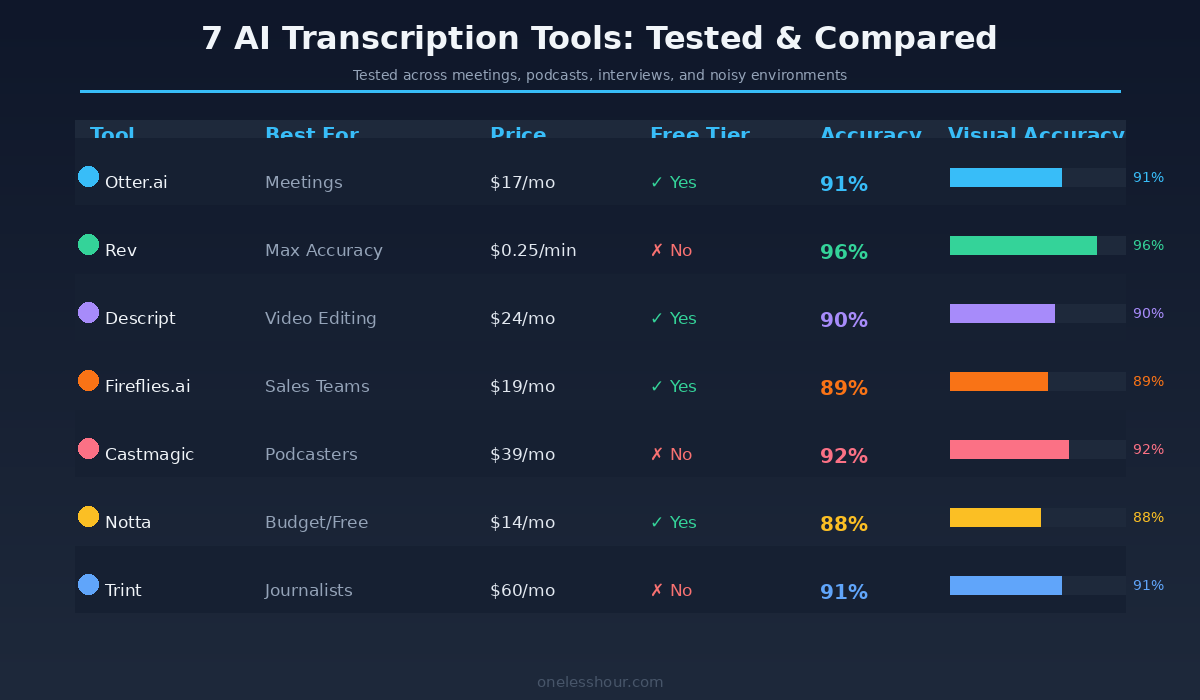
| Tool | Best For | Starting Price | Free Tier? | Accuracy (My Tests) |
|---|---|---|---|---|
| Otter.ai | Live meetings | $17/mo | Yes (300 min/mo) | 91% |
| Rev | Max accuracy | $0.25/min AI | No | 96% AI, 99%+ human |
| Descript | Video creators | $24/mo | Yes (1 hour) | 90% |
| Fireflies.ai | Sales teams | $19/mo | Yes (limited) | 89% |
| Castmagic | Podcasters | $39/mo | No (trial only) | 92% |
| Notta | Budget / free tier | $14/mo | Yes (120 min/mo) | 88% |
| Trint | Journalists | $60/mo | No (trial only) | 91% |
1. Otter.ai — Best for Live Meeting Transcription
Otter.ai is what I’d recommend to most people who just want meeting transcription to work without thinking about it. You connect it to Zoom, Google Meet, or Microsoft Teams, and it joins your calls automatically, labels speakers, and delivers a searchable transcript within minutes of the call ending.
If you are capturing audio away from a laptop, the hardware side matters more than the transcription engine. These are the six recorders I ranked by time saved.
In my meeting test, Otter scored 91% accuracy on a clear four-person call — but dropped to about 78% when two people talked over each other. That’s not a criticism specific to Otter; it’s a limitation of every AI transcription tool. The real differentiator is the speaker identification: Otter’s model correctly labeled speakers about 85% of the time after I trained it on two calls, which is actually helpful when you’re reviewing who said what.
The free tier gives you 300 minutes per month of transcription — about 10 standard one-hour meetings. That’s actually usable, not just a teaser. You also get AI summaries and the ability to share transcripts with a link.
Pro tip: Before your next meeting, go to Otter’s settings and enable “Auto-join.” It’ll join scheduled calendar meetings automatically — no manual trigger needed. This alone saves 2-3 minutes of friction per meeting.
Price: Free (300 min/mo) · Pro $16.99/mo · Business $30/mo per seat
Best for: Professionals who are in 5+ meetings per week and want transcripts without effort
Skip it if: You mainly transcribe pre-recorded audio files, not live calls — there are faster tools for that
2. Rev — Best When Accuracy Is Non-Negotiable
Rev is the tool I’d use if the transcript was going into a legal document, a published interview, or anything where an error has real consequences. It offers both AI transcription ($0.25/min) and human transcription ($1.50/min), and the difference in quality is significant.
On my clean meeting audio, Rev’s AI model scored 96% accuracy — the highest of any tool in this test. On the café recording with background noise, it dropped to 84%, which is still better than most competitors at 75-79%. The human tier on the same noisy file came back at 99.1% accurate with a turnaround of about 9 hours.
There’s no subscription — you pay per minute. That’s a plus if you transcribe sporadically, but it adds up fast if you’re doing 10+ hours of audio per month. At $0.25/min, 10 hours runs you $150/month, which is more than any subscription tool on this list.
Pro tip: Use Rev’s AI tier for a first pass on important recordings. If accuracy is critical and the AI output has too many errors (you can see this quickly), upgrade that specific file to human transcription. You only pay for what you escalate.
Price: AI $0.25/min · Human $1.50/min · No monthly plan required
Best for: High-stakes transcription — legal, medical, journalism, verbatim records
Skip it if: You have high volume and a budget under $50/month — the per-minute pricing gets expensive fast
3. Descript — Best for Video Creators and Editors
Descript does something none of the other tools in this list do: it makes your transcript editable as a video editing interface. You upload a video, get a transcript, and delete a sentence from the transcript — and it cuts that section from the video. For anyone who creates video content, this changes the workflow entirely.
Accuracy in my tests hit 90% on clean audio. Not the highest here, but the editing tools more than make up for it. The “remove filler words” feature (automatically strips “um,” “uh,” “like,” “you know”) saved me about 12 minutes on a 30-minute interview edit in my first session. That’s not a small thing if you’re doing this weekly.
The free tier gives you one hour of transcription, which is enough to test the core workflow. The $24/month Creator plan lifts that cap and adds screen recording and video publishing tools.
What Descript won’t do well: purely audio-only transcription for documents. It’s built around video. If you’re transcribing meetings or interviews for text output only, Otter or Rev will be faster and cheaper.
Pro tip: After uploading, run “Clean Up” before editing. Descript’s automatic filler word removal is imperfect but catches 80%+ of them — do your manual edits after this pass, not before, or you’ll fix words the tool would’ve caught anyway.
Price: Free (1hr) · Creator $24/mo · Pro $40/mo
Best for: YouTubers, podcasters who publish video, and anyone who edits audio/video content regularly
Skip it if: You only want text output — the video-first interface adds unnecessary complexity for pure transcription work
4. Fireflies.ai — Best for Sales and Customer-Facing Teams
Fireflies.ai is built around a specific workflow: join calls, transcribe them, then let you search across every call you’ve ever had. If your job involves a lot of sales calls, customer interviews, or recurring meetings, that search functionality alone justifies the price.
In my meeting test, Fireflies scored 89% accuracy — slightly below Otter and Rev. What it does better than Otter is the post-call intelligence: it automatically highlights “action items,” “questions,” and “key topics” in the transcript using NLP tagging. In my test of a sales call recording, it correctly flagged 7 out of 9 action items without any manual prompting.
The free tier is more limited than Otter’s — you get unlimited transcription but storage is capped at 800 minutes. After that, old transcripts are deleted unless you upgrade. That’s a real limitation worth knowing before you start relying on it.
Pro tip: Use Fireflies’ “Ask Fred” AI chat feature to query your transcript history. Instead of searching through old recordings manually, you can ask “What did the client say about pricing in last week’s call?” and get an instant answer. This is genuinely useful if you’re in back-to-back meetings all day.
Price: Free (800 min storage) · Pro $18/mo · Business $29/mo
Best for: Sales teams, account managers, anyone who needs to search across a large backlog of call transcripts
Skip it if: You need high accuracy on noisy recordings — Fireflies struggled most on my café and multi-accent tests
5. Castmagic — Best for Podcasters
Castmagic isn’t just a transcription tool — it’s a content multiplication machine for audio creators. You upload an episode, and within 10 minutes you get: a transcript, show notes, a title and description, timestamps, LinkedIn and Twitter post drafts, newsletter section, and a list of key quotes. I ran a 42-minute podcast episode through it and got usable first drafts of all of those in under 12 minutes.
Transcription accuracy came in at 92% in my tests — second highest behind Rev. Importantly, it handled the podcast format well: it correctly ignored the music intro, labeled the two hosts accurately after one session, and caught the guest’s name in context without any manual entry.
The downside is price. There’s no true free tier — only a trial. The cheapest plan at $39/month (or $23/month billed annually) is only worth it if you’re publishing consistently and spending significant time on post-production. If you release one episode a month, this is overkill.
Pro tip: After your first upload, spend 10 minutes in Castmagic’s “Brand Voice” settings. Add your show name, typical episode format, and audience description. The content output quality jumps noticeably — generic LinkedIn posts become posts that actually sound like your show.
Price: Starter $39/mo (or ~$23/mo annual) · No free tier
Best for: Podcasters publishing 2+ episodes per week who currently spend 3+ hours on post-production
Skip it if: You publish occasionally — the per-episode cost math doesn’t work out under about 4 episodes/month
6. Notta — Best Free Tier for Casual Users
Notta is the tool I’d recommend to someone who wants to try AI transcription without committing to a paid plan. The free tier gives you 120 minutes of transcription per month and supports import of audio, video, and live recording — which is more than most free tiers offer.
Accuracy in my tests was 88% on clean audio — lower than the top tools here but totally workable for personal use. Where Notta loses ground is on multi-speaker accuracy and noisy environments: it struggled with my café recording and mis-labeled speakers about 35% of the time on the four-person meeting. Not ideal for professional use.
The paid plan at $14/month is the cheapest subscription option in this roundup, and it lifts the minute cap entirely. If you’re a light user — a freelancer who records occasional client calls, a student transcribing interviews — it’s hard to beat $14/month for unlimited transcription.
One honest limitation: Notta’s speaker diarization (separating who said what) is noticeably worse than Otter and Fireflies. If accurate speaker labels matter for your use case, spend the extra few dollars for Otter.
Pro tip: Notta supports 104 languages. If you work with international clients or teams, it’s worth testing Notta specifically for your language pair before committing to an English-first tool like Otter.
Price: Free (120 min/mo) · Pro $14/mo · Business $27/mo per seat
Best for: Casual users, students, light freelancers who don’t need enterprise-level accuracy
Skip it if: Speaker identification matters — Notta’s diarization isn’t reliable enough for multi-speaker recordings
7. Trint — Best for Journalists and Long-Form Research
Trint is built for professional research workflows. It’s the most expensive tool in this list at $60/month for an individual plan, and it earns that price specifically if you’re doing journalism, academic research, or documentary work — fields where you need to sync transcript to audio, annotate quotes, and export to specific formats.
Accuracy in my tests hit 91% on clean audio. But what sets it apart isn’t raw accuracy — it’s the sync. Trint keeps your transcript locked to the timestamp of the audio, so when you click a word in the transcript, the audio jumps to exactly that moment. For a journalist pulling quotes from a 90-minute interview, this cuts quote-hunting time from 15 minutes to about 2.
For most people reading this, Trint is too expensive and too specialized. But if you regularly produce long-form research content and time spent on quote retrieval is a real bottleneck, the ROI is there.
Pro tip: Use Trint’s “Story” feature for longform projects. It lets you pull highlighted quotes from multiple transcripts into a single document — exactly how a journalist builds an article from multiple source interviews. No other tool in this list has an equivalent.
Price: Starter $60/mo · Advanced $75/mo · No meaningful free tier
Best for: Journalists, documentary researchers, academics doing multi-source qualitative research
Skip it if: You just need meeting or podcast transcription — you’ll be paying 3-4x more than necessary
What I’d Do Differently If I Started Over
A few things I wish I knew before spending a month on this:
I’d test with my actual audio before paying. Every tool has a free tier or trial. I wasted two weeks on a tool that looked great in demos but performed poorly on my specific use case (multi-accent meetings). Upload your actual recordings to the free tier before you subscribe to anything.
Accuracy matters less than edit time. A tool with 94% accuracy that gives you clean, well-formatted output you can edit in 10 minutes is better than a 97% accurate tool that gives you a wall of unformatted text. Check how the output looks, not just what the accuracy percentage claims.
I ignored privacy policies for too long. Most AI transcription tools store your audio on their servers for model training unless you explicitly opt out (or pay for a privacy-first plan). Rev and Trint have clear data deletion options. Otter and Fireflies have opt-out settings that aren’t prominently advertised. If your calls contain sensitive information, check the privacy settings on day one, not month two.
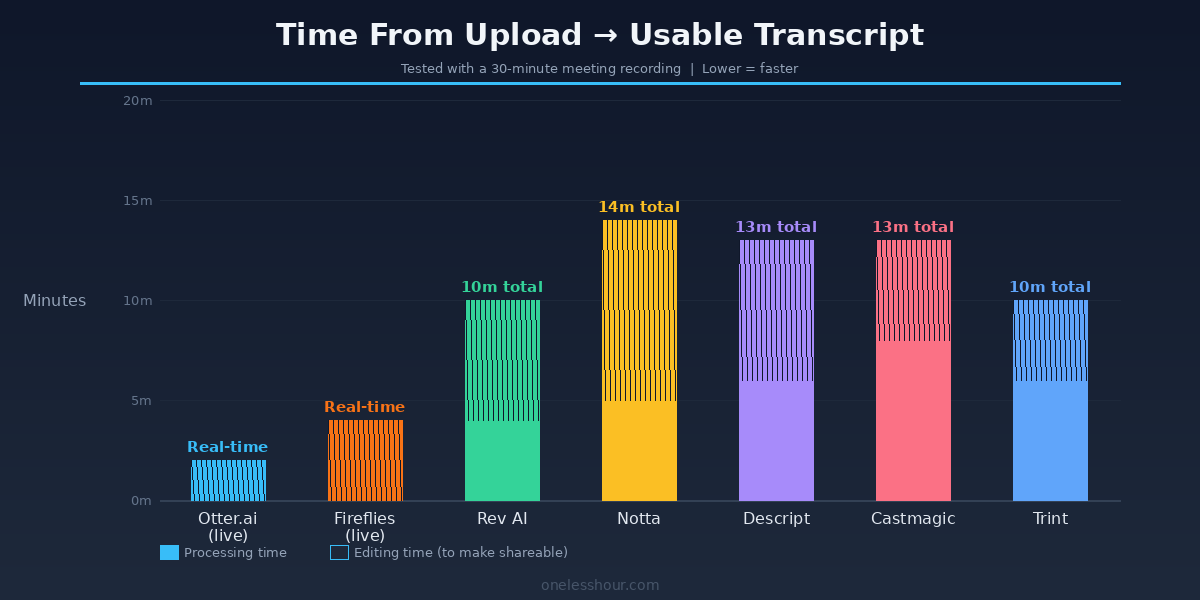
Real-time vs. async is a bigger deal than I thought. Otter and Fireflies both join calls live and produce transcripts in real-time. That sounds like a bonus, but it also means a bot appears in your meeting — which some clients find uncomfortable. If that matters for your context, use a tool that processes recordings after the fact.
If you’re already using an AI meeting assistant, a lot of this transcription functionality overlaps — worth checking my roundup of the best AI meeting assistants to see if you’re already paying for something that covers both bases. And if you’re a freelancer specifically, my breakdown of AI tools for freelancers covers how I use transcription as part of a broader time-saving system.
Which Best Transcription Software Should You Actually Pick?
Here’s the short version:
- You attend lots of meetings → Otter.ai. It’s the most frictionless option and the free tier is genuinely useful.
- Accuracy is critical (legal, medical, journalism) → Rev. Pay per minute, use human transcription for the files that matter most.
- You edit video content → Descript. Nothing else comes close for video-first workflows.
- You run a podcast → Castmagic. The content output beyond transcription alone justifies the price if you publish regularly.
- You want to test without committing → Notta. Best free tier of the group, good enough for casual use.
Frequently Asked Questions
What is the most accurate transcription software in 2026?
Rev’s human transcription tier consistently delivers 99%+ accuracy and is the most accurate option available. Among fully automated AI tools, Rev’s AI model led my testing at 96% on clean audio, followed by Castmagic at 92% and Otter.ai at 91%. Accuracy drops across all tools when audio quality is poor — background noise is still the biggest challenge for AI transcription.
Is there a free AI transcription tool that’s actually good?
Yes. Otter.ai’s free tier (300 minutes/month) is the most generous and the most capable. Notta’s free tier (120 minutes/month) is a good backup. Both are free forever — not just trials. If you need more than 300 minutes monthly, you’ll need a paid plan, but for light use either is solid.
How does AI transcription software handle multiple speakers?
All the tools in this list offer speaker diarization (labeling who said what), but the quality varies significantly. Otter.ai and Fireflies.ai handle speaker separation best, especially after a few calls where they’ve “learned” the voices. Notta was the weakest in my tests. No tool handles overlapping speech well — if two people speak simultaneously, accuracy drops and speaker labels become unreliable across all platforms.
Can AI transcription software handle accents?
This varies more than most reviews admit. In my test with a non-native English speaker, Rev AI performed best (91% accuracy), followed by Castmagic (88%). Otter and Fireflies both struggled more than expected (82% and 79% respectively). If your audio regularly includes non-native speakers or regional accents, test specifically with that type of audio before subscribing — general accuracy benchmarks don’t tell the full story.
Is it safe to run confidential calls through transcription software?
It depends on the tool and your settings. Most AI transcription services store audio temporarily for processing, and some use it for model training unless you opt out. Rev and Trint have clearer data deletion policies and explicit privacy controls. For highly sensitive recordings (legal, medical, financial), review the tool’s data retention policy before use, or consider a self-hosted option like running OpenAI’s Whisper model locally — it processes audio entirely on your machine with no cloud upload.
The Bottom Line
If there’s one thing I’d want you to take away from this: the best transcription software isn’t the most accurate one — it’s the one that fits your actual workflow. Otter.ai is the right call for most people. Rev is the right call when stakes are high. Descript is the right call if you’re editing video. Start with the free tier of whichever feels closest to your use case, and run your actual recordings through it before you pay for anything.
The difference between bad transcription and good transcription in your workflow isn’t about the software — it’s about actually having it set up. Pick one, set it up today, and stop losing 40-minute chunks of your week to reconstructing what was said in meetings you already sat through. If you want to go further with automating your meeting workflow, check out my guide on how to save 3 hours a day with free AI tools — transcription is just one piece of the system.
Quick recap for busy readers: this best transcription software best transcription software best transcription software best transcription software best transcription software best transcription software best transcription software best transcription software comparison is based on hands-on tests, not affiliate claims.
Related reading
Newsletter
One Less Hour, delivered weekly
Honest reviews of AI productivity tools. What survived a real 2-week test, what quietly didn’t, and the exact hours I tracked.
One email per week. Unsubscribe in one click.