
Transparency note: This article contains no affiliate links, and no company paid for or reviewed it. I pay for most of the AI tools I use myself.
I once sent the same cover letter to 30 companies with only the company name swapped out. Thirty. I heard back from exactly none of them.
The problem wasn’t my experience. It was that every hiring manager could smell the copy-paste. A generic ChatGPT cover letter has the exact same flaw — bland in, bland out. “I am writing to express my interest in the position at [Company].” Delete.
A good ChatGPT cover letter fixes that in about 15 minutes — not by writing a generic letter faster, but by researching the company and tailoring every paragraph to the role. Below is the exact three-part method I use now, including the prompts you can copy word for word.
Why your cover letter is getting ignored
Most cover letters die for the same three reasons. They open with a limp “I am writing to apply.” They talk about what the applicant wants instead of what the company needs. And they’re so generic you could swap in any name and any job.
Here’s what a hiring manager is actually asking while they skim: “Does this person get what we do, and can they help?” If your letter answers that in the first two sentences, you’re in the yes pile. If it makes them work to figure out why you applied, you’re gone.
ChatGPT can write a letter that answers that question fast — but only if you give it the raw material first. That’s the whole trick, and it’s why most people’s results are bad. They skip straight to “write me a cover letter” and paste the bland output.
The 15-minute ChatGPT cover letter method
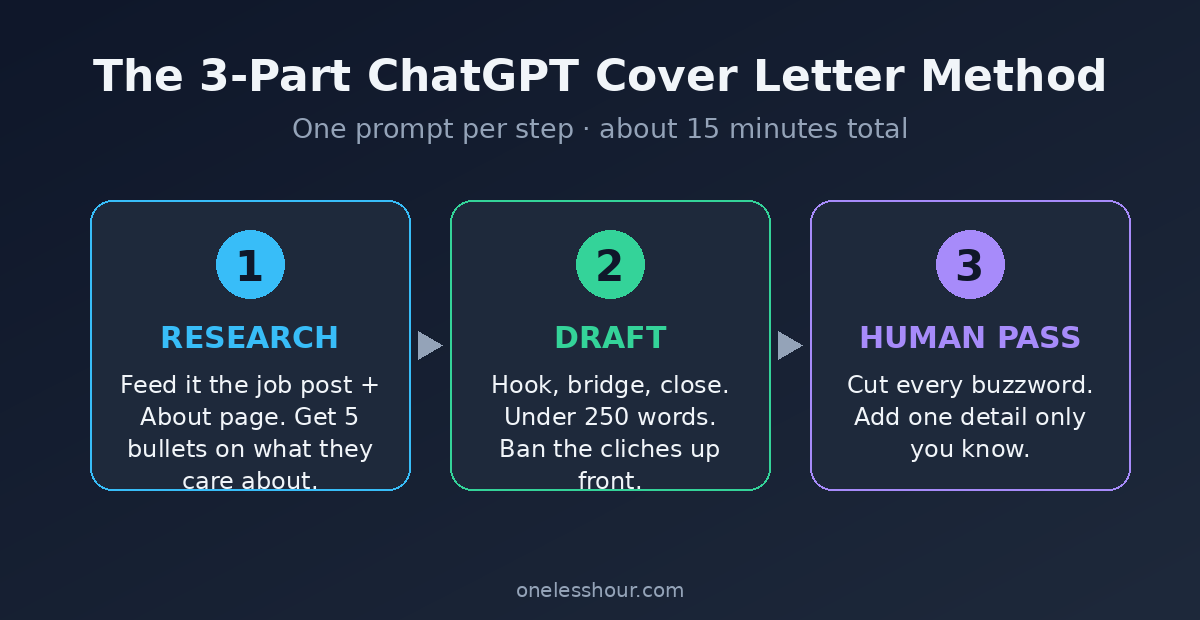
Three parts, and each one is a single prompt. Research first, draft second, then a human pass to strip the robot voice. Keep your resume and the job posting open before you start.
Part 1: The research prompt
Before ChatGPT writes a word, it needs to understand the company. Grab the job description and a paragraph from the company’s About page, then run this.
I’m applying for [ROLE] at [COMPANY]. Here’s the job description: [PASTE]. Here’s a bit about the company: [PASTE ABOUT PAGE]. In five bullet points, tell me what this company seems to care about most, and what core problem this role is meant to solve. Be specific, not generic.
Those five bullets are your ammunition. They’re the difference between “I’m passionate about your mission” (meaningless) and “your push into same-day delivery is exactly the logistics problem I fixed at my last job” (specific, and it lands).
Try this now: run the research prompt on a job you’re eyeing, even one you haven’t applied to. Reading those five bullets tells you in ten seconds whether the role is actually a fit.
Part 2: The draft prompt
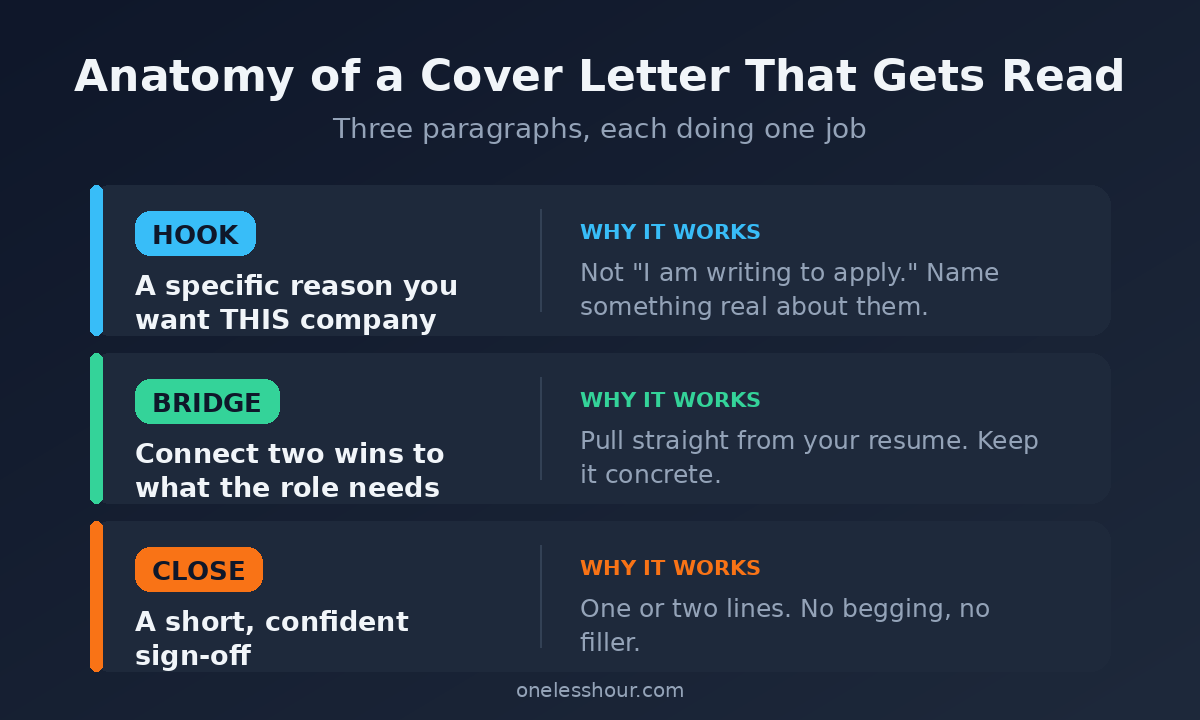
Now you write the letter, using a structure that works: a specific hook, a bridge from your experience to their need, and a short confident close.
Write a three-paragraph cover letter for this role. Paragraph 1: a specific hook about why this company, using the bullets above — no generic opener. Paragraph 2: connect two things from my resume to what the role needs. Here’s my resume: [PASTE]. Paragraph 3: a short, confident close. Under 250 words total. Never use “I am writing to apply,” “I would be a great fit,” or “team player.”
Banning those exact phrases matters. They’re ChatGPT’s defaults, and they’re the same phrases in every rejected letter. Naming what you don’t want is often more powerful than describing what you do.
Pro tip: if paragraph 2 feels thin, it’s because your resume was thin on specifics. Go back and add one real number to it, then rerun. The letter is only as concrete as what you feed it.
Part 3: The human pass
The draft is 80% there and 100% obvious that a machine wrote it. This prompt fixes the tone.
Rewrite this to remove every cliché and buzzword. Replace anything vague with something specific. It should read like a smart, slightly informal human wrote it in one confident sitting — not like a template. Keep it under 250 words.
Then do the final edit yourself, because this is the part ChatGPT can’t do. Add one detail only you know — a project you shipped, a number you hit, the reason this company actually caught your eye. That single human sentence is what a hiring manager remembers.
The three prompts at a glance
| Prompt | What it does | Time |
|---|---|---|
| 1. Research | Pulls out what the company actually cares about | ~4 min |
| 2. Draft | Writes hook, bridge, and close in under 250 words | ~6 min |
| 3. Human pass | Cuts clichés and adds the one detail only you know | ~5 min |
The one-paragraph version (for quick applications)
Half of applications now ask for a short blurb in a text box, not a full letter. Don’t paste three paragraphs in there. Use this instead.
Condense this cover letter into four sentences I can paste into a short application box or an email. Keep the specific hook and one concrete achievement. Cut everything else.
Pro tip: keep both versions in a note. The four-sentence one covers quick applies; the full letter is for the jobs you really want. Two minutes of prep saves you rewriting from scratch every time.
Weak opener vs. strong opener: a real example
Same applicant, same job, two different first lines. The gap between them is the whole game.
Before: “I am writing to express my strong interest in the Marketing Coordinator position. I believe I would be a great fit for your team.”
After: “Your new pop-up shops are doing what most brands only talk about — meeting customers offline. I spent two years running exactly that kind of local activation, and I want to bring it to your Coordinator role.”
The “before” line could be pasted into any application on earth. The “after” could only be written by someone who actually read about the company and did one specific thing. That’s what the research prompt in Part 1 buys you — and it’s why the same person gets ignored with one opener and called back with the other.
Mistakes that get AI cover letters deleted
I lean on this method for every application, but it fails in predictable ways when you rush it:
- Skipping Part 1. Without the research bullets, the letter is generic — the exact thing you’re trying to avoid. This is the step people cut, and it’s the most important one.
- Leaving the clichés in. If “I am a results-driven professional passionate about synergy” survives to the final draft, it gets deleted. Read every line.
- Letting it invent things. ChatGPT will claim you “led a team of 12” if it thinks that sounds good. Only keep what’s true.
- Going too long. Nobody reads a full-page cover letter. Under 250 words, always.
The downside: a lazy ChatGPT cover letter is worse than no cover letter, because it signals you didn’t care enough to edit. Skip the tool entirely if you’re not going to do the human pass in Part 3. And if you’d rather not use ChatGPT, Claude and Gemini both have free tiers that handle these prompts just as well.
Frequently asked questions
Can ChatGPT write a cover letter for free?
Yes. The free version runs all three prompts with room to spare. A dedicated ChatGPT cover letter generator or paid plan isn’t necessary for one application — the free tier plus the prompts above does the same job.
Can employers detect a ChatGPT cover letter?
They can spot a lazy one instantly — the buzzwords and generic openers give it away. A researched, edited letter with a specific hook reads like a strong human wrote it. AI detectors are unreliable, so the real tell is always whether the letter says something only you could say.
How long should a cover letter be?
Under 250 words for a full letter, or four sentences for a short application box. Hiring managers skim, so shorter and sharper beats long and thorough every time.
What should I never let ChatGPT put in a cover letter?
Invented achievements and the phrase “I am writing to apply.” The first can cost you the job in a background check; the second tells the reader you didn’t bother. Ban both in your prompt.
Write one before you close this tab
Pick a job, grab its description and the company’s About page, and run the research prompt. Fifteen minutes later you’ll have a letter that sounds like you actually want the role — because you did the work most applicants skip.
A cover letter only works as hard as the resume it’s attached to. If yours needs the same treatment, here’s my 20-minute ChatGPT resume process. And if you want to get quicker with prompts across the board, start with the busy person’s guide to ChatGPT.