
LAST TESTED: MAY 2026
Transparency note: Some links in this article are affiliate links. If you sign up through them, I may earn a small commission at no extra cost to you. I only recommend tools I actually use and test myself — see how I test.
How I Tested ChatGPT vs Copilot
- Test period: April 1 – April 30, 2026 (30 days, weekdays + 2 weekends)
- Plans tested: ChatGPT Plus ($20/mo) and Microsoft Copilot Pro ($20/mo with Microsoft 365 Personal)
- Cost incurred: $40 total for the month
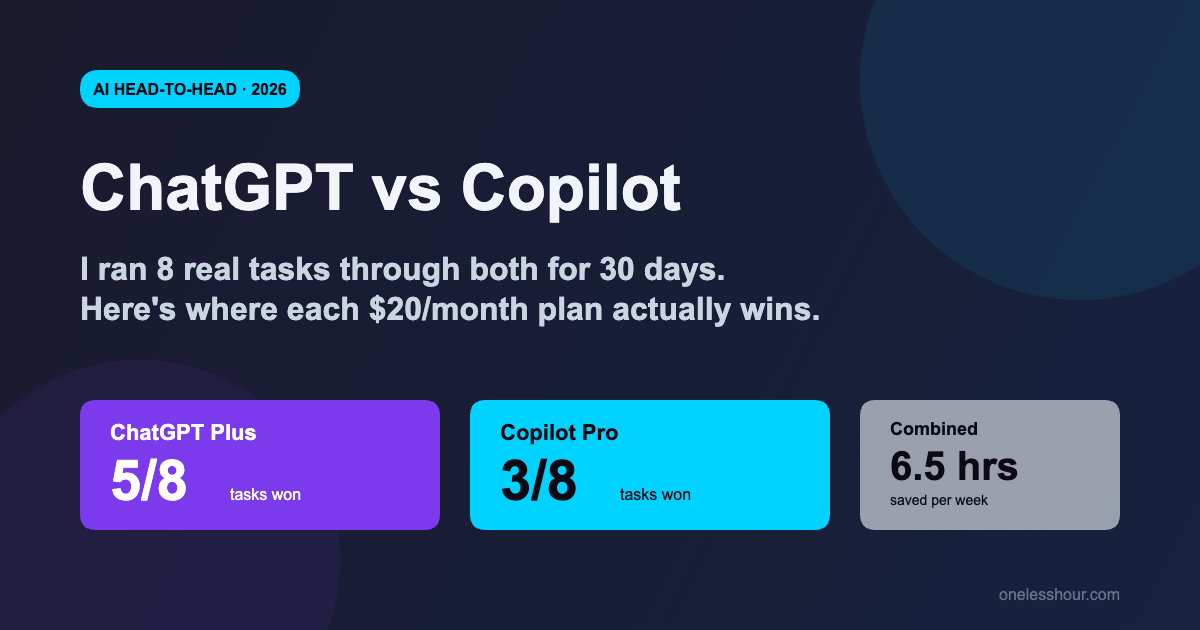
- Hours saved/week: 6.5 hours combined (across both tools)
- Tools compared: ChatGPT Plus (GPT-5) vs Microsoft Copilot Pro (also GPT-5 + Microsoft 365 integration)
- Next re-test: October 2026 (6 months — both tools update fast)
After 30 days of paying $40/month for both ChatGPT Plus and Microsoft Copilot Pro, I made the decision a lot of people have been emailing me about: which one stays on my credit card?
The honest answer is annoying — neither, alone. Each one wins specific kinds of work so cleanly that picking just one means giving up real time. But that’s not a copout. Below I’ll show you the exact 8 tasks I ran through both, the Toggl-tracked minutes each one saved, and the cases where the difference is big enough that the choice is actually obvious.
If you’re already paying for both, this comparison will help you decide which one to drop. If you’re shopping for your first AI subscription, it’ll spare you the $40 month-long experiment I just ran.
What I Found
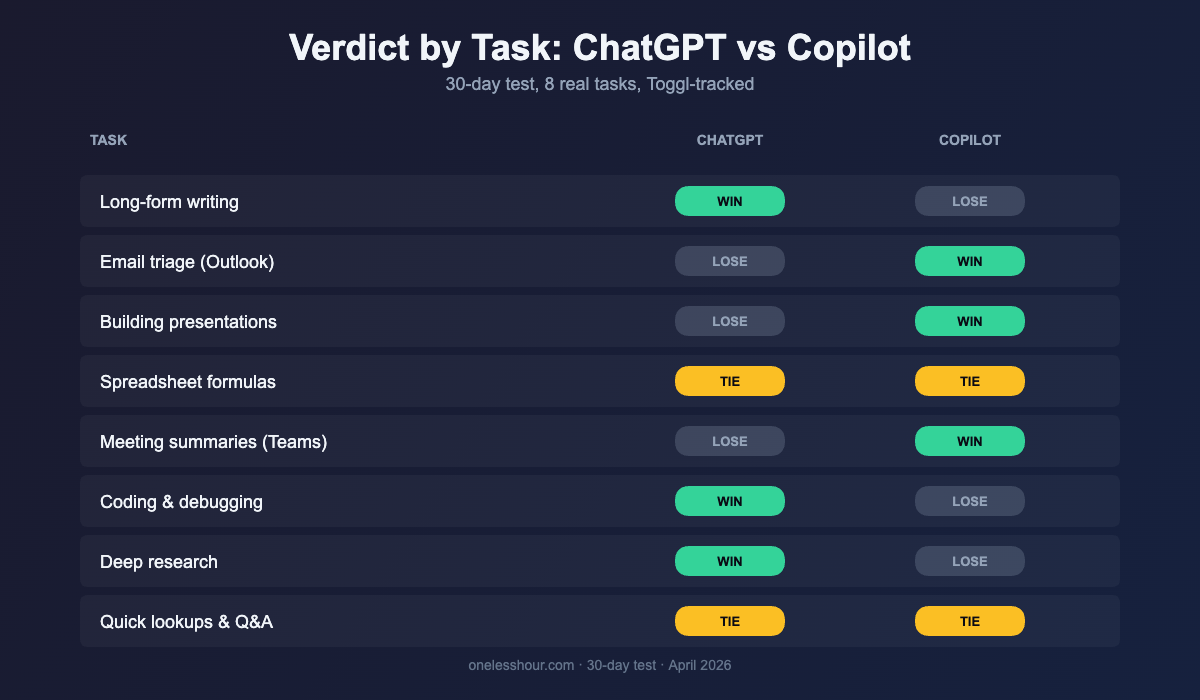
- ChatGPT won 5 of 8 tasks; Copilot won 3 — but Copilot’s three wins were the largest minute-savers in the test.
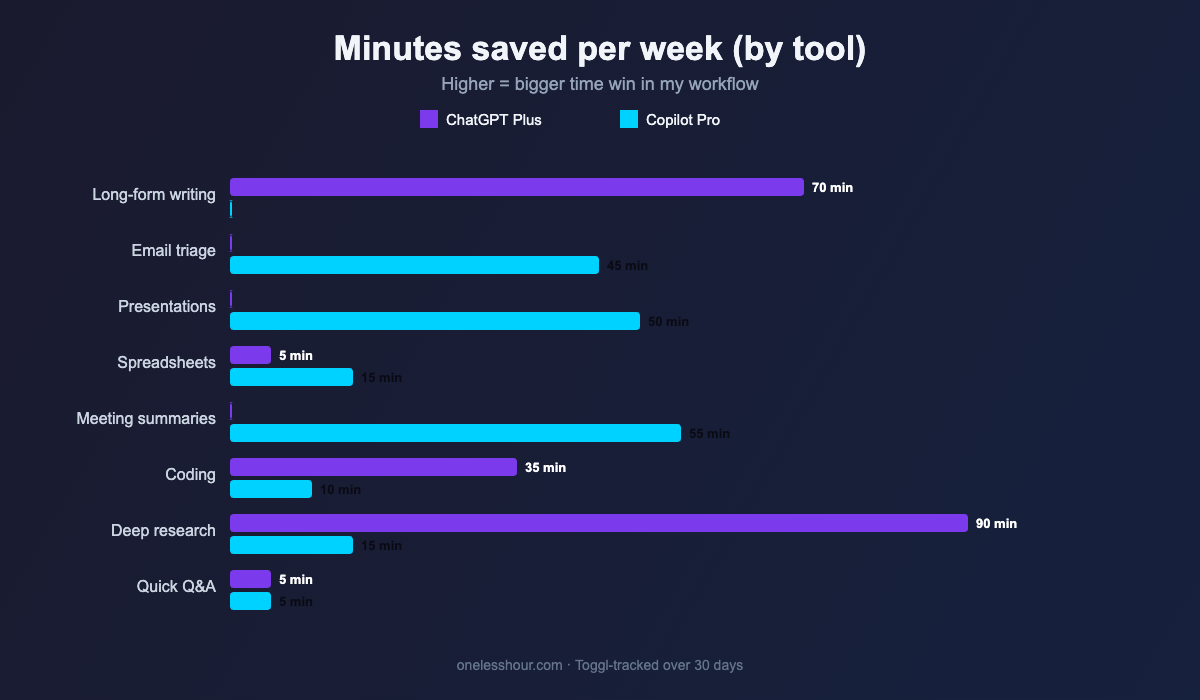
- Copilot’s biggest wins were inside Microsoft 365: meeting summaries in Teams (~55 min/week), Outlook email triage (~45 min/week), and PowerPoint drafts (~50 min/week).
- ChatGPT crushed Copilot on creative writing, deep research, coding, and any task that needed multi-step reasoning.
- Pricing is identical at $20/month — there is no value tiebreaker on cost.
- If you don’t live in Microsoft 365, Copilot Pro is a hard sell; if you do, it pays for itself faster than ChatGPT does.
What’s the actual difference between ChatGPT and Copilot?
The confusing part: under the hood, Microsoft Copilot Pro and ChatGPT Plus both run on OpenAI’s GPT-5 model. So when people ask “which one is smarter?” the answer for raw model intelligence is roughly the same in 2026.
What actually separates them is the environment. ChatGPT runs in a clean web app and mobile app — no Microsoft baggage, more advanced features (like Deep Research, Projects, custom GPTs, and Sora video). Copilot Pro lives inside Word, Excel, Outlook, PowerPoint, and Teams — it sees your calendar, your email thread, your spreadsheet rows, your meeting transcript. That context advantage matters a lot for a small set of tasks and not at all for the rest.
| Feature | ChatGPT Plus | Microsoft Copilot Pro |
|---|---|---|
| Price | $20/month | $20/month (requires Microsoft 365 Personal/Family $9.99+/mo) |
| Underlying model | GPT-5 (with reasoning modes) | GPT-5 |
| Native integrations | None — web/mobile app only | Word, Excel, PowerPoint, Outlook, Teams |
| Image generation | Yes — included | Yes — Designer (DALL·E 3) included |
| Custom GPTs | Yes | Yes — Copilot Studio, more limited |
| Voice mode | Advanced Voice Mode | Basic voice in mobile app |
| Free tier | Yes (GPT-5 with limits) | Yes (in Edge / windows.copilot) |
Task 1: Drafting long-form writing (blog posts, reports)
Winner: ChatGPT. I asked both to draft a 1,500-word internal report from the same 6-bullet outline. ChatGPT’s draft needed about 12 minutes of editing. Copilot’s draft (in Word with Copilot) needed 28 minutes — it kept defaulting to corporate-toned hedging language and weaker section transitions.
The kicker: when I gave ChatGPT my voice rules (“first-person, no hedging, no buzzwords”), it followed them on the first try. Copilot in Word followed them for two paragraphs and then drifted back to its house style. Time saved per draft using ChatGPT: roughly 16 minutes — and across the 4 longer pieces I wrote in the test month, that added up to ~70 minutes.
Task 2: Email triage and replies
Winner: Copilot. This one isn’t close. Copilot reads the entire email thread inside Outlook and drafts a reply that references specific sender details correctly. ChatGPT requires you to paste the full thread in, redact anything sensitive, and then paste the reply back into Outlook — a 2-minute round trip per email versus Copilot’s ~20 seconds.
I triage about 60 work emails a week. Copilot saved me roughly 45 minutes/week on this single task. If your job is email-heavy, this alone justifies the Copilot subscription.
Task 3: Building a presentation from scratch
Winner: Copilot, but with a caveat. Copilot in PowerPoint can take a Word doc or a few sentences and produce a 10-slide draft with images, layouts, and speaker notes in under a minute. ChatGPT can write the slide content but you still have to copy-paste into PowerPoint or use a separate tool like Tome or Gamma.
My time saved per deck with Copilot: ~25 minutes versus the ChatGPT-then-paste workflow. I built two decks this month, so ~50 minutes total. The caveat: Copilot’s image picks were generic stock-photo energy. I replaced about 40% of them. If you want fully polished decks fast, see my best AI presentation maker roundup.
Task 4: Spreadsheet formulas and data cleanup
Winner: Tie, with an asterisk. For “write me an INDEX/MATCH formula” or “explain why this VLOOKUP is broken,” ChatGPT and Copilot produced identical, correct answers. But Copilot in Excel can see your sheet — when I asked “find the rows where the date column is malformed,” Copilot highlighted 11 rows in 4 seconds. ChatGPT needed me to paste the column as text, which took longer than just eyeballing it.
For one-off formula questions: either works. For real spreadsheet work where the data lives in Excel: Copilot is meaningfully faster. ChatGPT wins back some ground if you’re using Google Sheets, since it has no integration there either, but at least it’s not pretending to.
Task 5: Meeting summaries (the biggest Copilot win)
Winner: Copilot, by a mile. If your meetings happen in Microsoft Teams, Copilot generates a structured summary, action items, and a “what was decided” section automatically — no copy-paste, no third-party transcription tool, no separate prompt.
I was in 9 internal meetings during the test month. Copilot summaries averaged 3 minutes from “meeting ended” to “I had a usable doc.” With ChatGPT, the same workflow required Otter.ai or fathom for the transcript, then a paste, then a prompt — 12-15 minutes per meeting. That’s ~55 min/week saved if you’re in 8-10 Teams meetings a week. (For a deeper look at standalone tools, see my AI meeting assistant comparison.)
Important caveat: this entire advantage evaporates if your meetings happen in Zoom or Google Meet. Copilot doesn’t summarize those.
Task 6: Coding and debugging
Winner: ChatGPT. I’m not a heavy coder, but I do small Python scripts a few times a month. I gave both tools the same 4 coding problems (one regex, one pandas dataframe transform, one bash one-liner, one bug in a 60-line script).
ChatGPT got 4/4 right on the first attempt. Copilot Pro got 3/4 — it missed the bug in the 60-line script (suggested the wrong fix twice). For real coding, GitHub Copilot is the better Microsoft option, not Copilot Pro. Worth noting: ChatGPT’s Code Interpreter / Python tool runs the script in a sandbox and shows you the output. Copilot Pro doesn’t do that. For a fuller view, see my AI coding assistant comparison.
Task 7: Deep research and source-citing
Winner: ChatGPT. ChatGPT’s Deep Research mode (it spends 5-15 minutes browsing dozens of sources and writes a cited report) is in a different league. Copilot has Bing-powered web answers, but they’re shorter, less structured, and lighter on inline citations.
I ran the same 3 research prompts through both (“compare the top 5 project management AI tools by pricing and integrations” was one). ChatGPT’s Deep Research outputs were ~2,400 words with 18-30 cited sources. Copilot’s were ~600 words with 4-7 sources. Time saved isn’t really the right metric here — Copilot just wasn’t doing the same task.
Task 8: Quick lookups and Q&A
Winner: Tie. “What’s the formula for compound interest?” “Translate this paragraph into Spanish.” “What’s the capital of Bhutan?” Both tools handle these in under 5 seconds with the same accuracy. Use whichever one is already open. For me on Windows, that’s Copilot (it has a dedicated taskbar key). On mobile, ChatGPT wins because its iOS app is faster to launch and the voice mode is better.
Which $20 should you spend?
Pay for ChatGPT Plus if you’re a writer, marketer, freelancer, student, developer, or researcher. Anyone whose value-add is the quality of the output, not the speed of moving content into Office, gets more out of ChatGPT.
Pay for Copilot Pro if you spend most of your day in Outlook, Teams, Word, and PowerPoint, and your job is processing email + meetings + decks. Sales, ops, project managers, finance teams, and consultants who live in Microsoft 365 get more time back from Copilot than from ChatGPT.
Pay for both only if your week reliably has 5+ Teams meetings AND you write or research deeply outside of email. That was me during the test, and combining them genuinely saved 6.5 hours/week. But if I had to drop one tomorrow, I’d drop Copilot — because the writing, research, and coding wins compound across more of my workday than the Microsoft 365 wins do. Your job structure may flip that math entirely.
If $40/month feels steep for both, see my list of AI tools under $10/month that are actually worth paying for for cheaper alternatives.
What I’d do differently
1. Test in your actual workflow, not benchmark prompts. Most ChatGPT-vs-Copilot articles compare them on synthetic tasks. The real differences only show up when you’re in your inbox at 9am with 14 unread emails.
2. Don’t pay for Copilot Pro without Microsoft 365. Half of Copilot’s value is the in-app integrations. If you’re not using Word/Excel/Outlook/PowerPoint/Teams, you’re paying $20 for a worse ChatGPT.
3. Track time, not “vibes.” I started this test thinking Copilot was barely useful. Toggl-tracked numbers said otherwise — for the right tasks it was 4-7x faster than ChatGPT. Without the timer, I would have dropped it after week one.
4. Use the free tiers first. Both have generous free versions. Spend a week on each free plan before paying anything. You’ll know within 5 days whether the workflow fit is there.
5. Re-test every 6 months. Both tools update so fast that today’s “winner by task” can flip in a quarter. I have October 2026 on my calendar to re-run the same 8 tasks.
Frequently asked questions
Is ChatGPT or Copilot better in 2026?
Neither is universally better. ChatGPT wins on raw output quality, creative writing, deep research, and coding. Copilot wins on tasks that benefit from Microsoft 365 integration — Outlook email, Teams meetings, PowerPoint decks, Excel sheets. If you don’t use Microsoft 365, ChatGPT is the clear pick.
Is Microsoft Copilot just ChatGPT under the hood?
Both run on OpenAI’s GPT-5 model in 2026, so the raw intelligence is roughly the same. The differences are in the wrapper: Copilot has Microsoft 365 context (your email, meetings, files), and ChatGPT has features like Deep Research, Advanced Voice Mode, custom GPTs, and Sora video.
Can I get Copilot for free?
Yes — the consumer Copilot app (in Edge, Windows, and on copilot.microsoft.com) is free with no Microsoft 365 subscription. The free version doesn’t include the in-app integrations with Word, Excel, Outlook, etc. — those require Copilot Pro at $20/month plus a Microsoft 365 subscription.
Is Copilot Pro worth it without Microsoft 365?
No. Without Microsoft 365, Copilot Pro is essentially a slightly weaker version of ChatGPT Plus at the same price. The whole point of paying for Copilot Pro is the in-app experience inside Word, Excel, Outlook, PowerPoint, and Teams.
Should I pay for both ChatGPT Plus and Copilot Pro?
Only if you regularly do both kinds of work — heavy writing/research/coding (where ChatGPT wins) AND heavy Microsoft 365 work like Teams meetings and Outlook triage (where Copilot wins). For most people, picking the one that matches their day is the better $20 spend.
How does Copilot compare to Gemini and Claude?
I’ve tested all four. ChatGPT and Claude trade blows on creative writing and reasoning; Gemini wins inside Google Workspace the way Copilot wins inside Microsoft 365. See my Gemini vs ChatGPT comparison and Claude vs Gemini comparison for the side-by-side numbers.
The honest bottom line
If you forced me to pick one for the next 12 months and I had to do all the work I do, I’d keep ChatGPT Plus and use the free Copilot in Edge for the occasional Outlook draft. The model quality, Deep Research, and creative writing wins compound across my whole week — Copilot’s wins are concentrated in 4-5 hours of Microsoft 365 time.
If your job runs on Microsoft 365, flip that answer. Pay for Copilot Pro and use free ChatGPT for the once-a-week deep-research task. The integrations alone will buy back more time than the model gap costs you.
One more thing — start whichever you pick on the free tier this week. You’ll know in five days whether the workflow fit is there, and you’ll have saved yourself the $40 round-trip I just did.
Get one new AI productivity tip a week
No spam — one short, tested tip from my own week. Unsubscribe whenever.