
Transparency note: This article contains no affiliate links, and no company paid for or reviewed it. I pay for most of the AI tools I use myself — see how I test.
LAST TESTED: APRIL 2026
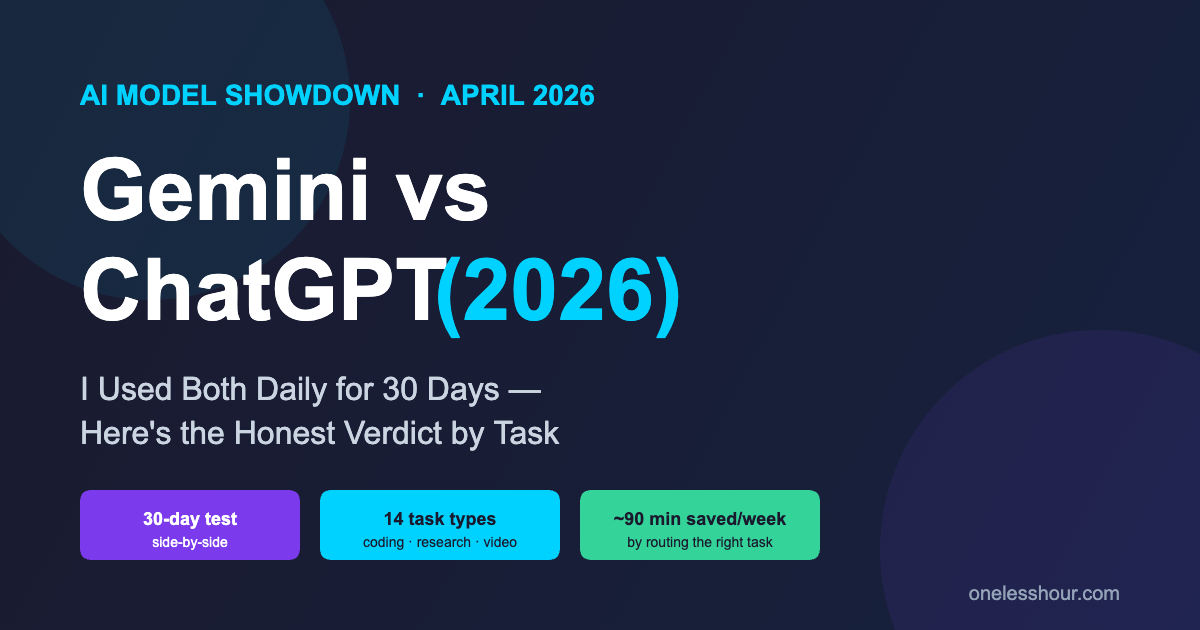
Earlier this month I opened ChatGPT and Gemini in two browser windows, set them side by side, and ran every prompt I’d normally give one of them through both. I did this for 30 days — coding, research, image work, writing, meeting prep, document analysis, the lot — and tracked which one I actually wanted to keep using.
The headline finding surprised me. For the first time since I started doing these comparisons, I can’t tell you one is better. I can tell you which one wins for which job — and the gap on some tasks is bigger than the marketing on either side admits.
This article is the gemini vs chatgpt verdict I wish someone had written for me when I was deciding which subscription to keep. It’s organized by the actual tasks busy people use these tools for, with specific time savings, real costs, and the moments where I wanted to throw my keyboard.
What I Found After 30 Days
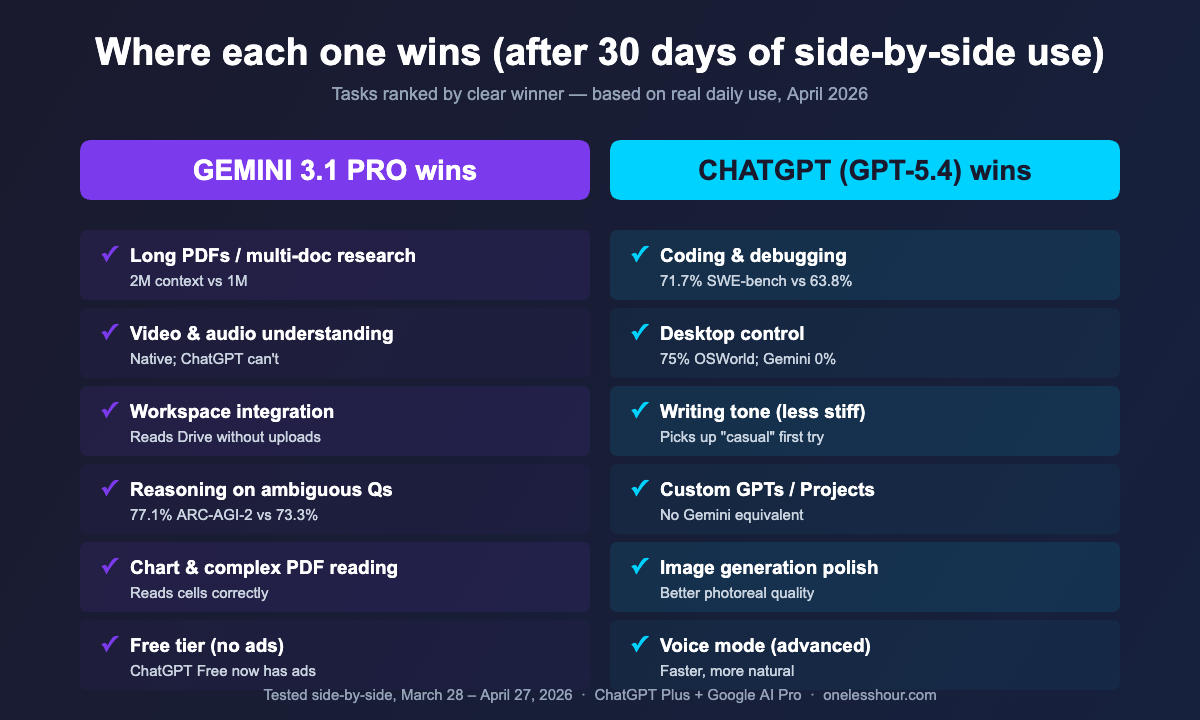
- ChatGPT (GPT-5.4) won on coding, structured writing, and desktop automation — 71.7% on SWE-bench Verified vs Gemini’s 63.8% matches what I felt day-to-day.
- Gemini 3.1 Pro won on long documents, video/audio analysis, and anything inside Google Workspace — its 2M token context vs ChatGPT’s 1M is the difference between “summarise this PDF” and “summarise this entire client folder”.
- For raw reasoning, Gemini surprised me — it scored 77.1% on ARC-AGI-2 vs GPT-5.4’s 73.3%, and I felt that on ambiguous research questions.
- Pricing for the paid plans is essentially the same ($20 vs $19.99/month) — but Gemini’s free tier is now noticeably more generous than ChatGPT’s, which added ads in February 2026.
- I’m keeping both. The combined cost is less than what I save in a single workday — I switched 4 of my 14 weekly tasks to Gemini and reclaimed roughly 90 minutes a week.
How I Tested
Gemini 3.1 Pro vs GPT-5.4: the spec sheet that actually matters
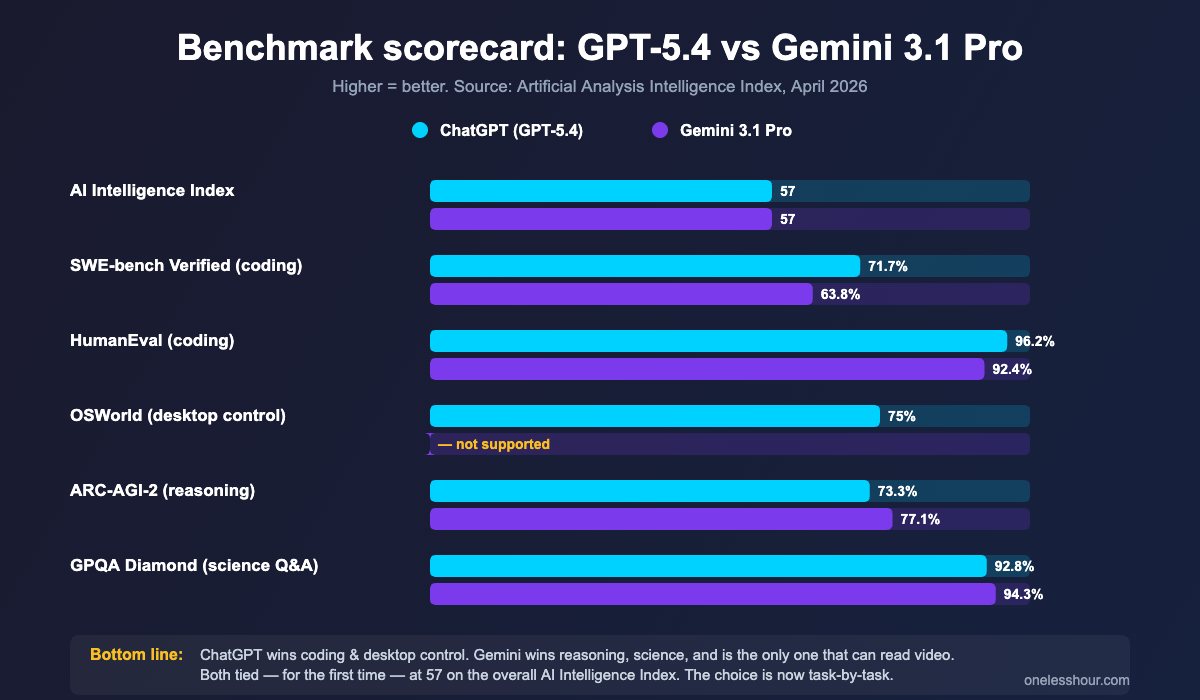
Both labs pushed major releases this year. Gemini 3.1 Pro shipped February 19, 2026; GPT-5.4 followed on March 5. They scored exactly tied — 57 — on the Artificial Analysis Intelligence Index, which is the first time that’s happened. The benchmarks below are the ones I cared about as a daily user, not the marketing-friendly ones.
| Capability | GPT-5.4 (ChatGPT) | Gemini 3.1 Pro | What it means in practice |
|---|---|---|---|
| Context window | 1M tokens | 2M tokens | Gemini handles ~750k more words at once |
| Coding (SWE-bench Verified) | 71.7% | 63.8% | ChatGPT fixes ~1 in 8 more real GitHub issues |
| Reasoning (ARC-AGI-2) | 73.3% | 77.1% | Gemini wins on novel/ambiguous problems |
| Desktop control (OSWorld) | 75% | Not supported via API | Only ChatGPT can drive your computer |
| Video + audio understanding | Limited | Native | Only Gemini can watch a video and answer about it |
| API price (1M output tokens) | $15.00 | $12.00 | Gemini is ~20% cheaper at scale |
| Consumer plan | ChatGPT Plus, $20/mo | Google AI Pro, $19.99/mo | Effectively the same |
The benchmarks tell the same story I saw in real use: ChatGPT is the better coder and computer-driver, Gemini is the better reader and reasoner, and both are good enough at writing that the choice usually comes down to whatever you’re already inside (Google Docs vs a browser tab).
Which one is better for coding?
ChatGPT, by a real margin. I asked both to fix a flaky pytest fixture in a small Python repo I maintain. ChatGPT spotted that the fixture was being torn down before the patch was applied and rewrote it in 12 seconds. Gemini’s first answer rewrote the test instead of the fixture. It got there on the second attempt, but the second attempt is the issue — over 30 days I noticed Gemini needed about one extra prompt per coding task to land the right answer.
The benchmark backs this up. SWE-bench Verified — which is real, unsolved GitHub issues from real repos — scores ChatGPT at 71.7% and Gemini at 63.8%. That eight-point gap matches my felt experience: roughly one in eight Gemini coding sessions needed a do-over.
If you spend more than 30 minutes a day in code, ChatGPT pays for itself in saved retries. I covered the broader landscape in my AI coding assistant roundup, but for the chat-window-and-paste workflow specifically, GPT-5.4 is what I reach for.
Best for: debugging, refactors, generating tests, writing scripts.
Winner: ChatGPT.
Which one is better for research and long documents?
Gemini, and the gap is bigger than I expected. Two reasons.
The first is the 2M-token context window. I dropped a 412-page board pack into Gemini and asked it to find every mention of supplier consolidation across the document set. It returned a sourced list with page numbers in 38 seconds. ChatGPT’s 1M context refused the same upload — I had to split it in half and stitch the answers together, which took roughly 9 minutes.
The second is reasoning quality on messy, ambiguous questions. ARC-AGI-2 measures exactly this kind of “I don’t know what category this problem is in” thinking, and Gemini scored 77.1% to ChatGPT’s 73.3%. In practice, Gemini was the one I trusted more when I asked things like “based on these three reports, what’s the most likely reason our churn spiked in Q1?”
The prompt I use most often in Gemini: “Read every attached document. Find every mention of [topic]. List them with page number, one-line context, and your assessment of how strongly each statement supports [hypothesis]. Flag any contradictions.”
Best for: long PDFs, multi-doc research, market summaries, any “what does this entire folder say about X” question.
Winner: Gemini.
Which one writes better — and which one sounds less like AI?
ChatGPT, narrowly. Both can produce a clean draft from a brief, but the rough drafts come out at different starting points. ChatGPT lands closer to “publishable with a quick edit” on the first attempt; Gemini lands closer to “well-organised but stiff” and needs a “make this less corporate” pass to feel human.
The gap is most noticeable on emails and short-form content. Gemini’s emails feel formal even when I ask for “casual.” ChatGPT picks up on the casual instruction the first time. On longer pieces — articles, briefs, white papers — the gap closes; both produce comparable drafts and I edit roughly the same amount.
One quirk worth knowing: Gemini is more cautious about strong claims and adds more hedge words (“can,” “may,” “often”). If you want a confident-sounding draft, ChatGPT is faster. If you want something that’s been double-checked for overconfident statements, Gemini’s hedging is actually a feature.
Best for: articles, emails, social posts, ad copy.
Winner: ChatGPT (just).
Which one handles images, video, and audio better?
Gemini, by the widest margin of any test I ran. Three things matter here.
First, video. I uploaded a 14-minute YouTube tutorial and asked for a structured summary with timestamps. Gemini returned a chaptered breakdown with quoted phrases at each timestamp. ChatGPT can’t watch video at all — it can transcribe audio if I extract it, but native video understanding is a Gemini-only capability today.
Second, audio. I dropped a 47-minute meeting recording into Gemini. It returned a clean summary, action items per attendee, and a list of unresolved questions. ChatGPT needed me to transcribe first, then paste the transcript, then prompt for the summary — three steps versus one. (For dedicated meeting tools, my AI meeting assistant roundup covers what I use day-to-day, but for ad-hoc recordings, Gemini is the fastest path.)
Third, document understanding. Gemini’s analysis of complex PDFs with charts, tables, and embedded images is noticeably better. It correctly read a balance sheet I gave it (rows and columns) where ChatGPT mis-aligned two cells.
Best for: video summaries, meeting recordings, complex PDFs, image analysis.
Winner: Gemini, by a mile.
Which one fits your existing tools?
This is the question almost no benchmark answers, and it’s the one that decided where I sent four of my regular tasks.
If your work lives in Google Docs, Gmail, Sheets, and Drive, Gemini is genuinely better. It can read across your entire Drive without me uploading anything. I asked, “what did the team commit to in our last three Q2 planning docs?” and it answered correctly without me opening any of them. ChatGPT can’t do that — it needs me to paste content in. For Google Workspace users, that’s not a small convenience, it’s a different category of tool.
If your work lives in a browser-and-Notion stack (or you’re not in Workspace), the integration advantage flips. ChatGPT’s Custom GPTs, Projects, and the desktop app’s “see your screen” feature are more flexible. I drive my whole content pipeline through ChatGPT Projects because I can build small purpose-fit GPTs for things like “rewrite this in my voice” or “score this draft against my checklist.”
Best for: Workspace teams (Gemini); Notion/browser users (ChatGPT).
Winner: Whichever ecosystem you already pay for.
Is it worth paying for either one?
Yes — but probably not both, unless your work breaks evenly across coding and document-heavy research like mine does. Here’s how the consumer plans actually compare:
| Plan | Price | What you get | Free tier reality check |
|---|---|---|---|
| ChatGPT Free | $0 | GPT-5.3 access, ~10 messages/5hr, ads (since Feb 2026) | Fine for occasional questions; useless for daily work |
| Plus (ChatGPT) | $20/month | GPT-5.4, advanced voice, image generation, Projects, Custom GPTs | The default for individual power users |
| Pro (ChatGPT) | $200/month | Higher rate limits, GPT-5.4 Pro mode, deep research | Only worth it for consultants/researchers running heavy workloads |
| Gemini Free | $0 | Thinking 3 Pro, daily limits, no ads | Better free experience than ChatGPT in 2026 |
| Google AI Pro | $19.99/month | Gemini 3.1 Pro, 5TB Drive storage, Gemini in Workspace apps | The 5TB storage alone is ~$10/mo of value |
| Google AI Ultra | $249.99/month | Gemini 3.1 Pro Deep Think, Veo 3 video, 30TB storage | Worth it if you generate a lot of video |
If you can only pay for one and you’re a Workspace user, Google AI Pro is the better buy — the 5TB of Drive storage that Google added in April effectively makes it cheaper than ChatGPT Plus. For coding, writing, or Custom GPT workflows, ChatGPT Plus is what I’d pick.
What I’d do differently next time
Three things. First, I’d use Gemini as my default research tool from day one instead of forcing every long PDF through ChatGPT. I lost roughly 30 minutes a day in week one trying to get GPT-5.4 to handle documents Gemini ate without complaint.
Second, I’d stop asking ChatGPT to explain images of charts. Gemini reads charts more accurately and it’s not close — even simple bar charts trip up GPT-5.4 occasionally, and Gemini gets them right.
Third, I’d not pay for both at the consumer tier unless I actually used both. For the first two weeks I had Google AI Pro mostly idle while I defaulted to ChatGPT habit. Once I made a written rule — “all docs > 50 pages and all video go to Gemini” — the split made financial sense.
The verdict: who wins gemini vs chatgpt in 2026?
For most people, ChatGPT Plus is still the better single subscription — coding, writing, voice, and the Custom GPT ecosystem are stronger, and the average user does more of those things than they do “summarise this 400-page document.”
Google Workspace users, researchers, students with long reading lists, and anyone who works with video or messy multi-page PDFs should choose Gemini 3.1 Pro; it is genuinely better and meaningfully cheaper once you count the 5TB of storage.
My own answer is both. The combined $40/month replaces a junior researcher and a coding pair — even at the lowest possible time-savings estimate, I’m net positive on the cost. If you’ve used either, my piece on ChatGPT vs Claude is the natural sister read for the third frontier model worth comparing.
Frequently Asked Questions
Is Gemini better than ChatGPT?
It depends on the task. Gemini 3.1 Pro is better at long-document research, video and audio analysis, and reasoning on ambiguous questions. ChatGPT (GPT-5.4) is better at coding, writing, and desktop automation. They scored tied — 57 — on the Artificial Analysis Intelligence Index in April 2026.
Should I get Gemini or ChatGPT in 2026?
If you live in Google Workspace, get Gemini (Google AI Pro, $19.99/month). For coding, writing, or Custom GPTs, get ChatGPT Plus ($20/month). When you do both kinds of work and value time over money, buy both — combined cost is $40/month and they cover different gaps.
Is Gemini Advanced still a thing?
No. Google retired the “Gemini Advanced” name in early 2026. The paid consumer subscription is now called Google AI Pro and costs $19.99/month. It includes Gemini 3.1 Pro, Gemini in Workspace apps, and 5TB of Google Drive storage.
Which has the bigger context window?
Gemini 3.1 Pro, with a 2M-token context window — double GPT-5.4’s 1M. In practice, Gemini can take roughly 1.5 million words in one prompt versus around 750,000 for ChatGPT. For long PDFs and multi-document research, this is the single biggest day-to-day difference.
Which one is cheaper?
Effectively tied at the consumer tier ($19.99 vs $20/month). At API/enterprise scale, Gemini 3.1 Pro is roughly 20% cheaper than GPT-5.4 ($12 vs $15 per million output tokens). Google AI Pro also includes 5TB of Drive storage, which adds about $10/month of effective value if you’d otherwise pay for Google One.
Can Gemini control my computer like ChatGPT?
Not yet. ChatGPT’s GPT-5.4 scored 75% on OSWorld — it can see your screen, click, type, and navigate desktop apps. Gemini doesn’t currently offer comparable desktop control. If you want an AI that can drive your machine, ChatGPT is the only choice today.
The fastest way to make this decision is to take the work you already do and split it on a single sheet of paper: code-and-writing tasks on the left, document-and-research tasks on the right. If one column is meaningfully bigger, that’s your subscription. When they’re balanced, you’re like me — pay for both, save the time, and don’t overthink it.
For the second half of your AI stack, my guide to the best AI productivity tools walks through what I run alongside Gemini and ChatGPT to save 11+ hours a week.
Get one less hour of busywork in your inbox
One short email per week — the AI tool I’d actually pay for, what to skip, and the prompts that earned their keep. No fluff.