
LAST VERIFIED: October 11, 2026
Transparency note: This article contains no affiliate links. It’s research-based: I wrote it from official documentation and announcements and didn’t test every feature hands-on. I pay for most of the AI tools I use myself. See how I test.
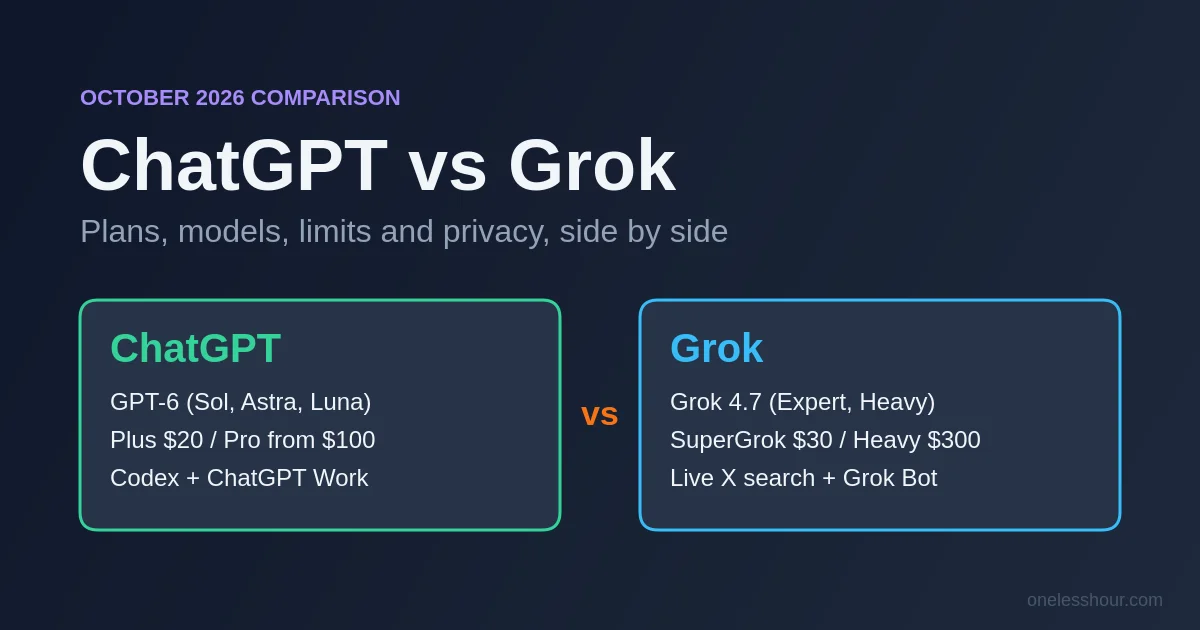
ChatGPT vs Grok used to be an easy call: ChatGPT for work, Grok for whatever was happening on X right now. That shortcut doesn’t hold up any more. In the last six weeks OpenAI shipped the GPT-6 family, xAI shipped Grok 4.7, and both companies rebuilt their plans around agents that work while you’re away.
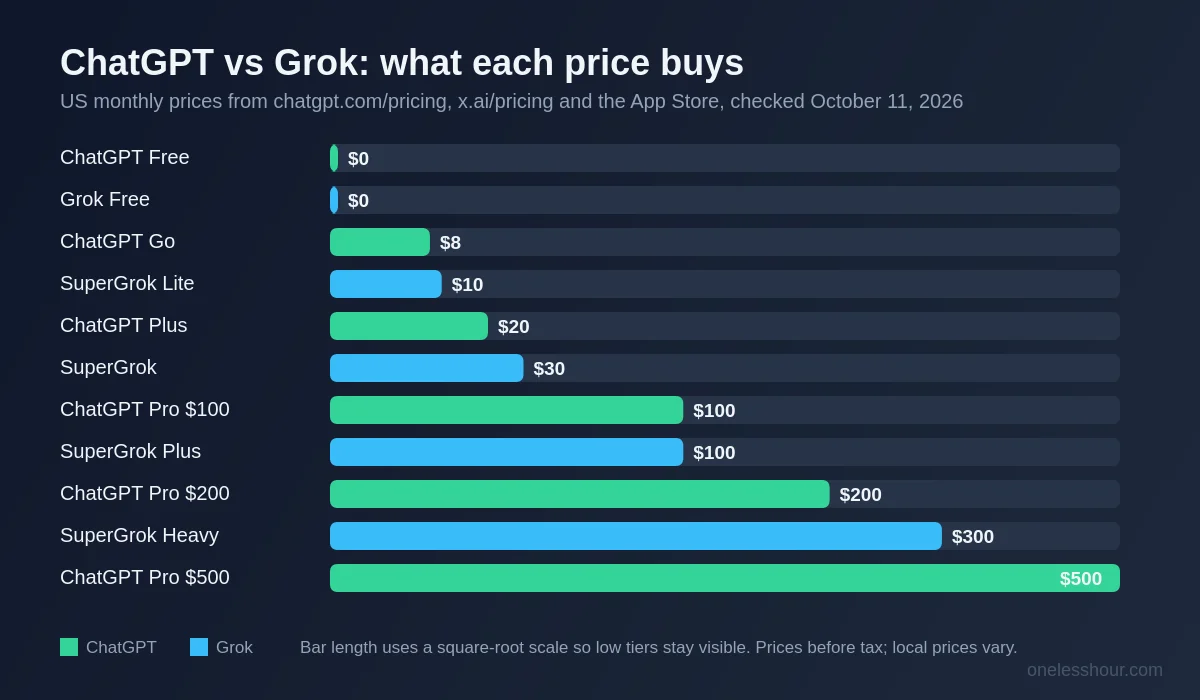
The price ladders don’t line up either. ChatGPT runs $0, $8, $20, then $100 to $500. Grok runs $0, $10, $30, $100 and $300. So the useful question isn’t “which is smarter”, it’s “what do I get for the money I’m willing to spend”, and that’s how this comparison is organised.
What this article is (and isn’t)
This is a research comparison, not one of my two-week time-tracked tests. I haven’t run GPT-6 and Grok 4.7 side by side on the same tasks yet, so you won’t find hours-saved numbers or “I asked both the same question” screenshots here. What you will find is every plan, price, model, limit and privacy setting as OpenAI and xAI document them on October 11, 2026, with the sources listed at the end. Where an official page didn’t say something clearly, I say so instead of guessing.
What I Found
- At the most common paid tier, ChatGPT Plus is $20 a month and SuperGrok is $30. The cheapest paid plans are ChatGPT Go at $8 and SuperGrok Lite at $10.
- Grok’s always-on agent, Grok Bot, comes with SuperGrok ($30). ChatGPT’s always-on agent, Dot, needs a Pro plan ($100 and up). ChatGPT Plus gets ChatGPT Work instead, which runs the tasks you give it.
- Only Grok searches X posts live, and only Grok makes video inside the chat app (up to 15 seconds, with 1080p on SuperGrok Plus).
- Usage limits work differently. ChatGPT gives unlimited everyday text chats and meters tools, Work and Codex separately. Paid Grok plans have drawn from a single weekly pool since June 2026, and xAI doesn’t publish how big it is.
- Both can train on your chats unless you switch it off. Grok on X has its own, separate setting.
ChatGPT vs Grok: which should you pick?
Here’s the short version, based on what each plan includes rather than on benchmark charts.
- Pick ChatGPT if you want the cheaper paid plan ($8 or $20), coding help across the web, the terminal and your editor (Codex is in Plus), add-ins for Excel, Word, PowerPoint and Google Sheets, or the most generous free tier for everyday text chats.
- Pick Grok if live X posts are part of your job (news, markets, social media, PR), you want to make short videos in the same app you chat in, or you want an always-on agent without paying $100 or more a month.
- Stay free on both if you’re still working out what you’d use an AI assistant for. Both free tiers include web search and voice.
If you’re new to Grok, my plain-English guide to using Grok covers setup and the basics first.
How much do ChatGPT and Grok cost in 2026?
These are US prices, billed monthly, as listed on chatgpt.com/pricing, x.ai/pricing and both companies’ App Store listings on October 11, 2026. Local prices and tax vary, so check checkout in your country.
| Budget | ChatGPT | Grok |
|---|---|---|
| $0 | Free: unlimited everyday text chats on OpenAI’s lighter Luna model; limited uploads, images, voice, deep research and memory; limited Work and Codex in the desktop app | Free: Fast mode, real-time web and X search (limited), voice mode, connectors |
| $8 to $10 | Go, $8: more messages with tools, uploads, images and voice, longer memory, scheduled tasks. May include ads. | SuperGrok Lite, $10: a step up from Free. xAI lists it on its plans table but doesn’t spell out its features on x.ai/pricing. |
| $20 to $30 | Plus, $20: GPT-6 with Medium and High thinking, Projects, custom GPTs, deep research, Codex, ChatGPT Work on desktop, web and mobile | SuperGrok, $30: Grok 4.7 and Expert mode, Grok Bot, image and video generation, higher limits |
| $100 | Pro $100: GPT-6 Pro (powered by GPT-6 Astra), Dot, bigger context, no five-hour cap in Work and Codex | SuperGrok Plus, $100: 1080p video, “significantly higher” usage, priority access at peak times |
| $200 | Pro $200: same as Pro $100 with higher allowances | No plan at this price |
| $300 to $500 | Pro $500: the highest allowances plus Ultrafast mode | SuperGrok Heavy, $300: xAI’s top personal plan, with Heavy mode (a “team of experts” running Grok 4.7) |
Two billing details are easy to miss. OpenAI only bills Go, Plus and Pro monthly, while SuperGrok also comes as a $300 yearly plan, which works out to $25 a month. And ChatGPT Plus is listed at $19.99 in Apple’s App Store against $20 on the web, so it costs about the same wherever you subscribe.
Measured against each other, the $20 to $30 rung is where the decision usually sits, and ChatGPT is $10 a month cheaper there. Grok’s extra $10 buys two things ChatGPT keeps for Pro or doesn’t offer at all, an always-on agent and video generation, on top of the X search Grok gives you even on Free. If you don’t need either, Plus is the better buy. For more cheap options across the whole AI tool market, see my list of AI tools worth paying for under $10.
Which models do you get with each plan?
ChatGPT. OpenAI introduced GPT-6 Astra in early September 2026, followed by the cheaper GPT-6 Sol and GPT-6 Luna later that month and GPT-6.1 Sol on September 29. In Chat, GPT-6 is still rolling out to paid accounts. It runs on GPT-6 Sol at the Instant, Medium, High and Extra High thinking levels, and on GPT-6 Astra when you pick Pro. Plus gets Medium and High. Extra High and Pro thinking need a Pro plan. Free and Go run on the lighter Luna model. OpenAI’s own pages don’t agree on which Luna that is: the pricing page lists GPT-6 Luna, while the model help article (updated October 9) still says GPT-5.6 Luna is becoming their default.
Grok. xAI released Grok 4.7 on September 21, 2026. In the Grok app you pick a mode rather than a model. Fast is free. Expert (“thinks hard”, Grok 4.7) and Auto, which chooses between Fast and Expert, need a paid plan. Heavy (“team of experts”, Grok 4.7) is the SuperGrok Heavy mode. xAI doesn’t say which model powers Fast.
What about “ChatGPT vs Grok 4”? A lot of people still search for that, but Grok 4 dates from July 9, 2025. xAI has since released Grok 4.5, 4.6 and now 4.7, so comparisons of Grok 4 against GPT-4o or GPT-5 are describing models neither app leads with any more. Be careful with launch-day charts too. xAI’s Grok 4.7 announcement compares it with GPT-5.6 Sol, not GPT-6, and each company picks the benchmarks it publishes. I’d treat vendor charts as marketing until independent tests catch up.
ChatGPT vs Grok: feature by feature
| Feature | ChatGPT | Grok |
|---|---|---|
| Real-time info | Web search | Web search plus live X posts (limited on Free) |
| Images | Image creation on every plan (limited on Free); “image generation with Thinking” from Plus | Grok Imagine, up to 2K resolution; listed as a SuperGrok feature |
| Video | Not in the ChatGPT plans | Text-to-video up to 15 seconds at 720p; 1080p on SuperGrok Plus |
| Voice | All plans; voice with video from Go | Voice mode on Free |
| Memory | Limited on Free, expanded on Plus and Pro, can draw on past chats | Memory across chats (xAI doesn’t break it down by plan) |
| Projects | On every plan, including shared projects | Projects on grok.com |
| File analysis | Limited on Free; Plus reads roughly 320 pages of text per request with reasoning | Up to about 100 files per message on the web, up to 150 MB each |
| Coding | Codex (desktop only on Free and Go; web, CLI, IDE and iOS from Plus) | Grok Build coding agent, which runs Grok 4.7 by default |
| Agents | ChatGPT Work (full on Plus); Dot always-on agent on Pro only | Grok Bot always-on agents from SuperGrok (beta) |
| Integrations | Plugins on every plan; Excel, Word, PowerPoint and Google Sheets extensions from Plus | Connectors on every plan, including Free |
Real-time news: Grok’s clearest advantage
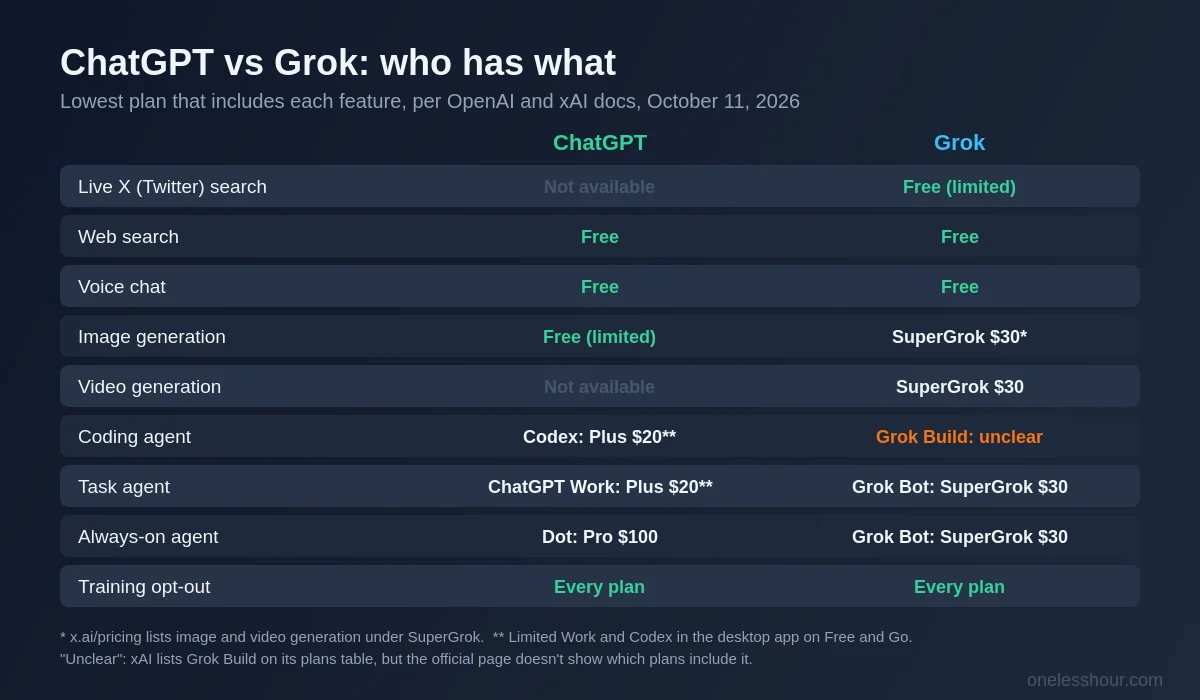
Both assistants search the web. Only Grok also searches X, live, and xAI built its model to run its own X keyword and semantic searches. If your work depends on what people are posting right now, such as a product launch, a breaking story or how a campaign is landing, that’s something ChatGPT can’t match. If you mostly need sourced answers from the open web, both will do, and I compared the two strongest options for that in ChatGPT vs Perplexity.
Images and video
ChatGPT makes images on every plan, and from Plus it can think through an image before generating it, which helps with layouts and text in images. Grok Imagine does images and short video in the same thread, and you can edit either with follow-up prompts. Every image and video Grok makes carries a Grok watermark, and xAI says there’s no setting to remove it. For a wider look beyond these two, see my AI image generator roundup.
Agents: ChatGPT Work vs Grok Bot
This is where the two companies have moved furthest apart. ChatGPT Work, launched July 9, 2026, replaced agent mode. You hand it a multi-step job and it works through it with a cloud browser, asking before anything you can’t undo. I covered how it works in what replaced ChatGPT agent mode. It’s limited to the desktop app on Free and Go and fully available from Plus. OpenAI keeps its always-on agent, Dot, for Pro.
Grok Bot launched in beta on August 11, 2026. Each Bot gets its own always-on cloud computer with a browser and terminal, signs into your apps and keeps going when you’re away. You message it like a colleague on desktop or iOS. Two details stand out. It comes with SuperGrok at $30, not just the top plans, and xAI says Bot usage is separate from your Grok plan’s limits. Because it’s a beta, I’d start it on low-stakes jobs. If agents are new to you, my beginner’s guide to AI agents explains what to hand off first.
Coding
ChatGPT Plus includes Codex on the web, in the terminal, in your editor and on iOS, and it shares an allowance with Work. Grok’s equivalent is Grok Build, and Grok 4.7 is also offered inside Cursor. xAI’s plans table lists Grok Build, but I couldn’t confirm from the official page which plans include it. If coding is your main use, my guide to using ChatGPT for coding goes deeper on the ChatGPT side.
How do the usage limits compare?
ChatGPT splits its limits. Everyday text chats are unlimited on every plan, including Free and Go, subject to abuse safeguards. File uploads, image generation, voice and data analysis each have their own limits. Thinking levels and GPT-6 Pro have allowances too, and ChatGPT tells you when they reset. Work and Codex share a separate budget. On Plus, OpenAI estimates 15 to 150 local GPT-6 Sol messages per five hours, depending on how big the task is, and Pro plans have no five-hour limit. Images use that budget about three to five times faster than text.
Grok replaced its per-product daily limits in June 2026. Paid plans now share one weekly pool across Chat, Imagine, Voice and Build, so a long video uses far more of it than a chat message. You can see how much you’ve used as a percentage, with the reset time, under Settings, then Usage. When the pool runs out, paid features pause, but Grok’s free Chat and Voice allowance keeps working. You can also buy extra credits from $5, on the web only. xAI doesn’t publish how big any plan’s pool is, so be wary of any article that quotes exact message counts.
In practice, ChatGPT’s model is easier to predict if you mostly chat. Grok’s pool is more flexible if you go through bursts of image or video work, but you only find out its size by using it.
Is Grok or ChatGPT better for privacy?
Neither one is private by default on a personal plan. Both can use your conversations to train their models, and both give you a switch.
- ChatGPT: Settings, then Data controls, then turn off “Improve the model for everyone”. When you’re signed in, it applies across your devices and also covers Codex tasks.
- Grok app and grok.com: Settings, then Data Controls (just Data on the web), then turn off “Improve the model”. There’s also a separate “Personalize Grok using X” toggle that controls whether your X data shapes Grok’s answers.
- Grok inside X: this has its own training setting in X’s privacy settings. Turning off the one in the Grok app doesn’t cover it, so if you use Grok in both places, check both.
For one-off sensitive chats, ChatGPT has Temporary chat and Grok has Private Chat (the ghost icon). Neither is used for training, and neither is kept for more than 30 days. Two catches apply to both. Rating a reply with a thumbs up or down can let that conversation be used for training even after you opt out. And on business plans, neither company trains on your content by default. One difference matters if you use Grok without an account: outside the EU and UK, logged-out users can’t opt out of training.
What about Claude and Gemini?
Plenty of people search “Claude vs ChatGPT vs Grok” or “Gemini vs ChatGPT vs Grok” because they’re choosing between three, not two. This page sticks to ChatGPT and Grok so every number in it is current, but I’ve compared the other pairs separately: ChatGPT vs Claude, Gemini vs ChatGPT and Claude vs Gemini. Those tests ran earlier in 2026, so check today’s prices and model names before you buy. My best AI chatbot roundup puts the whole field side by side.
One thing works with any three. Write down the three jobs you’d actually use an assistant for, then run each on the free tiers for a week. The plan tables above tell you what each one costs. Your own week tells you which is worth it.
What do Reddit users say about ChatGPT vs Grok?
The “ChatGPT vs Grok” threads on r/ChatGPT and r/OpenAI keep coming back to the same few points. These are opinions, not tests, but they’re a useful gut check:
- People who prefer Grok like its more direct, less filtered tone and its grip on X trends.
- People who prefer ChatGPT see it as the better all-round daily tool, especially for voice, research and longer coding work.
- A recurring complaint about Grok is running into usage limits, and it comes up again in threads about the June 2026 weekly pool.
- Switching stories go both ways. One widely shared r/OpenAI post comes from someone who cancelled ChatGPT for Grok after also trying Claude and Gemini.
Treat any single thread with caution. Many were written before GPT-6 and Grok 4.7 arrived, and preferences shift with every model release.
Frequently Asked Questions
Is Grok better than ChatGPT?
It depends on the job. Grok is the better pick for live X posts, short video generation and getting an always-on agent (Grok Bot) on a $30 plan. ChatGPT is cheaper at the main paid tier ($20 vs $30), has Codex and office add-ins in Plus, and gives unlimited everyday text chats even on Free.
Is Grok free to use?
Yes. Grok’s free plan includes Fast mode, real-time web and X search (with limits), voice mode and connectors. Paid plans start with SuperGrok Lite at $10 a month and go up to SuperGrok Heavy at $300. xAI doesn’t publish the exact free limits.
Is Grok 4 still the latest Grok model?
No. Grok 4 launched on July 9, 2025. The current model is Grok 4.7, released on September 21, 2026, which powers Expert and Heavy modes in the Grok app. On the ChatGPT side, the current family is GPT-6 (Astra, Sol and Luna), introduced in September 2026.
Does Grok use my chats for training?
It can, unless you turn it off. In the Grok app go to Settings, then Data Controls, and switch off “Improve the model” (on grok.com it’s under Settings, then Data). Private Chat is never used for training. If you use Grok inside X, X has its own separate setting. ChatGPT works the same way, with “Improve the model for everyone” under Data controls.
Which is cheaper, ChatGPT or Grok?
ChatGPT is cheaper at the lower tiers. Go costs $8 against SuperGrok Lite at $10, and Plus costs $20 against SuperGrok at $30. Both charge $100 for the next tier up. At the top, SuperGrok Heavy ($300) sits between ChatGPT Pro $200 and Pro $500. SuperGrok can also be billed yearly ($300, or $25 a month), while ChatGPT’s personal plans are monthly only.
Where to start this week
Don’t pay for either yet. Pick the one task that made you search “ChatGPT vs Grok” in the first place. If it’s tracking what people say on X, start with Grok Free. If it’s writing, spreadsheets or code, start with ChatGPT Free. Use it for five working days, and only upgrade if you hit a limit that actually slows you down. Before your first real chat, switch off model training on whichever you choose. It takes about 30 seconds.
I’ll run both through a proper side-by-side test and update this page with real numbers. Until then, everything above comes from OpenAI’s and xAI’s own pages, checked on October 11, 2026.
Sources (all checked October 11, 2026): ChatGPT pricing; OpenAI Help Center, GPT-6 and other models in ChatGPT and Data controls in ChatGPT; ChatGPT Learn: Work and Codex pricing; OpenAI, “Introducing GPT-6 Sol and Luna” and the ChatGPT Work launch post (July 9, 2026); x.ai/pricing; x.ai/grok; xAI, “Introducing Grok 4.7”, “Introducing Grok Bot” and “Grok 4” (July 9, 2025); Grok website and apps FAQ; Grok 4.7 developer guide; xAI consumer FAQ; App Store listings for Grok and ChatGPT (US).
Related reading
Get the next comparison in your inbox
Every week I write up one AI tool honestly: what it costs, what it’s good at and where it falls short. Subscribe here and skip the trial-and-error.