
Last tested: April 2026
Transparency note: This article contains no affiliate links, and no company paid for or reviewed it. I pay for most of the AI tools I use myself — see how I test.
Last quarter I logged every hour I spent on writing. First drafts of blog posts, client emails, LinkedIn updates, product copy, report summaries — it came to 11 hours a week. Not editing. Not thinking strategically. Just producing first drafts.
I’d been using AI to cut time on email, meetings, and research. But writing felt different. I’d convinced myself my voice was irreplaceable and that AI would produce generic slop. I wasn’t entirely wrong — but I was applying that logic to the wrong part of the workflow.
First drafts aren’t where your voice lives. Your voice lives in the editing. AI gets you from blank page to something real in a fraction of the time — then you make it yours.
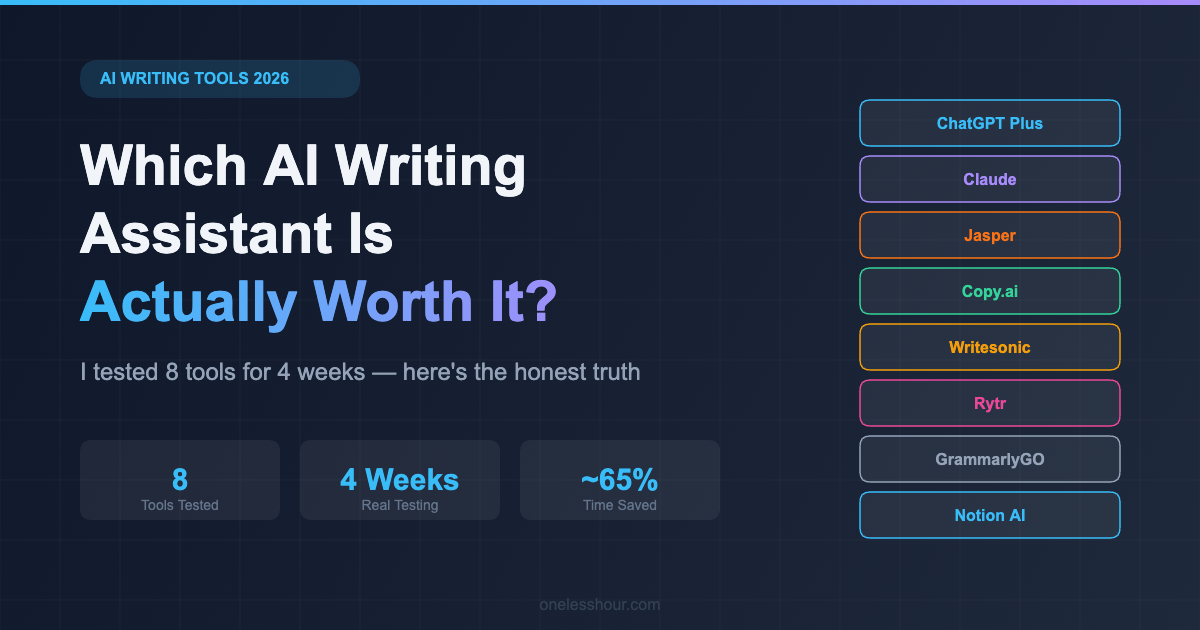
I spent four weeks running identical writing tasks through 8 AI writing assistants: blog post intros, sales email sequences, LinkedIn posts, product descriptions, and document summaries. Same briefs, different tools. Here’s what actually worked — and what’s overhyped.
What I Found
- ChatGPT and Claude are the best starting point for most people — and both have genuinely useful free tiers that outperformed most paid alternatives on quality
- Jasper’s $49/month is only worth it for marketing teams managing brand guidelines at scale — solo users are paying for features they won’t use
- Rytr’s free tier (10,000 characters/month) is more capable than most people expect for email and short-form content
- GrammarlyGO is an editing tool, not a writing assistant — calling it an AI writer is misleading, and it disappointed me on drafting tasks
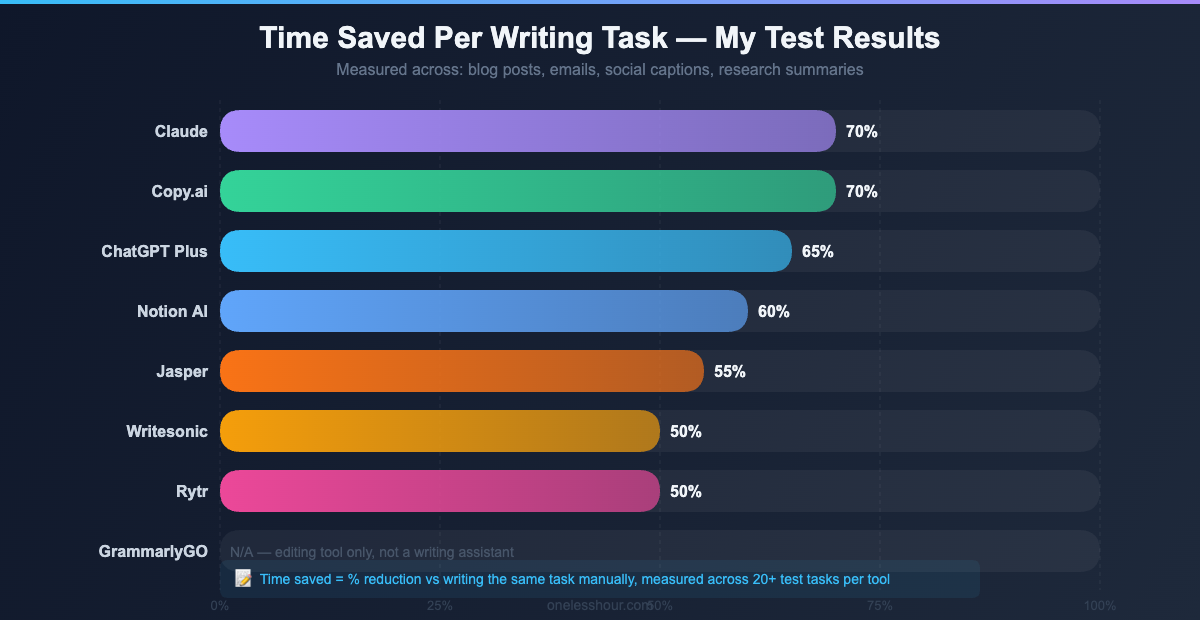
- My average first-draft time dropped from ~45 minutes to ~15 minutes per 1,000 words across the tools that actually worked
How did I actually test these AI writing tools?
I gave each tool the same five tasks:
One thing worth knowing before you publish anything from these tools: AI detectors are far less reliable than their marketing suggests. I ran 200 real texts through eight of them and logged how often they got it wrong.
- Blog intro (800 words): “How to save 2 hours a day using AI tools” — professional audience, conversational tone, no fluff
- Sales email sequence (3 emails): Onboarding sequence for a $99/month SaaS project management tool
- LinkedIn post (3 variations): Announcing a product feature, needs to feel personal rather than corporate
- Product description (150 words): A $199 noise-cancelling headphone set for remote workers
- Document summary (300 words): Condensing a 5-page strategy report into executive-ready bullets
I judged each on: output quality without editing, time from prompt to usable draft, how well it matched a specific writing voice when given examples, and whether the free tier was actually useful — not just a 7-day tease.
Is ChatGPT actually the best AI writing assistant? ($20/month)
ChatGPT isn’t the most specialized tool on this list. It’s the most flexible — and for most people, that matters more.
On the blog intro task, GPT-4o produced a solid 800-word draft in 90 seconds. Without editing, I’d put it at 7/10 — clear, reasonably structured, but generic. With a second prompt that gave it three examples of my writing style and asked it to rewrite matching that voice, the output jumped to 9/10. That style pass took two minutes. Three prompts total, not one.
That’s the right way to use ChatGPT for writing: brief → draft → style pass. Anyone disappointed by ChatGPT’s writing quality is almost always using a single vague prompt and judging the result. The prompting techniques I use daily make a bigger difference here than the tool itself.
Free tier reality: GPT-3.5 is free and capable for emails and short-form content. GPT-4o access on the free tier is rate-limited — you’ll hit the cap within 2–3 longer pieces per day. The $20/month Plus plan removes that friction and is worth it for daily writing work.
Time saved: ~65% on first drafts. My 45-minute blog intro dropped to 16 minutes including the style pass.
Best for: Writers who need flexibility across content types. Anyone already using ChatGPT who hasn’t yet tried it systematically for writing work.
Skip it if: You need built-in SEO optimization, structured content briefs, or team brand consistency tools. There are purpose-built options for those jobs.
Pro tip: Give ChatGPT your audience, your goal, the tone you want, and 2–3 examples of your best writing before asking for a draft. The quality difference between a vague prompt and a detailed one is larger than the difference between any two tools on this list.
Does Claude produce better writing than ChatGPT? (Free / $20/month)
Claude is the AI writing assistant I actually use most for serious long-form work — and it won on quality in more of my test tasks than any other tool.
If ChatGPT is the one you already pay for, it is worth learning where it genuinely helps. These are the six writing jobs I actually hand to it.
Where ChatGPT produces structurally competent content, Claude produces writing that feels more considered: better paragraph flow, less repetition, more natural transitions between ideas. On content longer than 800 words, this becomes consistently noticeable.
On the document summary task — condensing a 5-page strategy report into 300 words — Claude’s output required zero editing. It identified the actual decisions in the document, not just the topic sentences, and organized them in a logical sequence. ChatGPT’s summary was accurate but needed restructuring.
For voice preservation, Claude performed best of the eight tools. When I gave it three writing samples and asked it to match my tone, it picked up patterns others missed: sentence length variation, the tendency to follow long explanatory paragraphs with short punchy ones, the way I use em dashes instead of semicolons. If you write in a distinct style, this matters.
Free tier reality: Claude’s free tier uses the Sonnet model, which is genuinely strong for writing tasks — not a degraded version designed to upsell you. You’ll hit usage limits under heavy daily use, but moderate writing work is fine on the free plan. See my beginner’s guide to AI chat tools for a side-by-side comparison of how they handle common tasks.
Time saved: ~65–70% on long-form first drafts. Strongest time savings on document work and structured writing.
Best for: Long-form content, tone-sensitive writing, document summarization, and anyone who prioritizes prose quality over template volume.
Skip it if: You need deep integrations with marketing platforms, or your primary need is short-form ad copy at volume. Claude is a generalist writer, not a marketing machine.
Pro tip: Claude handles very long context better than any tool I tested. Paste your full research notes, style guide, and brief in a single prompt — it synthesizes across all of it without losing track of earlier instructions the way ChatGPT sometimes does.
Is Jasper worth $49/month as an AI writing assistant?
Jasper is genuinely good. It’s also genuinely expensive — and most of what makes it worth the price only matters if you’re running content at scale.
The core differentiator is Brand Voice: you train Jasper on your writing samples, style guide, and product docs, and it applies that consistency across everything it generates. For a solo creator, this is overkill. For a team of five writers producing content for multiple clients, it’s a consistency tool that’s hard to build any other way.
Output quality on my test tasks was solid — I’d put it at 7.5/10 without editing, comparable to ChatGPT Plus. The difference shows up in the templates: 50+ purpose-built templates (cold email, case study, ad copy, product description) that give a head start over a blank chat interface. The onboarding email sequence Jasper produced was the most structurally coherent of all eight tools, with each email clearly building on the previous one.
Free tier reality: 7-day free trial, then $49/month minimum. No ongoing free tier. If you’re evaluating it, run your actual work through it during the trial — not their demo templates.
Time saved: ~55% on first drafts. Slightly lower than ChatGPT/Claude due to template setup overhead, but higher quality-per-edit-cycle on marketing content.
Best for: Marketing teams managing brand consistency across multiple writers. Agencies. Anyone already paying for Surfer SEO who can bundle the integration.
Skip it if: You’re a solo creator or blogger. At $49/month, you’re paying for team features you won’t use. ChatGPT Plus gives you 80% of the writing quality for $29 less per month.
Pro tip: Jasper’s “Campaigns” feature generates a blog post, social posts, and email sequence from a single brief. If you repurpose content across channels, this alone can save 45+ minutes per content piece.
What is Copy.ai best at? (Free / $49/month)
Copy.ai’s strongest suit is speed on short-form: email subject lines, social posts, ad copy, product descriptions. It doesn’t try to compete with the all-rounders on long-form — and that focus shows.
On the LinkedIn post task — 3 variations for a product launch — Copy.ai was the fastest tool on this list. Three usable variations in 45 seconds. Not the most original writing, but all three were structurally complete and required only light tweaks for voice.
The email sequence task showed its limits. The three onboarding emails were each fine individually, but they didn’t build on each other the way a good nurture sequence should. The connective thread between emails had to be rewritten. For high-volume individual pieces of short copy, it’s fast. For anything requiring sustained narrative across multiple pieces, look elsewhere.
Free tier reality: 2,000 words per month — enough to evaluate the tool on real tasks but not enough for regular use. The free plan doesn’t limit features, just volume.
Time saved: ~70% on short-form content. ~50% on anything longer than 500 words.
Best for: Social media managers, email marketers focused on short sequences, anyone whose primary output is ad copy and product descriptions.
Skip it if: Your primary need is blog posts, long-form articles, or coherent multi-part sequences. There are better tools for sustained output.
Pro tip: Use Copy.ai’s Workflows feature to chain prompts — give it a product brief, let it generate a headline list, pick the best one, then expand into full copy. This works well for product launches where you need multiple short-form assets fast.
Does Writesonic save time on SEO blog content? ($16/month+)
Writesonic sits between Jasper and the free tools — more purpose-built than ChatGPT for content marketing, cheaper than Jasper for solo use.
The draw is the SEO integration: connect your domain and target keyword, and Writesonic pulls in competitor analysis before drafting. For blog content where you’re actively trying to rank, this reduces a research step that would otherwise require a separate tool.
On pure prose quality, it sits below ChatGPT and Claude. The writing is competent but occasionally mechanical — you can feel the template underneath it. For SEO articles where structure and keyword placement matter more than literary flow, the built-in optimization is a real time-saver. For anything where voice matters, you’ll be editing more.
Free tier reality: 25 credits per month. A 1,000-word article uses roughly 5–10 credits. Enough to test seriously, not enough for regular use.
Time saved: ~50% on SEO blog content when you factor in the built-in research. ~40% on general writing.
Best for: Bloggers optimizing for search traffic who want research and drafting in one workflow.
Skip it if: SEO isn’t your primary goal, or you already use a dedicated SEO tool. Don’t pay for the same research capability twice.
Pro tip: Writesonic’s article rewriter is underrated for content clusters — paste an existing post and ask it to restructure around a new angle. Faster than starting from scratch when you’re expanding a topic.
Is Rytr actually good enough as a free AI writing assistant? (Free / $9/month)
Rytr is what I’d recommend to anyone who needs an AI writing assistant but isn’t ready to spend $20+ a month. The output quality ceiling is lower than ChatGPT or Claude — you feel it on anything longer than 600 words. But for email drafts, social captions, and short product copy, it’s genuinely capable.
On the sales email task, Rytr produced a three-email sequence I’d rate 6.5/10 without editing — better than expected from a free tier. The emails had a clear structure, appropriate CTAs, and didn’t feel like a template dump. The LinkedIn post task was where it struggled: the output skewed safe and corporate, without the specific detail that makes posts actually perform.
Free tier reality: 10,000 characters per month — roughly 1,500–2,000 words. That’s 3–4 real business emails, or 8–10 short social posts, every month at zero cost. The most useful free tier on this list for the people it’s designed for.
Time saved: ~50% on email drafts. ~30% on anything requiring a distinct voice, because you’ll be rewriting more.
Best for: Freelancers and small business owners who need occasional help drafting emails and social posts without a monthly commitment.
Skip it if: You need high-quality long-form content or your voice is the product. Rytr works best as a starting point you’ll rewrite, not a tool you use as-is. The output quality gap compared to Claude is noticeable.
Pro tip: Always select a specific tone before generating — Rytr has 20+ options. “Conversational” produces the most usable starting point for most business writing. Then layer in your own edits. The base tone selection makes a bigger difference than any other setting.
Should you use GrammarlyGO as an AI writing assistant? (Free / $30/month)
This one needs upfront clarification: GrammarlyGO is not an AI writing assistant. It’s an AI editing tool.
It doesn’t generate first drafts from a brief. It improves, rewrites, and polishes content you’ve already written. If you’re expecting Grammarly to replace ChatGPT for drafting, you’ll be disappointed — I was, on the blog intro task. It kept asking for source material rather than generating from the brief.
What it does exceptionally well is inline editing. It’s embedded in your browser, email client, and Google Docs. You write, it suggests improvements in real time. The “Improve it” and “Change tone” features are genuinely useful for polishing AI-generated drafts or tightening your own writing. On the product description task, Grammarly improved a mediocre ChatGPT draft into something I’d actually publish — in about 90 seconds of accepting suggestions.
Free tier reality: The free tier handles grammar and spelling well. GrammarlyGO (the AI generation and rewriting features) requires the Premium plan at roughly $30/month, or ~$12/month on an annual plan. Worth it if you’re already paying for Grammarly and want an editing boost on top.
Best for: Anyone who already uses Grammarly and wants to polish AI-generated content or improve their own first drafts. Editors more than writers.
Skip it if: You need a tool that generates content from scratch. Use ChatGPT or Claude for that, then run Grammarly over the output afterward if you need it. Treating them as a pair — not competitors — is how you actually get the best results.
Pro tip: The workflow that works: ChatGPT or Claude for the first draft → paste into Google Docs → let Grammarly suggestions clean up the rough edges. Draft speed from AI, polish from Grammarly. Faster than doing either job alone.
Is Notion AI worth it as a writing assistant? ($10/month add-on)
If you already live in Notion, the AI add-on is worth $10/month without much deliberation. If you don’t use Notion, this section doesn’t apply to you — don’t adopt a whole productivity system just for the AI features.
Notion AI is embedded directly in your workspace — inside your meeting notes, project briefs, research docs. You highlight a block, ask it to summarize, expand, rewrite, or draft the next section, and it does it without switching context to a separate tool.
On the document summary task, it was the most seamless experience on this list. I highlighted the pasted strategy doc, clicked “Summarize,” and had a usable 300-word output in 30 seconds. No copy-pasting, no context switching. The limitation is scope: Notion AI is optimized for in-Notion tasks. It doesn’t have robust templates for email sequences, ad copy, or long-form blog content. It’s a productivity layer, not a writing platform.
Free tier reality: Notion has a free workspace plan, but the AI is a paid $10/month add-on. A limited number of free AI uses are available when you first enable it — enough to test, but not enough to evaluate it properly.
Best for: Notion power users who take meeting notes, maintain project docs, and want AI to help inside that workflow without opening another tab.
Skip it if: You’re not already a Notion user, or your writing work happens mostly in Google Docs, Word, or a CMS. For broader note-taking and AI tool comparisons, my best AI note-taking apps roundup covers how Notion AI stacks up against dedicated tools.
Pro tip: Use Notion AI’s “Fill database” feature to turn rough notes into structured database rows — content calendar entries, CRM records, project tasks. It converts messy notes into organized data in seconds, which is the kind of 10-minute job that disappears entirely.
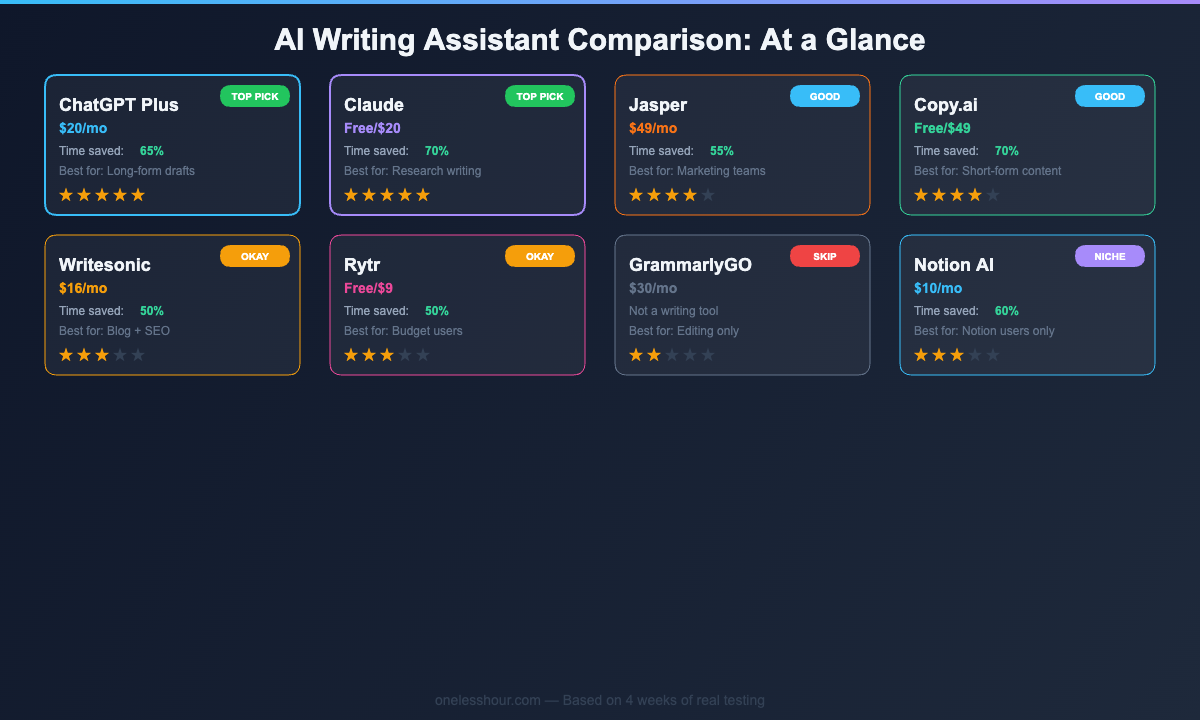
Quick comparison: all 8 AI writing assistants at a glance
| Tool | Best For | Free Tier | Paid From | First-Draft Time Saved |
|---|---|---|---|---|
| ChatGPT Plus | All-round writing | Rate-limited GPT-4o | $20/mo | ~65% |
| Claude | Long-form + voice preservation | Strong (Sonnet) | $20/mo | ~65–70% |
| Jasper | Marketing teams + brand consistency | 7-day trial only | $49/mo | ~55% |
| Copy.ai | Short-form + social content | 2,000 words/mo | $49/mo | ~70% (short-form) |
| Writesonic | SEO blog content | 25 credits/mo | $16/mo | ~50% |
| Rytr | Budget email + social drafts | 10,000 chars/mo | $9/mo | ~50% |
| GrammarlyGO | Editing + polishing | Grammar only | $30/mo | N/A (editing tool) |
| Notion AI | In-Notion workflows | Limited trial | $10/mo add-on | High (in-Notion tasks) |
Which AI writing assistant should you actually use?
Here’s the decision by use case — because the “best” tool depends entirely on what you’re writing and how much you’re spending.
You’re a blogger or content creator: Start with Claude (free) or ChatGPT Plus ($20/month). Both handle the full range of content types, and either free tier is strong enough to test seriously before committing. Once you know you’re using it daily, upgrade. If you’re already doing your own SEO research, ChatGPT or Claude paired with a separate keyword tool beats Writesonic or Jasper for most creators.
You’re a marketer or copywriter on a team: Try Copy.ai first for short-form output — the free tier covers the evaluation. If you need brand consistency enforced across multiple writers, Jasper justifies the $49/month. If you’re already paying for Surfer SEO, consider Writesonic instead of adding Jasper on top.
You’re on a tight budget: Rytr’s free tier (10,000 chars/month) is the most generous truly-free option for email and social drafts. Claude’s free tier is the best free option for quality writing. You don’t need to pay anything to get meaningfully better first drafts.
You’re already a Notion power user: Add the $10/month Notion AI add-on before evaluating any other tool. It’ll handle 80% of your in-workflow needs without adding friction or context switching.
You need editing help, not drafting: Skip the writing tools and pair ChatGPT (draft) with Grammarly Premium (polish). Two tools doing two distinct jobs beats one tool doing both badly.
What I’d do differently if I started this test over
I wasted two weeks assuming more expensive meant better. Jasper and ChatGPT Plus produced near-identical quality on most tasks. The $29/month price gap isn’t justified for solo use — and I should have eliminated Jasper from the solo-creator category in week one.
I also started every test with a single generic prompt. “Write a blog post about AI tools” gets generic output from every tool on this list — that’s not a tool problem, it’s a prompt problem. My results improved significantly once I gave each tool my audience, my tone, and three examples of my writing before asking for a draft. The free AI apps I’ve kept using all got better results after I learned to brief them properly.
The second thing I’d do differently: evaluate on my worst writing tasks, not my easiest ones. I tested with a generic blog intro I didn’t care about. The tools that saved the most real time were the ones I used on the emails I’d been avoiding for a week — the awkward client update, the request I didn’t know how to frame. That’s the honest test.
Frequently Asked Questions
What is the best free AI writing assistant in 2026?
Claude’s free tier is the strongest for writing quality — the Sonnet model handles long-form and voice-sensitive content without feeling degraded. For shorter content like emails and social posts, Rytr’s free plan (10,000 characters/month) gives you more volume. Both are genuinely free without tricks that cut access off after a few uses.
Is ChatGPT or Claude better for writing?
Claude generally produces better prose quality — cleaner structure, less repetition, better voice preservation when given writing examples. ChatGPT is faster and handles more content types without adjustment. If you’re choosing between them, use both free tiers on your actual writing tasks for a week. The difference will be obvious in your specific use case. For most professional writing, I use Claude first.
Which AI writing tool is best for blog posts?
For general blogging, ChatGPT Plus or Claude. For SEO-specific blogging where you’re optimizing for rankings, Writesonic’s built-in keyword research saves a workflow step. I’d start with ChatGPT or Claude and add a dedicated SEO layer separately — doing SEO research inside a writing tool is usually less precise than using a purpose-built tool like Ahrefs or Surfer alongside it.
How much time can an AI writing assistant actually save?
On first drafts, expect 50–70% time reduction after 2–3 weeks of learning the tool’s prompting patterns. My 45-minute blog intros dropped to 15 minutes. My email drafts went from 20 minutes to 6 minutes. The impact is proportional to how much writing you currently do — if writing is only 1 hour of your week, the math is modest. At 8–10 hours a week, this is significant.
Do AI writing tools produce plagiarism-free content?
AI tools generate content based on patterns in training data, not by copying existing text. Standard plagiarism checkers like Copyscape won’t flag AI-generated content as copied. That said, AI writing tends toward safe, predictable phrasing that lacks originality. Adding your own examples, data points, and opinions is how you make AI-drafted content genuinely distinctive — and that editing step is where your voice belongs anyway.
Where to start
Open Claude’s free tier right now. Paste in your most-avoided writing task — the email you’ve been postponing, the blog intro you’ve been staring at — and run it through three passes: rough draft, style adjustment (“rewrite this to sound more like [paste 2 sentences of your own writing]”), final polish. That’s your first 15-minute writing session with AI.
Once that’s part of your routine, you’ll know which gaps remain — that’s when adding a second tool (Grammarly for polish, Rytr for volume, Notion AI if you live in Notion) makes sense. For the other half of the productivity equation, the best AI note-taking apps covers where your ideas go after the writing is done.
Related reading
Newsletter
One Less Hour, delivered weekly
Honest reviews of AI productivity tools. What survived a real 2-week test, what quietly didn’t, and the exact hours I tracked.
One email per week. Unsubscribe in one click.