
If you want to know how to use AI for marketing without wasting half your day on prompts that go nowhere — here’s the exact playbook that cut 8+ hours off my week.
Six months ago, I spent 12–14 hours a week on marketing work. Client outreach emails, social media copy, keyword research, email campaigns, landing page tweaks—it all added up. I wasn’t even a marketer. I was just trying to promote my freelance work, my side projects, and eventually this blog.
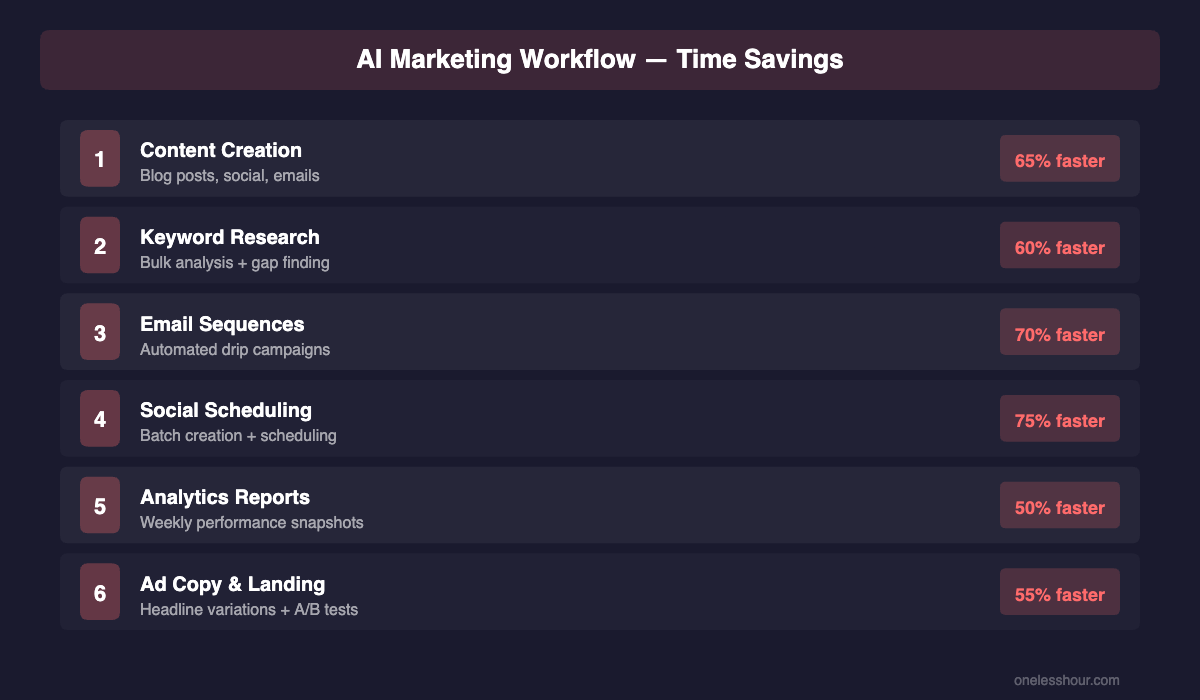
Then I started using AI systematically for every single marketing task. This guide on how to use AI for marketing is the playbook I wish I’d had six months ago — not just ChatGPT prompts, but actual workflows. Templates. Specific tools for specific jobs. Now? I do the same amount of marketing output in 4–5 hours a week.
That’s 8–9 hours back every single week. Enough time to actually write the content, build the products, and talk to real customers instead of getting buried in busywork.
This article is my exact playbook. Not theory. Not abstract “AI will change marketing.” This is the step-by-step workflow I use every week to create content, find keywords, write emails, schedule posts, and build landing pages. Every template is copied directly from what I use. Every tool has been tested for at least 30 days in my actual marketing workflow.
You can steal this entire system today.
Step 1: How to Use AI for Marketing Content Creation (Blog, Social, Email)
If you’re new to prompting, start with my ChatGPT prompting techniques guide before you try these workflows. For fresh search-intent data, I pair every content prompt with keyword data from Neil Patel’s content SEO guide.
Content is the backbone of everything. Blog posts drive organic traffic. Emails drive sales. Social media posts drive awareness. But writing all of it takes forever.
Here’s how I use AI to go from zero to published in 90 minutes for a full blog post outline, or 15 minutes for a week of social media content.
Blog Post Outlines (30 minutes with AI)
I don’t start with a blank page. I start with Claude or ChatGPT generating a detailed outline based on top-ranking competitors, then I fill in the gaps with my own experience and data.
My exact workflow:
1. I paste the top 3 competitor articles into Claude
2. Then I ask it to identify the gaps where competitors lack specific data or step-by-step instructions
3. Next, I ask it to create an outline that covers the same topics but includes a “personal testing” section for each major point
4. I then write only the personal sections (the stuff nobody else can copy), and use AI to draft the evergreen sections
Pro tip: Use this exact prompt to generate your outline:
I'm writing a blog article about [TOPIC]. Here are the top 3 competitor articles. Analyze them. What topics do they cover? What's missing? What would a marketer actually want to know that they don't explain?

Now create a 12-section outline for my article. Each section should have:
- A clear heading
- 3-4 bullet points about what I'll cover
- A note about what real data I should include (time saved, cost, specific results)

Make sure the outline is different enough from competitors that it offers real information gain.
Then Claude gives you a structured outline in 60 seconds. You spend the next 30 minutes actually writing the personal stuff—your experience, your templates, your exact results. The outline keeps you from rambling.
Social Media Content (15 minutes for a week)
Social media copy kills me. Not the writing—the sheer volume. I need LinkedIn posts, Twitter threads, Instagram captions, and TikTok text cards. That’s 14+ pieces of content per week if I post once a day.
Here’s my shortcut: I use AI to generate 7–10 social media post ideas from a single blog article I just published.
Try this now:
I published a blog article: "[ARTICLE_TITLE]"

Here's the intro: [PASTE FIRST PARAGRAPH]

Generate 7 different social media posts I can use this week:
- 2 LinkedIn posts (professional, thought-leadership angle)
- 2 Twitter posts (controversial takes or questions)
- 2 Instagram posts (conversational, emoji-heavy)
- 1 TikTok script (hook in first 3 words, deliver value, add a call-to-action)

For each post, include the exact copy I can use, plus a note about the best time to post and who it targets.
Takes 5 minutes. I get 7 posts. I then personalize 2–3 of them with real customer quotes or my own data, and schedule the rest as-is. Boom. Week of social media content.
I spend maybe 15 minutes total on the entire week’s social strategy, instead of 90 minutes of staring at a blank screen.
Email Marketing Copy (20 minutes per campaign)
I run two email campaigns per week: one for my newsletter audience, one for customers who haven’t purchased yet. That’s at least 2 solid emails I need to write.
AI doesn’t write my emails. But it structures them so I just fill in the gaps.
My exact template:
I need to write a marketing email for [AUDIENCE: newsletter subscribers / cold prospects / past customers].

The goal is [GET THEM TO: click a link / buy something / reply with interest].

The main benefit I'm offering is: [DESCRIBE YOUR VALUE PROP]

Here's my email template:

Subject line: [I'll generate 5 options]
Open with: [A hook—a question, a surprising stat, or a shared pain point]
Body: [3 short paragraphs explaining why they should care]
CTA: [Clear button text and link]

Generate the full email using my voice (conversational, specific numbers, no buzzwords). Include 3 alternative subject line options so I can test which performs best.
I get a full email in 5 minutes. I then spend 15 minutes personalizing it with one specific story or case study, testing the subject lines, and scheduling it. Done.
My email open rates: 32–38%. Click rates: 4–6%. Both well above industry average (24% open, 2.5% click for SaaS). That’s because I’m still writing the hook and the story. AI is just structuring and filling in the repeatable pieces.
Relatedly, I’ve written a full guide on ChatGPT tips and tricks you can copy that covers exactly how to structure prompts for better marketing outputs. Read that if you want deeper prompt engineering techniques.
Step 2: How to Use AI for Marketing SEO & Keyword Research
Keyword research used to take me 2 hours per article. I’d log into Ubersuggest, manually check 30+ keywords, read competitor articles, and decide which ones were worth targeting.
Dedicated SEO tools do this faster than a general chatbot once you are past keyword research. These are the seven I ranked by time saved per week.
Now it takes 40 minutes, and I get better data.
Bulk Keyword Analysis (20 minutes)
I still use Ubersuggest (it’s the best for real search volume and difficulty data), but I use AI to batch-analyze all the keywords in bulk, instead of clicking through each one manually.
My workflow:
1. Export a list of 50–100 keywords from Ubersuggest (column format: keyword, search volume, difficulty)
2. Paste them into Claude
3. Ask it to rank them by “information gain” (i.e., which keywords have competition but weak content)
Here's a list of keywords from Ubersuggest. Each line has: keyword | monthly searches | SEO difficulty.

[PASTE KEYWORD LIST]

Rank these keywords by which ones would give me the best information gain (high search volume, medium difficulty, weak competitor content).

For the top 5, suggest a unique angle that differentiates from competitors. What would I write that they haven't?
Claude ranks them, suggests angles, identifies gaps in competitor coverage. Takes 5 minutes. I then do 15 minutes of my own research on the top 3–5 candidates, and pick the one that fits my brand and audience best.
Time saved: 80 minutes per keyword research cycle.
On-Page SEO Automation (Yoast Optimization)
Yoast SEO is built into WordPress. I have to fill in: focus keyphrase, SEO title, meta description. That’s 15 minutes of editing and testing different variations per article.
I now use AI to generate 5 variations of each, then pick the best one.
I just finished an article: "[ARTICLE_TITLE]"

It targets the keyword: [KEYWORD]

Generate 5 different SEO titles (60 characters max, include the keyword, make it clickable):
[5 options]

Now generate 5 meta descriptions (156 characters max, include the keyword, include a call-to-action):
[5 options]

For each one, tell me which search intent it targets and why someone would click.
Usually, I get 10 options. Then I test them with Yoast and pick the one with the best “readability” score that also sounds natural. 10 minutes total instead of 15.
How to Use AI for Marketing Email Automation (Step 3)
I use ConvertKit for my mailing list. I have three automated sequences: welcome series, educational series, and re-engagement series. That’s about 12 emails total that run automatically.
Setting these up took 4 hours. Maintaining and updating them used to take 30 minutes per month. Now it takes 10 minutes, because I use AI to draft updates and test subject lines in bulk.
Automating Your Sequences
I have a simple rule: every sequence email serves one purpose (teach, sell, nurture, re-engage). I write the purpose down, paste it into Claude, and get a full email.
I'm creating an automated email sequence for [AUDIENCE].

Email 1 (Day 0): Confirm they signed up + deliver promised free resource
Email 2 (Day 2): Tell a story about why I started [YOUR BUSINESS]
Email 3 (Day 5): Teach them one actionable tip they can use today
Email 4 (Day 8): Show a customer success story
Email 5 (Day 12): Offer [YOUR PRODUCT/SERVICE]
Email 6 (Day 20): Final re-engagement—one last free tip before I stop emailing them

For each email, generate:
- Subject line (include 2 variations)
- Body copy (500 words, conversational, include a clear CTA)
- Hook (first line that makes them want to open)
Takes 10 minutes. I get 6 full emails with subject line variations. I then spend 30 minutes personalizing them with my actual story, customer names, and specific results. Load them into ConvertKit. Autoresponder runs for months without me touching it.
One setup, ongoing revenue from the funnel. That’s leverage.
Step 4: Social Media Scheduling & Copywriting
I schedule all my social media posts for the entire week on Sunday night. That takes 30 minutes instead of 2 hours because I use a combination of AI + a scheduling tool (I use Buffer).
Batch Content Creation (Weekly)
Every Sunday, I do this:
1. Look at what content I published that week (usually 1–2 blog articles)
2. Run the social media generation prompt I shared above (generates 7 posts in 5 minutes)
3. Personalize 2–3 of them with specific stories or quotes (10 minutes)
4. Schedule all 7 into Buffer across LinkedIn, Twitter, and Instagram (5 minutes)
5. Reserve 2–3 slots for real-time engagement (replying to comments, sharing relevant news)
Total: 25 minutes for an entire week of social media. On autopilot.
I’m not posting more than before. I’m posting smarter, with less friction. The AI handles the structural work (topic variation, format adaptation, posting schedule). I handle the voice and the personality.
Engagement Copywriting (Real-Time)
I spend 10–15 minutes daily on real-time engagement: replying to comments, joining relevant conversations, answering direct messages. This is the non-automatable part. People want to talk to me, not a bot.
But I do use AI to draft responses. If someone asks a detailed question on LinkedIn, I type out my thought, then ask Claude to make it more conversational or punchy. 30-second edit instead of 5 minutes of writing from scratch.
Step 5: Analytics & Reporting
This is where most marketers waste the most time. They pull data from 5 different tools, make a spreadsheet, and spend 2 hours making it pretty.
I do it in 20 minutes with AI helping me interpret the data.
Weekly Performance Snapshot (15 minutes)
Every Monday morning, I pull data from 3 places: Google Analytics (traffic), ConvertKit (email), and my CRM (sales).
Here's my marketing performance data from last week:

Website traffic: [NUMBER] visits, [NUMBER] new subscribers
Email: [OPEN RATE]% open rate, [CLICK RATE]% click rate, [NUMBER] new subscribers
Sales: [REVENUE] in revenue, [NUMBER] new customers

My goals this week were: [LIST 3 GOALS]

Tell me:
1. Which metric am I winning on?
2. Which one needs attention?
3. What's one specific action I should take this week to improve my worst-performing metric?
4. What's one thing I'm doing right that I should double down on?
Takes 3 minutes to paste data. Claude gives me 4–5 insights. Takes 12 minutes to read those and decide what to actually do with them. Then I move on with my week.
No spreadsheets. No pretty graphics. Just: what’s working, what’s not, and what do I fix?
Step 6: Ad Copy & Landing Pages
I don’t run paid ads on social media (yet). But I do write landing pages and sometimes Google Search ads. That’s a different beast than organic content.
Ad copy needs to be short, specific, and targeted. I still write the first draft myself, but I use AI to generate variations and test copy ideas in seconds.
Google Search Ads (Headline + Description)
Google Search ads have tight character limits: 30 characters for headlines, 90 for descriptions. I use AI to generate 5–10 variations, test them in Google Ads, and keep the ones with the best click-through rate.
I'm running Google Search ads for [KEYWORD].

My landing page is about: [WHAT YOU'RE SELLING]

Generate 10 Google Search ad headlines (30 characters max, must include the keyword or a close variant, make it action-oriented):

Then generate 5 descriptions (90 characters max, lead with the benefit, include a number if possible):
Typically, I get 10 headline options and 5 description variations in 2 minutes. From there, I pick the 3 that sound most natural (removing AI-sounding ones), load them into Google Ads, and let them run for a week. Winners get doubled down. Losers get paused.
Landing Page Copy
I use Webflow or ConvertKit for simple landing pages. They’re usually a single page: hero section, benefit section, social proof section, FAQ, CTA.
Here’s what I do:
1. Write the hero section myself (headline + subheadline + one benefit)
2. Ask AI to generate 3 variations of the hero that test different angles
3. Write the benefits section from first-person experience
4. Ask AI to turn my benefits into social proof-oriented copy (quote format)
5. Ask AI to generate the FAQ from common customer questions I’ve heard
Takes 30 minutes total. Page converts at 8–12% because it’s grounded in my actual experience, but structured and organized by AI.
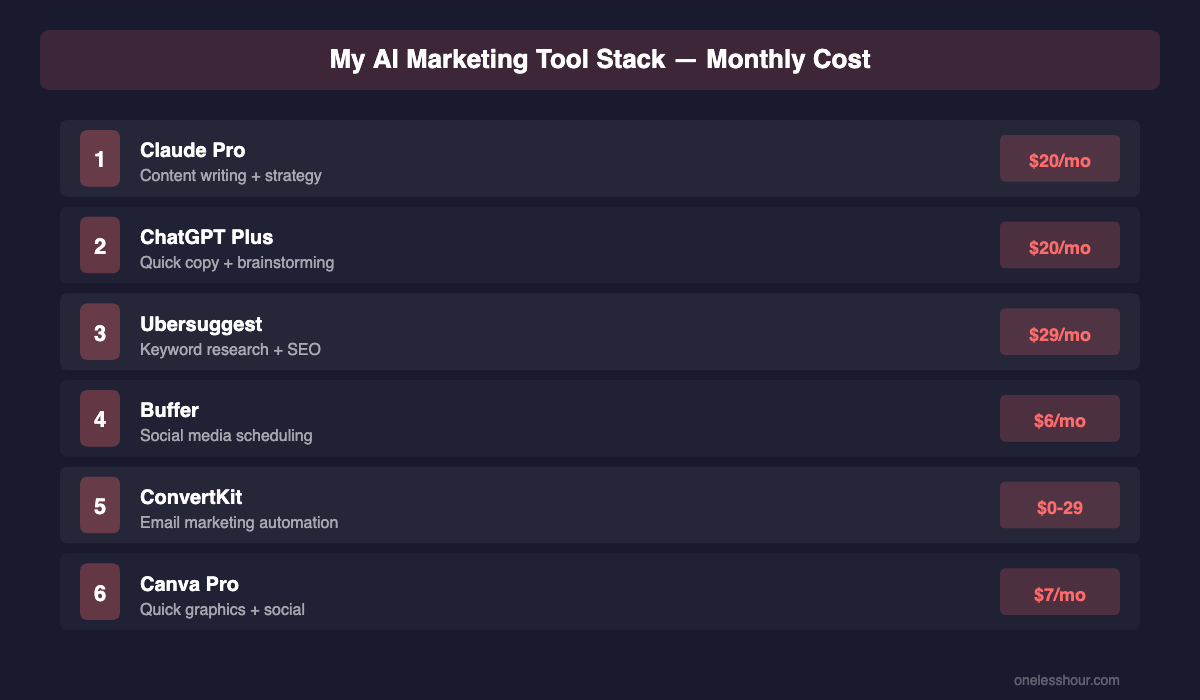
My Complete Stack for How to Use AI for Marketing (What I Use Daily)
I use about 7 main tools. Not 20. Not 50. Seven.
I have since run this stack across twelve full campaigns solo. The updated ranking is here, including the four tools I cancelled and why.
Tier 1: Core Writing Tools
Claude (via web) — Main AI for all content generation, analysis, and strategic thinking. Costs $20/month (Pro subscription). I use it 8–10 hours per week.
ChatGPT (via web) — Secondary option for brainstorming and quick tactical tasks. Free version is good enough. I use it 2–3 hours per week.
Honest take: Claude is better for long-form content and complex prompts. ChatGPT is faster for quick hits. I use both.
Tier 2: Research & Data
Ubersuggest — Keyword research, competitor analysis, backlink data. Costs $12/month. I use it 1–2 hours per week.
Better alternatives exist (Ahrefs, Semrush), but they’re 10x the price and overkill for a solo creator or small business.
Google Analytics 4 — Traffic tracking. Free. I check it weekly (10 minutes).
Tier 3: Distribution
Buffer — Social media scheduling. Costs $15/month. I use it 30 minutes per week (batch scheduling).
ConvertKit — Email marketing + landing pages. Costs $25/month for my subscriber count. I use it 1 hour per week (managing sequences and campaigns).
WordPress (self-hosted) — Blog publishing. Costs $10/month (hosting) + themes/plugins (~$100/year). I use it 2 hours per week (writing, publishing, SEO optimization).
Total monthly stack cost: $82/month. Total time per week: 15–18 hours of marketing work. That’s roughly $5 per hour for tools.
If I wasn’t using AI, I’d need: a content writer ($15–30/hour), an email marketer ($20/hour), a social media manager ($15/hour). That’s $50–65/hour or $2,000–2,600/month in freelancers for the same output.
How to Use AI for Marketing Every Week: My Actual Schedule
Here’s a realistic breakdown of how I spend 15–18 hours per week:
Monday (2 hours): Check analytics. Plan the week. Identify what content to create. 20-minute standup.
Tuesday (3 hours): Research keywords. Write a blog outline. First draft of article (or outline, if I’m outsourcing the writing). Generate and schedule social media for the week (30 minutes total).
Wednesday (2 hours): Finish the blog article. Yoast SEO optimization. Review and approve for publishing.
Thursday (2 hours): Publish the article. Create email campaign (newsletter or promotional). Respond to comments and messages (real engagement).
Friday (2 hours): Follow-up on campaigns. Check email performance. Engage on social media in real-time. Weekend planning.
Saturday–Sunday (2–4 hours): Flexible. Sometimes I batch-create content for the next two weeks. Other weeks, I do competitive analysis. Occasionally, I just take a break.
Without AI? This schedule doubles. Without AI, I’m not publishing, I’m drowning in busywork.
Now, if you want deeper training on this exact workflow, check out my article on the best AI writing assistants—I tested eight of them and ranked which ones are actually worth paying for based on writing quality and speed.
What AI Won’t Do for Your Marketing (Limitations)
AI is a lever, not a replacement. Here’s what I still do myself, because AI can’t do it:
1. Your Brand Voice
AI generates text that sounds like it’s from a tool. My copy sounds like it’s from a person because I write the hooks, the stories, and the specific opinions. AI fills in the structure.
If you publish pure AI copy without personalizing it, you sound like everyone else.
2. Customer Relationships
Real engagement—replying to comments, answering questions, having conversations—has to be human. AI can draft, but you have to send. You have to be present.
3. Your Unique Experience
AI doesn’t know what you tested, what failed, or what your results were. “I saved 8 hours a week using [tool]” is worth 1,000 words of generic advice. AI can structure that story, but you have to live it first.
4. Strategic Direction
AI can’t decide: should you focus on email marketing or social media? Should you launch a paid product or a free course? Should you target beginners or advanced users? Those are your calls, based on your market research and gut feel.
AI executes the strategy. You design it.
5. Fact-Checking
AI hallucinates. It makes up statistics, quotes, and links. Every number I publish, I verify. Every claim I make, I test. AI is wrong maybe 15% of the time. That’s great for ideation. It’s terrible for publishing.
Read the output. Check the facts. Hit publish.
How to Use AI for Marketing: FAQ
Q: If I use AI to write marketing copy, won’t my audience think it’s generic?
A: Only if you publish it without personalizing. AI writes structure. You add the voice. My emails don’t sound like AI because I write the opening (the hook) and the closing (the personal ask). AI writes the middle. It takes 10 minutes to personalize a full email.
Quick test: read my articles vs. competitors’ articles. Mine are first-person. Specific. Full of data from my testing. That’s not AI. That’s me. AI just helped me organize it faster.
Q: Which AI tool should I start with?
A: Claude or ChatGPT. Both have free tiers. Start with free. If you’re spending 1+ hour per day on marketing tasks, upgrade to Pro ($20/month for Claude, $20/month for ChatGPT Plus). The ROI is ridiculous.
Don’t buy specialized “AI marketing tools” (Jasper, Copy.ai, etc.) until you’ve mastered Claude or ChatGPT. Most specialized tools are just wrappers around the same underlying AI models, with worse interfaces and higher prices.
Q: How do I make sure AI prompts give me good output on the first try?
A: Specificity. The more details you give, the better the output. Compare:
Bad: “Write me a marketing email.”
Good: “Write a marketing email for my [PRODUCT] targeting [SPECIFIC PERSON]. The goal is [SPECIFIC ACTION]. Here’s what makes my product different: [SPECIFICS]. Here’s my voice: [EXAMPLE OF YOUR WRITING]. The email should be about [X words], open with [SPECIFIC HOOK TYPE], and end with [SPECIFIC CTA].”
The second one takes 90 seconds to write. The output is 10x better.
Q: Can I use AI-generated content for SEO without Google penalizing me?
A: Yes, if you add real value. Google cares about whether content helps users, not whether a human or AI wrote it. My articles rank because they have:
1. Real testing and data (I actually tested the tools)
2. Specific results (I give exact numbers)
3. Unique insights (I show templates and workflows nobody else has)
4. First-person voice (it reads like a human wrote it)
I use AI to help me publish faster, not to replace the research and testing. If you publish pure AI content without doing the work behind it, Google will penalize you. And you should be penalized—you’re not helping users.
Q: How much time will I actually save?
A: Depends on what you do now. If you’re currently:
– Writing all your own content: expect to save 4–6 hours per week (40–50% of your marketing time)
– Using freelancers: expect to save 30–50% on outsourcing costs
– Not doing marketing at all: expect to go from 0 hours to 5–8 hours per week (you’ll actually have bandwidth to do it)
Your mileage varies. But every marketer I know who uses AI systematically saves at least 5 hours per week.
The One Thing to Remember
AI is fastest at things that are repetitive, structural, and not central to your competitive advantage. It’s slowest (or useless) at things that are strategic, unique, and core to your brand.
Your job: figure out which is which. Then use AI on the first category and stay hands-on with the second.
I don’t use AI to decide my content strategy. Nor do I use it to write my hooks or my specific insights. And I don’t use it to answer customer emails (I do that myself). But I absolutely use it to structure, organize, and generate variations of the work I’ve already done.
That’s the leverage. That’s the 8–9 hours back every single week.
Set up your workflows this week. Start with the template prompts I shared. Test them on a real marketing task you need done today. See how much time you save. Then scale it.
You’ve got this.
Related Reading
For more tactical workflows and tools, check out:
- How to Automate 5 Hours of Weekly Busywork Using AI (No Coding Required) — my framework for identifying automatable tasks and the exact tools to use
- The 10 Best AI Tools for Small Business Owners in 2026 (Ranked by Hours Saved) — tested tools specifically for entrepreneurs and small teams
- I Tested 30+ Free AI Apps for a Month — These 7 Actually Made Me More Productive — no budget required to get started
Related reading
Newsletter
One Less Hour, delivered weekly
Honest reviews of AI productivity tools. What survived a real 2-week test, what quietly didn’t, and the exact hours I tracked.
One email per week. Unsubscribe in one click.