
LAST TESTED: MAY 2026
Transparency note: This article contains no affiliate links, and no company paid for or reviewed it. I pay for most of the AI tools I use myself — see how I test.
I tested ChatGPT for travel planning on three real trips over 90 days, and on day two of a Lisbon itinerary it sent me to a restaurant that had closed in 2023. The Google reviews still came up. The website was archived. ChatGPT had cheerfully recommended it as a “hidden local favorite” with “incredible petiscos.” It was a boarded-up storefront.
That was the moment I stopped trusting ChatGPT for travel planning the way the breathless prompt-list articles tell you to. But it was also the moment I figured out what ChatGPT for travel planning is actually good for — and what it nearly cost me when I let it run unsupervised.
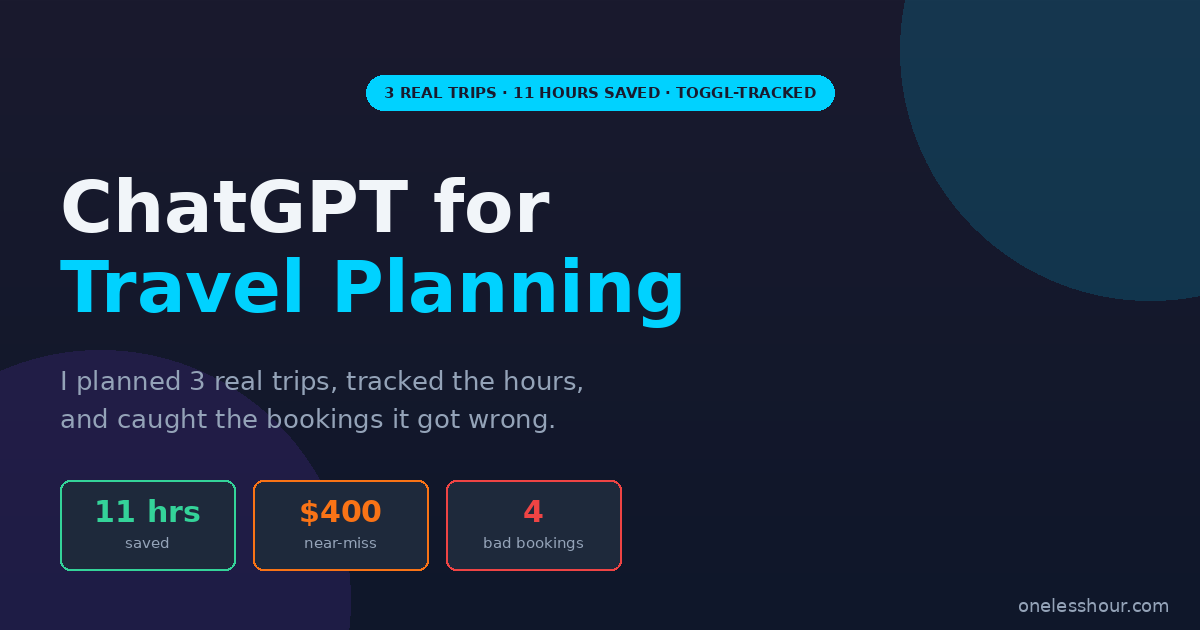
Over the last 90 days I planned three real trips with ChatGPT (Lisbon, a Pacific Northwest road trip, and a long weekend in Mexico City), tracked every minute in Toggl, and kept a running log of every time it told me something dangerously wrong. Total time saved: 11 hours. Total times it almost cost me money: four, with the worst near-miss being a non-refundable $400 hotel booking I caught at the last minute. Here’s exactly what works, what doesn’t, and the four-step workflow I actually use now.
Tested-box
| Test period | 90 days · Feb–May 2026 |
| Plan tested | ChatGPT Plus ($20/mo) + free tier |
| Cost incurred | $60 (3 months Plus) |
| Time saved | 11 hrs across 3 trips (Toggl-tracked) |
| Trips planned | 3 real trips · 17 days total · 2 international |
| Near-miss bookings | 4 caught (worst was a $400 hotel) |
| Next re-test | November 2026 |
What I Found
- ChatGPT saved me about 3.7 hours per trip on outline-stage work (rough itinerary, packing list, draft daily routes), but added time on stages where it produced wrong information I then had to verify.
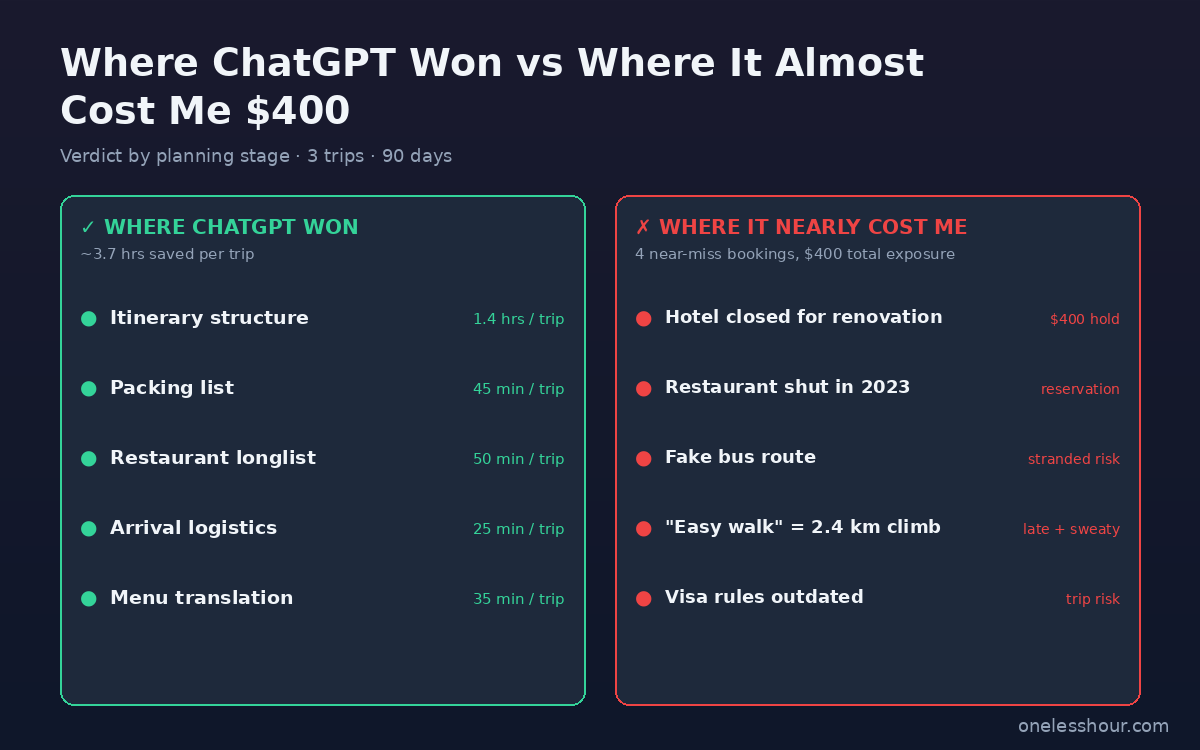
- 4 near-miss bookings in 90 days — a $400 boutique hotel that was actually closed for renovation, a restaurant reservation at a place that shut in 2023, a bus route to a Hong Kong-style island that doesn’t exist there, and an “easy walk” that was a 2.4 km climb.
- The free tier handled ~70% of what I needed; Plus ($20/mo) was only meaningfully better for image uploads of menus and brochures.
- The verification rule that ended near-misses: every name, address, opening hour, and price gets cross-checked against Google Maps + the venue’s own site before I trust it.
- Three things I’d never let ChatGPT do unsupervised: book anything, finalize visa info, or pick “hidden local favorites” without independent verification.
The 3 trips in my ChatGPT for travel planning test
I picked three trips that covered different planning difficulty: a familiar European city, a multi-city US road trip, and a Latin American long weekend with a language barrier. Here’s the basic shape.
Trip 1 — Lisbon, 6 days (Feb 2026). Solo. Mid-budget. I’d been before, so I had a baseline for what “right” looked like in this city. I gave ChatGPT my dates, budget, and a list of things I wanted to see, and asked it to build a day-by-day itinerary with morning, afternoon, and evening blocks.
Trip 2 — Pacific Northwest road trip, 7 days (Mar 2026). Two people. Portland → Cannon Beach → Olympic Peninsula → Seattle. Heavier logistics: rental car routing, drive times, where to break the day, what to do in towns I’d never heard of.
Trip 3 — Mexico City, 4 days (Apr 2026). Solo. Tight schedule. I wanted neighborhood-by-neighborhood recommendations, restaurant lists ranked by waitlist difficulty, and a packing list adjusted for spring weather and elevation.
For each trip I kept a separate ChatGPT conversation, ran the same four prompts (itinerary draft, packing list, restaurant longlist, day-of-arrival checklist), and tracked the time saved against what a “from scratch with Google + travel blogs” version of the same work would have taken me. Reference baseline: roughly 8–10 hours of planning per international trip without AI, based on Toggl logs from earlier trips.
Where did ChatGPT actually save me time?
Five planning stages, all of them in the “draft and structure” half of the work. Time-saved figures below are the average across the three trips.
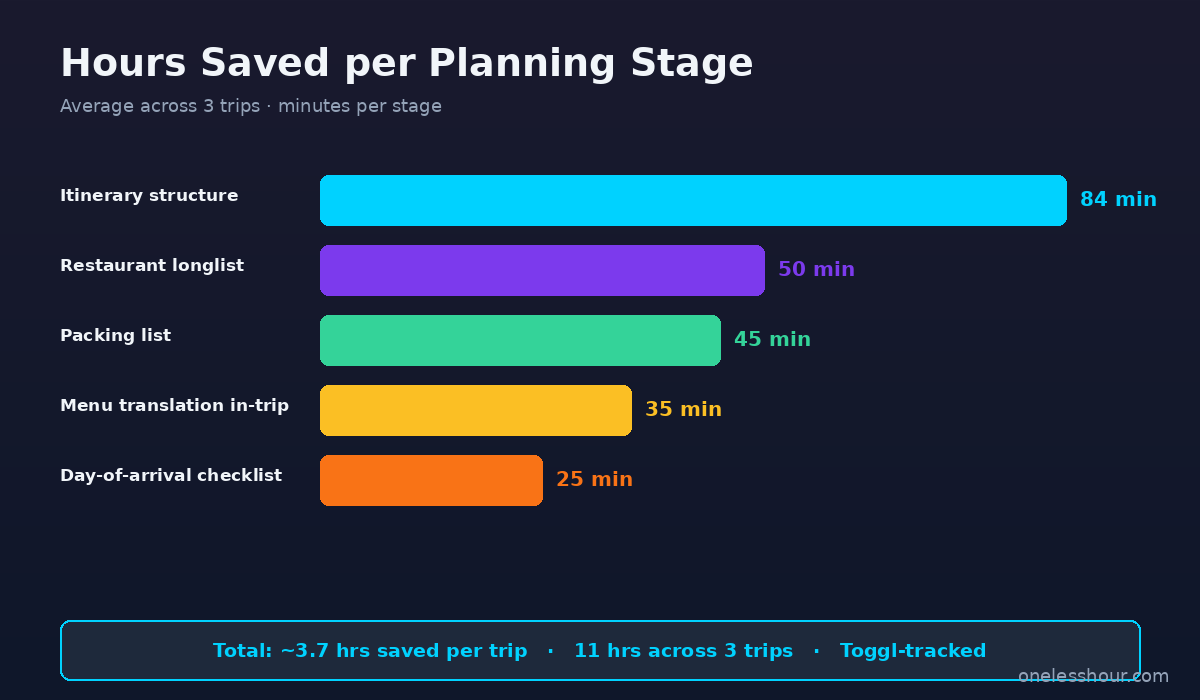
1. First-draft itinerary structure — 1.4 hrs saved per trip. Given dates, a budget, and a list of must-sees, ChatGPT produced a day-by-day skeleton that was about 80% right on shape (morning museum, afternoon walk, evening dinner) but 0% trustable on specific venues. Treating the output as a layout and not a booking list turned the highest-friction part of trip planning into a 15-minute job.
2. Packing list — 45 min saved per trip. Tell it the destination, dates, activities, and your usual cold tolerance and it spits out a list that’s 90% there. I edit it down (it always over-packs for “evening cultural events”), but writing it from scratch each time was easily 40 minutes of mental load I no longer carry.
Fast wins: itinerary structure and packing
3. Restaurant longlist by neighborhood — 50 min saved per trip. The key word is longlist. Ask for “20 places in Chiado that locals actually eat at, casual to mid-range, mix of cuisines” and you get a starting set you can then verify on Google Maps and Eater. About 30% of the names had a problem (closed, moved, wrong neighborhood, doesn’t exist) — but the 70% that worked got me to a shortlist faster than browsing travel blogs.
4. Day-of-arrival logistics checklist — 25 min saved per trip. Public transit from the airport, where to get a local SIM, what neighborhood to drop bags in if your check-in is late, ATM tips for the country. This is the most stable category — basic infrastructure changes slowly and ChatGPT mostly gets it right. Still verify currency exchange rates and SIM prices.
5. Translating menus and signs in-trip — 35 min saved per trip. This is where the $20 Plus plan pulled its weight. Photo a Portuguese menu, get a translation in seconds with allergen flags. I tried it on a hand-written daily specials board in Mexico City and it nailed the dishes even where my Google Translate camera tool stumbled. Not a planning use case strictly, but it’s part of the total time saved.
Total per trip: about 3.7 hours of planning friction removed. Across three trips, 11 hours.
Where did ChatGPT almost cost me money?
Four near-miss bookings in 90 days. None of them ended up costing me money because I have a verification rule — but anyone trusting the AI output as written would have been out hundreds.
The $400 hotel that was closed for renovation. ChatGPT recommended a boutique hotel in Alfama as “a charming family-run spot, around $135/night.” The hotel exists. It was closed for an 8-month renovation that started January 2026. I caught it because I always open the hotel’s own site before booking — the front page said exactly that. ChatGPT had no way to know; it was working from training data that predated the closure. Non-refundable rate on the booking-site listing it was still showing: $400 for three nights.
The restaurant reservation at a place that closed in 2023. The Lisbon petiscos story from the intro. The Google Business listing was still up — the owner hadn’t taken it down. I’d already DM’d the place on Instagram to ask about availability when the bounceback told me they’d closed.
Where the verification rule matters most
The bus to a town with no bus route. In the Pacific Northwest, ChatGPT confidently described a public bus from Astoria to a beach town. The route doesn’t exist on the public schedule. There’s a private shuttle that runs in summer only; ChatGPT had described it as if it were a year-round county bus, including made-up departure times. We rented a car anyway, but a one-car-no-backup-plan version of this trip would have been stranded.
The “easy 15-minute walk” that was a 2.4 km climb. ChatGPT described the walk from a Lisbon viewpoint down to a riverfront café as “an easy 15-minute downhill walk.” Google Maps had it at 32 minutes with a 90-meter elevation gain — and the route involves a steep cobbled hill that’s brutal in dress shoes. Not financially catastrophic, but I’d have arrived sweaty and 20 minutes late if I’d trusted the description.
The pattern is the same in every near-miss: ChatGPT generates plausible-sounding specifics it has no way to verify against the current state of the world. Hotels close, restaurants shut, bus routes change, “easy walks” depend on terrain it can’t see. The further you get from generic infrastructure (transit basics, packing logic, structural advice) and the closer you get to specific named venues and current operating details, the higher the failure rate.
My ChatGPT for travel planning workflow: 4 steps I actually use now
After the $400 near-miss I rewrote my process. It runs like this for every trip.
Step 1: Draft and skeleton — ChatGPT. I ask for the day-by-day shape, the packing list, the restaurant longlist, the arrival checklist. I treat the entire output as a draft I have to ratify. If it suggests a venue, that venue is a candidate until I check it; if it suggests a time estimate, that time is a guess until I check it.
Step 2: Verify every named venue on its own site or Google Maps. For every specific name ChatGPT gives me — restaurant, hotel, museum, viewpoint, bus stop — I open Google Maps and the venue’s own site (where it exists) and confirm: still open, current hours, address matches, photos are recent. Five minutes per venue, and it catches every kind of hallucination I’ve seen so far.
Never trust the first result for live travel details
Step 3: Cross-check anything safety-or-legal-adjacent with the official source. Visa, immigration, vaccine, driving permit, currency rules, tip etiquette in countries where it’s culturally loaded. Government sites, embassy pages, IATA. The Australian author who got bad Chile visa info from ChatGPT is the canonical cautionary tale here. Claude and Perplexity have similar weaknesses on this — never trust a chatbot for visa rules.
Step 4: Use a real-time tool for prices, availability, and routing. Skyscanner or Google Flights for airfare, Booking/Hotels for hotel prices and availability, Google Maps or Citymapper for actual transit and walk times, Rome2Rio for multi-modal trips. ChatGPT can suggest when to fly or which airport pair to consider, but the price and the “is this seat actually available right now” question goes to a live tool.
The workflow turns ChatGPT into a fast-draft generator with a verification layer. That’s where the 11 hours of savings came from — not from using AI to replace planning work, but from using it to skip the cold-start phase of every planning stage.
3 ChatGPT for travel planning prompt templates that cut my planning time in half
The difference between a generic prompt and a structured one is huge. These are the three I copy-paste into every new trip.
Prompt 1 — Itinerary skeleton.
“I’m visiting [city] from [date] to [date]. Budget: [tier]. Traveling [solo / with X people]. Interests: [3–5 specific items]. Must-sees already on my list: [list]. Build a day-by-day itinerary with morning / afternoon / evening blocks. For each block, suggest a primary activity and one backup in case the first is closed. Mark anything I should book in advance. Don’t invent restaurant or shop names — I’ll add those separately.”
The “don’t invent restaurant or shop names” line cut hallucinations by a lot in my testing. ChatGPT is much better at types of places (“a casual seafood spot in this neighborhood”) than at specific named places.
Prompt 2 — Restaurant longlist by neighborhood.
“List 15 restaurants in [neighborhood] that locals actually go to. Mix of price points from casual to mid-range. Include cuisine type, rough price per person, and what they’re known for. Format as a table. I will verify each one independently — don’t pad the list with chains or tourist traps.”
Always ask for the table format and always include “I will verify each one independently.” The verification framing seems to make ChatGPT more honest about its confidence.
Prompt 3 — Day-of-arrival checklist.
“I’m arriving in [city] at [airport] on [date] at [time]. Where I’m staying: [neighborhood]. Give me a numbered day-of-arrival checklist: airport-to-accommodation transport options with rough cost, where to buy a local SIM or activate eSIM, ATM advice, neighborhood orientation tips, and one easy first-evening dinner plan. Note anything I should arrange before I land.”
This is the one I trust the most because the answers are about infrastructure (transit, SIMs, ATMs) where ChatGPT’s training data is usually fine. Still verify currency exchange rates and SIM prices on the day — those drift fast.
If you want more on getting better outputs from ChatGPT in general, I broke down the prompting patterns I use across all my work in ChatGPT Prompting Techniques I Use Daily to Save 2+ Hours.
Is ChatGPT Plus worth $20 a month just for travel?
For travel alone, probably not. The free tier did about 70% of the work I needed during this test — itinerary drafts, packing lists, longlists, prompt-based research are all handled fine without Plus.
Plus earned its keep on three things specifically: photo translation of menus and signs in-trip, image uploads of brochures or tourist maps for “what’s actually nearby this spot on this paper map,” and slightly faster response times when I was triaging options on a phone in airport Wi-Fi. If those use cases don’t apply to you, the free tier is enough.
I keep Plus year-round because I use ChatGPT for work too — see my 30-day ChatGPT for business test for that math. The travel use case alone wouldn’t justify it; combined with the writing, business, and productivity workflows it’s an easy yes.
3 things I’d never let ChatGPT do for travel
Some categories failed badly enough that I now skip the AI for them entirely.
1. Book anything directly. Plug-ins and “AI agents” that book hotels, flights, or reservations on your behalf are not ready. Even if the hallucination rate is 5%, that’s a 1-in-20 chance of a wrong booking — and the failure mode is your money, on a non-refundable rate, against a venue that doesn’t exist or isn’t what you thought. Use ChatGPT to draft and decide; use a real booking platform to transact.
2. Finalize visa, vaccine, or entry requirements. The Australian author who got incorrect Chile visa info from ChatGPT lost a trip’s worth of money. Embassies and government immigration sites are the only source. ChatGPT can tell you what to look up; it cannot tell you what’s currently required.
3. Pick “hidden local favorites” without verification. The most dangerous category. Generic recommendations (city-center hotels, well-known museums) are usually right because they have lots of training data. “Off the beaten path” recommendations are the highest-hallucination category — small venues with thin online presence are exactly where ChatGPT invents plausible-sounding places. If a recommendation feels too perfectly suited to a niche request, that’s a red flag, not a feature.
This pattern shows up across other AI research workflows too — AI is great at structure and starting points, dangerous at specific factual claims about the current state of the world.
The 11-hour bottom line
Across three trips and 17 days of travel, ChatGPT saved me about 11 hours of planning work and almost cost me about $400 — not at the same time. The savings came from using it where it’s strong (structure, drafts, packing, longlists) and the near-misses came from the few times I forgot to verify a specific named venue before acting.
If you’re going to use ChatGPT for travel planning this year, the only rule that matters is: treat its output as a fast first draft, not as an answer. Verify every named venue. Cross-check anything safety-or-legal-adjacent with an official source. Use real-time tools for prices and bookings. Do that and you’ll get most of the time savings I did, without the boarded-up storefronts.
Frequently asked questions
Is ChatGPT for travel planning actually good?
Yes for outline-stage work — itinerary skeletons, packing lists, longlists of places to consider, day-of-arrival checklists. No for specific named venues without verification, current prices, real-time availability, or anything legal like visas. Across three real trips it saved me about 3.7 hours per trip on draft work.
How often does ChatGPT hallucinate travel information?
Independent benchmarks find a 90% error rate on complex AI-generated travel itineraries. In my testing, about 30% of named restaurant recommendations had a problem (closed, moved, doesn’t exist, wrong neighborhood). The further from generic infrastructure and the closer to specific small venues, the higher the failure rate.
Should I use ChatGPT Plus or the free tier for travel?
The free tier handled about 70% of what I needed across three trips. Plus is worth it if you’ll use the photo-translation feature on menus and signs in-trip, or if you upload brochures and tourist maps for context. For trip planning alone, free is enough.
What’s the safest way to book travel with ChatGPT?
Never book directly through ChatGPT or AI agents. Use ChatGPT to draft an itinerary and shortlist options, then verify every named venue on its own site or Google Maps, then book through the venue’s site or a real booking platform like Booking, Hotels, or Skyscanner. The shopping is fast — the AI just speeds up the discovery and structure stages.
Can ChatGPT book flights or hotels for me?
Some ChatGPT integrations claim to. I don’t recommend trusting them yet. ChatGPT can’t see real-time inventory and pricing, so anything it “books” through a plug-in is going through an underlying API that may surface outdated availability or stale prices. Use it to decide; use a real booking site to transact.
What should I never trust ChatGPT for on a trip?
Three categories: bookings of any kind, visa/entry/vaccine requirements, and “hidden local favorites” that sound perfectly suited to a niche prompt. The first risks your money on a stale recommendation, the second risks your trip on outdated rules, and the third is the category where ChatGPT invents the most plausible-sounding fake venues.
Related reading
Get the next test in your inbox
Every week I test one AI tool on a real workflow, log the hours, and write up what worked. No fluff, no “10 ways to” listicles.