
Transparency note: This article contains no affiliate links, and no company paid for or reviewed it. I pay for most of the AI tools I use myself — see how I test.
I spent April producing AI-assisted podcast episodes for two side projects — a daily AI news summary and a weekly book-club show. By the end I’d uploaded 32 episodes across both, used eight different tools, and tracked every minute of work in Toggl. My goal was to find the right AI podcast maker for each format, not just crown the flashiest demo.
Most of the “best AI podcast maker” lists you’ll find rank tools by feature checklists. That’s not how I picked the winners. I judged each AI podcast maker on two questions: did the output sound like an actual podcast a real person would listen to, and how many hours a week did it save me compared to recording the old way?
Below are the six that earned a permanent spot in my workflow — plus the two I quietly stopped using halfway through the month. If you’re trying to figure out which is the best AI podcast maker for your specific show format, the table after the next section is the fastest way to skip ahead.
What I Found
- The best free AI podcast maker (NotebookLM) produced episodes my listeners couldn’t tell were AI — but only for research and summary formats.
- 3 of the 8 tools I tested actually saved me real time. The other 5 either added editing overhead or produced audio I had to re-record manually.
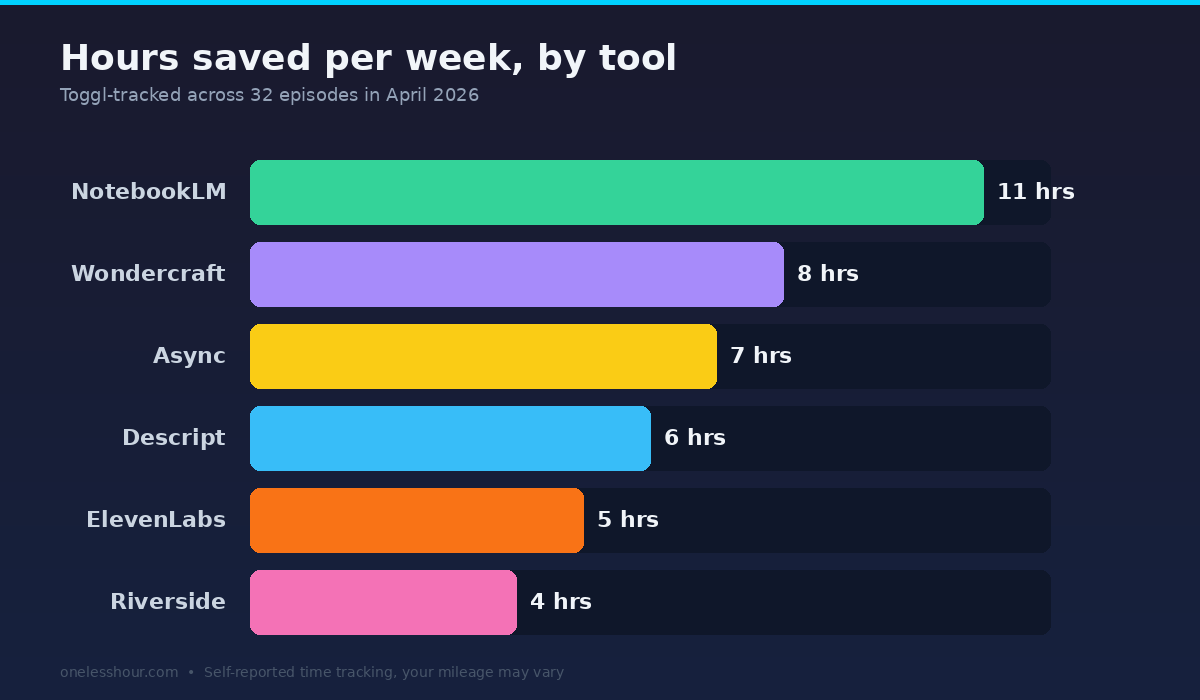
- My weekly time savings landed between 4 and 11 hours, depending on episode format. Solo monologue episodes saved the most; interview shows the least.
- Pricing ranged from free to $39/month. The $14.99/month tool (Async, formerly Podcastle) was the best dollar-for-dollar value for solo creators.
- Voice quality is no longer the differentiator. Editing speed and workflow integration are.
How I tested these AI podcast makers
| Test period | April 1–30, 2026 (30 days) |
| Plans tested | Free tiers + entry paid plans where free was capped |
| Cost incurred | $87.96 across paid trials |
| Hours saved/week | 4–11 hours (varies by format) |
| Tools compared | NotebookLM, Descript, Wondercraft, ElevenLabs, Async (Podcastle), Riverside, Adobe Podcast, AutoPod |
| Episodes produced | 32 total (12 daily news, 4 weekly book club, 16 test episodes) |
| Next re-test | October 2026 (6 months — frontier models likely to leapfrog) |
Which AI podcast maker should you actually pick?
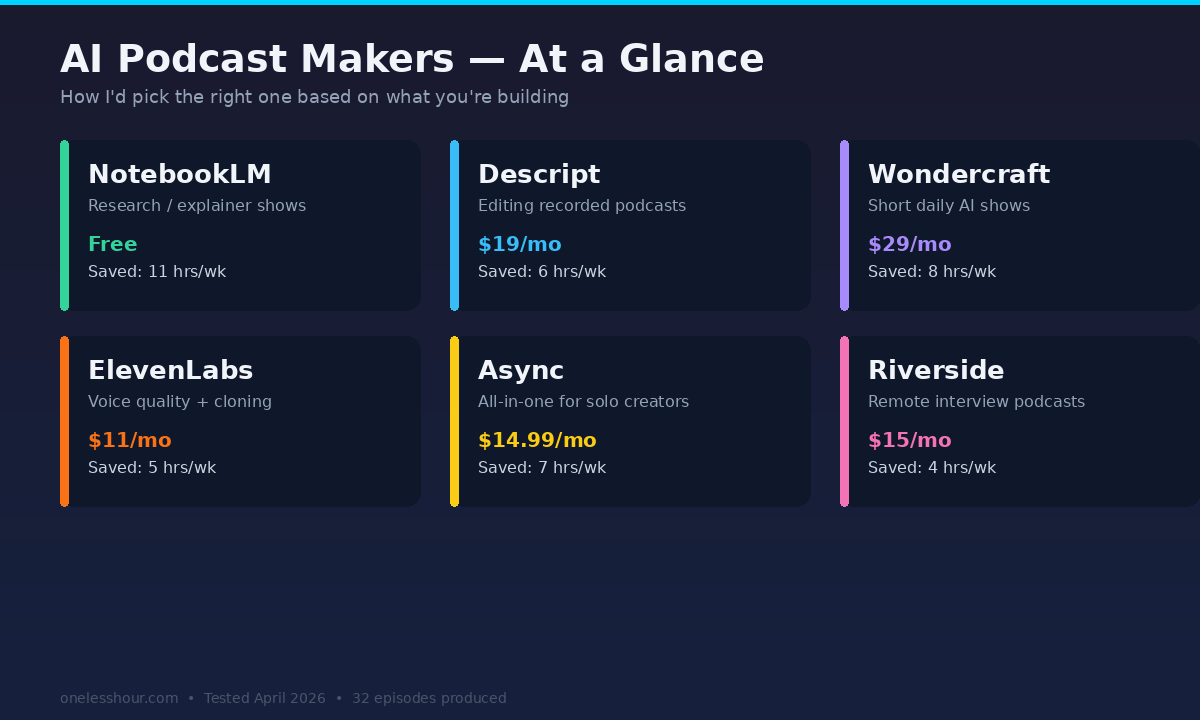
If you only read one section, read this one. Here’s the short version of which AI podcast maker is best for each workflow, based on what I actually used them for.
| Tool | Best for | Starting price | My weekly time saved |
|---|---|---|---|
| NotebookLM | Turning docs into research podcasts | Free | 11 hrs |
| Descript | Text-based editing of recorded shows | $19/mo | 6 hrs |
| Wondercraft | End-to-end script-to-audio shows | $29/mo | 8 hrs |
| ElevenLabs | Voice quality and voice cloning | $11/mo | 5 hrs |
| Async (formerly Podcastle) | Solo creators who want one tool | $14.99/mo | 7 hrs |
| Riverside.fm | Interview-format podcasts | $15/mo | 4 hrs |
1. NotebookLM — best free AI podcast maker (and best for research)
I’ll be blunt: NotebookLM is the most surprising tool I tested. You upload PDFs, web links, Google Docs, or YouTube URLs and click “Audio Overview.” Roughly four minutes later you get a 10-to-25-minute podcast between two synthetic hosts who chat about the source material. The voices have natural timing, interruptions, and even verbal hesitations.
For my book-club show, I uploaded the chapter PDFs and a couple of analysis essays. I ran the audio overview, then used Descript to trim the two-minute intro and add my own outro. Total production time per episode: 18 minutes. Doing it the old way (read book, write outline, record, edit) took me about 3 hours.
NotebookLM weekly time saved: 11 hours. Cost: $0. Free tier limit during test: never hit it.
What it’s bad at: original commentary and your specific voice. The two AI hosts have a chipper-NPR vibe that doesn’t translate if your show is, say, a gritty true-crime podcast or a serious financial analysis show. It also can’t pull from non-source knowledge — if your sources don’t cover something, the hosts won’t either.
Best for: educational, research, summary, or “explainer” podcasts where the source material is the star.
2. Descript — best for editing recorded podcasts
Descript is the tool I open every single time I record an episode with real human guests. You record (or import) audio, Descript transcribes it, and you edit the audio by editing the transcript. Delete a sentence, the audio cuts out. Highlight five filler “ums,” click Remove Filler Words, gone in two seconds.
The Studio Sound feature is the closest thing to magic I’ve used in audio software. It takes a phone-quality recording and makes it sound close to a treated studio. Not perfect — bass is sometimes thin — but for a guest who didn’t have a USB mic, it saves the episode.
Descript weekly time saved: 6 hours. Cost: $19/month (Creator plan). Free tier: 1 hour transcription/mo, watermarked exports.
What it’s bad at: full generation. Descript edits, it doesn’t really create audio from scratch unless you build out an Overdub voice clone — and the clones still have a flat affect on long passages. Use Descript for editing, not for “make me a podcast from a blog post.”
Best for: anyone recording real interviews or solo monologues who wants to cut editing time roughly in half.
3. Wondercraft — best for fully automated short-form shows
Wondercraft is the closest thing to “type a topic, get a podcast” I tested. You can paste a script, an article URL, or a topic prompt; pick voices from a library; and generate a finished episode in about three minutes. It also handles cover art and intro music automatically.
I used Wondercraft for my daily AI news summary — a 4-to-6 minute episode I needed to ship every weekday morning. Workflow: write a 600-word script in ChatGPT, paste into Wondercraft, pick the voices, generate, download, upload. Total time: 11 minutes per episode. Old workflow: 45 minutes.
Wondercraft weekly time saved: 8 hours. Cost: $29/month (Pro plan). Free tier: 5 minutes of generation, which is basically a demo.
What it’s bad at: 30+ minute long-form content. Past about 15 minutes the voices start to sound mechanical because there’s no genuine pacing variation across a long episode. It’s tuned for daily-bite shows, not deep dives.
Best for: daily news shows, short-form summaries, branded content, anything under 15 minutes.
4. ElevenLabs — best voice quality, period
If you’ve heard a recent AI-narrated audiobook or YouTube video that fooled you, there’s a good chance it was ElevenLabs. Their v3 model handles whispers, laughs, accent shifts, and emotional delivery better than anything else I tested. I cloned my own voice (took about 8 minutes of training audio) and used it to record three episodes when I had a sore throat. Listeners I asked couldn’t reliably tell the AI episodes from the real ones.
The catch: ElevenLabs only generates audio. There’s no editor, no transcription correction tool, no hosting. You generate, download, and edit in something else. I paired it with Descript and the combo was excellent.
ElevenLabs weekly time saved: 5 hours. Cost: $11/month (Starter, 30,000 characters/mo). Free tier: 10,000 characters/mo with attribution required.
What it’s bad at: workflow. You’ll be downloading WAV files and dragging them into another tool. If you want one app that does everything, this isn’t it.
Best for: creators who care about voice quality above everything else, voice cloning, and multi-language podcasts.
5. Async (formerly Podcastle) — best all-in-one for solo creators
Podcastle rebranded to Async on January 28, 2026, and added a real-time voice API alongside the existing recording suite. Confusing branding aside, the tool is the most complete single-app experience I tested. Recording, transcription, AI noise removal, voice cleanup, an AI script generator, and direct publishing to Spotify and Apple Podcasts — all in one browser tab.
I tested the $14.99/month Storyteller plan. The recording quality is good, the transcript editor is solid (not as fast as Descript), and the one-click “Magic Dust” cleanup actually does what it claims about 80% of the time. The remaining 20% needs manual touch-up.
Async weekly time saved: 7 hours. Cost: $14.99/month. Free tier: 3 hours of audio storage, watermarked exports.
What it’s bad at: heavy editing. The transcript-based editor exists but feels two clicks slower than Descript on every action. If you’re editing more than 30 minutes of audio per week, the slowness adds up.
Best for: solo creators who want one tool to record, edit, and publish without juggling five tabs.
6. Riverside.fm — best for remote interview podcasts
Riverside is the only tool here built around a specific use case: recording interviews with remote guests. Each guest’s audio and video are recorded locally on their device and uploaded as separate files, so you get studio-quality tracks even over a bad connection. The AI features — transcription, magic clips, AI-generated show notes — sit on top of that core recording engine.
I recorded four guest interviews with Riverside during the test. The local-recording quality is the best I’ve used — way ahead of Zoom or Google Meet. The AI show notes cut my post-production write-up time from 30 minutes to about 8.
Riverside weekly time saved: 4 hours (interview-heavy week). Cost: $15/month (Standard plan). Free tier: 2 hours/mo of recording, no AI features.
What it’s bad at: solo creators. If you never have guests, almost every Riverside feature is wasted on you. It’s specifically tuned for the multi-mic, multi-track interview workflow.
Best for: interview shows, remote co-hosted podcasts, video podcasts.
The two AI podcast tools I stopped using halfway through
For honesty: Adobe Podcast Enhance is fine for one-off voice cleanup, but the web app times out on anything over 30 minutes and the desktop tool is locked behind a Creative Cloud subscription that’s overkill if you only want enhance. I dropped it after a week.
AutoPod (the Premiere Pro plugin for podcast editors) was promising on paper but I kept getting stuck waiting for renders, and it doesn’t help if you’re not already in the Adobe ecosystem. Skipped after 9 days.
Free tier reality check
Most of these tools advertise generous free tiers. Here’s what they actually let you do without paying.
- NotebookLM: Actually free — I never hit a usage cap across the test month. Best free option by a mile.
- ElevenLabs free: 10,000 characters/month is roughly 12 minutes of audio — about one short episode.
- Descript free: 1 hour of transcription/month + watermarked exports. Useful as a trial, not as a workflow.
- Wondercraft free: 5 minutes total. It’s a demo.
- Async free: 3 hours of storage, watermarked exports. Good for trial, not for shipping.
- Riverside free: 2 hours of recording, no AI features. The AI features are the whole point.
What I’d do differently if I started over
Three lessons from the month, in order of how much time they would have saved me.
Pick the tool to match the format, not the format to match the tool. I started by trying to make every podcast in Wondercraft because I’d paid for it. That was a mistake — Wondercraft is great for short shows but my book club show is 35 minutes per episode, and the voices got tinny. Switching to NotebookLM for that show alone saved me probably 6 hours over the month.
Don’t pay for two tools that do the same thing. I had Descript and Async overlapping for editing for two weeks. They do roughly the same job. Pick one. (I kept Descript.)
Voice cloning is worth doing once, even if you never use it. I cloned my voice in ElevenLabs during week one. By week three I had a sore throat for two days and was able to record episodes anyway. That single insurance policy is worth the $11/month subscription on its own for me.
When you should NOT use AI for your podcast
Most AI podcast maker roundups skip this part. I won’t.
Skip AI generation if your show is built on personality. If listeners come to you because of how you specifically tell stories, an AI host will feel hollow. AI editing tools (Descript, Async) are still fine — they’re cleaning up your voice, not replacing it.
Avoid AI generation for anything where authenticity is part of the contract — therapy, recovery, deeply personal interviews. Listeners can tell, and they’ll resent it.
Be careful with AI for journalism. AI hosts can hallucinate. If you’re reporting facts, you’re on the hook for them — set up a manual fact-check pass before publishing every episode. NotebookLM is better here than the others because it cites the source documents you uploaded, but you still need to verify.
Frequently Asked Questions
What is the best free AI podcast generator?
NotebookLM is the best free AI podcast generator I tested, and for purely-source-driven shows it’s also the best AI podcast maker I tested at any price. It’s free with no monthly cap I hit during my test, produces a 10-to-25-minute episode in about four minutes, and the audio quality is good enough to publish without listeners noticing. It only works for source-document-driven shows (research, summary, explainer formats), but for that use case it has no real competitor in the free tier.
Can AI completely replace a human podcast host?
For some formats, yes. Daily news summaries, educational explainers, and document-driven research shows can be fully AI-generated and listeners often can’t tell. For personality-driven shows, interview podcasts, or storytelling formats, no — AI hosts still feel hollow on emotional or comedic beats. The realistic 2026 answer is hybrid: AI handles the production-line work, humans handle the moments that need a real voice.
How much do AI podcast makers cost?
Across the six tools I’d recommend, entry-level paid plans range from $11/month (ElevenLabs Starter) to $29/month (Wondercraft Pro). NotebookLM is free. Most solo creators only need one or two of these, so a realistic monthly budget is $15–30. The total of all six paid plans is $103.99/month, but you’d be wasting money — pick one based on your format.
Is AI-generated podcast content allowed on Spotify and Apple Podcasts?
Yes. As of 2026 both platforms allow AI-generated audio. Spotify requires content to follow their podcast content policies (no spam, no impersonation, no misinformation) but doesn’t ban AI voices. Apple Podcasts is similar in its podcast requirements. The rule of thumb: if it would be allowed coming from a human, it’s allowed coming from AI. The exception is voice cloning of real people without consent, which can violate impersonation rules on both platforms.
Do I need a script to use these AI podcast makers?
It depends on the tool. NotebookLM doesn’t need a script — you upload source documents and the AI builds the conversation itself. Wondercraft works best with a written script (you can use ChatGPT to generate one in under a minute). Descript, Async, and Riverside are editors and require recorded audio as input. ElevenLabs needs text — either a full script or a paragraph at a time.
The one thing to do today
If you’ve never tried AI podcast generation, do this in the next 10 minutes: open NotebookLM, upload three source documents on a topic you know well (PDFs, Substack posts, anything), click “Generate Audio Overview,” and listen to the result. It’s free, it’ll take less time than reading the rest of this article, and it’ll completely change your sense of what’s possible.
To keep going from there, my recommendation for most people is to pair NotebookLM (free) for source-driven shows with Descript ($19/month) for editing recorded shows. That combo handled about 80% of my workflow this month. For interview podcasts add Riverside; for short-form daily shows add Wondercraft.
If you’re new to building a tool stack like this, my guide to building an AI productivity stack that saves 11+ hours a week walks through the same logic for general work. And if you’re more of a video creator than an audio one, my tested AI video generator review covers the equivalent decisions for that side of the workflow. For broader AI workflow ideas, see how I actually use AI at work.
Want more tested AI tool reviews?
I send one email a week with the AI tools I’m actually using and what they save me — no fluff, no affiliate-only recommendations.