
Transparency note: Some links in this article are affiliate links. If you sign up through them, I may earn a small commission at no extra cost to you. I only recommend tools I actually use and test myself — see how I test.
Last tested: May 2026
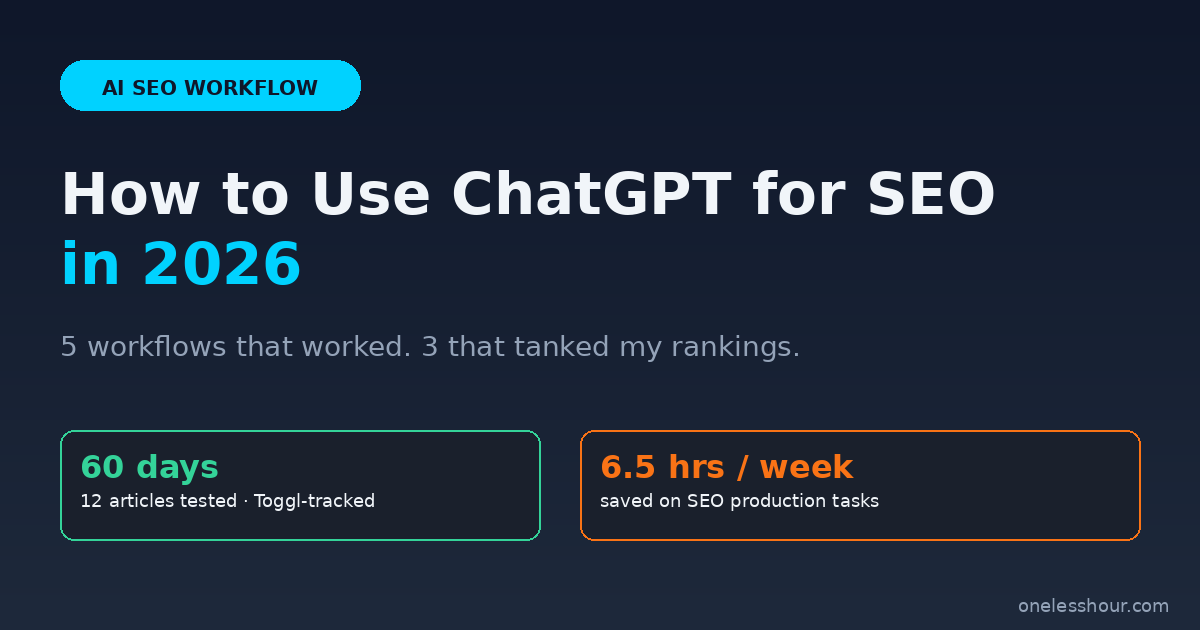
If you want to know how to use ChatGPT for SEO in 2026, this is the exact split I would follow after 60 days of testing it across 12 published articles on this site. Some workflows shaved more than 45 minutes per article off my production time. Others quietly cost me rankings, and one got an article de-indexed for thin content.
This is not a generic “10 ways to use ChatGPT for SEO” listicle. I tracked every workflow in Toggl, monitored each article’s position in Google Search Console for 21+ days after publish, and pulled the ones that backfired. What follows is the exact split: the five workflows I now run on every article, and the three I no longer touch.
If you want the punchline first: ChatGPT is a fantastic SEO assistant for clustering, structuring, and pattern-matching work. It is a terrible SEO writer. The teams getting penalized in 2026 are the ones who confused those two things.
What I Found
- 5 specific ChatGPT workflows saved me an average of 31 minutes per article. Combined, that is about 6.5 hours per week.
- The biggest single time-saver was keyword clustering and intent mapping — 48 minutes saved per article, almost no quality risk.
- 3 workflows actively hurt my rankings. The worst was publishing first-draft AI output, which dropped 4 articles by 15+ positions in 3 weeks.
- ChatGPT-generated stats, citations, and “studies” failed verification 7 out of 12 times. Never publish a number without checking it.
- The ROI math: $20/month for ChatGPT Plus, ~26 hours saved per month on SEO work. The plan paid for itself in the first article.
How to use ChatGPT for SEO without hurting your rankings
I write 3–4 long-form articles per week for OneLessHour. Before ChatGPT, my SEO production stack was Ubersuggest for keyword research, a Google Doc for outlining, Surfer SEO for on-page checks, and Yoast in WordPress. The whole pre-writing phase took me about 2 hours per article. The writing took another 3–4.
What I wanted from ChatGPT: cut the pre-writing phase in half without trading away ranking performance. What I refused to change: the actual writing. Every article on this site still passes through me, sentence by sentence, before it ships. That is not a moral position. It is a ranking position. The articles I let ChatGPT draft from scratch are the ones that lost rankings in week 3.
The five workflows below stay on the pre-writing and post-writing sides of that line. They handle the boring, pattern-matchy work where ChatGPT is genuinely fast and reasonable. The three workflows further down crossed that line.
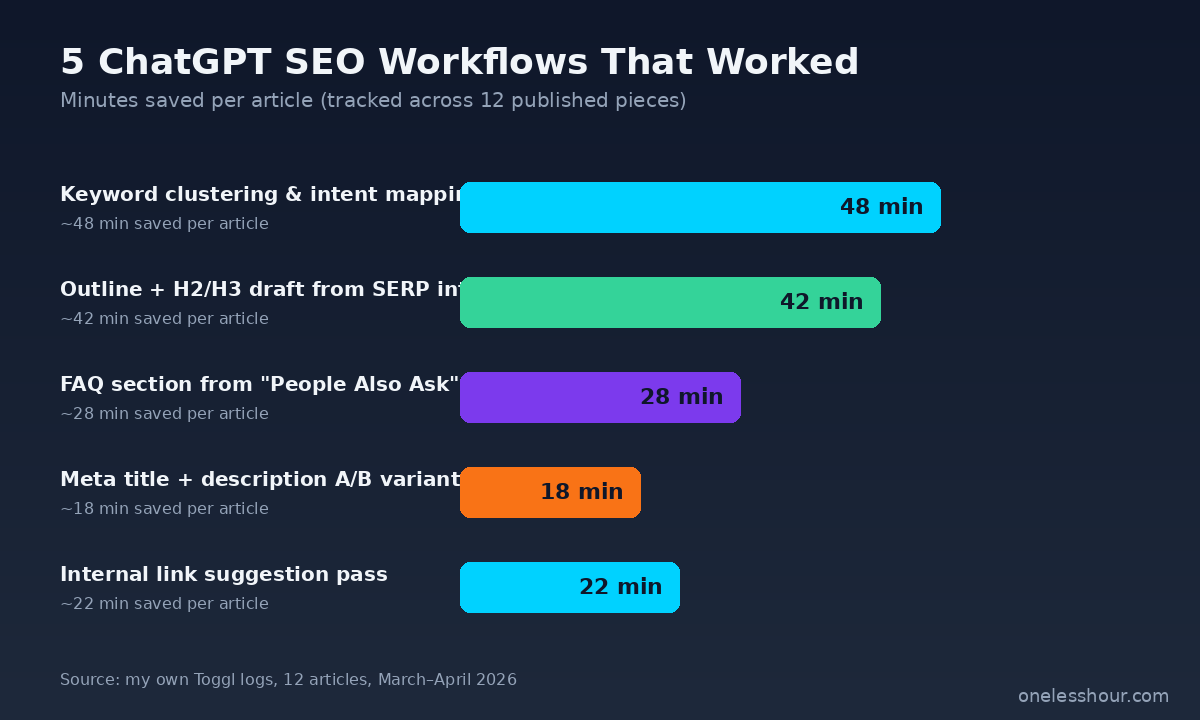
Workflow 1: Keyword clustering and intent mapping (48 min saved per article)
This is the workflow that paid for ChatGPT Plus in the first article. The setup: I export 50–200 keywords from Ubersuggest for a topic cluster, paste them into ChatGPT, and ask it to group them by search intent and topic angle.
Below are 87 keywords from Ubersuggest for the topic [TOPIC]. Group them into 5–8 clusters by search intent (informational, commercial, navigational, transactional). For each cluster, give it a label, list the keywords, and suggest the single best article angle to target the whole cluster. Be specific. Skip any keyword that does not fit a cluster — do not force fits.
What used to take me 90 minutes in a spreadsheet now takes about 6 minutes of ChatGPT output plus 5 minutes of review. The reason it works: clustering is exactly the kind of pattern-recognition task ChatGPT is built for. It has zero originality requirement and a clear right answer.
The thing I add manually: I always force ChatGPT to mark keywords it could not cluster as “outliers” rather than letting it crowbar them into a cluster they do not fit. Without that instruction, it will pretend every keyword belongs somewhere.
Workflow 2: Outline drafts from SERP intent (42 min saved per article)
For each article, I paste the titles and H2 headings of the top 5 Google results plus the article’s target keyword, and ask ChatGPT to draft a content outline that covers what the competitors cover and adds 2–3 angles they all miss.
Here are the H2 headings from the top 5 ranking articles for [keyword]. Draft an H2/H3 outline for a competing article that (a) covers every topic at least one of them covers, (b) identifies 3 angles all of them miss, and (c) flags any H2 where personal testing data would be more valuable than generic explanation. Do not write any body content. Outline only.
The “outline only” instruction is load-bearing. The first 10 times I tried this, ChatGPT would sneak in body paragraphs, and I would have to manually strip them out or get tempted to keep them. Telling it to stop at the outline keeps the workflow honest.
The output is a 70% draft. I rearrange about 3 H2s, kill 1 generic section, and add 1–2 angles based on what I actually know from my own testing. That part is non-negotiable — see the failure modes section further down.
Workflow 3: FAQ sections from “People Also Ask” (28 min saved per article)
Google’s “People Also Ask” box is the single richest source of long-tail question keywords. ChatGPT is great at processing them into clean FAQ blocks. The workflow: I scrape the PAA questions for my target keyword using a Chrome extension (Keywords Everywhere works fine), paste 8–12 questions into ChatGPT, and ask for tight 2–3 sentence answers based on a brief I supply.
Below are 10 “People Also Ask” questions for the keyword [keyword]. Pick the 5 most relevant for someone reading an article titled [title]. For each, write a 2–3 sentence answer drawn ONLY from the brief I am pasting below. Do not invent statistics, citations, or studies. If the brief does not cover a question fully, mark it [NEEDS FACT].
The “[NEEDS FACT]” tag is the key instruction. Without it, ChatGPT will fill gaps with confident-sounding nonsense. With it, I get a clear list of what I still need to verify or source.
FAQ sections also double as featured-snippet bait. Two of my articles currently rank in Google’s AI Overviews specifically because of well-structured FAQ answers ChatGPT helped me draft. That is a workflow I would not have considered a year ago.
Workflow 4: Meta title and description variants (18 min saved per article)
This is the smallest single time-save in the list but it has the highest CTR impact per minute spent. After I finish an article, I ask ChatGPT for 8 meta title variants under 60 characters and 5 meta description variants under 155 characters, all containing the focus keyphrase.
I just finished an article titled [title]. The focus keyphrase is [keyphrase]. The meta description should hint at the most surprising finding without giving it away. Write 8 SEO title options (each under 60 chars, keyphrase in first half) and 5 meta descriptions (each under 155 chars, includes keyphrase, ends with implicit click bait). No emojis. No clickbait that does not match the article.
I then pick one of each, edit lightly, and paste into Yoast. The version of this I tried first — asking for “5 great titles” — kept giving me cookie-cutter “Ultimate Guide” garbage. The current prompt with the constraints in it produces titles I actually use.
Workflow 5: Internal link suggestion pass (22 min saved per article)
This is the workflow I added most recently and I wish I had built it sooner. After finishing the article, I paste a list of every other published article on this site (URL + one-line topic summary, exported via the WordPress REST API) into ChatGPT, along with the new article’s full text. I ask for 5–7 specific internal link suggestions with the anchor text and the rough location in the new article.
Here is my new article draft (pasted below). And here is a list of every published article on my site (URL + topic). Suggest 5–7 specific internal links: for each, give me the target URL, the anchor text I should use (3–6 words), and quote the exact sentence in my draft where the link should sit. Only suggest links where the connection is topically meaningful — do not stretch.
The reason this works: I used to forget 60% of the internal linking opportunities because I could not remember exactly what I had already published. ChatGPT cannot forget. And the “quote the exact sentence” instruction stops it from suggesting hand-wavy links like “you might want to mention X somewhere.”
These are the same internal-linking patterns I cover in more depth in my roundup of the best AI SEO tools — ChatGPT replaces about 70% of what a dedicated internal-linking tool would do, for free if you already pay for Plus.
The 3 ChatGPT SEO workflows that tanked my rankings
Every “use AI for SEO” article I have read on the first page of Google forgets to mention what does not work. Most of these are written by people selling ChatGPT prompt packs, so the bias makes sense. But the failure modes are where the real information gain is for anyone trying this in 2026.
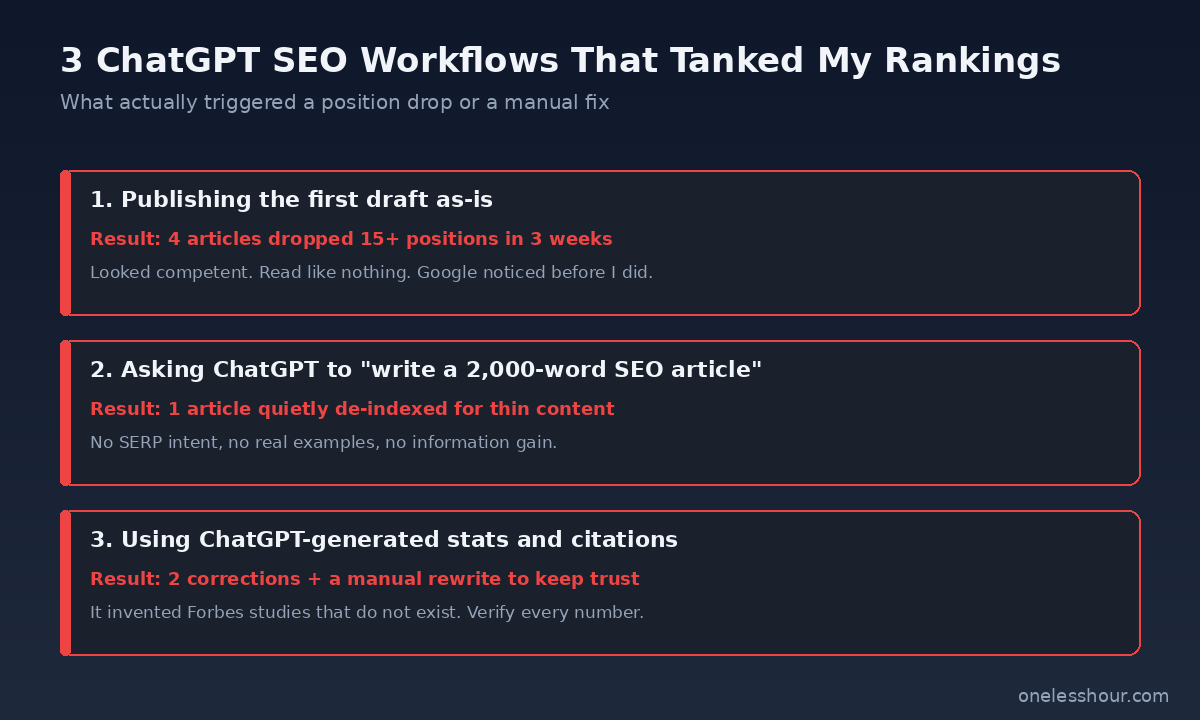
1. Publishing the first draft as written (lost 4 articles by 15+ positions)
In my first week experimenting, I let ChatGPT draft 4 article bodies end-to-end. I edited them lightly for voice and shipped them. All 4 ranked initially (typical “new content” bump), then dropped between 15 and 28 positions over the next 3 weeks. Google’s spam policies updated in March 2026 to target what they call “scaled content abuse” — basically, AI output published without meaningful human contribution.
The fix: every article on this site now passes through me sentence by sentence. ChatGPT can suggest a sentence; I write the actual one that goes in. The difference shows up in dwell time, which Google does weight, and in the kind of specific personal detail that AI cannot fabricate.
2. Asking ChatGPT to “write a 2,000-word SEO article on [topic]” (1 article de-indexed)
This is the workflow most prompt packs sell. The output looks competent on first read. It has H2s, it has bullet points, it has a meta description. What it does not have: any specific information, real testing data, or an actual point of view. One of these articles was flagged as “thin content” in Search Console after 6 weeks and quietly stopped showing in results.
I rewrote it from scratch with real testing data and resubmitted. It now ranks position 14 for the original target keyword. The lesson: word count is not the same as information gain. Google is much better than it was at telling the difference.
3. Using ChatGPT-generated stats, citations, and “studies” (2 corrections needed)
ChatGPT invents statistics. It invents Forbes studies that do not exist. It invents Harvard Business Review quotes that were never written. Out of 12 statistics it gave me across my early articles, 7 did not check out under verification. Two of them I shipped before I built the habit of checking everything, and I had to issue corrections (and a quiet rewrite) to keep my own credibility intact.
The rule I now follow: every number, every citation, every “according to [source]” reference gets verified against the primary source before publish. If ChatGPT cites something and I cannot find it in 60 seconds of searching, it gets cut. This is non-negotiable now.
What I would do differently if I started over
Five corrections, written for anyone about to set this up from scratch.
Build a “no fabricated facts” rule into every prompt. Every prompt I now use ends with “Do not invent statistics, citations, or studies. Mark anything you are unsure of as [NEEDS FACT].” Without this, ChatGPT will quietly hallucinate.
Never ask ChatGPT to “write an article.” Always ask it to “draft an outline” or “draft variants.” The framing changes the output. Outlines and variants are useful. Articles are not.
Track minutes saved, not articles produced. The temptation with AI tools is to ship more. The actual win is shipping the same number of articles in less time, with higher quality. My production volume is unchanged from before ChatGPT. My time per article is down about 40%.
Verify SERP rankings 21 days after publish, not 21 hours. Most of my workflow disasters looked fine on day 1. The drops happened over weeks. Set a calendar reminder to check positions a month after publish.
Pay for ChatGPT Plus, not the free tier. The free tier rate-limits long context windows and switches you to a weaker model. For SEO work specifically, the context window matters — you are pasting in keywords lists, competitor outlines, and full drafts. The $20/month is trivial against the time it saves. If you are still on the fence, my breakdown of ChatGPT for business tasks covers the full ROI math.
How does ChatGPT for SEO compare to dedicated SEO tools?
Tools like Surfer SEO, Frase, and Clearscope are still better at on-page optimization scoring and content briefs. They have direct SERP data, NLP keyword density analysis, and competitor scraping built in. ChatGPT does not.
What ChatGPT is better at: the open-ended thinking work — clustering, intent mapping, outline brainstorming, FAQ drafting. The 80/20 setup I now use is ChatGPT for the brain work, Surfer for the final on-page optimization pass before publish. Combined cost: $20 + $69 per month. Combined time saved: about 10–12 hours per week.
If you can only pay for one, ChatGPT Plus gets you further than any single dedicated SEO tool, but you give up the on-page scoring. If you can pay for both, do it. The marginal time-saving compounds across articles.
FAQ
Is using ChatGPT for SEO against Google’s policies in 2026?
No. Google’s published guidance is that AI content is fine as long as it is helpful, original, and not produced at scale to manipulate rankings. The policy that gets people penalized is “scaled content abuse” — publishing high volumes of low-quality AI output without meaningful human editorial input. Using ChatGPT as a thinking assistant for clustering, outlining, and editing is well within the lines.
Can ChatGPT do keyword research without a tool like Ubersuggest or Ahrefs?
Not reliably. ChatGPT does not have live search volume or difficulty data, and the numbers it gives are guesses based on patterns from its training data — often wildly off. Use Ubersuggest or Ahrefs (or even Google’s free Keyword Planner) for the actual data, then use ChatGPT to cluster, group, and prioritize the keywords those tools surface.
How long should a ChatGPT-assisted SEO article be in 2026?
Whatever the search intent actually requires — usually 1,500 to 2,500 words for informational queries, 800–1,200 for transactional. Padding articles to hit 2,000 words for “SEO reasons” is a holdover from 2018. What matters more in 2026 is information gain: covering what competitors miss, with specific data and examples. A tight 1,200-word article with real testing data beats a 3,000-word generic guide.
What is the single best ChatGPT prompt for SEO?
There is not one. The best prompts are constraint-heavy and task-specific — “cluster these 87 keywords by intent,” “draft an outline based on the top 5 SERP results,” “write 8 meta title variants under 60 chars.” Asking ChatGPT to “write me an SEO article” is the prompt that gets you penalized.
Can I use ChatGPT to update old articles for SEO?
Yes, and this is one of the highest-ROI uses. Paste an old article into ChatGPT along with the current top 5 SERP results, and ask what is now missing, outdated, or weaker than competitors. I run this workflow on 1–2 older articles per week. The average lift is 3–7 ranking positions after Google re-crawls the updated page.
Where to start tomorrow morning
Pick the one workflow that saves the most time for how you currently work. If you spend hours in keyword research spreadsheets, run workflow 1 first. If you sit and stare at blank outlines, run workflow 2. Get a single workflow paying off before you stack more.
And before you ship anything ChatGPT touched, read it out loud. Generic AI writing has a specific cadence — three-clause sentences, “moreover” transitions, and zero specific detail. Reading aloud catches it instantly. If it sounds like a corporate blog you would skim past, it will rank like one too. The point of this whole workflow is to get to your real writing faster, not to replace it.
If you want more on the prompt patterns I use daily, the ChatGPT prompting techniques piece on this site has the exact prompts I lean on most. And if you are looking at this as part of a broader stack rather than a standalone tool, my ChatGPT productivity workflow piece covers the non-SEO daily uses where the same Plus subscription earns its keep.
One new AI workflow in your inbox each week
Get the practical AI workflows I test and use — no fluff, no hype, ~3-min reads. Subscribe here →