
Last tested: April 2026
Transparency note: This article contains no affiliate links, and no company paid for or reviewed it. I pay for most of the AI tools I use myself — see how I test.
I used to spend three hours on SEO groundwork before writing a single word. Researching competitors, identifying subtopics I should cover, scoring my content after writing — all of it manual, all of it tedious. Then I started testing AI SEO tools. A few of them genuinely cut that time in half. Most of them didn’t.
After running 10+ AI SEO tools through real publishing projects over several months, I found 7 that are actually worth using. Here they are, ranked by how much time they saved me each week — from most impactful to most specialized.
One thing you’ll notice: most of these tools do one thing exceptionally well. I’ll tell you what that is, what it actually costs, and whether you need it at your current stage.
What I Found
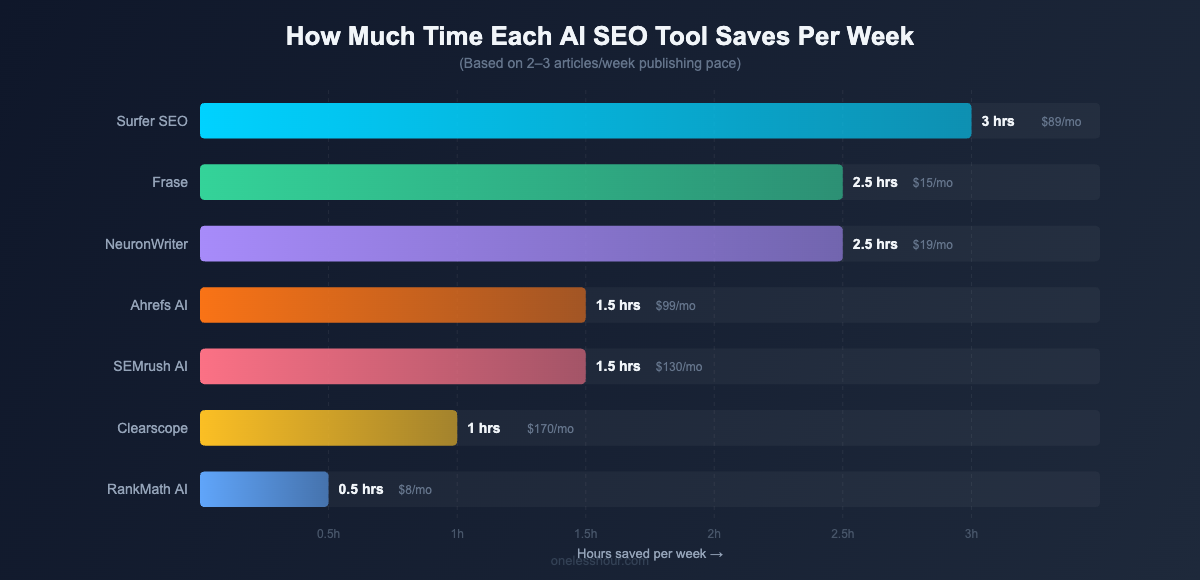
- Surfer SEO saved me the most time overall — about 3 hours per week across 2-3 articles — by replacing manual competitor research with live content scoring.
- Frase at $15/month is the best value tool in this category; it turns a 45-minute research process into a 5-minute brief.
- NeuronWriter gives you 75-80% of Surfer’s functionality at $19/month versus $89 — the right call for solo bloggers on a budget.
- Three of the seven tools I tested had AI writing features — none of them produced content good enough to publish without heavy editing.
- The free tiers of most AI SEO tools are preview mode, not functional — I’ll flag the honest reality for each.
What Makes an AI SEO Tool Actually Worth the Money?
I tested a lot of tools that weren’t worth it. The difference between tools that stay in my workflow and tools I cancel after a free trial comes down to three things: they automate genuinely tedious parts of the process (not parts that require judgment), their suggestions are specific rather than generic, and they integrate into your existing workflow rather than demanding you rebuild it around them.
You can get a surprising distance with ChatGPT alone before paying for any of these. Five SEO workflows that worked for me, and three that tanked my rankings.
A note on free tiers: SEO is competitive enough that free tiers of most tools are preview mode, not functional. I’ll call out the exceptions below, but don’t expect to run a serious content operation on free plans.
The 7 Best AI SEO Tools in 2026
1. Surfer SEO — Best for Real-Time Content Optimization
Surfer’s Content Editor is the closest thing to having an SEO analyst sitting beside you while you write. Paste in your target keyword and Surfer immediately analyzes the top-ranking pages, then generates a live Content Score that updates as you write.
What changed for me: I went from manually opening five competitor articles in separate tabs, taking notes on what they covered, and guessing whether I’d hit the right topics — to getting a live score that tells me exactly which terms I’m missing and what the top pages include. That shift eliminated roughly 90 minutes of prep per article.
The specific mechanic: Surfer shows which terms appear in top-ranking content, at what frequency, and how your current word count compares to the competitors’ average. The Content Score runs from 0 to 100. Articles I’ve published with a score above 75 consistently rank higher than older content I wrote without any optimization tool.
Best for: Content writers and bloggers publishing 2+ articles per week. Price: $89/month (basic), $129/month (pro). Honest take: At $89/month, the ROI math only works if you’re writing consistently. For active publishers, it pays for itself quickly.
Time saved: ~3 hours per week
2. Frase — Best for Content Brief Generation
Frase does one thing better than any other tool I’ve tested: it turns content research from a 45-minute manual slog into a 5-minute automated brief.
Point Frase at a keyword and it scrapes the top search results, extracts the questions they answer, the headers they use, the statistics they cite, and the topics they cover — then compiles it into a structured content brief. Writing that brief manually, reading competitors and organizing by topic, used to take me 45 minutes minimum. Frase gets me 80% of the way there in under 5.
The AI writer that comes with Frase can draft section outlines based on the brief. I don’t use the AI output directly — the writing quality isn’t good enough to publish without heavy rewriting — but the structural starting point helps when I’m stuck on how to organize a piece.
Best for: Anyone who does their own SEO research before writing. Price: $15/month (basic), $45/month (team). Honest take: At $15/month, this is the best value tool in this list. The brief generation alone justifies the price for anyone writing more than two articles per month.
Time saved: ~40 minutes per article on research
3. NeuronWriter — Best Budget Alternative to Surfer
NeuronWriter does what Surfer does — content scoring, competitor analysis, term suggestions — for less than a quarter of the price. If $89/month for Surfer isn’t realistic, NeuronWriter at $19/month gets you 75-80% of the same functionality.
I ran the same article through both tools directly. Surfer’s analysis was more granular and its Google Docs integration is smoother. NeuronWriter’s interface is clunkier and the Chrome extension occasionally lags. But the core output — which terms to include, at what frequency, how your content compares to competitors — was comparable enough that for a solo blogger, NeuronWriter is the smarter starting point.
Best for: Bloggers and freelancers who need content scoring without the Surfer price tag. Price: $19/month (Bronze), $37/month (Silver). Honest take: If you’re evaluating both tools fresh, start here. If you’re already on Surfer and love it, NeuronWriter isn’t a reason to switch.
Time saved: ~2.5 hours per week
4. Ahrefs (AI Features) — Best for Keyword Research and Content Gaps
Ahrefs isn’t new, but its AI-powered features — particularly the AI Content Helper — have gotten genuinely useful. The AI Content Helper analyzes your draft against top competitors and flags subtopics you’re missing. On one article, it identified 12 subtopics that competitors covered and I didn’t. I added sections for six of them. That article now ranks in position 4 for its primary keyword, up from page 3.
What makes Ahrefs’ keyword research better than cheaper tools: the data is fresher and the SERP analysis is more detailed. The SERP overview — which shows exactly why each top-ranking page is winning — is worth the price for anyone serious about long-term SEO strategy.
Best for: Anyone building a long-term SEO strategy with detailed keyword data. Price: $99/month (Lite), $199/month (Standard). Honest take: Expensive for beginners. Come back to Ahrefs once you’re publishing consistently and need precise competitive data.
Time saved: ~1.5 hours per week on research and gap analysis
5. SEMrush (AI Writing Assistant) — Best All-in-One Platform
SEMrush has been a standard SEO platform for years, and its AI Writing Assistant — integrated directly with the keyword and competitor data — is more useful than standalone AI writing tools because it starts with your actual target keyword data.
The workflow that saves me the most time: use SEMrush’s Keyword Magic Tool to find a target keyword, pull up the SEO Content Template to see what top-ranking pages cover, then write in the AI Writing Assistant that’s connected to the same data. That’s the research-to-writing pipeline in one platform instead of four separate tools. I estimate it saves me about 30 minutes of tab-switching and data-copying per article.
Best for: Teams that need keyword research, rank tracking, site audit, and content tools under one account. Price: $130/month (Pro), $250/month (Guru). Honest take: SEMrush’s strength is breadth. As a pure AI content tool it doesn’t outperform Surfer or Frase — but if you’re already paying for keyword research and content tools separately, it may let you consolidate.
Time saved: ~1.5 hours per week
6. Clearscope — Best for Content Grading and Team Editing
Clearscope’s focus is narrower than most tools on this list: it helps you optimize content you’ve already written. The grading system — A+ through F — is simple enough that anyone on a content team can use it without training, and the term suggestions are well-calibrated to what Google actually wants.
I use Clearscope at the editing stage. Draft the article, run it through Clearscope, see which terms are missing, add them naturally. The process takes 20-30 minutes and consistently improves content scores. One article went from a D grade to a B+ after a revision pass, and its organic traffic doubled within 60 days of republishing.
Best for: Content teams where multiple people optimize articles post-draft. Price: $170/month (Essentials), $350/month (Business). Honest take: Hard to justify at $170/month for individuals when Surfer and NeuronWriter offer similar scoring at a fraction of the cost. Clearscope’s advantage is simplicity for teams.
Time saved: ~25 minutes per article at editing stage
7. RankMath AI — Best for WordPress Users
RankMath is a WordPress SEO plugin that added AI-powered features to its Pro version. If you already use RankMath (or Yoast) for on-page SEO, the AI additions in Pro are worth knowing about — especially at $7.99/month.
The features I actually use: the AI-generated focus keyphrase suggestions that analyze your post content and recommend what primary keyword you should be targeting, and the meta description generator that produces click-worthy descriptions directly from your content. Combined, those save me 15-20 minutes per post compared to writing metadata manually.
This is a lower-tier time savings than the other tools — but at $7.99/month, the price-to-value ratio is hard to argue with for WordPress users. It handles the on-page metadata side that content optimizers like Surfer and Frase don’t touch.
Best for: WordPress bloggers who want AI SEO features without a standalone subscription. Price: Free (basic), $7.99/month (Pro). Honest take: Doesn’t replace a content optimizer — use it alongside Surfer or Frase, not instead of them.
Time saved: ~15-20 minutes per post
Which AI SEO Tool Is Right for You?
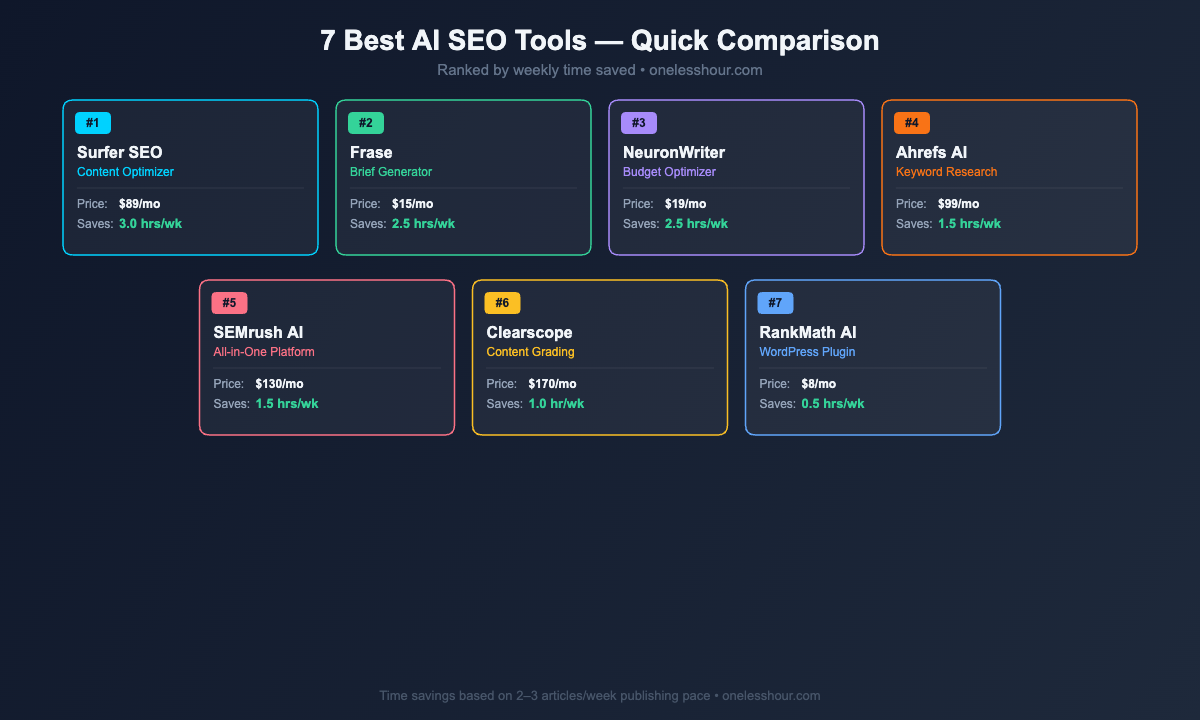
| Tool | Monthly Cost | Time Saved/Week | Best For |
|---|---|---|---|
| Surfer SEO | $89+ | ~3 hours | Active content publishers |
| Frase | $15+ | ~3.5 hrs (5 articles) | Best value for researchers |
| NeuronWriter | $19+ | ~2.5 hours | Budget-conscious bloggers |
| Ahrefs AI | $99+ | ~1.5 hours | Long-term keyword strategy |
| SEMrush AI | $130+ | ~1.5 hours | Teams needing all-in-one |
| Clearscope | $170+ | ~2 hrs (4 articles) | Content teams, post-draft editing |
| RankMath AI | Free / $8 | ~1 hour (4 posts) | WordPress users |
What I’d Do Differently
Three mistakes I made when I started using AI SEO tools that cost me time instead of saving it:
I tried to use everything at once. Running the same article through Surfer, Frase, and Clearscope sounds thorough. In practice it took longer than doing research manually and produced contradictory suggestions. My current workflow uses exactly two tools: Frase for the brief, Surfer for writing. That’s 95% of the value.
I trusted the AI writing output too much. Every tool on this list has an AI writing feature. None of them produce content you can publish directly. I learned this after publishing an AI-drafted section that a reader called out as generic and factually imprecise. Treat AI output as a first draft that needs heavy editing, not a finished product.
I optimized for content score instead of reader value. Getting a Surfer score of 85 is satisfying. But I’ve published 72-score articles that rank in position 2 and 91-score articles that sit on page 3. The score correlates with quality — it doesn’t determine it. Write for the reader first, optimize second.
Frequently Asked Questions
Is there a free AI SEO tool that’s actually worth using?
RankMath’s free WordPress plugin is the best genuinely free option if you’re on WordPress. Ubersuggest has a limited free tier for keyword research. Frase offers a $1 five-day trial. Most “free” AI SEO tools give you 2-3 uses before requiring a paid plan — enough to test the tool, not enough to rely on it.
Do I need both a keyword research tool and a content optimizer?
Yes, for most publishers. Keyword research tools (Ahrefs, SEMrush, Ubersuggest) answer “what should I write about?” Content optimizers (Surfer, Frase, NeuronWriter) answer “how do I write it to compete?” They solve different problems. Frase is the exception — it handles a version of both at $15/month, which is why it shows up so often in beginner recommendations.
Can AI SEO tools help me appear in ChatGPT and Perplexity answers?
This is a real and growing area. Surfer and Ahrefs have started incorporating AI search visibility data. For now, the most effective way to appear in AI-generated answers is to publish clear, factual, well-structured content — the same practices that help with Google. A dedicated AI visibility tool isn’t necessary at this stage for most publishers, but it’s worth watching.
How long before AI-optimized content starts ranking?
Most of my articles optimized with Surfer or Frase showed ranking improvements within 4-8 weeks. That’s consistent with standard SEO timelines — AI tools improve the quality of what you publish, they don’t accelerate Google’s crawl and index cycle. Set expectations accordingly.
Which AI SEO tool should a beginner start with?
Frase at $15/month. It handles the research phase that most new publishers skip entirely, which is the biggest beginner mistake in content SEO. Start there, add a content optimizer like NeuronWriter once you’re publishing consistently, and graduate to Ahrefs or SEMrush when you need more competitive data.
My Recommended Starting Stack
If I had to pick just two tools from this list: Frase for research and NeuronWriter for optimization. That combination costs $34/month, covers the two stages where AI saves the most time, and doesn’t lock you into a $200+ monthly commitment before you’ve validated your publishing pace.
Add Surfer when you’re publishing consistently and the content score data becomes genuinely useful. Add Ahrefs when you need competitive keyword data that goes beyond what cheaper tools can provide.
If you want to see how AI fits into a complete workday — not just your SEO workflow — my breakdown of how I actually use AI at work shows the full hour-by-hour system. And if you’re looking for the broader toolkit beyond SEO, the best AI productivity tools covers what I rely on daily to save 11+ hours a week.
Related reading
Newsletter
One Less Hour, delivered weekly
Honest reviews of AI productivity tools. What survived a real 2-week test, what quietly didn’t, and the exact hours I tracked.
One email per week. Unsubscribe in one click.