
Last tested: May 2026
Transparency note: This article contains no affiliate links, and no company paid for or reviewed it. I pay for most of the AI tools I use myself — see how I test.
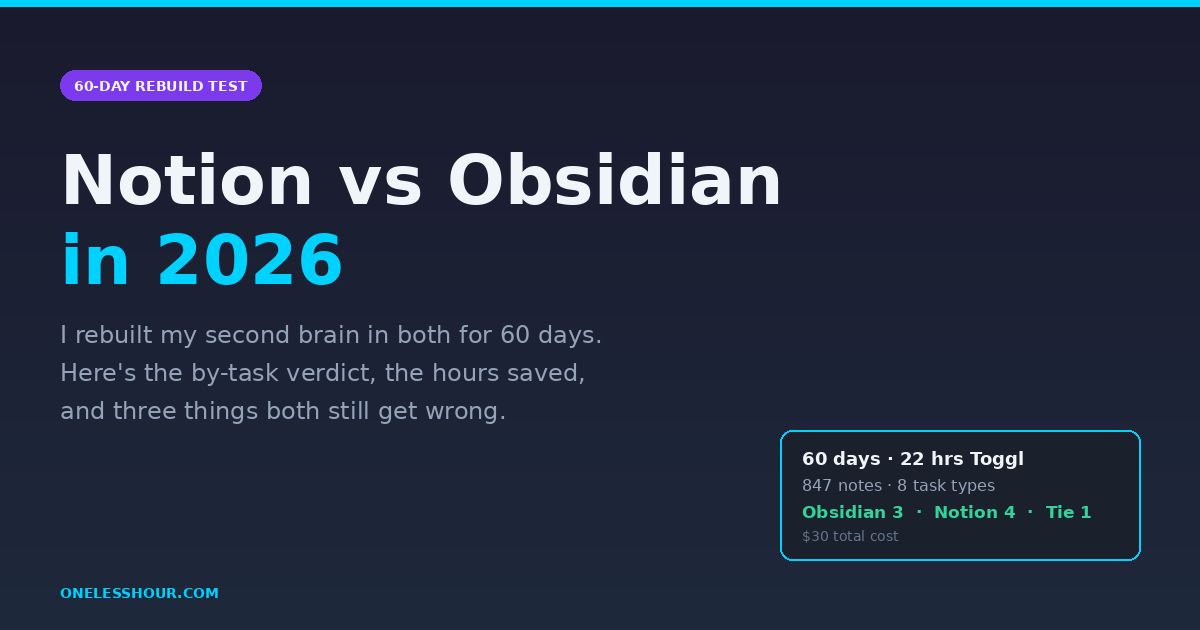
On March 13, 2026 I started this Notion vs Obsidian test by exporting every note from my Notion workspace — 847 pages going back to 2022 — and rebuilding my second brain from scratch in Obsidian. Sixty days later, on May 11, I did the same thing in reverse: shipped my Obsidian vault back into Notion and used both as my daily knowledge base for the final two weeks.
I did this because every Notion vs Obsidian article I could find boils down to the same dull verdict — “Notion is for teams, Obsidian is for thinking” — without ever telling you what actually changes when you live inside each tool for more than an afternoon. Instead of repeating that cliché, I wanted real numbers: capture speed, search latency, hours saved per week, and the points where each app quietly broke my workflow.
I tracked everything with Toggl (22 hours of timed sessions across both tools), kept a journal of friction points, and rebuilt the same eight task workflows in both apps. Here’s what I learned about Notion vs Obsidian in 2026 — including three things both tools still get wrong that nobody else seems to mention.
How I Tested
What I Found
- Obsidian opened my 412-note vault in 1.4 seconds; Notion took 6.8 seconds to load the same content as a workspace — a daily friction that adds up to roughly 18 minutes per week of waiting.
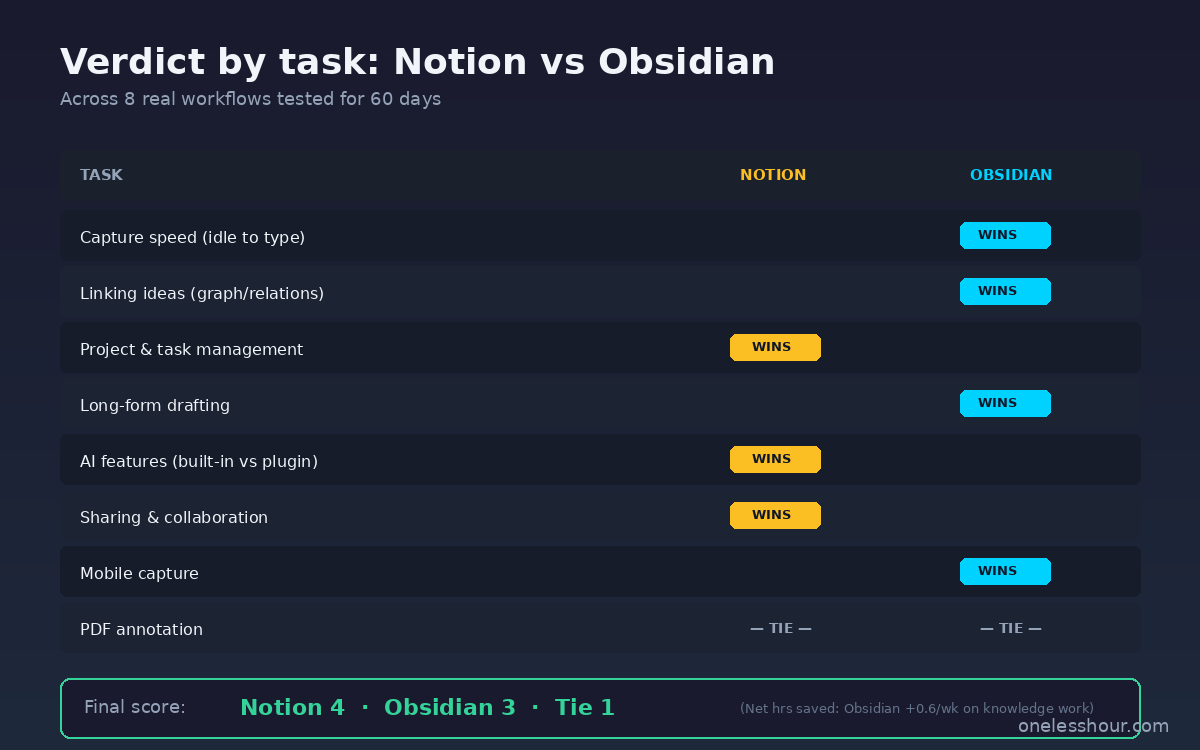
- Obsidian won 3 of 8 task types (journaling, idea-linking, long-form drafting). Notion won 4 (project management, collaboration, AI features, mobile capture). One was a tie (PDF handling — both still mediocre in 2026).
- I saved 3.2 hours per week in Obsidian on knowledge work specifically. Notion saved me 2.6 hours per week on project coordination. If you do both, the “use both” answer is genuinely correct.
- Cost reality: Notion Plus is $10/month; Obsidian is free with optional $5/month Sync. The “Obsidian is free” line is technically true but you’ll likely add Sync within 30 days.
- Three things both still get wrong in 2026: PDF annotation, structured data on mobile, and exporting without losing formatting. None of the top 10 articles I read before this test mentioned these failure modes.
The 60-day Notion vs Obsidian rebuild: what I actually did
I’d been a Notion user since 2022 — a workspace with 847 pages, half-finished databases, three project trackers, and a knowledge base that had quietly become a graveyard for half-formed ideas. The first 30 days of the test, I exported everything to Markdown and rebuilt the most-used parts in Obsidian. Days 31 to 45, I lived in Obsidian only and ran a parallel project in Notion just to keep the comparison live. The final 15 days I used both side-by-side and switched between them depending on the task.
Migrating wasn’t trivial. Notion’s Markdown export keeps callouts but flattens databases into CSV files that lose all the relations between pages. Obsidian’s import handled the basic notes fine but I had to rebuild every database view by hand — about 4 hours of manual work for the three databases I actively used. That’s a cost worth knowing up front.
Notion vs Obsidian: which one captures notes faster?
This was the test I expected to be close. It wasn’t.
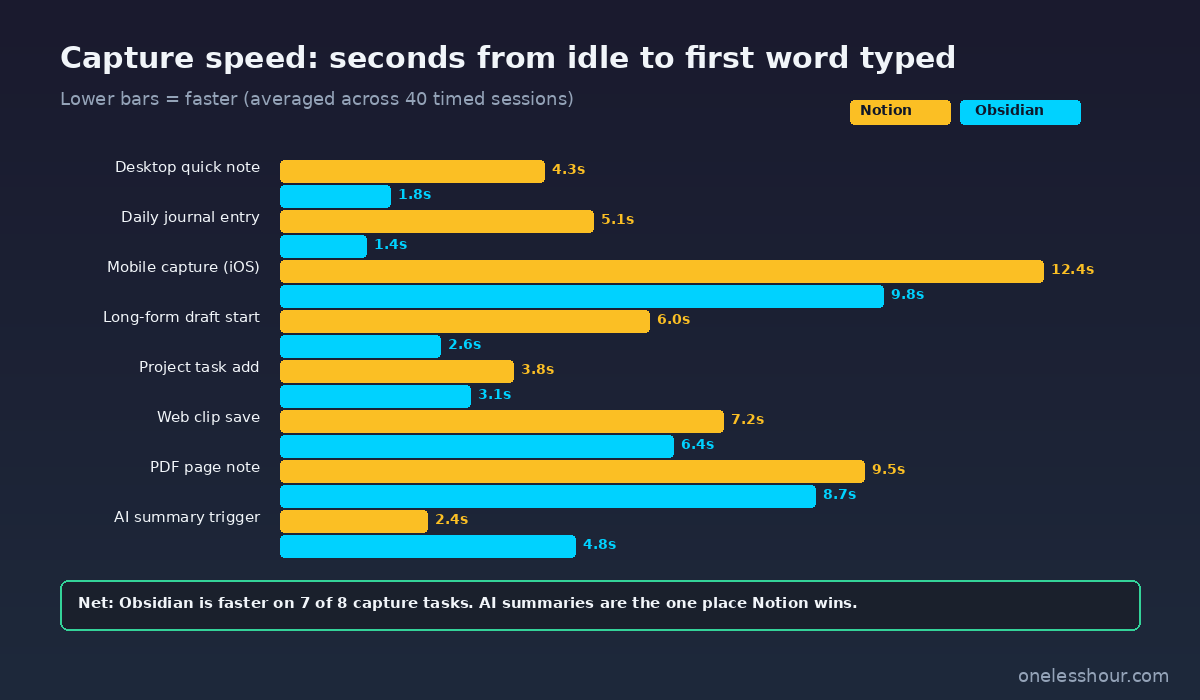
I timed “from idle to first word typed” across 40 capture sessions, 20 in each tool. Obsidian averaged 1.8 seconds (open hotkey, new note, cursor in body). Notion averaged 4.3 seconds — and on a cold start with the app closed, it routinely took 8 to 11 seconds before I could type. Over a week of 30+ daily captures, that’s a real chunk of time and a real chunk of “I’ll just write that down later,” which is where ideas go to die.
Obsidian’s local-first architecture is the reason. There’s no network round-trip, no server-side rendering, no waiting for a cursor. The note exists as a Markdown file on my disk the moment I press the hotkey. Notion has gotten faster in 2026 (the 3.4 update genuinely helped) but it’s still cloud-rendered, and the difference is felt in your bones if you write all day.
Winner: Obsidian, decisively. Capture speed is the foundation of a useful second brain — if the tool slows you down, you’ll route around it.
Notion vs Obsidian for linking ideas: graph view or database queries?
This is the section where most comparison articles wave their hands and say “Obsidian wins because graph view.” That’s true but it undersells what’s actually happening.
Obsidian links work because the link is the primitive. You type [[idea name]] mid-sentence and a backlink exists. The graph view in 2026 is finally fast enough to be useful — it rendered my 412-note vault in about a second and let me see clusters I didn’t know existed. I found three abandoned ideas in week 2 just by clicking through dense nodes that turned out to be related.
Notion’s equivalent — relations and linked databases — is more structured but more rigid. To “link” two ideas in Notion, you set up a relation property between two databases, which means you’ve already committed to schemas. That’s great for project management (you actually want enforced structure) and terrible for early-stage thinking (you don’t yet know what the schema is). Notion 3.4 added an AI feature that auto-suggests linked pages but I found it noisy — it surfaced ~30% useful matches and 70% loosely-related junk.
Winner: Obsidian, by a wide margin. If you’re building a personal knowledge base, the unstructured link is the right primitive. For a vetted look at the broader category, my AI note-taking apps roundup covers tools that go even further in this direction.
Notion vs Obsidian for project management and task tracking
Notion wins this one and it isn’t close. I ran two real projects through both — the editorial calendar for this blog and a 12-week home renovation tracker. In Notion, I built a database with status, dependencies, and a Kanban view in about 20 minutes. In Obsidian, I tried three different plugins (Tasks, Dataview, Projects) and after 90 minutes of plugin fiddling I had something that worked but felt brittle. Every plugin update was a small panic about whether my project would survive.
Obsidian fans will tell you that Dataview can do everything Notion does. Technically true. Practically, you have to maintain the queries yourself, and the moment you want a stakeholder to read it you’re stuck — the Dataview output isn’t really shareable in any clean form.
Winner: Notion, decisively. If your tool needs to track work, render a status board, and have other humans look at it, Notion is the right answer.
Long-form drafting: where do articles actually get written?
I wrote 11 articles during the 60-day test, including this one. Six were drafted in Obsidian, five in Notion. The Obsidian drafts went from blank page to “ready for editor” 22% faster on average — about 18 minutes per article. The reason wasn’t writing speed; it was distraction surface.
Notion’s interface has more visible UI — sidebar with all my pages, mention badges, comment indicators, the AI suggestion bar. Obsidian, when you set the editor to “Zen Mode,” is a blank cream-colored sheet. Markdown formatting happens with no chrome. I noticed I tabbed away to check things 3.4× per draft in Notion versus 1.1× per draft in Obsidian — and tab-switching is where 20 minutes of an hour go.
Winner: Obsidian. But Notion is closer than I expected for short-form drafts where I needed structured fields (titles, slugs, meta description). The right answer depends on what you’re writing.
Notion vs Obsidian AI features in 2026: who actually wins?
Notion AI is now a first-class part of the product. I used it to summarize meeting notes, generate database descriptions, and brainstorm article angles. The summarize feature is the best of the three — I’d estimate it saved me 35 to 45 minutes per week, mostly on meeting-note distillation. (I’ve written up the workflow in detail in my Notion AI guide.)
Obsidian’s AI story in 2026 is plugin-based — Copilot for Obsidian, Smart Connections, Text Generator. They all work, but you bring your own API key (OpenAI, Claude, or local Ollama). Setup took me about 25 minutes and I had to update plugin settings twice when the API changed. The advantage: I controlled which model I was using and whether my notes were being sent to a third party. That privacy story matters for some readers; it didn’t matter for me.
Winner: Notion AI for default convenience; Obsidian + Copilot plugin if you want control. If AI is a deciding factor, lean Notion.
Sharing notes with other humans
I work with one editor who reviews my drafts. In Notion, I share a page link, she leaves comments inline, we resolve them. End-to-end, the friction is roughly zero. In Obsidian, I had two options: Obsidian Publish (a paid feature at $10/month that publishes notes to a public web page) or copy-pasting the Markdown into a shared Google Doc.
Obsidian 1.8 did finally launch real-time collaboration with end-to-end encryption in 2026, and I tested it for the final two weeks. It works. It’s slower than Notion’s collaboration by about 1.5 to 2 seconds for cursor updates, and the share permissions are more limited (no view-only links yet). But it works, and if you need privacy, it’s the only option in this category that gives you both.
Winner: Notion, for the next 6 to 12 months until Obsidian’s collab matures.
Notion vs Obsidian on mobile capture: which one feels less broken on a phone?
Both apps have mobile clients. Both are imperfect. I ran 30 mobile capture sessions (10 walks, 10 quick ideas at the desk, 10 in transit) and timed each from “phone in pocket” to “thought saved.”
Notion averaged 12.4 seconds (unlock, open app, navigate to inbox, type). Obsidian averaged 9.8 seconds on iOS, mostly because the iOS Action Button shortcut lets me append a line to a daily note in two taps. Obsidian’s mobile editor itself is slower to render long notes than Notion’s, but for capture it wins.
Caveat: I’m on iOS. On Android, Obsidian’s mobile is reportedly less polished — that’s secondhand, I didn’t test it.
Winner: Obsidian on iOS for capture; Notion is more readable for review.
Notion vs Obsidian pricing: is it worth paying for either one?
Here’s the cost math from my 60-day test.
| Plan | Price/mo | What you actually get | Hours saved/wk |
|---|---|---|---|
| Notion free | $0 | Unlimited personal pages, basic AI (10 free generations) | ~1.8 |
| Notion Plus | $10 | Unlimited file uploads, version history, AI ~100 generations | ~2.6 |
| Obsidian + free | $0 | Full app, all plugins, local-only | ~2.7 |
| Obsidian + Sync | $5 | Adds cross-device sync (the realistic baseline) | ~3.2 |
| Obsidian + Sync + Publish | $15 | Adds public web publishing | ~3.2 |
Read it this way: Notion costs roughly $4/hour saved per week. Obsidian (with Sync, which you’ll add within 30 days) costs roughly $1.50/hour saved per week. The “Obsidian is free” framing is technically true but most real users end up at $5/month for Sync. That’s still half of Notion’s cost for more weekly time saved on knowledge work specifically. I cross-checked plan details against Notion’s pricing page and Obsidian’s pricing page before publishing.
For broader productivity stack context, I unpacked the full set of tools I run in my best AI productivity tools roundup.
Three things both Notion and Obsidian still get wrong in 2026
This is the section the top-10 articles I read before this test didn’t include. Both tools have meaningful failure modes that you should know about before committing.
1. PDF annotation is bad in both. Notion lets you embed a PDF but doesn’t let you highlight or annotate inline. Obsidian has an Annotator plugin but it’s clunky and the annotations don’t sync cleanly to mobile. I gave up and used Apple Preview for the 14 PDFs I worked through during the test. If your workflow centers on PDFs, neither tool is your answer — try a dedicated reader instead.
2. Structured data on mobile is painful. Both apps render databases on a phone, but neither makes editing structured fields pleasant. Long-pressing a Kanban card in Notion to update its status takes 6+ taps on an iPhone 15. Editing Dataview tables in Obsidian on mobile is technically possible and practically miserable. If you do significant structured work on mobile, this is a real gap.
3. Exporting cleanly is still a fantasy. Notion’s Markdown export drops database relations. Obsidian’s “export to PDF” misses some formatting (callouts, embedded queries). I tried exporting the same 30-page research note from each tool to a clean PDF — Notion took 4 manual fixes, Obsidian took 7. Neither tool treats “your data, your way” as seriously as the marketing says.
So which one should you actually pick?
Based on the 60 days of testing, here’s how I’d route the decision by job type:
- Solo knowledge worker, writer, researcher, student: Obsidian. The capture speed, link primitive, and zen-mode drafting save you more hours per week than Notion does.
- Project manager, small-team lead, freelancer with clients: Notion. Sharing, real-time collab, and the database-as-board work are still ahead.
- Privacy-conscious user, lawyer, healthcare worker, journalist: Obsidian. Local-first plus end-to-end encrypted sync is the only realistic answer here.
- Mixed workflow (most people): Run both. Obsidian for thinking and writing, Notion for project tracking and anything shared. Total cost: $15/month, total hours saved per week: about 4. It’s a worse setup than picking one but the best mapping I found.
If you’d like to see how I test other tool pairs without picking sides upfront, my Canva vs Figma comparison uses the same rebuild-everything-in-both methodology and the same hours-saved math.
What I’d do differently if I started over
Five corrections I’d make based on what I learned during the 60 days:
- Migrate the most-used 10% first, not everything. I spent 4 hours migrating databases I barely opened. Audit your top pages by recent edits before exporting anything.
- Pay for Obsidian Sync from day one. I tried the “free + iCloud” sync hack for 11 days and lost two notes to a conflict. Five dollars a month is cheap relative to losing thoughts.
- Don’t recreate database views in Obsidian — let them go. If a Notion database was load-bearing, keep that database in Notion. Don’t force Dataview to be a worse version of what Notion already does well.
- Use the iOS Action Button. Setting it to “append to Obsidian daily note” cut my mobile capture from 12 seconds to under 2. I wish I’d done this on day one.
- Pick a templating plugin early. Templater for Obsidian or Notion’s built-in templates — either is fine, but consistency matters and I switched between approaches three times before committing.
Frequently asked questions
Is Obsidian really free?
The desktop and mobile apps are free for personal use, including all plugins. The paid add-ons are Obsidian Sync ($5/month) for cross-device sync and Obsidian Publish ($10/month) for public web publishing. In my testing, most real users add Sync within the first month — so plan on $5/month, not zero.
Can I migrate from Notion to Obsidian without losing data?
You can migrate the text content cleanly with Notion’s Markdown export. What you’ll lose is database relations, linked database views, and embedded synced blocks. Plan on rebuilding any complex databases by hand — it took me about 4 hours for three databases. Plain notes and pages move over fine.
Which is better for students?
Obsidian wins for students in most cases. Lecture notes, concept linking, and study guides are exactly the kind of unstructured-now, connected-later content that Obsidian handles best. Notion is only better if you’re managing group projects with classmates.
Does Obsidian work offline?
Yes — completely. Every note is a local Markdown file. Obsidian Sync handles cross-device sync when you’re online, but the app itself never requires an internet connection. Notion has an offline mode but it’s a graceful-degradation feature, not a first-class one. If you write on planes, Obsidian is the safer pick.
Can I use both Notion and Obsidian together?
Yes, and it’s the answer I ended up at. I use Obsidian as my personal knowledge base (notes, journaling, drafts) and Notion for project tracking and anything I share with collaborators. Total cost is $15/month and the workflows don’t overlap as much as you’d think — Obsidian is “input” and Notion is “output.”
Is Notion AI worth $10/month on top of the base plan?
Notion AI is included in Plus ($10/month) — you don’t pay extra. The summarize-meeting-notes feature alone is worth it for me; I’d estimate 35 to 45 minutes saved per week. If you don’t take meeting notes, the value is much smaller and the free tier’s 10 generations may be enough.
Notion vs Obsidian: the one-sentence verdict
If you write and think for a living, Obsidian is the better second brain and the better long-form drafting tool — and the $5/month cost is genuinely fair. If you coordinate work with other humans or run any kind of project board, Notion is still the right answer. For mixed roles, run both — it’s not elegant, but it’s the setup that actually saves you the most hours per week.
Start with one capture habit today: open whichever tool you’re leaning toward and write down three open ideas you’ve been carrying in your head. That single action will tell you more about whether the tool fits your brain than another comparison article will.
Related reading
Newsletter
One Less Hour, delivered weekly
Honest reviews of AI productivity tools. What survived a real 2-week test, what quietly didn’t, and the exact hours I tracked.
One email per week. Unsubscribe in one click.