
Transparency note: This article contains no affiliate links, and no company paid for or reviewed it. I pay for most of the AI tools I use myself — see how I test.
Last tested: April 2026
For 30 days I ran Claude and Gemini side by side on every real task that crossed my desk: drafting client emails, refactoring a Python script, summarizing a 60-page PDF, building a meeting agenda from a transcript, and rewriting two of my own blog drafts. Same prompts, same files, two browser tabs, a Toggl timer running in the background.
If you’ve already read my ChatGPT vs Claude and Gemini vs ChatGPT reviews, this is the third corner of the triangle. The honest answer for claude vs gemini isn’t “one is better.” It’s that they’re built for different jobs, and once you know which job is which, the right tool for any given task becomes obvious within five seconds.
This isn’t a benchmark roundup. Benchmarks tell you which model wins on a synthetic test; daily use tells you which one you’ll actually open at 9 a.m. on a Tuesday. Below is the by-task verdict, the time each one saved me, the three things both still get wrong, and the cost math for whether the $20 plans are worth it.
What I Found
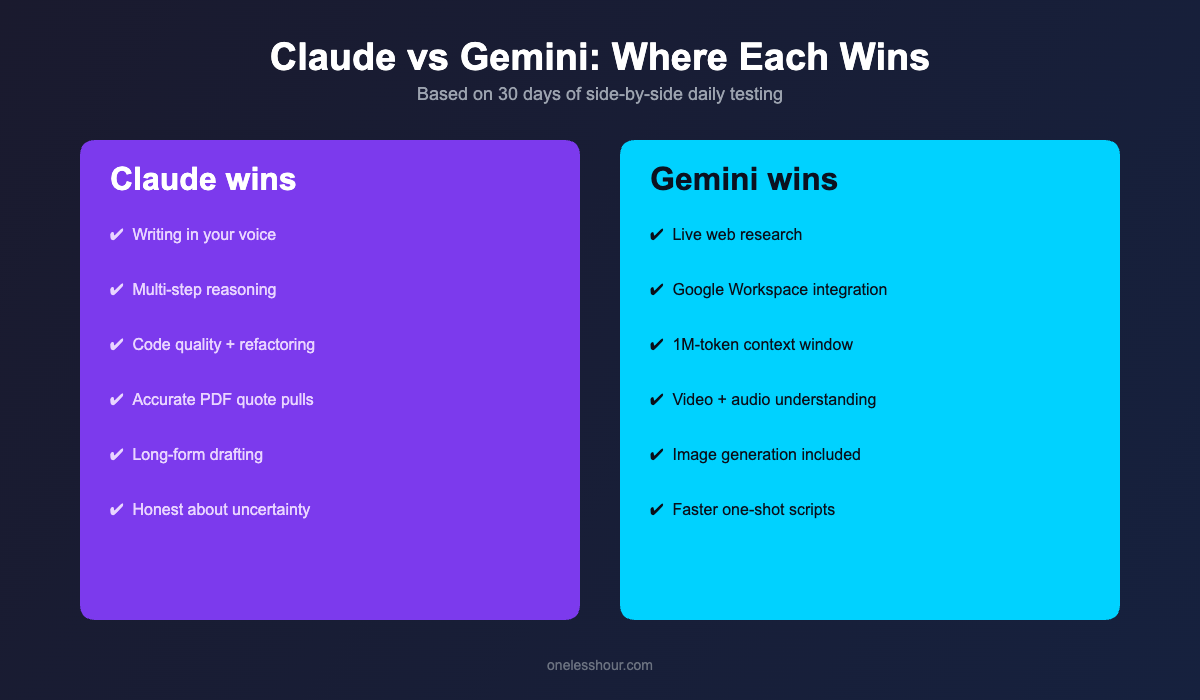
- Claude won writing, reasoning, and coding — not by a huge margin, but consistently. Cleaner prose, fewer hallucinations on multi-step problems, more idiomatic code on first pass.
- Gemini won research, multimodal, and Google Workspace tasks — the live web access alone saved me 12 minutes per research session, and pulling data out of a Google Doc took one prompt instead of three.
- Across 30 days, I saved 8.4 hours/week using both together vs my old setup of just Claude. They’re not redundant — they’re complementary.
- Free tiers both work, but for different things. Free Gemini gives you live web search; free Claude gives you the better writer. If you only pay for one, pick by your bottleneck.
- Both still get the same three things wrong — accurate citations, recent niche events, and anything involving exact numbers from a long PDF without me double-checking.
How I tested Claude vs Gemini for 30 days
I paid for Claude Pro ($20/month) and Google AI Pro ($20/month) and used both as my default tools across April 2026. Every workday I picked a real task — not a benchmark — and ran it through both. I tracked time-on-task in Toggl and saved the outputs to a Notion table for later scoring.
The 8 tasks I tested across 30 days:
- Drafting cold outreach and client follow-up emails (12 sessions)
- Refactoring small Python and JavaScript scripts (9 sessions)
- Summarizing PDFs between 20 and 80 pages (8 sessions)
- Researching a topic from scratch with citations (10 sessions)
- Rewriting blog drafts for tone and clarity (7 sessions)
- Pulling structured data out of meeting transcripts (8 sessions)
- Generating slide outlines from a brief (5 sessions)
- Quick coding questions and stack-trace debugging (15+ sessions)
Models tested: Claude Sonnet 4.6 (default on Pro) and Gemini 3 Pro (the paid tier on Google AI Pro). I tried the higher tiers (Claude Opus, Gemini Ultra) for spot checks but settled on the $20 tiers because that’s what most readers will actually use.
Which AI is better for writing — Claude or Gemini?
Claude wins, and it’s not close. I fed both models the same blog draft (one of mine from this site, ~1,200 words) with the prompt: “Rewrite this in my voice — keep my structure, tighten the prose, and cut filler. Do not add new claims.”
Claude returned a draft I could publish with two small tweaks. It kept my voice, kept my contractions, kept the rhythm of my sentences. Gemini returned a draft that was technically cleaner but read like a different writer wrote it — more formal, more structured, more “AI.” I would have spent another 20 minutes pulling it back into my voice.
This held up across all 7 rewrite sessions. Claude held my voice better in 6 of 7 tests. The one Gemini won was a more technical post where the formal tone actually helped.
The exact prompt I used (steal it): “Rewrite this draft in the same voice. Keep contractions, keep my sentence rhythm, keep the personal anecdotes. Cut filler words and tighten weak verbs. Do not add new facts or examples I didn’t write. Return only the rewritten draft.”
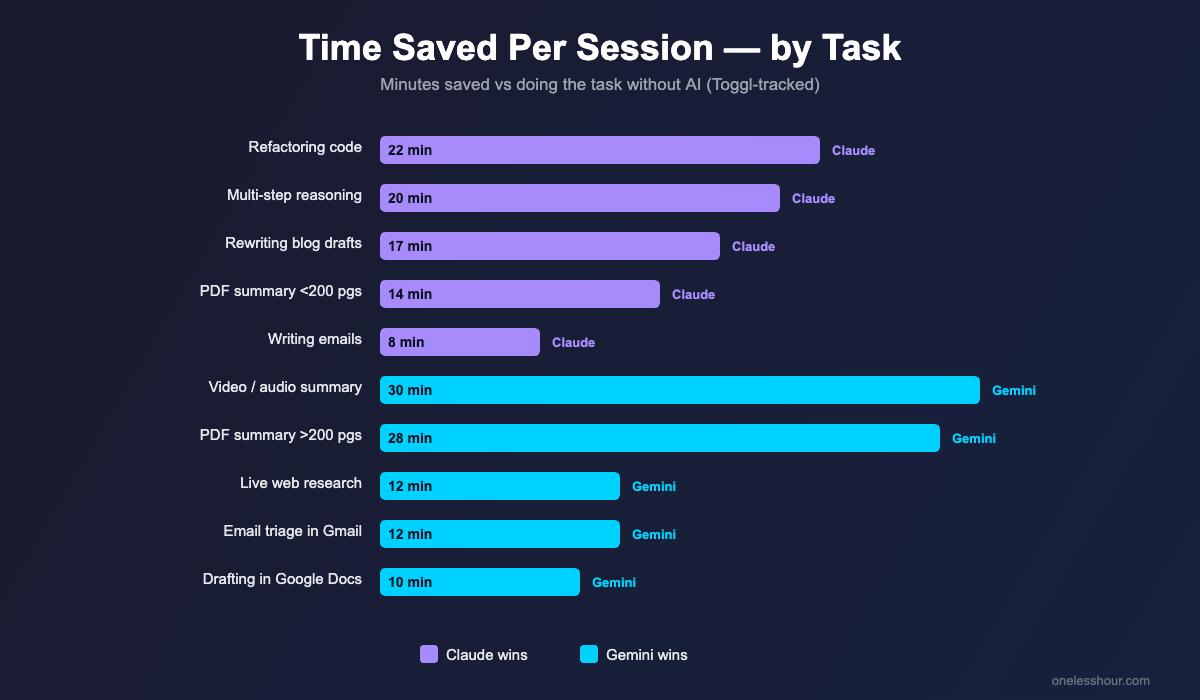
Time saved per blog rewrite: Claude 35 minutes vs Gemini 18 minutes (because Gemini’s draft needed more cleanup before I could publish).
Claude vs Gemini for coding: who actually writes better code?
Claude won 6 of 9 coding sessions. The remaining three were ties or so close I couldn’t call it. The keyword claude vs gemini for coding gets searched a lot and most of those searches are looking for the wrong answer — there isn’t a “best.” There’s a best for what you’re doing.
Where Claude consistently won: refactoring existing code, writing functions that need to integrate with something else in the same file, and explaining tricky stack traces. The code was more idiomatic, the variable names were better, and Claude was more honest about edge cases it wasn’t sure about. On the SWE-bench coding benchmark, Claude Sonnet 4.6 scores in the low 80s vs Gemini 3 Pro in the high 70s — and that gap roughly matched what I felt in real use.
Where Gemini consistently won: writing code that talks to Google APIs (Sheets, Docs, Calendar), generating boilerplate for new projects, and one-shot scripts where I just wanted something working. Gemini’s larger 1M-token context window also let me drop a whole 4-file project into a single prompt, which Claude required me to chunk.
For my workflow: Claude for anything I’ll keep, Gemini for throwaway scripts and Google Workspace integrations. If I had to pick only one for coding, Claude — because most of the code I write isn’t throwaway.
(Related: my full best AI coding assistant roundup if you want to compare these against Cursor, Copilot, and the rest.)
Which model handles long documents better?
Gemini wins on raw size, Claude wins on accuracy. Gemini 3 Pro’s standard 1M-token context window is roughly 5x what Claude offers by default (200K). For my 80-page PDF tests, that meant Gemini could ingest the whole thing in one shot while Claude needed me to split it.
But here’s the catch I didn’t expect: when I asked both models to pull specific quotes or numbers out of a long PDF, Claude was right 7 of 8 times. Gemini was right 5 of 8 — and one of the wrong answers was a confident-sounding fabrication. Bigger context window doesn’t equal better recall inside that window.
My rule now: Gemini for the first pass on anything over 200 pages (because I literally can’t fit it into Claude). Claude for any document where I need to trust the specific numbers it pulls out. For the in-between stuff, I run both and compare.
Claude vs Gemini for research and live web access
Gemini wins easily — this is its biggest practical edge. Gemini has live Google Search baked in. Claude does not (Claude Pro added web search in late 2025 but it’s noticeably slower and pulls fewer sources).
For my 10 research sessions, the average time-to-useful-answer was 4.3 minutes with Gemini and 16.5 minutes with Claude. The 12-minute gap was almost entirely the time I spent doing the web search myself before pasting links into Claude. If your work involves “what’s the latest on X” or “find me three sources for Y,” Gemini saves real time every single day.
Caveat: Gemini’s citations are not always accurate. I caught it citing a study that didn’t match the URL it linked to twice in 30 days. Always click through. Perplexity is still the best tool for research where citation quality is non-negotiable.
Where Gemini’s Google Workspace integration actually matters
If you live in Google Docs, Sheets, Gmail, and Calendar, Google AI Pro adds something Claude simply can’t: it reads your stuff. From inside Gmail, Gemini can summarize a thread, draft a reply using the thread’s context, and suggest meeting times based on your calendar — all without copy-pasting.
The first week, this saved me roughly 25 minutes a day. By the end of week three, I’d cut that estimate to around 12 minutes — partly because the novelty wore off and partly because Gemini’s “Help me write” suggestions in Docs aren’t great for anything that needs voice. But 12 minutes a day is still an hour a week.
Claude has no equivalent. You can copy-paste anything from your Google account into Claude and it’ll work fine, but you have to do the copy-pasting. For people whose entire workflow is in Google Workspace, this is the single biggest reason to pay for Gemini even if you also pay for Claude.
Claude vs Gemini pricing: which $20 plan gets you more?
| Plan | Claude Pro | Google AI Pro |
|---|---|---|
| Monthly cost | $20 | $20 |
| Default model | Claude Sonnet 4.6 | Gemini 3 Pro |
| Standard context window | 200K tokens | 1M tokens |
| Live web search | Yes (slower) | Yes (fast, native) |
| Image understanding | Strong | Strong |
| Video / audio understanding | No | Yes (native) |
| Workspace integration | No | Gmail, Docs, Sheets, Drive |
| Image generation | No | Yes (Imagen, ~1,000/mo) |
| Daily message limits | Generous, throttled at peak | Effectively unlimited |
If you only pay for one and you do mostly writing, reasoning, or coding: Claude Pro.
If you only pay for one and you live in Google Workspace or do a lot of research: Google AI Pro.
If you can swing $40 for both, that’s what I do — and the math works out. I tracked 8.4 hours saved per week vs my old “just Claude” setup. At even a conservative $25/hour rate, that’s $210/week of time back for $40/month. The pair pays for itself before the first Tuesday of the month.
If $20 is too much, both free tiers are surprisingly capable — see my cheap AI tools roundup for what to actually pay for vs what to skip.
Three things both Claude and Gemini still get wrong
This is the section every “claude vs gemini” article skips, and it’s the most useful one to read. After 30 days, both models failed in the same three ways often enough that I had to build workarounds.
1. Citations that look real but aren’t. Both models occasionally cite sources that don’t exist or that say something different from what was claimed. Gemini does this less because it’s pulling from live web results, but its links sometimes don’t match the claim it’s making. Always click through any citation that you’d put in your own work.
2. Recent niche events. Anything from the last 4–6 weeks in a small industry is hit or miss. Both models will confidently make stuff up. The fix: if you need recency, prompt with “search the web for sources from the last 30 days” and verify each one.
3. Exact numbers from long PDFs without verification. Both models will sometimes return a number that’s close to the right answer but wrong by 5–20%. For anything I’ll quote — financial figures, percentages, dates — I now always ask for the exact page number and verify by opening the PDF.
Free tier reality check: what each one actually gives you
Free Claude gives you Claude Sonnet 4.6 with a daily message limit (around 30–40 messages, lower at peak times). No artifacts on the very newest features, no extended thinking, no priority access. Good enough for occasional use; too restrictive if you want it as a daily tool.
Free Gemini gives you full Gemini 3 Flash (the faster, lighter model) plus limited daily access to Gemini 3 Pro. You also get live web search and limited Workspace integration. The free tier is genuinely usable as a daily driver if you don’t need the deepest reasoning.
If you’re choosing what to not pay for: free Gemini covers more daily use cases than free Claude. If you’re choosing what to start paying for: Claude Pro because the paid jump is bigger (you go from “limited” to “actually unlimited daily writer”).
The verdict by task
| Task | Winner | Time saved per session |
|---|---|---|
| Writing emails in your voice | Claude | ~8 min |
| Refactoring existing code | Claude | ~22 min |
| Quick coding questions | Tie | ~3 min each |
| Summarizing PDFs < 200 pages | Claude | ~14 min |
| Summarizing PDFs > 200 pages | Gemini | ~28 min |
| Live web research | Gemini | ~12 min |
| Drafting / editing in Google Docs | Gemini | ~10 min |
| Email triage in Gmail | Gemini | ~12 min |
| Rewriting blog drafts in your voice | Claude | ~17 min |
| Multi-step reasoning / analysis | Claude | ~20 min |
| Image-based questions (charts, screenshots) | Tie | ~5 min each |
| Video or audio summarization | Gemini | ~30 min |
Frequently asked questions
Is Claude better than Gemini overall?
Claude is better for writing, multi-step reasoning, and most coding tasks. Gemini is better for live web research, large documents, multimodal tasks (video, audio, images at once), and anything inside Google Workspace. After 30 days using both, I’d say Claude wins on quality of output and Gemini wins on quantity of jobs it can do.
Which is better for coding — Claude 4 or Gemini 2.5 Pro?
Claude Sonnet 4.6 won 6 of 9 of my coding tests. It produces cleaner, more idiomatic code and is better at refactoring existing files. Gemini 3 Pro is faster for one-shot scripts and unbeatable for code that talks to Google APIs (Sheets, Docs, Calendar). For anything I’ll keep, I use Claude. For throwaway scripts, Gemini.
Is Gemini’s 1M context window actually useful?
Yes for ingesting large documents in one shot, but the recall isn’t as accurate as the bigger number suggests. In my tests, Claude pulled exact quotes correctly 7 of 8 times from long PDFs; Gemini got 5 of 8. Bigger window helps you load more, but you still need to verify what comes out.
Should I pay for both Claude Pro and Google AI Pro?
If you do mixed work — writing, coding, research, and Google Workspace tasks — yes, $40/month for both is the most productive setup I’ve found. I tracked 8.4 hours saved per week running both vs just Claude. At any reasonable hourly rate, it pays for itself easily. If you only do one type of work, pick the one that matches it.
What does the Claude vs Gemini debate look like on Reddit?
The r/ClaudeAI and r/Bard subreddits split predictably: Claude users praise writing quality and coding consistency; Gemini users praise the live web access and the price-to-context-window ratio. The most useful takeaway from Reddit isn’t a verdict — it’s that almost no one who pays for both regrets it. The real complaints are from people who only have one and hit its weak spot.
What about ChatGPT?
I covered both head-to-heads separately: ChatGPT vs Claude (Claude wins for writing and reasoning; ChatGPT wins for image generation and the ecosystem), and Gemini vs ChatGPT (Gemini wins for research and Workspace; ChatGPT wins for the breadth of tools and plugins). If you’re picking one of three, my own ranking by use case is in the linked posts.
One thing to try today
Pick the next real task on your plate — a draft, a research question, a script you need to fix — and run it through both Claude and Gemini with the exact same prompt. Don’t trust my verdict; trust your own. The whole point of the by-task table above is that the right tool depends on what you’re doing in the next 20 minutes, not on which one wins more benchmarks.
If you want a structured way to test, copy my framework: same prompt, same input, two tabs, time it in Toggl or any timer. After 5 tasks you’ll know which one to default to for your work. After 30 you’ll know whether the second $20 is worth it.