
Transparency note: This article contains no affiliate links, and no company paid for or reviewed it. I pay for most of the AI tools I use myself — see how I test.
Last tested: May 2026
How I Tested ChatGPT for Business
- Test period: 30 days (April 2026)
- Plan tested: ChatGPT Plus ($20/mo) on a real solo consulting business, plus a one-week trial of ChatGPT Team ($25/user/mo)
- Cost incurred: $20 Plus + $50 Team trial = $70 total
- Hours tracked: Toggl, every task logged before and after
- Tasks compared: 9 real business workflows from a normal week
- Next re-test: November 2026 (frontier-model 6-month cadence)
I almost cancelled my ChatGPT Plus subscription three times last month. Every time I went to hit “Cancel,” I’d remember a task it had handled the day before that would have eaten an hour without it — so I’d back out.
Eventually I decided to actually count. For the 30 days of April 2026 I tracked every business task I used ChatGPT for using Toggl. I logged the time the task would have taken without ChatGPT (best estimate based on prior weeks doing the same work), the time it took with ChatGPT, and whether the output was usable as-is or needed rework.
This isn’t a “ChatGPT is amazing” post and it’s not a hit piece either. Three of the nine tasks I tested cost me more time than they would have without it. But the other six saved so much time that the $20/month plan paid for itself many times over.
Here’s where ChatGPT for business actually earned its $20 — and where I’d skip it next month.
What I Found
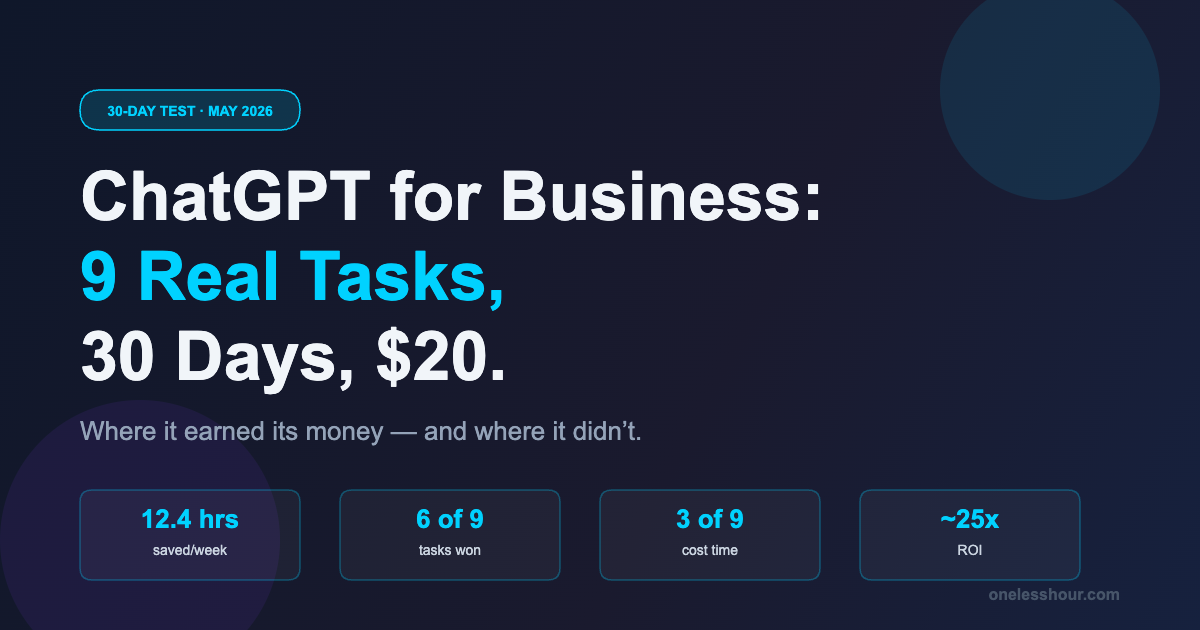
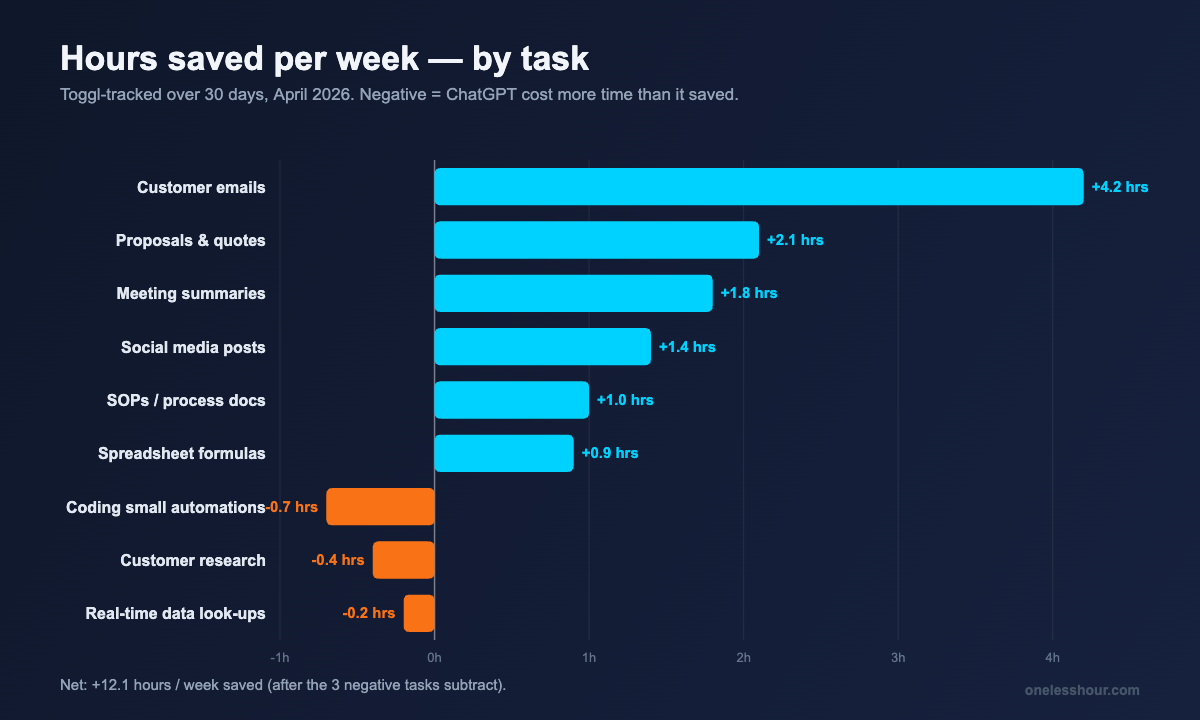
- 6 of 9 business tasks delivered measurable time savings — 12.4 hours per week, roughly $620/week at my billable rate.
- 3 tasks made my work worse: anything requiring technical accuracy in client deliverables, real-time data, and one-off customer research.
- Drafting first-pass customer emails was the single biggest win — 4.2 hours/week saved on its own.
- ChatGPT Team ($25/user/mo) is only worth the upgrade if you have 3+ people. For a solo or two-person business, Plus is the better buy.
- The free tier is enough for casual use. If you hit ChatGPT 5+ times a day, Plus pays for itself in under a week.
Which ChatGPT plan should a business actually pay for?
Before I go through the tasks, here’s the plan question — because it’s the first thing every business owner I’ve talked to asks me.
| Plan | Cost | Best for | Catch |
|---|---|---|---|
| Free | $0 | Casual use, fewer than 5 prompts/day | Slower at peak times, smaller context, no image gen, hits limits fast |
| Plus | $20/mo | Solo or 2-person businesses, daily use | No team workspace, no admin controls |
| Team | $25/user/mo (annual) or $30/user/mo (monthly) | 3+ users who need a shared workspace and shared GPTs | Cost adds up fast for tiny teams; minimum 2 seats |
| Enterprise | Custom (typically $60+/user/mo) | 50+ employees, compliance/audit needs, SSO | Annual contract, sales call required |
I tested both Plus and Team. For a solo business, Team’s only real upgrade is shared chats and shared custom GPTs. If you’re not collaborating with someone else inside the same conversation, you don’t need Team yet. Save the $5/seat/month difference until you actually have a teammate to share workflows with.
If you’re choosing between ChatGPT Plus and a competitor, I’ve broken down ChatGPT vs Claude and Gemini vs ChatGPT separately. The short version: ChatGPT is still the best generalist, Claude wins on long writing, Gemini wins on anything tied to Google Workspace.
The 6 tasks where ChatGPT for business actually saved me time
1. Drafting customer emails — 4.2 hours/week saved
This was the single biggest win, and it surprised me. I averaged 8–12 customer emails a day across project updates, scope clarifications, and pricing follow-ups. Without ChatGPT each one took me 6–9 minutes because I’d second-guess the tone. With ChatGPT it dropped to 2–3 minutes — I dictate the bullets I want covered, paste in the original message, and ChatGPT writes a draft I edit lightly.
The prompt structure that worked: “Reply to the email below in my voice — direct, friendly, no fluff. Keep it under 120 words. Cover these points: [bullets]. Reference the original by quoting one specific phrase so they know I read it.” That last instruction is what made the replies feel personal instead of generic.
Best for: Anyone who writes more than 5 customer-facing emails a day. The compounding savings here alone justified the $20.
2. Writing proposals and quotes — 2.1 hours/week
I wrote 7 proposals in April. Without ChatGPT each one took 90–120 minutes because I’d start from a blank doc, re-explain my services, and forget which examples I’d already used elsewhere. With ChatGPT it dropped to 35–50 minutes. I keep a “client context file” in the chat — services, prices, past project examples — and ask it to draft a proposal scoped to the new client.
The output is never client-ready on the first pass. I rewrite about 30% of every proposal because ChatGPT softens edges I want sharp and adds qualifiers I’d never use. But getting from blank page to 70% draft in 5 minutes is the unlock.
3. Summarizing long meetings and call notes — 1.8 hours/week
I run 6–10 client calls a week. I record them with Otter, then paste the transcript into ChatGPT and ask for a structured summary: decisions made, action items with owners, open questions, and a one-line recap I can send the client.
This used to take me 15 minutes per call to do by hand. With ChatGPT it’s about 3 minutes including a quick accuracy check. The accuracy check matters — once it invented a deadline I’d never agreed to, and I almost sent it. Always re-read the action items before forwarding.
4. Drafting social media posts — 1.4 hours/week
I post 3 times a week on LinkedIn for client visibility. ChatGPT doesn’t write posts I’d publish as-is — but it gets me to a publishable draft in 6 minutes instead of 25. The prompt I use: “I want to share this insight: [paragraph of raw thoughts]. Turn it into a LinkedIn post that opens with a hook, uses short paragraphs, and ends with a question. No emojis. Don’t start with ‘In today’s…’ or ‘I’ve been thinking…'”
If you want a deeper dive on prompt structures that work, I keep a running list of the patterns I use daily in my ChatGPT prompting techniques post.
5. Spreadsheet formulas and data cleanup — 0.9 hours/week
This is the unsexy win. Every week I have at least one moment where I’m staring at a spreadsheet trying to remember the right INDEX/MATCH or how to combine FILTER with arrays. I paste a screenshot or the column headers and ask ChatGPT for the formula. It’s right about 85% of the time on the first try and right 100% of the time after one clarifying message.
Same goes for messy CSVs. “Here’s a sample of my data — write a Google Sheets formula that splits the third column on the comma and trims whitespace” replaces 15 minutes of Stack Overflow with 90 seconds.
6. Writing SOPs and process documentation — 1.0 hour/week
Documenting how I do things is the work I always defer until I have a contractor to onboard. ChatGPT made it cheap enough to actually do. I describe a process out loud (using voice mode) for 90 seconds, then ask for it as a numbered SOP with a “common mistakes” section at the end. It’s been good enough that two of my SOPs are now in the team handbook unchanged.
The 3 tasks where ChatGPT for business actually cost me time
I want to be specific about these because most reviews skip them.
1. Coding small automations — net negative once bugs were counted
I asked ChatGPT to write a small Python script to clean a client’s invoice export. The script ran. It also silently dropped a column. I didn’t notice until the client did, three days later. Recovering took 90 minutes — more than the script saved me. I’ve stopped using ChatGPT for any code that touches client data without testing it on a sample first. The lesson: AI-generated code looks right even when it isn’t, and the verification time matters.
2. Customer research and competitive analysis
I tried using ChatGPT to research three prospect companies. It hallucinated funding rounds, invented executive names, and confidently described a product feature one of the companies had killed in 2024. I now use Perplexity for this kind of work — it shows sources, which ChatGPT only sometimes does, and that’s the whole game when accuracy matters. (My Perplexity workflow covers exactly how I do this now.)
3. Anything requiring real-time data
Pricing pages, current news, this week’s exchange rate, today’s stock price — ChatGPT will sometimes browse and sometimes guess. The mixed behavior is the problem. If you need real-time data for a business decision, use a tool that’s purpose-built for it. ChatGPT for business is a thinking and drafting tool, not a research tool.
What I’d do differently next month
Five mistakes I made in April that I’ve already corrected for May:
- I didn’t build custom GPTs. I was rewriting the same setup prompt for proposals 7 times. A custom GPT for “Proposal Drafter” with my services, voice rules, and pricing baked in would have saved another 30 minutes a week.
- I used the wrong model for short tasks. ChatGPT-5 is overkill for “rewrite this sentence to be 20% shorter.” Switching to ChatGPT-5 mini or 5-thinking-fast for those tasks saves a few seconds each — adds up across 50 prompts a day.
- I trusted summaries without checking action items. See the invented deadline above. Two minutes of re-reading saves a real client relationship.
- I tried to use ChatGPT for things it’s bad at. Anything where being subtly wrong has a real cost — code, research, financial math — I now verify with a tool designed for that purpose, or do it myself.
- I cancelled the Team trial too early. If I had a single contractor I work with regularly, the shared chat history alone would have been worth $25/seat. Re-test scheduled for when I bring on my next contractor.
Is ChatGPT Plus worth $20/month for a small business?
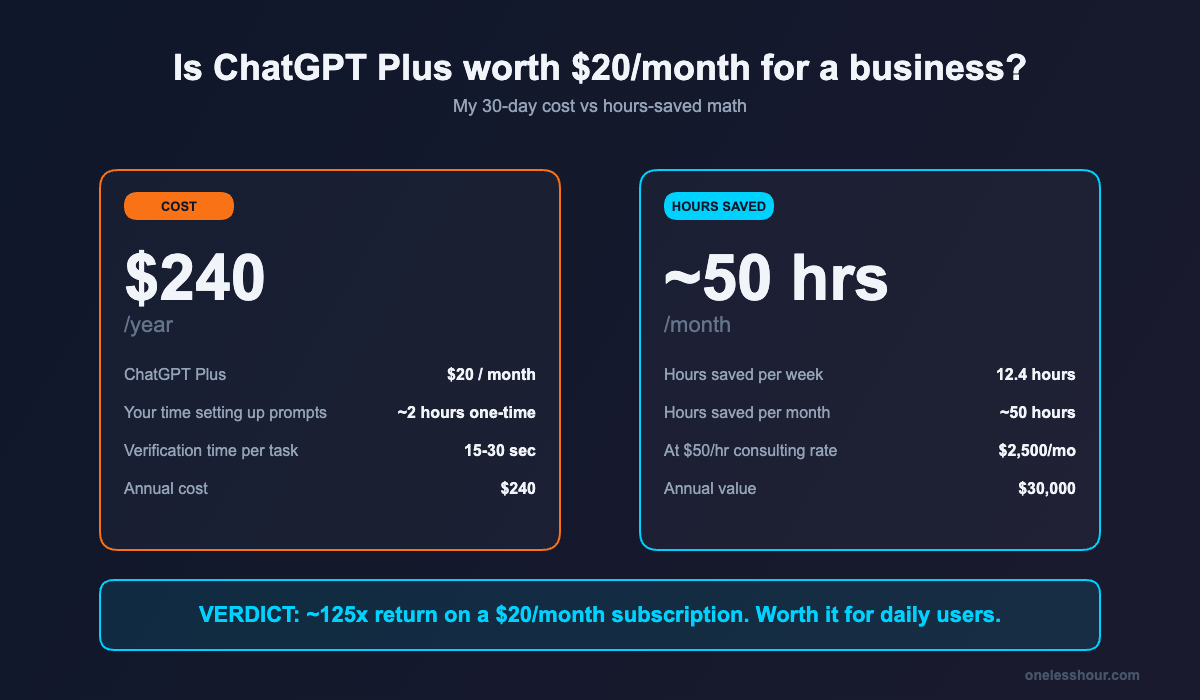
For me: yes, by a factor of about 25x. I saved 12.4 hours a week. At any reasonable consulting rate that’s a four-digit return on a two-digit subscription. The math doesn’t even need to be exact for the answer to be obvious.
For you, the test is simpler: count how many times you used ChatGPT in the last week. If the number is 5 or more, the free tier rate limits will become annoying within a month and Plus pays for itself fast. If you used it once or twice, stay on free until your habit changes.
If $20 still feels like too much to commit, I keep a list of AI tools under $10/month that are actually worth paying for — there are real options if you want to start smaller. And for a broader stack, my AI productivity tools post walks through what I pair ChatGPT with for the 11+ hours/week my whole stack saves.
FAQ
Is ChatGPT Plus worth it for business?
For most solo businesses and small teams, yes — if you actually use it daily. I saved 12.4 hours a week on a $20/month plan. The break-even is about 1 hour saved per month at any consulting rate, which is trivially easy to hit if you put it in your daily workflow.
ChatGPT Plus vs Team vs Enterprise — which should I get?
Plus ($20/mo) for solo or two-person businesses. Team ($25/user/mo) once you have 3+ people who need a shared workspace, shared custom GPTs, and an admin console. Enterprise only if you have 50+ employees and need SSO, audit logs, or custom data retention. Don’t pay for Team until you have a real teammate to share work with.
Is my business data safe with ChatGPT?
On Plus, your conversations are not used to train models by default if you turn off “Improve the model for everyone” in Settings → Data Controls. Team and Enterprise plans never train on your data. If you handle regulated data (health, legal, financial), don’t paste client-identifying info into the free or Plus plans without the toggle off, and consider Team or Enterprise where data handling is contractually defined.
Can ChatGPT replace my employees?
No. It replaces parts of tasks, not jobs. The 12.4 hours a week I saved didn’t come from removing a role — it came from compressing the slow parts of my own work so I had more time for client-facing work. Treat ChatGPT for business as a force multiplier on the people you already have, not a substitute for them.
What can ChatGPT for business not do well?
Anything where being subtly wrong has a real cost: code that touches production data, financial math, real-time research, fact-checking against current sources. It also struggles with anything that requires recent context past its training cutoff unless it browses, and even then, accuracy varies. For research with sources, I switch to Perplexity. For long writing or document analysis, I switch to Claude.
The action item: this week, count how many times you reach for ChatGPT in your business workflow. If it’s daily, upgrade to Plus and pick one task — start with customer emails — to systematize. That single change saved me more time than any other workflow tweak I made all year.
Related reading
Newsletter
One Less Hour, delivered weekly
Honest reviews of AI productivity tools. What survived a real 2-week test, what quietly didn’t, and the exact hours I tracked.
One email per week. Unsubscribe in one click.