
Last updated: November 2026
Transparency note: This article contains no affiliate links, and no company paid for or reviewed it. It’s research-based, written from Anthropic’s official pricing page and help center articles (checked November 16, 2026). Prices change often, so check the linked pages before you buy. See how I research tools.
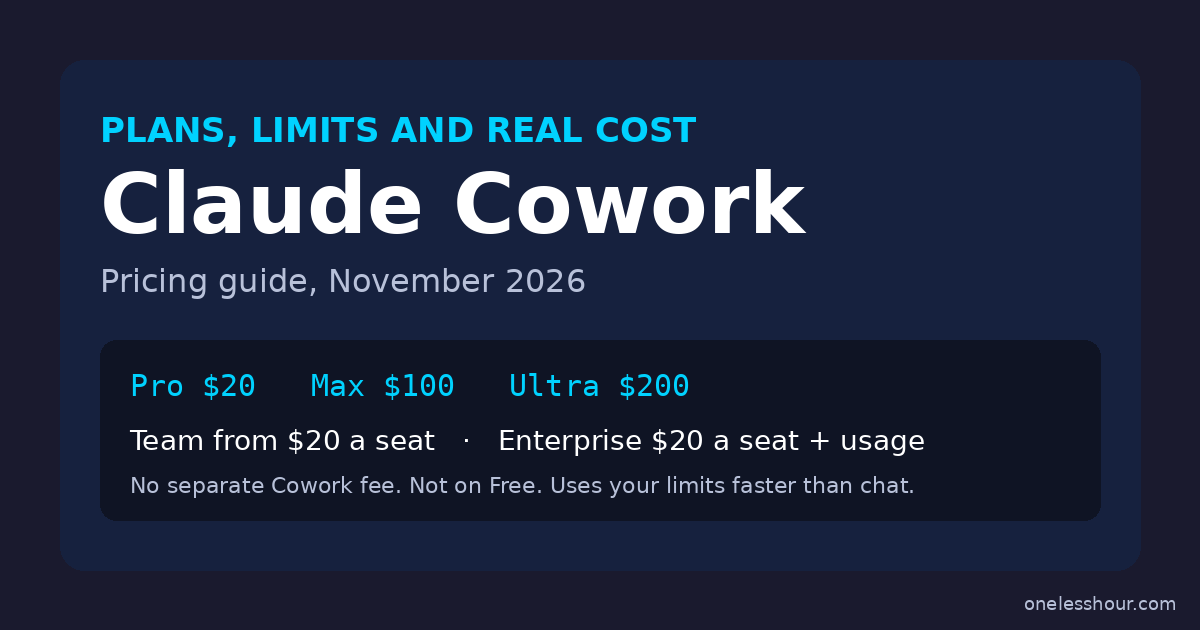
Here’s the short answer on Claude Cowork pricing: there is no separate Cowork price. Cowork comes with every paid Claude plan, from Pro at $20 a month up to Team and Enterprise seats, and it isn’t part of the Free plan. What you’re really choosing is how much usage you get, because Anthropic says Cowork eats through your limits faster than regular chat.
This guide covers Claude Cowork pricing plan by plan: what each one costs, what it includes, how usage limits work for agent tasks, what happens when you run out, and how to pick a plan. I haven’t tested it hands-on for this article. Every number below comes from Anthropic’s pricing page and help center, checked November 16, 2026, with links so you can confirm them yourself. If you want the step-by-step side instead, read my guide on how to use Claude Cowork.
Claude Cowork pricing at a glance
These are the US prices on Claude’s pricing page and plan help articles on November 16, 2026. Prices exclude tax, and Anthropic says prices and plans can change at its discretion.
| Plan | Price | Usage for Cowork | Billing |
|---|---|---|---|
| Free | $0 | No Cowork. “Hand off and schedule tasks” is not included. | n/a |
| Pro | $20/month, or $200/year up front (shown as $17/month) | Base allowance (1x), with a five-hour limit and a weekly limit | Monthly or annual |
| Max | $100/month | 5x Pro, every five hours and every week | Monthly only |
| Ultra | $200/month | 10x Pro every week; no five-hour limit for verified accounts | Monthly only |
| Team, Standard seat | $20/seat/month billed annually, $25 monthly | 1.25x Pro per session, plus a weekly limit | Monthly or annual, 2 to 150 seats |
| Team, Premium seat | $100/seat/month billed annually, $125 monthly | 5x a Standard seat (6.25x Pro per session) | Monthly or annual |
| Enterprise | $20/seat/month billed annually, plus all usage at API rates | No per-seat limits; you pay for what you use | Annual, 20-seat minimum (self-serve) |
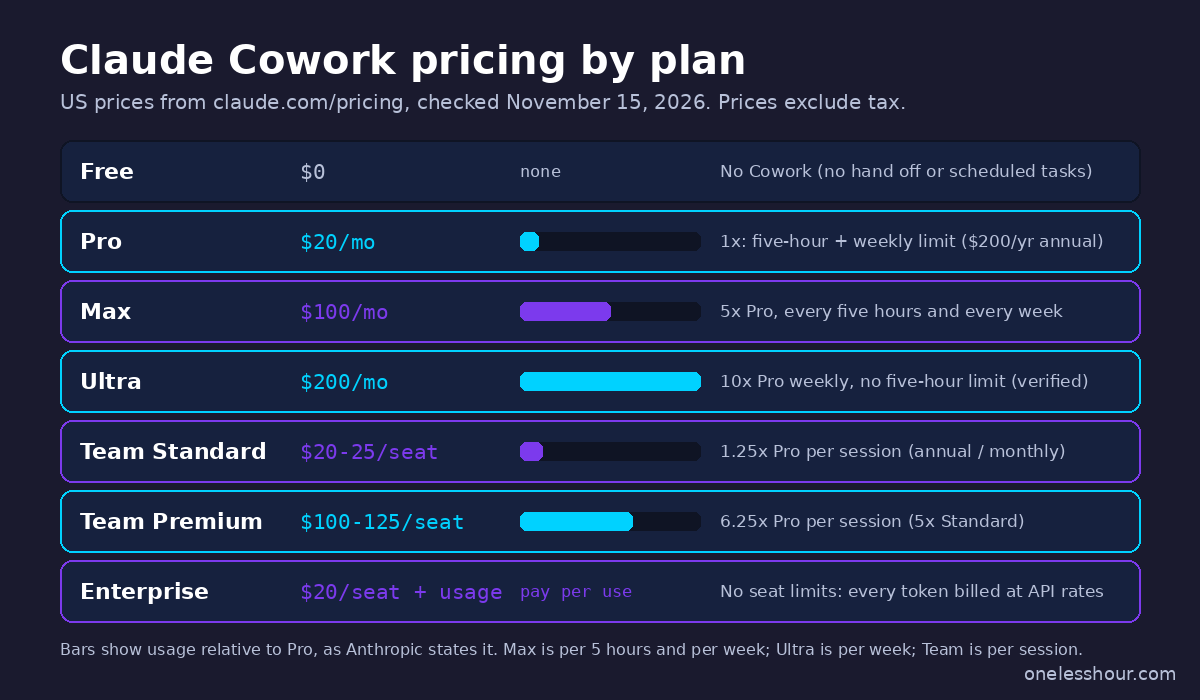
Two things stand out. First, the jump from Pro to Max is a jump in usage, not in Cowork features: scheduled tasks, projects, plugins and the desktop app are available on every paid plan. Second, Enterprise works differently from the rest. The seat fee only buys access, and every task is metered.
Is there a free version of Claude Cowork?
No. Anthropic’s Get started with Claude Cowork article lists Cowork on paid plans only (Pro, Max, Ultra, Team and Enterprise), and the pricing page’s comparison table marks “Hand off and schedule tasks” as No for Free. The Free plan still covers chat, web search, file creation with code execution, connectors, Artifacts and Claude Design, with limited usage.
One thing to watch: when Anthropic announced on September 16, 2026 that chat and Cowork are merging into one Claude, it said Team and Free plans “will follow soon.” That’s about the merged interface. Anthropic hasn’t said that Free users will get Cowork’s agent features, so I wouldn’t plan around it.
Individual plans: Pro, Max and Ultra
Claude Pro: $20 a month
Pro costs $20 a month billed monthly. On an annual plan you pay $200 once for the year, which the pricing page shows as $17 a month, and which works out to $40 less than twelve monthly payments. The Pro plan help article notes that monthly pricing varies by region and is shown in local currency where supported, and some regions include tax in the displayed price while others add it at checkout.
Anthropic’s Cowork product page describes Pro as “perfect for quick tasks like organizing a folder or pulling together a short report,” and adds a warning right under the price: Claude Cowork consumes limits faster than Chat, and heavy users should consider upgrading. Pro has a five-hour session limit and a weekly limit across all models. Anthropic doesn’t publish a message or task count for it.
Pro also includes Claude Code, Projects, Research and Claude in Chrome. If you are weighing Cowork against Claude Code, my Claude Cowork vs Claude Code comparison explains which one fits. Fable, which Anthropic calls its top model, is available on Pro only through paid usage credits.
Claude Max: $100 a month
Max is $100 a month and, according to the Max plan article, only available as a monthly subscription. You get five times Pro’s usage every five hours and every week, priority access at busy times, early access to new features, and Fable included for up to half of your weekly limit. Anthropic pitches it for everyday use on longer, more complex tasks.
Max also comes with $100 a month in Claude Platform API credits. That sounds like extra Cowork budget, but it isn’t. Anthropic’s API credits article says those credits are for building with the Claude API, and they don’t apply to extra usage in Claude, Claude Code or Claude Cowork.
Claude Ultra: $200 a month
Ultra is $200 a month, also monthly only. The Ultra plan article says it replaced the old Max 20x plan at the same price. You get ten times Pro’s usage every week, a separate weekly limit for Fable, and $200 a month in API credits for the Claude Platform. The bigger difference for Cowork is that verified Ultra accounts have no five-hour limit, so long hand-offs aren’t cut off mid-session. Anthropic verifies accounts automatically from factors like account and payment history; until then, a temporary limit applies.
Anthropic pitches Ultra at power users who hand off work throughout the day. Note that Ultra’s 10x is a weekly figure, while Max’s 5x applies both per five-hour window and per week.
Claude Team pricing for Cowork
The Team plan is for 2 to 150 people, and the Cowork product page says Cowork and the Slack connector are included on both seat types. You can mix seat types in one organization, according to the seat management article.
| Seat | Billed annually | Billed monthly | Usage |
|---|---|---|---|
| Standard | $20 per member/month | $25 per member/month | 1.25x Pro per session, plus a weekly limit |
| Premium | $100 per member/month | $125 per member/month | 6.25x Pro per session (5x a Standard seat), plus a weekly limit |
A few details matter for Cowork budgets:
- Limits are per person. One heavy Cowork user can’t drain a teammate’s allowance, and seats can’t share or transfer usage.
- Pooled API credits. Team plans get $20 per Standard seat and $100 per Premium seat in monthly API credits, pooled and capped at $500. As with Max and Ultra, these are for the Claude API, not for extra Cowork usage.
- Usage credits for overflow. Owners can turn on usage credits so members keep working in Claude, Cowork and Claude Code after hitting their seat limits, according to the Team usage credits article.
- Admin controls. Cowork is on by default and owners can switch it off in Organization settings > Cowork. Running Cowork in the cloud is on by default for Team, per the Team and Enterprise Cowork article.
On rollout status, the sources disagree slightly. Anthropic’s announcement post added an update on November 12, 2026 saying the merged chat and Cowork experience is now generally available for Claude Team, while several help center articles checked the same week still describe it as in beta on Team. Either way, Cowork itself is included.
Claude Enterprise pricing for Cowork
Enterprise is priced as US$20 per seat per month, billed annually, with a 20-seat minimum, plus usage at API rates. The Enterprise plan article is explicit that the seat fee covers access only. Every token your team uses in chat, Claude Code or Cowork is billed separately at standard API rates, and there are no per-seat usage limits and no included token allowance. Admins can set spend limits for the organization and for individual users.
Self-serve Enterprise needs at least 20 seats and pays in USD by card or ACH, with usage credits bought up front. Sales-assisted Enterprise needs at least 50 seats and can be invoiced, with usage billed monthly in arrears. Volume discounts are available through sales, but Anthropic doesn’t publish them.
For Cowork specifically, the Team and Enterprise article says Cowork is on by default, but running it in the cloud is off by default on Enterprise until an owner turns it on and grants it to a group. In organizations with HIPAA enabled, Cowork itself is off by default. Older Enterprise contracts with Standard and Premium seats move to the usage-based seat at renewal.
Cowork vs plain chat: what it really costs
On every plan except Enterprise, a Cowork task doesn’t cost money per task. It costs usage. Anthropic’s usage limits article says everything you do on claude.ai, Claude Desktop and Claude Code draws from the same limit, so a long Cowork task and your everyday chats compete for one allowance.
Why does Cowork burn through it faster? The Get started article says each step Claude takes uses tokens, so tasks that run code, create files, or use connected apps and the browser use more than a quick question. The product page FAQ adds that agentic tasks coordinate multiple sub-agents and tool calls. Anthropic’s usage articles list what pushes usage up:
- The model you pick, and the effort level. Higher effort uses more tokens.
- How long the conversation is, and how large your files are.
- Tools and connectors, which Anthropic calls token-intensive.
- Research mode, which runs multiple searches.
- Long conversations that trigger automatic context management.
Scheduled tasks count too. They’re available on all paid plans and run in the cloud, according to the scheduling article, so a daily summary that runs every morning uses your allowance every morning. Anthropic also notes in its merge article that while the new experience rolls out, usage may be measured slightly differently for accounts that have it and accounts that don’t.
On Enterprise, the same factors translate straight into dollars, because every token is billed at API rates.
What happens when you hit your Cowork limit
When you run out, you have three options, according to Anthropic’s limits article: wait for the reset, upgrade (the new plan’s limits apply right away), or turn on usage credits. The five-hour window starts with your first message and resets in full five hours later. Weekly limits reset at a fixed day and time assigned to your account, which you can see in Settings > Usage.
Usage credits are pay-as-you-go top-ups at standard API rates, charged separately from your subscription. The usage credits article explains how they work on Pro, Max and Ultra:
- Turn them on in Settings > Usage, add a payment method, and set a monthly spend limit (or choose unlimited).
- Buy credits up front, or turn on auto-reload, which is only available on the web.
- Once a five-hour or weekly limit is used up, your requests switch to credits and keep going until you hit your spend limit or run out of balance.
- Credits bought on or after December 7, 2026 generally expire 12 months after purchase. Earlier purchases don’t expire. Purchases are non-refundable except where local law requires it.
If you expect to need credits regularly, Anthropic sells discounted usage bundles on Pro, Max, Ultra and Team:
| Bundle value | Discount | You pay |
|---|---|---|
| $50 | 10% | $45 |
| $250 | 20% | $200 |
| $1,000 | 30% | $700 |
Individual subscribers can buy up to $2,000 of discounted bundles a month, and Team owners up to $3,000. Usage beyond that is billed at standard rates.
How to keep Cowork usage down
These tips come straight from Anthropic’s help center (usage limit best practices and the Cowork getting-started article):
- Group related work into one task instead of starting several.
- Start a new conversation for unrelated work, so Claude isn’t carrying extra context.
- Tell Claude when you only need a quick answer, not a file or finished deliverable.
- Lower the effort level for routine tasks, and turn off connected apps a task doesn’t need.
- Keep reference documents in a project, where cached content counts less against your limits when reused.
- On usage credits, Anthropic suggests Haiku or the latest Sonnet for most tasks, since they cost less per token than Opus.
- Check Settings > Usage for progress bars on your five-hour and weekly limits.
Which Claude plan fits you for Cowork?
Anthropic doesn’t publish how many Cowork tasks fit in each plan, so there’s no exact formula. Based on how Anthropic positions each plan, here’s how I’d think about it:
- Pro ($20): you want to try Cowork, or you hand it a few short jobs a week, like organizing a folder or drafting a short report.
- Pro plus usage credits: you mostly fit in Pro but hit the limit occasionally. Paying for the overflow can cost less than moving up a tier, and you can cap it with a monthly spend limit.
- Max ($100): Cowork is part of your daily routine, with longer, multi-step tasks, and you keep hitting Pro’s limits.
- Ultra ($200): you hand off work all day and the five-hour limit is what stops you. Ultra removes it for verified accounts.
- Team ($20 to $125 per seat): two or more people need Cowork with central billing, SSO and admin controls. Give Premium seats only to the heavy users.
- Enterprise ($20 per seat plus usage): 20 or more seats, compliance needs like audit logs or HIPAA, and a preference for paying for actual usage instead of fixed limits.
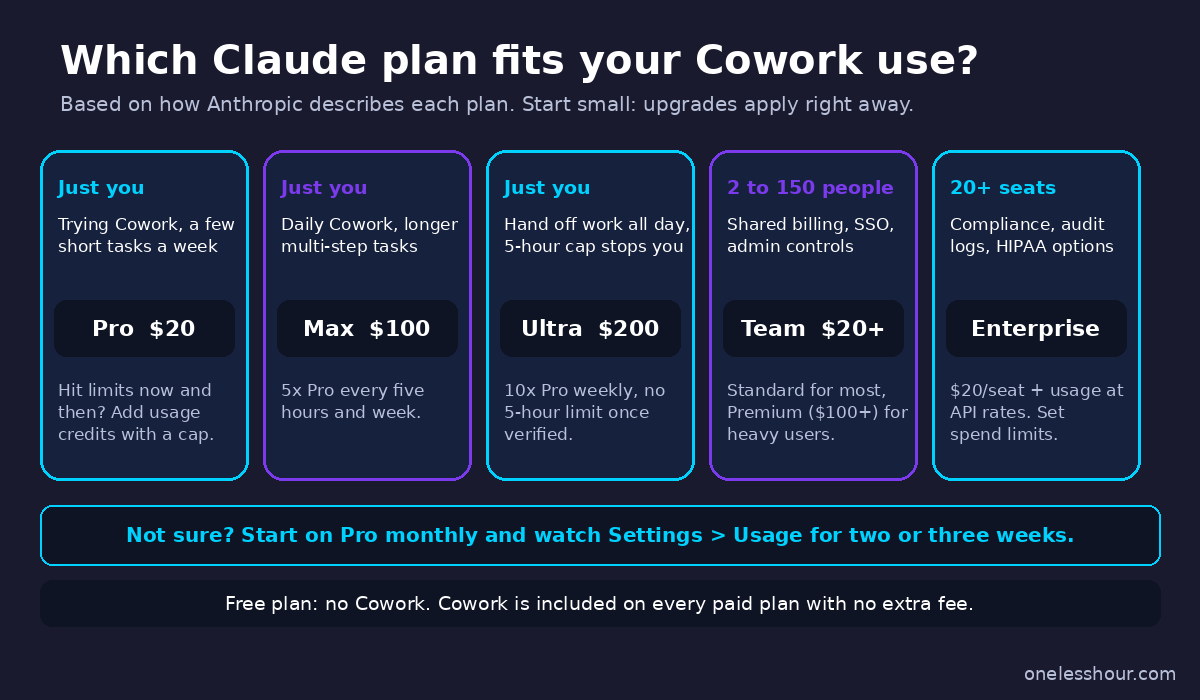
One practical approach: start on Pro monthly, watch Settings > Usage for two or three weeks of normal work, and only then decide. Upgrades take effect right away and unused time is credited toward the new plan, so starting small doesn’t waste what you’ve paid.
Billing details worth knowing before you pay
- Annual billing is only available on Pro and Team. Max and Ultra are monthly only, and Enterprise is annual only.
- Upgrades apply immediately, with unused time credited. Downgrades take effect at the end of the billing period, and your chats, projects and files stay with your account.
- Canceling: your plan stays active until the end of the period. Cancel at least 24 hours before renewal to avoid the next charge. App Store and Google Play subscriptions are canceled through the store.
- Refunds: payments are generally non-refundable. In the EEA and UK, you can request a refund in the app within your 14-day withdrawal period.
- Discounts: there are no standing discounts on Pro, Max or Ultra. Eligible nonprofits can get discounted Team and Enterprise pricing.
Related reading
Once you’ve picked a plan, my guide on how to use Claude Cowork walks through your first task, approval modes, projects and scheduled work. If you write code, Cowork’s sibling is covered in how to use Claude Code, and for slides and visuals see how to use Claude Design. For everyday chat, start with how to use Claude AI, and if you’re still choosing a chatbot, ChatGPT vs Claude compares the two.
Get the next guide in your inbox
Research-based guides to AI productivity tools: what each one costs, what the free plan really includes, and who it’s worth paying for.
FAQ
How much does Claude Cowork cost?
Claude Cowork has no separate price. It’s included in Claude’s paid plans. On Claude’s pricing page (checked November 16, 2026), Pro is $20 a month billed monthly or $200 a year billed up front (shown as $17 a month), Max is $100 a month, and Ultra is $200 a month. Team standard seats are $20 per seat per month billed annually or $25 monthly, and Enterprise is $20 per seat per month billed annually plus usage at API rates. Prices exclude tax.
Is Claude Cowork free?
No. Anthropic’s help center lists Cowork on paid plans only: Pro, Max, Ultra, Team and Enterprise. The pricing page marks “Hand off and schedule tasks” as not included on the Free plan. Anthropic has said the merged chat and Cowork experience will reach Free plans later, but it hasn’t said what Free users will get.
Does Claude Cowork cost extra on top of a Claude Pro subscription?
There’s no Cowork surcharge. Cowork tasks draw from the same usage limits as your chats and Claude Code. The catch is that Anthropic says Cowork consumes limits faster than chat, so you reach your five-hour and weekly limits sooner. If you turn on usage credits, work beyond your limits is billed separately at standard API rates.
Should I get Max or Ultra for Claude Cowork?
Anthropic positions Max ($100 a month, 5x Pro usage every five hours and every week) for everyday use on longer, more complex tasks, and Ultra ($200 a month, 10x Pro usage every week) for power users who hand off work throughout the day. Verified Ultra accounts also have no five-hour limit. If Pro only runs out now and then, usage credits may cost less than a full upgrade.
What happens when I run out of Claude Cowork usage?
You can wait for your limit to reset, upgrade to a bigger plan (the new limits apply right away), or turn on usage credits in Settings > Usage. With credits on, your work continues at standard API rates until you hit the monthly spend limit you set. Five-hour limits reset five hours after your first message, and weekly limits reset at a fixed time each week.
How much does Claude Cowork cost for a team?
On the Team plan, for 2 to 150 people, Cowork is included on both seat types. Standard seats are $20 per member per month billed annually or $25 monthly, and Premium seats are $100 billed annually or $125 monthly, with 5x the usage of a Standard seat. Enterprise is $20 per seat per month billed annually with a 20-seat minimum for self-serve, and every token used in chat, Claude Code and Cowork is billed on top at API rates.
Sources
- Plans and pricing (claude.com, checked November 16, 2026)
- Claude Cowork product page (claude.com, checked November 16, 2026)
- What is the Pro plan? (Anthropic Help Center, checked November 16, 2026)
- What is the Max plan? (Anthropic Help Center, checked November 16, 2026)
- What is the Ultra plan? (Anthropic Help Center, checked November 16, 2026)
- What is the Team plan? (Anthropic Help Center, checked November 16, 2026)
- Purchase and manage seats on Team plans (Anthropic Help Center, checked November 16, 2026)
- What is the Enterprise plan? (Anthropic Help Center, checked November 16, 2026)
- How do usage and length limits work? (Anthropic Help Center, checked November 16, 2026)
- Usage limit best practices (Anthropic Help Center, checked November 16, 2026)
- Manage usage credits for paid Claude plans (Anthropic Help Center, checked November 16, 2026)
- Manage usage credits for Team and seat-based Enterprise plans (Anthropic Help Center, checked November 16, 2026)
- Buy usage bundles (Anthropic Help Center, checked November 16, 2026)
- Monthly API credits for Max, Ultra, and Team plans (Anthropic Help Center, checked November 16, 2026)
- Get started with Claude Cowork (Anthropic Help Center, checked November 16, 2026)
- Use Claude Cowork on Team and Enterprise plans (Anthropic Help Center, checked November 16, 2026)
- Schedule recurring tasks in Cowork (Anthropic Help Center, checked November 16, 2026)
- Claude Cowork and chat are one Claude (Anthropic Help Center, checked November 16, 2026)
- Claude Cowork and chat are now one Claude (Anthropic, September 16, 2026, updated November 12, 2026, checked November 16, 2026)