
Last updated: November 2026
Transparency note: This article contains no affiliate links, and no company paid for or reviewed it. It’s research-based, written from Anthropic’s official product pages, help center articles and Claude Code documentation (checked November 20, 2026). Features and plans change often, so check the linked pages before you decide. See how I research tools.
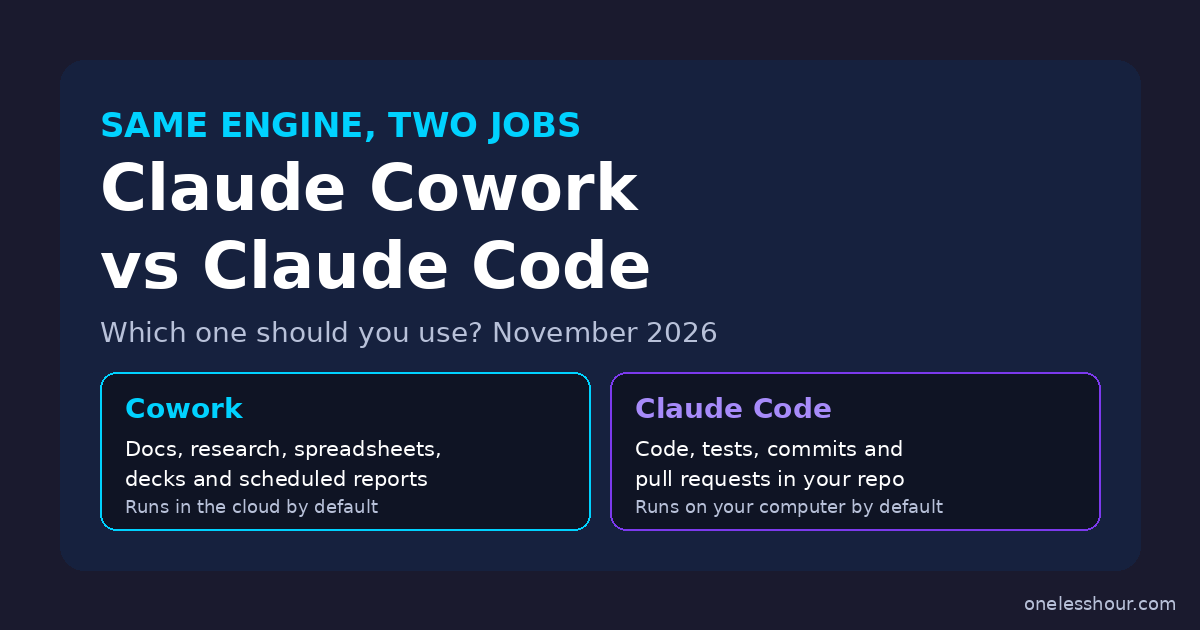
Here’s the short answer on Claude Cowork vs Claude Code: they’re two workspaces built on the same engine, aimed at different jobs. Claude Code is Anthropic’s coding agent. It works inside a codebase, edits files, runs commands and opens pull requests. Claude Cowork is the same kind of agent for everything else: research, reports, spreadsheets, decks and file chores. Both come with every paid Claude plan, from Pro at $20 a month, and both draw from the same usage limits.
So the real question in any Claude Cowork vs Claude Code decision isn’t price. It’s what you want back at the end: a finished document or committed code. This comparison covers what each tool is, where it runs, how permissions work, who each one is for, example workflows, plan overlap and limitations. I haven’t tested it hands-on for this article. Everything below comes from Anthropic’s own Cowork and Claude Code product pages, the help center and the Claude Code docs, checked November 20, 2026. For step-by-step setup, see my guides on how to use Claude Cowork and how to use Claude Code.
Claude Cowork vs Claude Code at a glance
Here’s what Anthropic’s official pages said on November 20, 2026. The sections below explain each row.
| Claude Cowork | Claude Code | |
|---|---|---|
| Built for | Non-coding knowledge work: research, analysis, documents, spreadsheets, decks | Software engineering: writing, debugging and shipping code |
| What you get back | Finished files such as Word documents, Excel sheets with formulas, PowerPoint decks and reports | Code edits, tests, commits and pull requests |
| Where you use it | Claude Desktop (macOS, Windows, Linux beta), web, iOS and Android apps, and the Claude in Chrome side panel | Terminal, VS Code and Cursor, JetBrains IDEs, the Code tab in Claude Desktop, the web at claude.ai/code, the Claude mobile app and Slack |
| Where the work runs | In the cloud by default on Pro, Max and Ultra since October 6, 2026; reaches local files through the desktop app | On your own computer by default; optional cloud sessions on Anthropic’s infrastructure |
| Setup | No install for web and mobile; desktop app for local folders, the built-in browser and computer use | Desktop app, or a one-line install for the terminal (macOS 13+, Windows 10 1809+, Ubuntu 20.04+, Debian 10+, Alpine 3.19+) |
| Approval modes | Manual, Auto and Skip | Manual (default), acceptEdits, plan, auto, dontAsk and bypassPermissions |
| Customizing it | Instructions for Claude, folder instructions, projects, skills, plugins and connectors | CLAUDE.md, auto memory, skills, hooks, MCP servers, plugins and the Agent SDK |
| Scheduling | Scheduled tasks run in the cloud on any cadence | Cloud scheduled tasks, desktop scheduled tasks, and /loop inside a session |
| Plans | Pro, Max, Ultra, Team and Enterprise (not Free) | Pro, Max, Ultra, Team and Enterprise (not Free), or a Claude Console account billed per token |
| Usage | Shares your plan’s limits; uses them faster than chat | Shares the same limits as chat and Cowork |
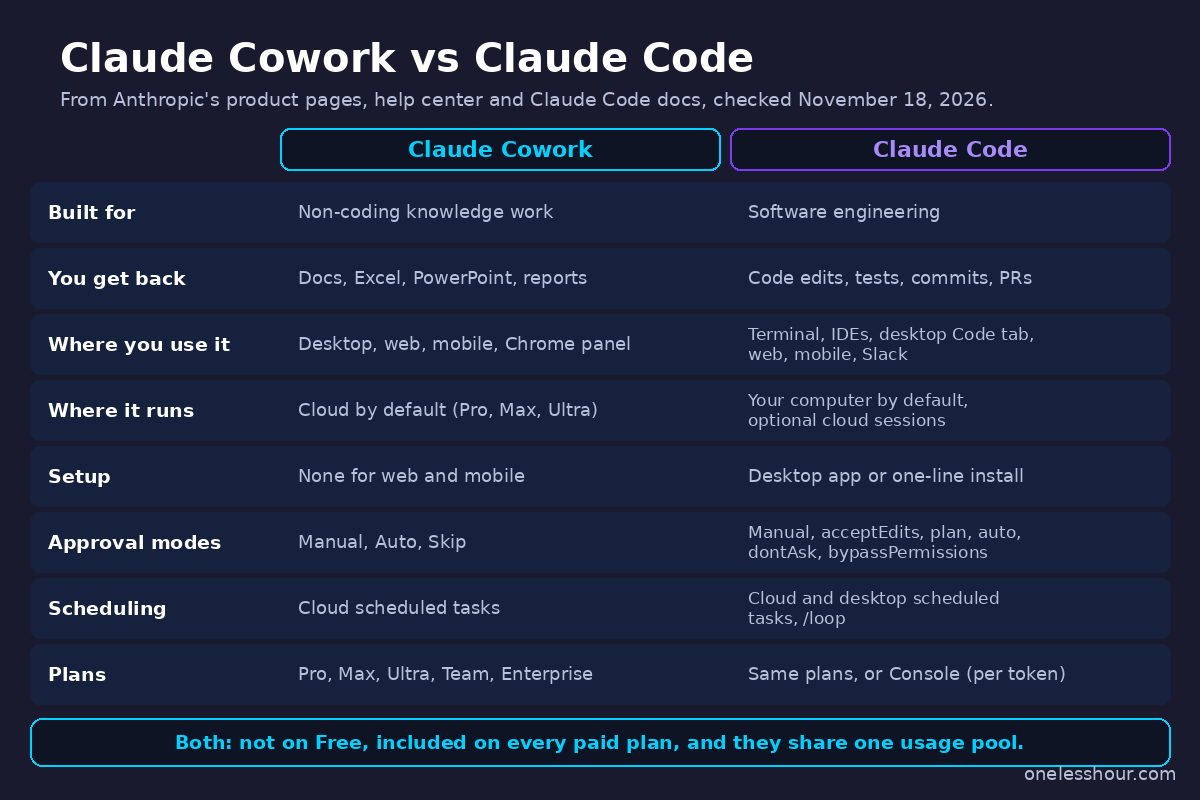
If you only remember one row, make it the first. Anthropic’s Cowork product page answers this exact question in its FAQ: Claude Code is built for software engineering, Cowork is built for non-coding knowledge work, and Cowork “uses the same agentic approach as Claude Code.”
Same engine, different workspace
Anthropic is open about the shared roots. The Get started with Claude Cowork article says Cowork “uses the same agentic architecture that powers Claude Code, with no terminal required,” and the Cowork best-practices article notes that many people don’t know the two “run on the same engine under the hood.” The same Claude models power chat, Cowork, Claude Code and Claude Design.
What differs is the workspace around the model. Anthropic’s guide to deploying Cowork puts it plainly: Cowork is the surface for knowledge work, “the way Claude Code is the agentic harness for developers.” Cowork brings folder access, connectors, a browser, scheduled tasks and plugins. Claude Code brings direct codebase access, plan and code modes, visual diffs, git integration and local or remote environments.
One recent change makes this easier to follow. Since September 16, 2026, Anthropic has been merging chat and Cowork into one Claude. In the new experience you just describe a task in any conversation, and Claude brings in Cowork’s abilities when it needs them. Claude Code didn’t merge. The help article on the change says the model picker and the “Code” tab are where they were, so in the desktop app Claude Code is still its own tab.
What Claude Cowork does best
Cowork is where you hand Claude a task with a deliverable at the end. According to the help center, Claude makes a plan, breaks big jobs into subtasks, runs code and shell commands in an isolated environment on Anthropic’s servers, coordinates parallel workstreams, and drops finished files into your session. Outputs include Excel spreadsheets with working formulas, PowerPoint decks and formatted documents.
Its strengths, based on Anthropic’s own feature list:
- Your folders and apps: on desktop, Claude reads and writes files in folders you connect, and pulls from connected apps such as Google Drive, Gmail, Microsoft 365 or Slack.
- A built-in browser: Claude can open sites, read pages, click and fill forms in a browser inside Claude Desktop, separate from your own logins, or in your Chrome through Claude in Chrome.
- Work that continues without you: cloud sessions keep going when you close your laptop, and you can check in or redirect from your phone.
- Scheduled tasks: type /schedule in any task and Claude can run it daily, weekly or on another cadence, with no device online.
- Projects and plugins: group related tasks with their own files and instructions, and add plugins for roles such as legal or finance.
What Claude Code does best
The Claude Code overview describes it as “an agentic coding tool that reads your codebase, edits files, runs commands, and integrates with your development tools.” You describe a feature or a bug in plain language, and it plans the approach, writes code across files, runs your tests and checks that the result works. It also works directly with git: it stages changes, writes commit messages, creates branches and opens pull requests.
Its strengths, from the docs and product page:
- Codebase understanding: it maps and explains unfamiliar projects using agentic search, without you picking context files by hand.
- Long engineering jobs: Anthropic pitches it for multi-hour refactors and migrations, following imports across the repo and rerunning tests when something breaks.
- Fits developer tools: it runs in your terminal and works alongside VS Code, Cursor and JetBrains IDEs, command line tools, GitHub and GitLab, and MCP servers.
- Automation: you can pipe logs into it, run it in CI with GitHub Actions or GitLab CI/CD, and mention @Claude in Slack with a bug report to get a pull request back.
- Project memory: a CLAUDE.md file in your repo holds coding standards and build commands, and Claude Code reads it at the start of every session.
Anthropic’s Claude Code user FAQ also separates it from autocomplete: autocomplete suggests the next few lines, while Claude Code takes a task such as “fix the failing tests” and works it through.
Where each one runs, and how you access it
Claude Cowork: cloud first
Per the Cowork surfaces article, Cowork works in Claude Desktop for macOS, Windows and Linux (beta) on all paid plans; on the web and in the mobile apps on Pro, Max, Ultra and Team (in beta on Team) and on Enterprise when an owner turns it on; and in the Claude in Chrome side panel. Since October 6, 2026, new Cowork tasks on Pro, Max and Ultra run in the cloud on every surface, and there’s no setting to change that.
Cloud doesn’t mean Cowork can’t touch your computer. When a task needs a local folder, the built-in browser or computer use, Claude reaches it through the Claude Desktop app, which has to be open and connected. If you want a task to run only on your machine, the same article now points you to Claude Code in the desktop app.
Claude Code: local first
Claude Code starts on your own computer. The setup page lists macOS 13.0 or later, Windows 10 1809 or later (or Windows Server 2019+), Ubuntu 20.04+, Debian 10+ and Alpine Linux 3.19+, with 4 GB of RAM or more and an internet connection. You can install it with one terminal command, Homebrew or WinGet, or skip the terminal entirely: the desktop docs say Claude Code is the Code tab in the Claude Desktop app, which includes it, and a paid subscription is required there.
If you want the cloud, cloud sessions run Claude Code on Anthropic’s infrastructure from claude.ai/code, the desktop app, your phone or the terminal. They’re available on Pro, Max, Ultra and Team, and to Enterprise users with premium or Chat + Claude Code seats. Claude Code has no separate mobile app; the mobile docs say cloud sessions and Remote Control live in the Code tab of the Claude app.
Permissions and approval modes compared
| Claude Cowork | Claude Code | |
|---|---|---|
| Asks before most actions | Manual (formerly “Ask before acting”) | Manual, config value default: only reads run without asking |
| Automated safety check instead of you | Auto: an automated check reviews actions and blocks risky ones | auto: a classifier reviews actions before they run |
| Fewer prompts, no classifier | Skip (formerly “Act without asking”): nothing checks its actions | acceptEdits (file edits run), or bypassPermissions for isolated containers and VMs only |
| Plan first | Claude shares its plan, and you review it before it runs | plan mode: explores and proposes a plan without editing source code |
| Default | Auto is rolling out as the default on Pro, Max, Ultra and Team; Manual on Enterprise | auto is the starting mode for terminal and VS Code sessions on v2.1.283 or later |
| Extra guardrails | Asks before permanently deleting files; per-connector “Always ask” | Allow, ask and deny rules, hooks, protected paths and a Bash sandbox |
The permission modes page adds that deny rules block in every mode, including bypassPermissions, and that some actions are never auto-approved in any mode. Cowork’s safety article is just as direct about risk: web content is a main route for prompt injection, so only give Claude access to sites you trust. For work with real consequences, such as money, messages sent as you or important files, Anthropic says to stay close or switch back to Manual.
Who each one is for
Choose Claude Cowork if
- Your work is documents, spreadsheets, decks, research or email, not code.
- You don’t want to open a terminal or install anything beyond the Claude app.
- You want recurring reports or checks to run on a schedule while you’re away.
- Your task pulls from several files or apps, or needs a browser to fill forms and read pages.
- You work in a role like marketing, sales or legal; Anthropic’s product page shows Cowork examples for all three.
Choose Claude Code if
- You write or maintain software, or you’re learning to.
- Your tasks are bug fixes, tests, refactors, migrations or new features in a repo.
- You want diffs to review, git commits and pull requests as part of the loop.
- You want to automate code review or issue triage in CI, or route Slack bug reports to pull requests.
- You need work to stay on your own machine. Claude Code runs locally by default.
Plenty of people will want both, for example Claude Code for the repo and Cowork for the release notes deck. Because the plans are the same, using both costs no extra money, only usage.
Example workflows for each
These examples come from Anthropic’s own product pages and help articles, so they show what each tool is designed for rather than results I measured.
Claude Cowork workflows
- Monday marketing readout: the Cowork product page shows a scheduled task that pulls web views and signups from Amplitude and channel numbers from a Drive folder, compares them to the week before, flags anything that moved more than 10% and saves a slide deck.
- First-pass contract review: point Claude at a folder of inbound agreements and your playbook, and come back to a memo per contract with each departure cited to the clause.
- Expense reports: the help center suggests dropping receipts into a folder and asking for a formatted expense report.
Claude Code workflows
- Write and fix tests: the docs’ example is
claude "write tests for the auth module, run them, and fix any failures". - Commit and open a pull request: ask it to commit your changes with a descriptive message, or to turn a GitHub issue into a pull request.
- Recurring code chores: cloud scheduled tasks can run morning PR reviews, overnight CI failure analysis or weekly dependency audits, even when your computer is off.
Pricing and plan overlap
This is where the two tools are almost identical. Claude’s pricing page lists both Claude Code and “Hand off and schedule tasks” (Cowork) as included on Pro, Max and Ultra and as not included on Free. The pricing FAQ says Claude Code is included in all paid plans and shares the same usage limits as the rest of your plan.
| Plan | Price (US, excludes tax) | Cowork | Claude Code |
|---|---|---|---|
| Free | $0 | No | No |
| Pro | $20/month, or $200/year up front (shown as $17/month) | Yes | Yes |
| Max | $100/month, 5x Pro usage every five hours and every week | Yes | Yes |
| Ultra | $200/month, 10x Pro usage every week, no five-hour limit for verified accounts | Yes | Yes |
| Team | Standard $20/seat/month billed annually ($25 monthly); Premium $100 ($125 monthly) | Yes, both seat types | Yes, every seat |
| Enterprise | US$20/seat/month billed annually, plus all usage at API rates | Yes | Yes |
| Claude Console | Pay per token at standard API pricing | Not listed | Yes |
The product pages even describe the plans in parallel. On Pro, Cowork is “perfect for quick tasks like organizing a folder or pulling together a short report,” while Claude Code is “perfect for short coding sprints in small codebases.” Max is pitched for longer, more complex tasks and larger codebases, and Ultra for power users of either.
Three billing details are worth knowing:
- One shared pool. The pricing FAQ says activity across Claude on web, desktop, mobile and Claude Code draws from the same limits. A heavy Cowork day leaves less room for coding, and the other way around.
- Cowork burns limits faster than chat. The Cowork product page says so directly, and the help center explains why: every step Claude takes uses tokens.
- Claude Code has a pay-as-you-go route. With a Claude Console account, Claude Code uses API tokens at standard API pricing. Anthropic’s Claude Code costs page says enterprise deployments average around $13 per developer per active day and $150 to $250 per developer per month. One catch from the Pro and Max help article: if an ANTHROPIC_API_KEY environment variable is set, Claude Code bills the API instead of your subscription.
On Team, the Team and Enterprise help article says Claude Code is included with every Team seat, and Premium seats give heavier users more room. On Enterprise, every token used in chat, Claude Code or Cowork is billed at API rates on top of the seat fee. For the full breakdown of limits, usage credits and plan picks, see my Claude Cowork pricing guide.
Limitations of each
Claude Cowork limitations
- Not on the Free plan.
- Local folders, the built-in browser and computer use need Claude Desktop open and connected; computer use is a research preview.
- No session sharing yet, though you can share individual artifacts.
- Some features, such as plugins with local MCP servers, still work only through the desktop app.
- On Team and Enterprise, admins control access, and once the HIPAA configuration is applied on Enterprise, Cowork in the cloud isn’t available.
Claude Code limitations
- Not on the Free plan, unless you pay per token through a Console account.
- It’s built for code. You need a project to work in and the ability to judge the changes it proposes.
- The JetBrains plugin needs the CLI installed separately, and Homebrew and WinGet installs don’t update themselves.
- Cloud sessions need a claude.ai account; they aren’t available with a Console sign-in or third-party providers such as Amazon Bedrock.
- Bypass permissions mode is only meant for isolated containers and VMs, and it isn’t available in cloud sessions.
Which one should you use?
Based on Anthropic’s documentation, here’s how I’d decide:
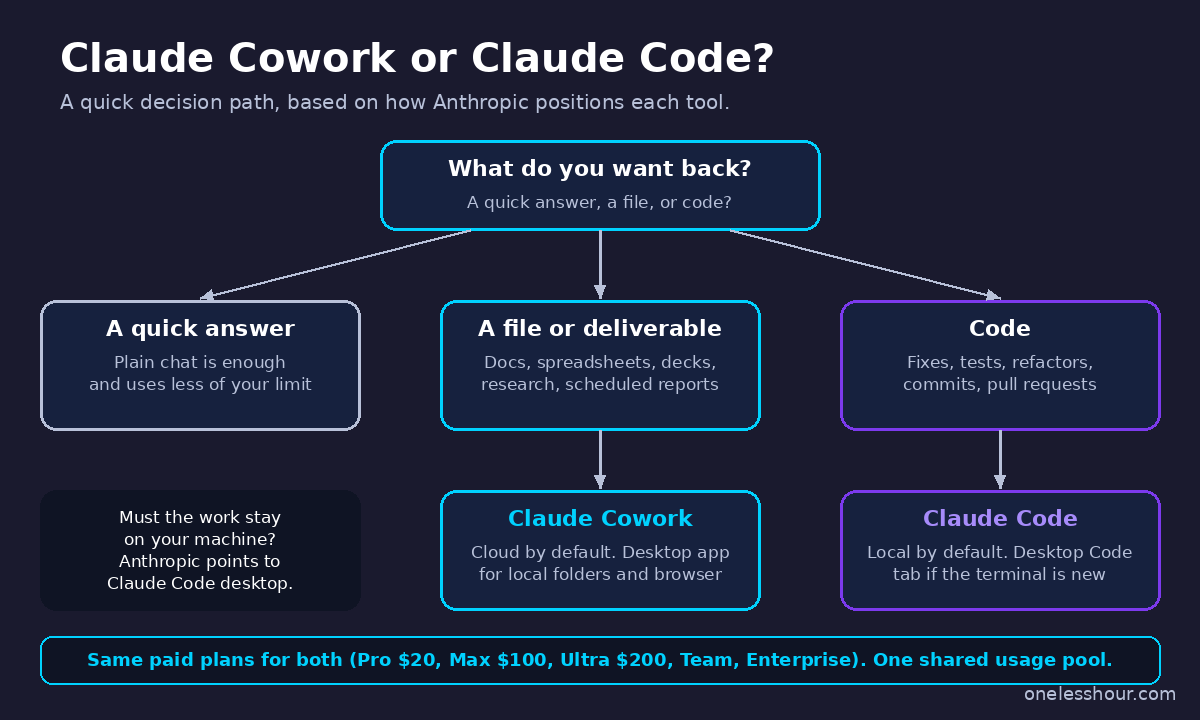
- If the result is code, use Claude Code. Start in the desktop app’s Code tab if the terminal is new to you.
- If the result is a document, spreadsheet, deck or research memo, use Claude Cowork. In the new Claude experience you don’t even need to pick it; just describe the task.
- If it’s a quick question, plain chat is enough, and it uses less of your limit.
- If the work must stay on your machine, Anthropic now points you to Claude Code in the desktop app.
- If you’ll use both heavily, remember they share one pool. Max or Ultra gives more room, and Team Premium seats do the same for heavy users at work.
Related reading
For setup steps, read how to use Claude Cowork and how to use Claude Code. My Claude Cowork pricing guide goes deeper on limits and plan choice. For visual work, see how to use Claude Design, and for everyday chat, how to use Claude AI. If agents are new to you, AI agents for beginners explains the basics.
Get the next guide in your inbox
Research-based guides to AI productivity tools: what each one costs, what the free plan really includes, and who it’s worth paying for.
FAQ
What is the difference between Claude Cowork and Claude Code?
Anthropic’s Cowork product page says Claude Code is built for software engineering (writing, debugging and shipping code), while Cowork is built for non-coding knowledge work such as research, analysis and document creation. Both use the same agentic approach. In practice, Cowork hands you back documents, spreadsheets and decks, and Claude Code hands you back code changes, tests and pull requests.
Is Claude Cowork just Claude Code for non-developers?
That’s close to how Anthropic describes it. The help center says Cowork brings Claude Code’s agentic capabilities to knowledge work beyond coding and uses the same agentic architecture, with no terminal required. The workspace around it is different, though: Cowork is built around folders, connected apps, a browser and scheduled reports, while Claude Code is built around a codebase, a terminal, diffs and git.
Do I need to pay for Claude Cowork and Claude Code separately?
No. Both are included in every paid Claude plan: Pro ($20 a month, or $200 a year up front), Max ($100 a month), Ultra ($200 a month), Team and Enterprise, per Claude’s pricing page (checked November 20, 2026). Neither is on the Free plan. They also share one usage pool, so a long Cowork task and a long coding session draw from the same limits.
Do you need to know how to code to use Claude Code?
You can start it without coding experience, and Anthropic’s docs include a terminal guide for beginners. But Anthropic positions Claude Code for developers building and shipping software, and you still need to judge the changes it proposes. If your work is documents, spreadsheets or research, Anthropic points non-developers to Cowork instead.
Which one keeps working when my laptop is closed?
Both can. On Pro, Max and Ultra, new Cowork tasks have run in the cloud since October 6, 2026, so they continue when you close your laptop, unless the task needs local files, the browser or your computer. Claude Code runs on your own machine by default, but cloud sessions at claude.ai/code and cloud scheduled tasks run on Anthropic’s infrastructure and keep going when your computer is off.
Is Claude Cowork or Claude Code safer to use?
Neither is risk-free, and Anthropic says no permission mode replaces your judgment. Cowork runs its code in an isolated cloud environment, asks before permanently deleting files, and offers Manual, Auto and Skip modes. Claude Code offers more granular controls, including plan mode, allow and deny rules, hooks and a sandbox, and Anthropic says to use its bypass mode only in isolated containers or virtual machines.
Sources
- Claude Cowork product page (including FAQ) (claude.com, checked November 20, 2026)
- Claude Code product page (including FAQ) (claude.com, checked November 20, 2026)
- Plans and pricing (claude.com, checked November 20, 2026)
- Get started with Claude Cowork (Anthropic Help Center, checked November 20, 2026)
- Use Claude Cowork on web, desktop, and mobile (Anthropic Help Center, checked November 20, 2026)
- Claude Cowork and chat are one Claude (Anthropic Help Center, checked November 20, 2026)
- Use Claude Cowork safely (Anthropic Help Center, checked November 20, 2026)
- Use Claude Cowork on Team and Enterprise plans (Anthropic Help Center, checked November 20, 2026)
- Use Claude Code with your Pro, Max, or Ultra plan (Anthropic Help Center, checked November 20, 2026)
- Use Claude Code with your Team or Enterprise plan (Anthropic Help Center, checked November 20, 2026)
- Claude Code user FAQ (Anthropic Help Center, checked November 20, 2026)
- How do usage and length limits work? (Anthropic Help Center, checked November 20, 2026)
- What is the Team plan? (Anthropic Help Center, checked November 20, 2026)
- What is the Enterprise plan? (Anthropic Help Center, checked November 20, 2026)
- Claude Code overview (Claude Code Docs, checked November 20, 2026)
- Claude Code setup and system requirements (Claude Code Docs, checked November 20, 2026)
- Choose a permission mode (Claude Code Docs, checked November 20, 2026)
- Claude Code on desktop (Claude Code Docs, checked November 20, 2026)
- Claude Code in the cloud (Claude Code Docs, checked November 20, 2026)
- Claude Code on mobile (Claude Code Docs, checked November 20, 2026)
- Manage Claude Code costs (Claude Code Docs, checked November 20, 2026)
- Best practices for getting started with Claude Cowork (Anthropic, checked November 20, 2026)
- Introducing Claude Cowork (deploying Claude across your organization) (Anthropic, checked November 20, 2026)
- Claude Cowork and chat are now one Claude (Anthropic, September 16, 2026, updated November 12, 2026, checked November 20, 2026)