
Transparency note: This article contains an affiliate link to Tidio: if you sign up through it, I may earn a commission at no extra cost to you. No company paid for or reviewed this article. I pay for most of the AI tools I use myself. See how I test.
Updated Oct 2026: prices re-checked, and the article reworded to make clear it’s based on research, not hands-on testing.
Most new small businesses lose their first weekends to jobs the right AI tools can shrink a lot: writing product descriptions, designing a basic logo, setting up an email list, making a simple landing page. None of it is hard. It’s slow when you do everything the 2019 way.
This roundup sorts out which AI tools are worth it for that repetitive work: the best ai tools for small business owners in 2026, grouped by the job each one does, with prices and the honest trade-offs included.
I’m not covering 30 tools. I’m covering the 10 that actually earn their place in a small business stack, plus the 4 I’d avoid, and a realistic price tag for what a lean AI setup really costs per month (spoiler: less than you’d think).
The quick list: what each tool does and what it costs
| Tool | What it does | Best for | Price |
|---|---|---|---|
| ChatGPT | Writing, brainstorming, research | Everyday writing | Free / $20/mo |
| Claude | Longer writing, document analysis | Long documents | Free / $20/mo |
| Canva Magic Studio | Design, graphics, basic video | Quick graphics | Free / $144/yr |
| Notion AI | Docs, notes, workspace Q&A | Teams already on Notion | Included on Business ($20/member/mo) |
| Zapier | Automation between apps | Connecting apps | Free / $19.99/mo |
| HubSpot Free CRM + AI | Customer tracking, emails | Free CRM | Free / $20/mo starter |
| Otter.ai | Meeting transcription + summaries | Meetings | Free / $8.33/mo |
| Tidio | Website chatbot & lead capture | Support chat | Free / $29/mo |
| Grammarly | All written communication | Proofreading | Free / $12/mo |
| Descript | Podcast & video editing | Podcast and video | Free / $16/mo |
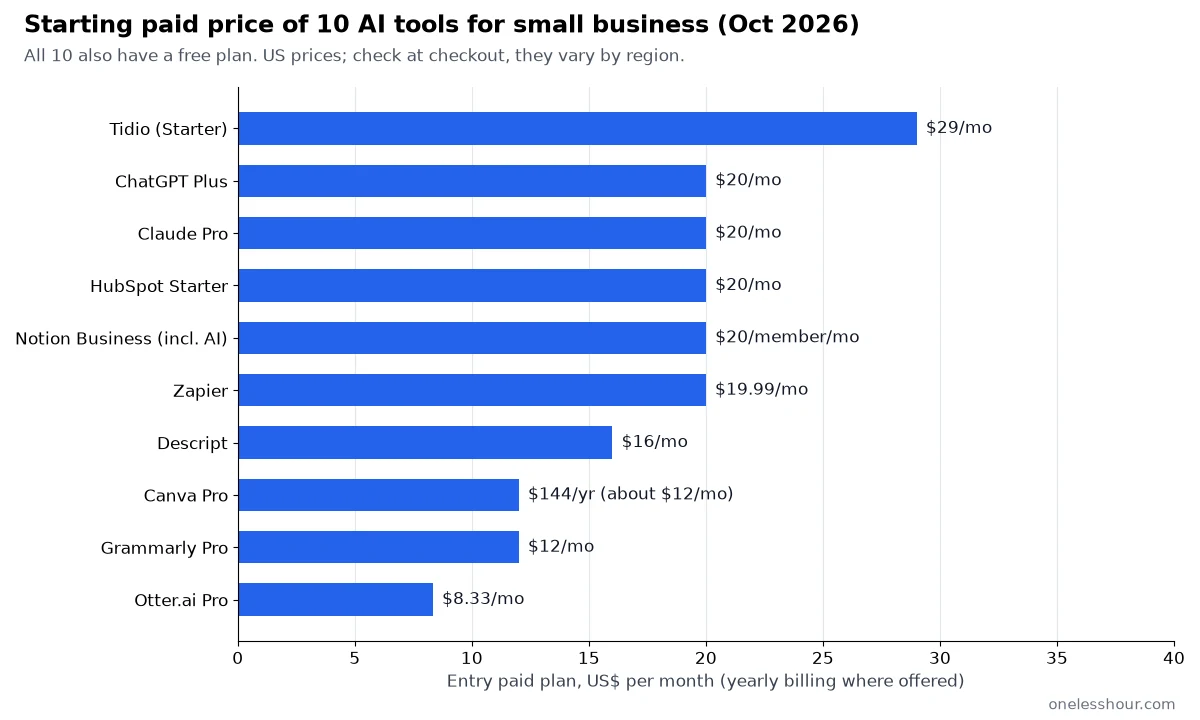
You can start on free tiers only. They’re legitimately useful and cover most early-stage small business needs, so upgrade a tool only when you keep hitting its limits.
1. ChatGPT — the one tool I’d keep if I could only keep one
ChatGPT is the workhorse. Product descriptions, first-draft emails, market research, social media captions, customer support replies, pricing research, competitor analysis, invoice wording. Most of these are quick jobs, which is where it shines.
The most useful habit: don’t use ChatGPT to “write me a product description”. Use it to rewrite yours. Describe the product in 4 messy sentences, then ask ChatGPT to turn that into a polished 60-word description in your voice. That usually beats a blank-prompt draft, because the AI starts from your facts.
Prompt template for product copy: “I sell [product]. Here’s a rough description: [your messy text]. Rewrite this as a 60-word product page description that emphasizes [main benefit], avoids marketing cliches, and includes one specific detail. Conversational tone, no exclamation marks.”
Free tier reality check: the free plan of ChatGPT is legitimately good now. OpenAI’s pricing page lists unlimited everyday text chats with GPT-6 on Free, with limits on uploads, image creation and deep research. For solo small business owners, free covers most everyday writing. Upgrade to Plus at $20/month when you keep hitting the limits.
Best for: every small business owner. This is the baseline tool.
2. Claude: the one for longer thinking
Claude is the second chat tool worth having, and it has a specific job: anything over 2,000 words or anything where I need the AI to keep context across a long conversation. Drafting contracts, reviewing a messy 40-page PDF, summarizing 10 customer interviews at once.
Where ChatGPT feels like a fast assistant, Claude feels like a slower, more careful one. For nuanced tasks — writing a refund email that says “no” politely, or summarizing a legal doc without glossing over the parts I actually need to worry about — that’s the kind of careful, long-context work Claude is built for.
Full honest comparison in my ChatGPT vs Claude comparison. Short version: use both, but spend the money on whichever one fits your primary use case.
3. Canva Magic Studio — the graphic design team you can’t afford
Canva is not new, but Canva’s AI features (now grouped as “Magic Studio”) are. Magic Design generates an entire 5-slide deck, a 12-post social campaign, or a product mockup from a text prompt. Magic Write handles headlines and body copy. Magic Eraser removes objects from photos. Background Remover does one-click cutouts. Magic Animate turns a static design into a short motion graphic.
For a small business, that combination covers a lot of what you’d otherwise hire a junior designer or buy from a stock service for. For routine social posts, it can be the difference between doing social media yourself and giving up on it.
Pro tip: upload your logo and brand colors to Canva’s Brand Kit first. Every Magic Design output then defaults to your brand. The jump in quality vs no-brand-kit designs is huge.
The downside: Canva-generated designs can start looking samey. It’s worth reviewing your social grid once a month and replacing anything that looks too template-y with a manual version.
4. Notion AI: where your operations can live
Notion can be a business’s second brain, and Notion AI makes that brain searchable. When a customer asks about something you discussed 3 months ago, you can ask Notion AI “what did we agree about refund timing?” and it finds the page, instead of you digging through meeting notes.
I wrote the full how-to in my Notion AI guide — but the short version: if your business runs on docs and notes (and most small businesses do), Notion AI now comes with the Business plan ($20/member/month), which makes Business the plan to pick if you want the AI.
5. Zapier — the automation glue
Zapier connects apps without code. New Stripe payment → send welcome email + add to spreadsheet + create a task in Notion. New form submission → create a contact in HubSpot + notify Slack + send a follow-up email in 24 hours. The “Zap” runs while you’re asleep.
Storefronts have their own automation stack sitting on top of this. Here are the seven ecommerce AI tools worth paying for.
Zapier also has AI steps that let you run a ChatGPT or Claude call inside a Zap. So you can build: new support ticket arrives → AI categorizes it → routes to the right folder → drafts a reply in your voice for you to approve.
Free tier reality check: 100 tasks a month on the free plan, with two-step Zaps only. Enough for 2 or 3 simple automations. The Professional plan (from $19.99/month billed yearly, with 750 tasks a month at the entry tier) adds multi-step Zaps and premium apps, which is where most small businesses land.
6. HubSpot Free CRM (now with Breeze AI)
Plenty of small businesses track leads in a Google Sheet until a forgotten follow-up costs them a deal. HubSpot’s free CRM is the easiest one to get started with, and its AI layer (Breeze AI) drafts follow-up emails, summarizes the conversation history, and suggests the next step for each lead.
If your business is specifically property, the CRM and lead-nurture picks change quite a bit. I tier-ranked eight tools by workflow stage for agents.
The free tier is genuinely usable for up to 1,000 contacts and includes basic AI features. You only need to pay when you want automation sequences, custom reports, or more advanced AI (starts at $20/month for the starter plan).
7. Otter.ai — meeting notes that actually stick
Otter transcribes meetings in real time, identifies speakers, and generates a summary with action items. It fits client calls and team syncs, and the summary is ready shortly after the meeting ends. No more “wait, what did she say about the deadline?” moments a week later.
The downside: it occasionally mis-transcribes names or technical terms, so skim the transcript for the 2 or 3 critical decisions before you archive it.
Covered more options in my AI meeting assistant roundup if Otter isn’t your style.
8. Tidio: an AI chatbot that answers support questions and captures leads
Plenty of website chatbots are more annoying than helpful. Tidio‘s AI agent, Lyro, works differently: it answers from the knowledge you give it (your FAQ, help docs and site content), and it hands the chat to a human when it doesn’t know the answer.
Setting it up means adding the chat widget to your site, giving Lyro your FAQ or help content, and deciding when it should pass a conversation to you. Tidio says its customers average a 75% resolution rate with Lyro. That is their figure, not mine. The chats Lyro can’t resolve come to you, which is where the leads are.
The Free plan covers 50 live chat conversations a month and includes 50 Lyro AI conversations as a one-time allowance. Paid helpdesk plans start at $29/month (Starter), and the Lyro AI Agent plan, which refreshes AI conversations every month, starts at $39/month.
9. Grammarly — still the cheapest upgrade in quality per month
Grammarly is worth running on every external email, proposal, landing page and social post. It catches the typo you missed at 11pm, and its tone suggestions flag when an email reads angrier than you meant it to, so you can fix it before sending.
Free tier is enough for most small business use. Full comparison in my grammar checker roundup.
10. Descript — if you touch podcast or video at all
Descript edits video and podcasts like a Google Doc. Delete a word in the transcript, it deletes from the audio. Remove filler words (“um”, “uh”) with a single click across an entire recording. Clone your voice to fix a mistake without re-recording. It’s genuinely magic for any small business owner who makes any audio or video content.
If you don’t make audio or video, skip this. If you do, it can take a real chunk of the editing off your plate.
The 4 I’d avoid (or at least deprioritize)
AI SEO writers that spit out full blog posts: one-click full-article generators tend to produce generic copy, and Google’s spam policies target content mass-produced mainly to rank rather than to help readers. Better to use ChatGPT with a clear brief and edit heavily. You’ll get a better post at a fraction of the cost.
All-in-one “AI business suite” tools: the ones that promise to do marketing, CRM, scheduling, and content in one dashboard. They tend to be weaker at each individual task than the best-in-class tool for that job. You’re paying for convenience and losing quality.
AI “business idea” generators: nonsense. None of them understand your specific market. They spit out the same 10 generic ideas everyone else gets. Skip entirely.
AI phone call assistants for sales: still early and creepy when customers realize they’re talking to an AI. Great tech for the future. For 2026 small businesses, not yet.
What this lean stack actually costs
Here’s the realistic monthly cost if you’re a solo small business owner picking the right plan on each tool:
- Just starting out (free tier only): $0/month. ChatGPT free + Canva free + HubSpot free + Grammarly free + Otter free + Zapier free covers writing, design, CRM, proofreading, meetings and simple automations for $0.
- Making some money ($500-$5,000/mo revenue): ChatGPT Plus $20 + Canva Pro $12 (US$144 a year) = about $32/month. If your team works in Notion, its Business plan ($20/member/month) includes Notion AI.
- Established small business ($5k+/mo revenue): ChatGPT Plus $20 + Canva Pro $12 + Zapier Professional $19.99 + HubSpot Starter $20 + Grammarly Pro $12 + Otter Pro $8.33 = about $92/month, using yearly billing where it’s offered. Add $20/member for Notion Business if you use Notion.
For roughly $100/month, you have an AI-powered assistant, designer, writer, automation engineer, CRM, and note taker. Ten years ago that stack would have cost you $3,000+ per month in contractors or salaries.
How I’d sequence rolling these out (if I were starting today)
Week 1: set up ChatGPT free + Canva free. Use them both every day for whatever comes up. You’ll build prompt skill and design instincts fast.
Week 2-4: add Grammarly free + HubSpot free CRM. Everything you write goes through Grammarly. Every lead and customer goes into HubSpot from day one (don’t do the spreadsheet thing).
Month 2: add Otter free for meetings + Zapier free for 2-3 basic automations (form submission → CRM, payment → welcome email).
Month 3+: only upgrade to paid plans on the tools where you’ve hit the free cap more than twice. Don’t upgrade speculatively. You’ll know when you need each one.
FAQ
What is the best AI tool for a small business with no budget?
ChatGPT’s free plan, Canva’s free plan, and HubSpot’s free CRM together cover the majority of what most small businesses need for $0. Add Grammarly free for written work and Otter free for meetings. That stack covers writing, design, CRM, proofreading and meetings without spending anything.
Is ChatGPT or Claude better for small business owners?
ChatGPT is better for short, fast tasks (emails, social posts, product descriptions) because of speed and the broader ecosystem of integrations. Claude is better for longer documents, customer research, and nuanced communication. If you can only pick one, pick ChatGPT first. If you write a lot or handle sensitive comms, add Claude.
How much should a small business spend on AI tools per month?
For most solo or early-stage small businesses, $0-$35/month is the sweet spot. Start with free tiers for the first 1-2 months, then upgrade only the tools you use every day. Past $100/month in AI subscriptions, you’re usually better off spending that money on a real part-time hire instead.
Can AI tools really replace hiring help?
For admin, writing, basic design, and scheduling work, mostly yes. For relationship-based work like sales conversations, client management, and creative direction, no. The right way to think about it: let AI take the grunt work so you can spend your hours on the work only a human can do.
Is it safe to put customer data in AI tools?
Check the privacy policy of each tool. Business plans such as ChatGPT Business and Claude Team or Enterprise don’t train on your content by default. On consumer plans, including ChatGPT Plus and Claude Pro, training is on unless you switch it off in the privacy or data settings, so avoid them for anything sensitive. For personally identifiable customer info, use tools like HubSpot or Notion that have clearer data agreements rather than pasting into a chat tool directly.
One thing to try this week
Pick the most annoying 30 minutes of your week — the task that shows up every Monday and always takes too long. It’s probably writing an update, drafting a proposal, cleaning a spreadsheet, or making a graphic. Whatever it is, try running it through ChatGPT + Canva + Zapier (all free) once. See how long it takes the second time around.
If the answer is “half the time”, you’ve just found your first use case. Compound that across a week, a month, a year — it’s the difference between “I’ll get to it” and actually having a business.
For the broader “how do I actually use AI at work” walkthrough, see my hour-by-hour breakdown.
Related reading
Newsletter
One Less Hour, delivered weekly
Honest, research-based reviews of AI productivity tools: what they cost, what they’re good at, and where they fall short.
One email per week. Unsubscribe in one click.