
Last updated: October 2026
Updated Oct 2026: prices re-checked, and the article reworded to make clear it’s based on research, not hands-on testing.
Transparency note: This article contains an affiliate link to Tidio: if you sign up through it, I may earn a commission at no extra cost to you. No company paid for or reviewed this article. I pay for most of the AI tools I use myself. See how I test.
Quick verdict
For a solo ecommerce operator, the busywork adds up fast: product descriptions for every new drop, the same support questions every day, email campaigns, social graphics. And that’s before photographing, listing or running a single ad. That kind of time debt is brutal, and it compounds every week.
So I looked at 10 AI tools that claim to help ecommerce stores work faster, using their pricing pages, help docs and changelogs plus independent reviews. I haven’t run them on a store of my own, so this is a research-based guide: what each tool does, what it costs and where it falls short, not a log of hours saved. Some of these tools do real work. Others are marketing with a login screen.
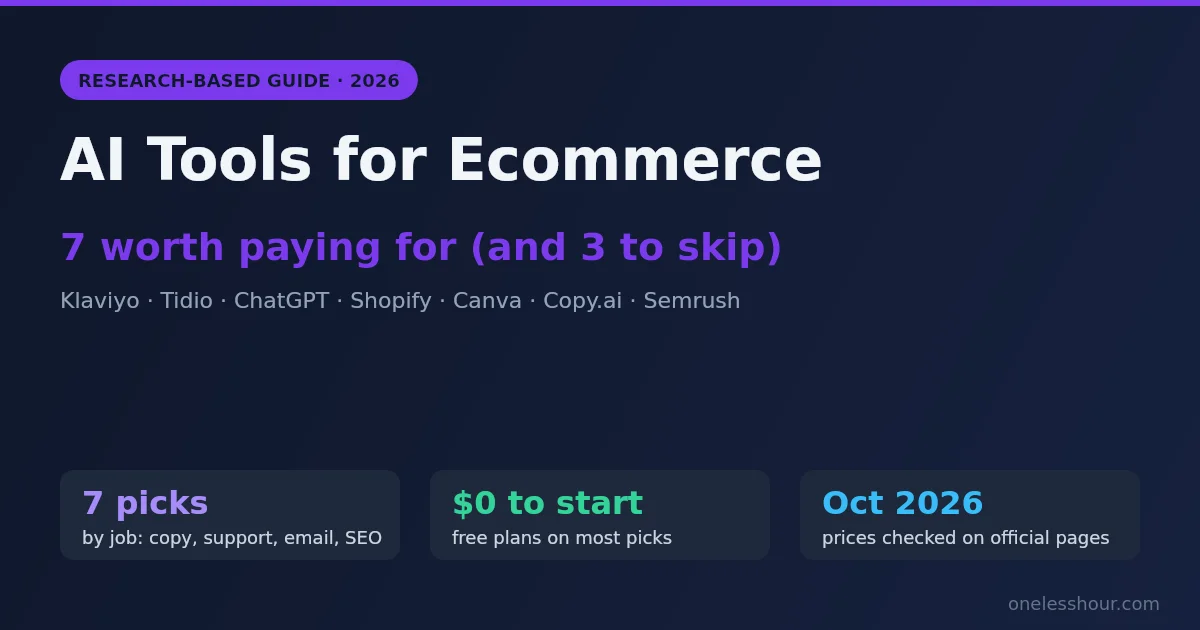
Here’s where I landed: seven AI tools for ecommerce are worth paying for. Three aren’t. I’ll cover all of them: the picks, the skips, and the stack I’d build if I were starting a store today on a tight budget.
Quick summary: which tool covers which job
| Job | Tool | Starting price (Oct 2026) |
|---|---|---|
| Product descriptions | ChatGPT Plus or Shopify’s built-in AI | $20/month, or included with Shopify |
| Customer support | Tidio (Lyro AI Agent) | Free plan; Lyro from $39/month |
| Email marketing | Klaviyo | Free up to 250 profiles, then from $20/month |
| Graphics | Canva Pro | Free plan; check Canva for current Pro pricing in your region |
| Product page SEO | Semrush | $139/month |
Which AI ecommerce tools write product descriptions and update prices automatically?
Short answer: none of the seven tools here does both jobs. They split cleanly. For product descriptions, Shopify’s built-in AI (formerly Shopify Magic; Shopify now calls its writing assistant Sidekick) is the cheapest place to start if you’re on Shopify, and ChatGPT Plus ($20/month) is the most flexible option on any platform. Automatic price updates are a different job, and none of the seven handles it.
On Shopify, the closest built-in route is Shopify Flow, Shopify’s free automation app (available from the Basic plan up). Its Send Admin API request action can run most of Shopify’s GraphQL Admin API mutations, which is how a workflow changes product data such as variant prices. If the new price has to come from outside Shopify, like a supplier feed or a competitor tracker, you need Flow’s Send HTTP request action, and that one is only on the Grow, Advanced and Plus plans. A dedicated repricing app is the other route. I haven’t researched those in enough depth to recommend one, so I’m not naming one.
| Job | Best value pick | Cost (USD, checked Oct 2026) | Note |
|---|---|---|---|
| Product descriptions, Shopify store | Shopify’s built-in AI (Sidekick, formerly Shopify Magic) | No add-on fee; availability varies by plan | Built into the Shopify admin; fine for bulk first drafts you then edit |
| Product descriptions, any platform | ChatGPT Plus | $20/month | Works on any platform; start with the prompt in section 3 |
| Bulk listing copy, 50+ SKUs | Copy.ai | Chat plan $29/month ($24/month billed yearly) | Copy.ai’s workflow credits now start on its $1,000/month Growth plan, so confirm the batch feature is on your plan before paying |
| Automatic price updates | Shopify Flow (Send Admin API request) or a repricing app | Flow is free | Not covered by the seven tools here. Try it on a duplicate product first, because a bad workflow can reprice your whole catalog |
Most value for the price: on Shopify, start with the built-in AI, which costs nothing extra, and add ChatGPT Plus only when its copy isn’t good enough. Off Shopify, ChatGPT Plus at $20/month is the cheapest paid tool on this list that covers product copy, ad copy and email drafts in one place.
1. Klaviyo — The Email Automation That Earns While You Sleep
Klaviyo isn’t new, but its AI features have gotten actually useful in 2026. The feature that matters most for small stores is its AI-generated email flows: abandoned cart sequences, post-purchase follow-ups, and win-back campaigns that Klaviyo drafts, times, and sends based on your store’s behavioral data.
Without automation, abandoned-cart, post-purchase and win-back emails mean writing, scheduling and segmenting by hand. Once Klaviyo is connected to your store (it has a native Shopify integration), those flows run on their own, and your job becomes reviewing and tweaking them.
The AI subject line generator is also worth using, and Klaviyo’s pricing page lists it on the free plan. Treat its suggestions as candidates: compare their open rates against your own lines over a few campaigns before you hand it the job.
Pro tip: Don’t sleep on Klaviyo’s predictive analytics. It estimates each customer’s next order date and lifetime value, which you can use to decide who gets a discount offer and who you let convert at full price. The catch: Klaviyo’s help center says predictions need at least 500 customers with orders and 180 days of order history, so this is a feature for established stores.
Price: Free up to 250 active profiles and 500 email sends a month. Paid plans from $20/month (based on list size).
Best for: Stores with steady order volume. The AI and predictive features work from your order history, so they get better as your data grows.
The downside: Klaviyo’s interface has a steep learning curve, so budget real time for the initial setup. The payoff is real, but don’t expect it to feel easy on day one.
2. Tidio (Lyro AI): Customer Support Without Hiring Anyone
Most small stores get the same handful of questions over and over: “Where’s my order?” “Can I change my address?” “What’s your return policy?” Tidio is a live chat and helpdesk tool built for exactly that, and its AI agent, Lyro, is designed to answer those repeat questions for you.
Lyro answers from the knowledge you give it, such as your FAQ page, return policy and product info, and it works around the clock. When it can’t answer, it hands the conversation to a human. Tidio lists knowledge-based responses and human handoff as core Lyro features.
Tidio says its customers average a 75% resolution rate with Lyro. That is the company’s own figure, not one I measured, and your rate will depend on how repetitive your questions are and how complete your knowledge base is. Complaints and anything emotional should still go to a person.
Pro tip: When setting up Lyro, paste your 20 most-asked support questions directly into the knowledge base during onboarding. Don’t wait for it to learn from live conversations — seed it manually first. You’ll get much better answers from day one.
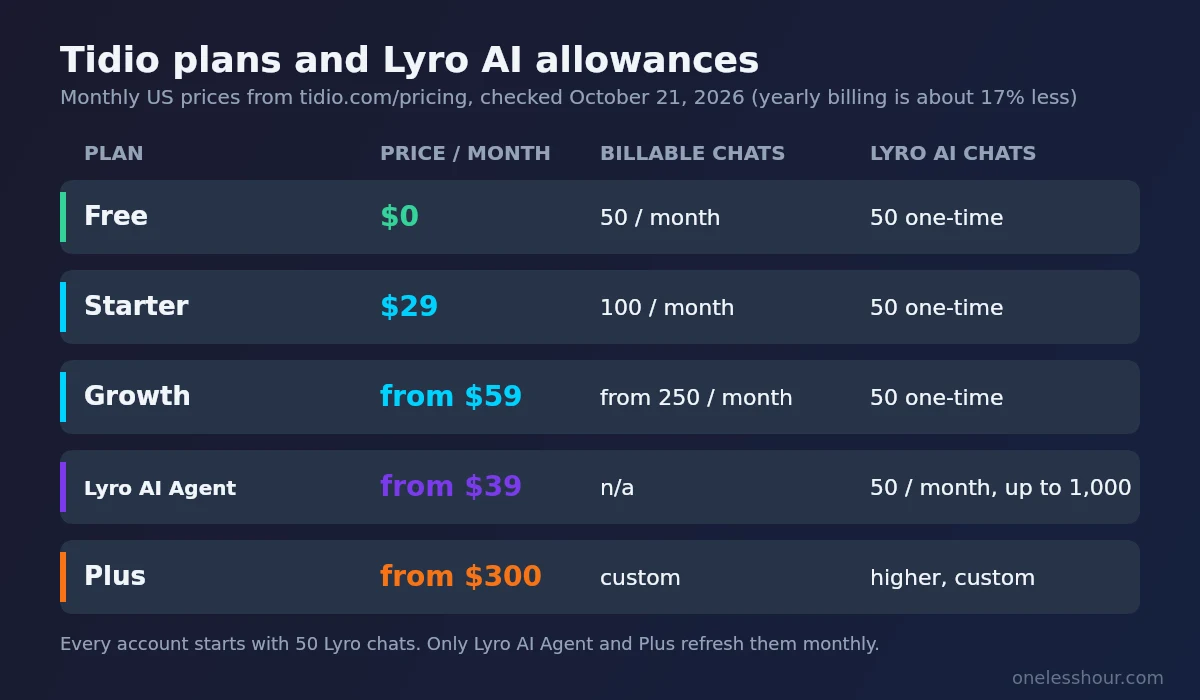
Price: Every account gets 50 free Lyro AI conversations to try (a one-time allowance). The Lyro AI Agent plan starts at $39/month for 50 AI conversations a month ($32.50/month billed yearly), with higher tiers for more volume.
Live chat plans: Free covers 50 conversations a month; Starter is $29/month for 100; Growth starts at $59/month.
Best for: Stores that get repetitive customer questions and want 24/7 coverage without staff costs.
Skip it if: Your store sells complex, high-consideration products where customers always need a detailed human conversation before buying. Lyro is built for support, not nuanced selling.
3. ChatGPT Plus — The Product Description Engine
I know ChatGPT isn’t ecommerce-specific, but for writing product descriptions at scale, it’s the most flexible tool on this list. The key is in the prompt.
Here’s a prompt template to start from:
Product description prompt:
“Write a product description for [PRODUCT NAME]. Key details: [dimensions/material/specs]. Target customer: [describe them]. Tone: conversational, benefit-focused, no fluff. Format: 2-sentence hook, 3 bullet benefits, 1 closing line with call to action. Max 120 words total. Avoid generic phrases like ‘perfect for any occasion’ or ‘high quality.'”
Fill in the brackets for each product and you get a first draft in seconds. Read every draft before it goes live: AI copy can invent specs or slip into generic phrasing, so check details like dimensions and materials against your own product data.
ChatGPT is also handy for Google and Meta ad copy variants. Give it a product description and ask for 5 ad headlines under 30 characters (the limit for Google responsive search ad headlines). Extra variants to test cost you almost nothing.
Price: $20/month (ChatGPT Plus).
Best for: Any ecommerce store. This is the foundation of the AI stack — use it first.
What this won’t do: ChatGPT doesn’t know your brand unless you tell it. Keep a short “brand brief” (2 or 3 paragraphs about your voice and customer) in a ChatGPT project or your custom instructions, or paste it at the start of each chat.
4. Shopify Magic — The Underused Built-In AI
If you’re on Shopify, you’re already paying for Shopify Magic — most store owners just don’t use it. It’s baked into the admin panel and handles product descriptions, email subject lines, and FAQ generation directly within Shopify without any additional subscription.
Expect competent but sometimes generic copy, so plan to edit. That said, for a store that’s already on Shopify and isn’t ready to add more tools, Shopify Magic is a solid starting point — especially for bulk listings where you just need decent copy fast.
Where it actually earns its place is media editing. Shopify’s help center describes removing the background from a product photo and generating a new one from a text prompt, right in the admin’s file editor. For routine product shots, that saves a round trip through a separate design tool.
Pro tip: Use Shopify Magic for first drafts and ChatGPT for polishing. Generate a description in Shopify, then paste it into ChatGPT with the instruction “rewrite this to sound more [your brand voice] and add one specific benefit I haven’t mentioned: [benefit].” Best of both worlds.
Price: No add-on fee. Shopify now calls the writing assistant Sidekick, and availability of some AI features varies by plan.
Best for: Shopify stores — use it as your zero-cost entry point before adding paid tools.
Skip it if: You’re on WooCommerce or another platform. Shopify Magic is Shopify-only.
5. Canva (AI Features) — Product Graphics in Minutes
The version of Canva in 2026 is not the Canva from a few years ago. The AI suite now includes background removal, AI image generation, Magic Write for ad copy, and a “Resize & Magic Switch” feature that reformats one design into every social size simultaneously.
For ecommerce, the three most useful jobs are promotional banners, social product posts and email header graphics. Magic Switch turns one base design into a set of sized versions for each social platform, which is where most of the time goes when you resize by hand.
The AI background generator is useful for secondary product shots and social content, where it can stand in for a photoshoot or a stock photo licence. I wouldn’t rely on it for hero images.
Price: Free tier available. Canva Pro is US$144 a year (or US$18 billed monthly) on Canva’s US pricing; prices vary by region, so check at checkout. Pro raises your AI usage allowance.
Best for: Small stores without a dedicated designer or photographer.
The downside: AI-generated product backgrounds occasionally look slightly off on close inspection. Always check before publishing anything that’ll be seen at large size.
6. Copy.ai — Bulk Ad Copy at Scale
Copy.ai sits in a slightly different lane than ChatGPT for ecommerce. Where ChatGPT is a general-purpose writing engine, Copy.ai has pre-built workflows for ecommerce tasks — specifically for generating Facebook ad copy, Google ad variants, and promotional email sequences in bulk.
The feature that stands out for stores is batch generation through Copy.ai’s workflows: you upload a CSV with your product names and specs and generate descriptions for all of them in one run. Plan to edit a share of them, as with any AI copy, and check the plan catch below first.
Copy.ai’s workflows are particularly good for stores running paid ads across multiple channels. Give it a product description and it generates ad headline variants, body copy variations and call-to-action options, formatted for each platform’s character limits.
Pro tip: Use Copy.ai’s “Brand Voice” feature (under Settings) to paste in examples of your best-performing product copy. It’ll match that style across everything it generates. This one setup step makes the outputs dramatically more on-brand.
Price: Free plan limited. Chat plan $29/month ($24/month billed yearly). Workflow credits, which batch runs use, now start on the $1,000/month Growth plan. Check what your plan includes before you pay.
Best for: Stores with 50+ products or running active paid ads on multiple channels.
Skip it if: You have fewer than 20 products and aren’t running paid ads. ChatGPT Plus handles the volume just fine at lower cost.
7. Semrush (AI Writing Assistant) — SEO for Product Pages
Most ecommerce stores are leaving organic traffic on the table because their product pages are SEO dead zones — no keyword research, thin descriptions, zero internal linking structure. Semrush’s AI Writing Assistant, built into their platform, fixes this without requiring you to become an SEO expert.
For product pages, the workflow is simple. You paste your product description, tell it your target keyword, and it audits readability, keyword density, and on-page SEO in real time. It surfaces specific fixes: “Add your target keyword to the first 100 words,” “This description is too short by 80 words,” “Add a header with a secondary keyword.”
For a store that hasn’t done any SEO work on its product pages, this is where the quick wins are: missing keywords, thin descriptions and missing headers. Rankings take weeks to move, so judge the edits by your Google Search Console impressions over a couple of months, not days.
Price: Semrush’s entry plan is $139/month ($117.33/month billed yearly) and covers SEO only; plans that add AI search tracking start at $199/month. For just the AI writing features, their free tier allows limited use — worth trying first.
Why it’s worth it: it helps product pages earn search traffic you’d otherwise pay for with ads.
Best for: Stores relying on or wanting to grow organic search traffic. Not useful if you’re purely a paid-traffic business.
What this won’t do: Semrush won’t generate your product copy from scratch. It optimizes what you already have. Combine it with ChatGPT or Copy.ai in your workflow: generate → optimize → publish.
3 AI Tools I Wouldn’t Start With
Three tools that come up a lot but didn’t make my list, and why.
Gorgias (from $40/month): Great customer support platform, but its AI Agent is a paid add-on on top of the helpdesk plan (from $30/month on Starter), and plans with real ticket volume start at $90/month (Basic) and $550/month (Pro). That is far more than Tidio’s Lyro plans (from $39/month). Worth a look at enterprise scale; overkill for most independent stores.
Zyng AI (product photo tool): Promised AI-generated lifestyle product photos. Reviews of AI lifestyle-photo tools still report inconsistent results and visible AI artifacts. The concept is right, but for product photography at the quality ecommerce needs, I’d wait.
Writesonic: Solid AI writing output but too much functional overlap with Copy.ai and ChatGPT. If you’re already using either of those, adding Writesonic doesn’t add meaningfully different capabilities, so you’d be paying twice for the same job.
How to Build Your AI Ecommerce Stack (3 Budget Tiers)
You don’t need all seven tools on day one. Here’s how I’d phase them in depending on your stage:
Starter Stack (~$20/month): ChatGPT Plus only. Use it for product descriptions, ad copy, email drafts, and FAQ content. This single tool covers most of the everyday AI writing jobs in ecommerce and is the right starting point before adding anything else.
Growth Stack (~$75/month): ChatGPT Plus + Tidio (Lyro) + Canva Pro. Now you’ve got help with customer support, faster graphics, and the content engine still running. This combination handles the three biggest time drains for growing stores.
Full Stack (~$125/month): Everything above plus Klaviyo (free up to 250 profiles, then from $20/month, sized to your list) and Copy.ai’s Chat plan ($29/month; batch workflows need its $1,000/month Growth plan). Add Semrush ($139/month) only if product-page SEO is a priority, which takes the total to about $260. At this point, your email marketing runs on autopilot and your paid ad pipeline is dramatically faster. Klaviyo is the piece most likely to pay for the rest, because abandoned-cart and win-back flows recover sales directly.
Pro tip: Add tools in order of where your time goes, not price. If support replies eat your mornings, start with Tidio. If writing does, start with ChatGPT ($20). Then layer up as revenue grows.
Three Mistakes to Avoid
Three common mistakes when stores add AI tools:
Turning on Klaviyo’s AI before you have the data. Klaviyo’s AI personalization works from your order and engagement history, so with only a handful of orders its recommendations will be generic. While you’re small, start with simple manual flows and let the AI features take over as your data builds up.
Using ChatGPT without a brand brief. Without one, product descriptions tend to drift off-brand: too formal in places, too generic in others. A short brand brief (voice, customer profile, words to avoid) saved in a ChatGPT project or pasted at the start of each chat keeps the output consistent.
Automating too much too fast. Replies to negative reviews and complaints are where a generic AI answer does the most damage, because customers can tell. Keep AI away from anything reputationally sensitive: negative reviews, complaints and influencer outreach.
Frequently Asked Questions About AI Tools for Ecommerce
Which AI tool writes product descriptions and updates prices automatically? None of the seven tools here does both. Use Shopify’s built-in AI or ChatGPT Plus ($20/month) for descriptions, and Shopify Flow (free) or a repricing app for price changes. Flow’s Send HTTP request action, needed to pull prices from outside Shopify, is only on the Grow plan and up.
What is the best free AI tool for ecommerce?
If you’re on Shopify, Shopify Magic is the best free starting point — it’s built in and costs nothing extra. For stores on other platforms, the free tier of ChatGPT handles product descriptions and email drafts well enough for low-volume stores. Tidio’s 50 free Lyro AI conversations (a one-time allowance) are also worth using before committing to the paid tier.
Can AI write product descriptions that actually convert?
Yes, with the right prompt. Generic AI output (“premium quality, perfect for any occasion”) doesn’t convert. Specific, benefit-focused descriptions with your target customer in mind do much better. The prompt template in the ChatGPT section is built around that, and the honest way to know if it converts for your store is to A/B test AI-written descriptions against your current copy. The key is specificity in your input: specs, target customer, tone, and what to avoid.
How much time can AI realistically save an ecommerce business per week?
There is no reliable single number, because it depends on how much of your week goes to writing, support and email. A partial stack (ChatGPT + Tidio + Klaviyo) targets the three biggest time drains for a solo operator: content, customer support and email marketing. On support, Tidio says its customers average a 75% resolution rate with its Lyro AI agent. That is the company’s figure, not one I measured.
Is AI good for ecommerce customer service?
For repetitive, factual questions — yes, and it’s excellent. Order status, return policies, shipping times, and product FAQs are handled well by tools like Tidio’s Lyro AI. The important limit: don’t use AI to handle complaints, negative experiences, or anything emotionally charged. Those interactions need a human. Set clear escalation rules in your chatbot from day one.
Do I need technical skills to use AI tools for my online store?
No coding required for any of the tools I covered. Klaviyo and Tidio both have Shopify integrations that connect with a few clicks. ChatGPT and Canva need no technical setup at all. Semrush has a learning curve for the broader platform, but the AI Writing Assistant itself is easy to use — paste your product text, it flags what to fix, you make the edits.
Start With One Tool, Not Seven
The biggest mistake I see ecommerce operators make with AI is trying to implement everything at once. You end up with five half-configured tools and no time saved because setup ate your week.
Pick the task that’s costing you the most time right now. For support messages, start with Tidio. Content-heavy stores should start with ChatGPT Plus. Email-heavy stores should start with Klaviyo. One tool used well saves more time than five tools set up poorly.
If you’re looking for broader AI productivity frameworks beyond just ecommerce, my guide on the best AI productivity tools covers the wider stack, including several that pair well with the ecommerce-specific tools above. And if automation is the goal, my guide to automating daily tasks with AI walks through the setup step by step.
Related reading
Newsletter
One Less Hour, delivered weekly
Honest, research-based reviews of AI productivity tools: what they cost, what they’re good at, and where they fall short.
One email per week. Unsubscribe in one click.