
Transparency note: This article contains no affiliate links, and no company paid for or reviewed it. I pay for most of the AI tools I use myself — see how I test.
I publish a tech blog while holding down a day job, which means content creation has to fit into about ninety minutes a night. Two years ago that meant constant trade-offs — finished posts that were rushed, or polished posts that took three nights instead of one.
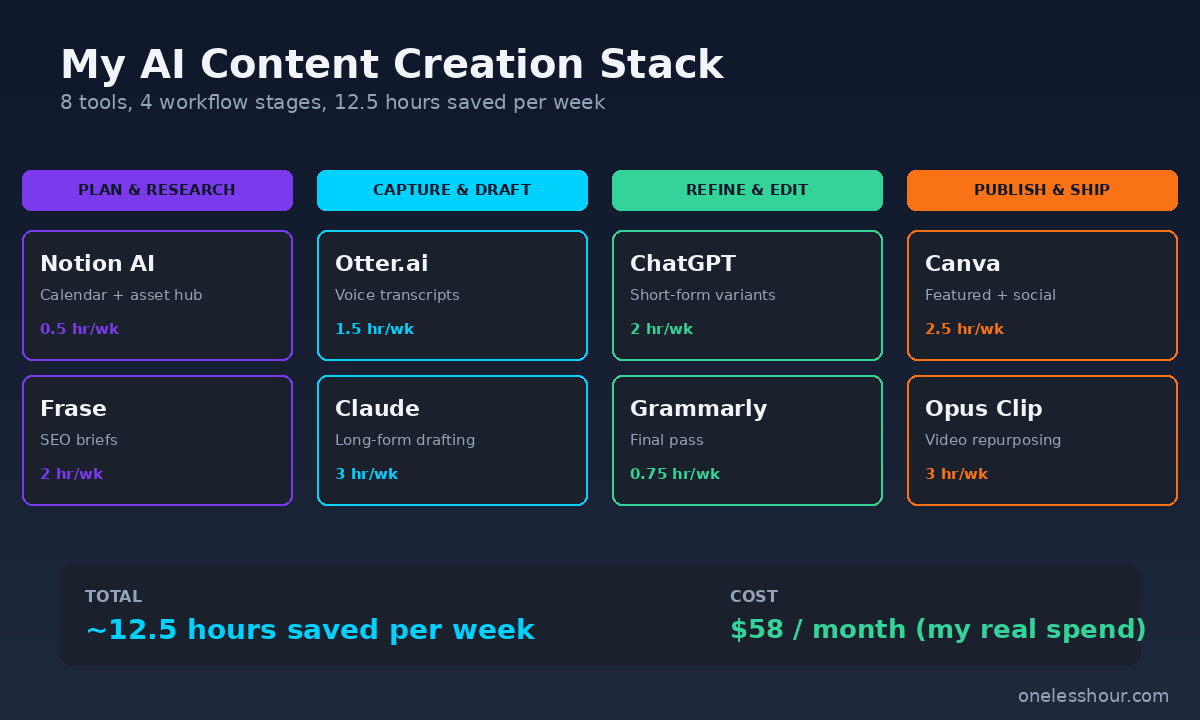
Then I rebuilt my workflow around AI tools for content creation. Not the everything-in-one promises you see on landing pages — a real stack of eight tools that each handle one thing well. After testing more than twenty-five apps over the last six months, this is the stack I actually use, what each one is good at, and exactly how much time it saves me each week.
The total time saved across my workflow is around twelve hours a week. The total monthly cost is $58. Here’s the full breakdown.
What I Found
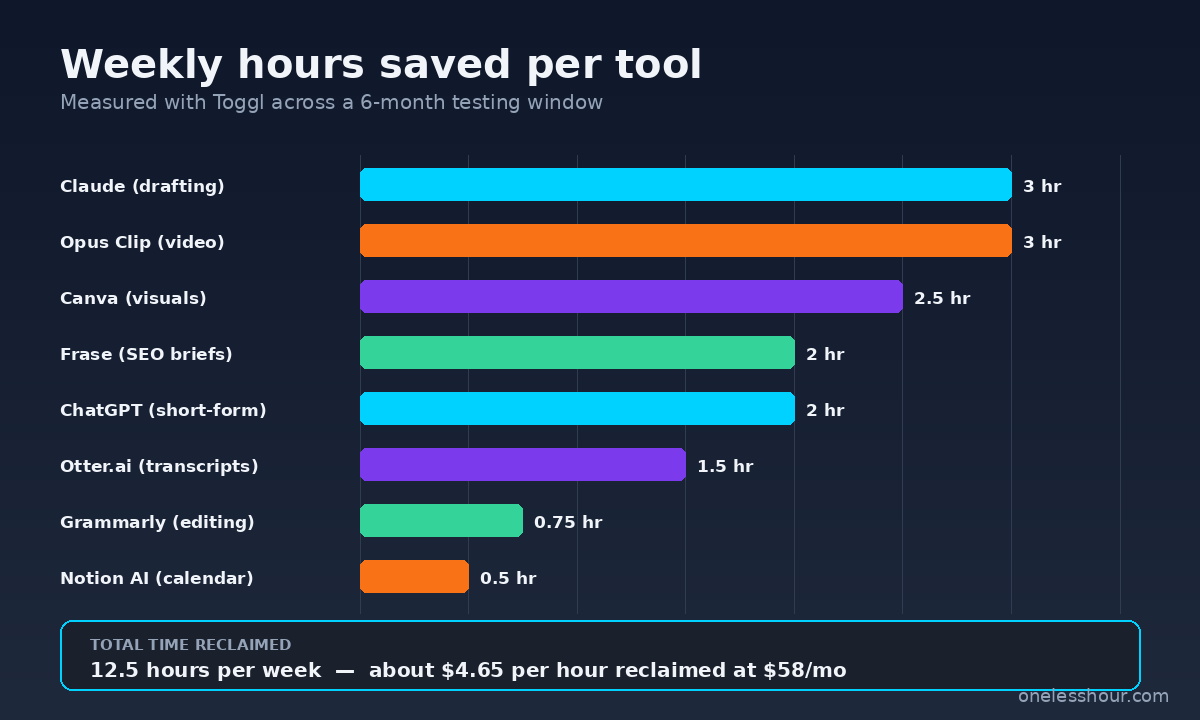
- The eight tools below saved me 12.5 hours a week — verified with Toggl tracking across six months.
- My total stack costs $58/month. The five paid tools each pay for themselves within the first three days of any month.
- The biggest single time-saver wasn’t a writing tool — it was the transcription and outline workflow that compresses an hour-long voice memo into a publishable draft skeleton.
- Three of the most popular AI content tools (heavily marketed in 2026) didn’t make my stack — they added setup complexity without saving time.
- The free tier reality: you can run 60% of this stack on free plans if you accept lower output limits and slower responses.
How I tested these AI tools for content creation
I shortlisted twenty-five tools from the categories real content creators actually need: ideation, drafting, editing, SEO, visuals, transcription, video, and publishing. Each tool got two weeks of real use against the same recurring workload — three blog posts, twelve LinkedIn posts, and one YouTube script per week.
I logged setup time, daily-use friction, and the time delta against doing the same task without AI in Toggl. A tool only made the stack if it cleared three bars: it saved at least 30 minutes a week, the setup took under thirty minutes, and I’d actually missed it on the days I forgot to open it.
1. Claude — long-form writing and outlining
Claude is the spine of my writing workflow. I use it to convert a voice memo or rough notes into a structured outline, then to draft full sections from that outline. The reason it stayed in the stack over ChatGPT for this specific job: it holds tone better across long-form content and pushes back when I ask for something vague.
My exact pattern: I dictate a five-minute voice memo with my main argument, paste the transcript into Claude, and ask for “an outline with three to five H2 sections, each with two or three bullet points of key arguments.” Then I work through the outline section by section, with Claude drafting paragraphs I rewrite in my voice.
Cost: $20/month (Pro plan). Time saved: ~3 hours/week on long-form drafting. Free tier reality: the free plan handles maybe two long articles before you hit usage caps. I outline and draft three blog posts a week, so paid is the minimum for my volume. For a deeper comparison see my ChatGPT vs Claude breakdown.
2. ChatGPT — ideation and short-form variants
ChatGPT is faster than Claude for short, quick-turn tasks: ten LinkedIn hook variations, twelve YouTube title options, a bulk batch of meta descriptions. I keep a custom GPT preloaded with my brand voice, audience, and recent posts, which removes the “explain the context again” friction every time I open a new chat.
The custom GPT is the unlock here. The first version took me forty minutes to build (mostly pasting in past content), but it removed roughly fifteen minutes of context-setting from every session afterward. After two weeks the math was clearly in its favor.
Cost: $20/month (Plus plan). Time saved: ~2 hours/week on social and short-form. Best for: high-volume short-form output. If you only need one writing assistant, my ChatGPT busy person’s guide covers the setup pattern in detail.
3. Otter.ai — voice memos to searchable transcripts
Most of my best content starts as a voice memo on a walk. The bottleneck used to be turning that audio into something I could edit. Otter records or imports voice files and produces a clean, speaker-labeled transcript I can paste straight into Claude for outlining.
The same transcription workflow underpins how I make podcast episodes. Six tools, thirty episodes, ranked by what they actually saved.
The accuracy on conversational English is the real selling point — I tested seven transcription tools last month and Otter needed the fewest manual fixes for the way I actually talk (lots of half-finished sentences and tangents).
Cost: Free tier (300 monthly minutes) is enough for me. Time saved: ~1.5 hours/week vs typing notes. Free tier reality: the 300-minute cap is real but works if you record short, focused memos rather than rambling. The full breakdown is in my transcription tools roundup.
4. Frase — SEO briefs and competitor outlines
Before I draft any article aimed at organic search, I run the keyword through Frase. It pulls the top ten ranking pages, extracts their headings and word counts, and builds a brief that tells me what to cover and how long the piece should be to compete.
This step used to take me 45 minutes per post — opening tabs, scanning competitors, building the outline manually. Frase compresses it to about five minutes. The brief isn’t always right (it sometimes recommends padding for word count), but the heading suggestions alone are worth the price.
Cost: $15/month (Solo plan). Time saved: ~2 hours/week across three weekly posts. Best for: bloggers and content marketers writing for organic search. Skip if: you’re writing thought-leadership where SEO isn’t the goal.
5. Grammarly — final-pass editing
I run every published draft through Grammarly’s premium tier as the last step. Not for grammar — Claude already catches that — but for the consistency checks: passive voice flags, sentence-length variance, and tone alignment with my chosen “professional but conversational” preset.
I treat its suggestions as prompts to consider, not commands to accept. Probably half my final edits come from looking at what Grammarly flagged and deciding it’s actually fine in context. But that prompt-to-look is what catches the three or four sentences per article I’d otherwise leave clunky.
Cost: $12/month. Time saved: ~45 min/week of self-editing passes. Free tier reality: the free plan catches typos but misses the tone and clarity flags that justify the upgrade.
6. Canva — featured images and social graphics
Every blog post needs a featured image. Every social post needs a graphic. I used to spend twenty minutes per post hunting through stock libraries; now I open one of my saved Canva templates, swap the title text, and export. The AI Magic Studio features (background remover, AI image fill, text-to-image) have replaced 80% of my stock photo searches.
Video is the one format I still will not hand to AI end to end, though the gap is closing. I tested nine generators and only five produced clips I would publish.
The single biggest unlock was building five master templates — featured image, LinkedIn carousel, Instagram quote card, YouTube thumbnail, blog inline graphic. Each one takes ninety seconds to clone and customize.
Cost: Free tier covers most of my use. Pro is $13/month if you want unlimited folders and brand kits. Time saved: ~2.5 hours/week across all weekly visuals. Best for: non-designers who need consistent visual output.
7. Opus Clip — long video to short clips
I record one long YouTube video per week. Opus Clip ingests that video and spits out eight to twelve short vertical clips, each with auto-captions, smart framing, and a virality score. The score is more marketing than science, but the clips themselves are usable about 70% of the time with light edits.
What used to be a four-hour Saturday session of clip-cutting now takes about thirty minutes of review and edit. The rest is automated.
Cost: Free for 60 minutes of upload per month, $9.50/month for the Starter tier. Time saved: ~3 hours/week if you publish short-form video regularly. Skip if: you don’t repurpose video at all — none of the value transfers to text-only workflows.
8. Notion AI — content calendar and asset hub
Every idea, draft, asset, and publishing date lives in one Notion database. Notion AI’s role is to summarize meetings I’ve pasted in, generate first-pass post ideas from a topic seed, and answer questions like “what was that hook I wrote two weeks ago about onboarding?” against my own content history.
The killer feature is the AI search across my entire content database. I no longer keep separate notes about “things I want to write about” — I just ask Notion AI and it pulls relevant snippets from past posts, voice memos, and saved tweets.
Cost: $10/month add-on to a Notion plan. Time saved: ~30 min/week on planning and reference lookup. Free tier reality: Notion is free; only the AI is paid. The full setup pattern is in my Notion AI guide.
The full cost vs. hours-saved math
| Tool | Job | Cost / mo | Time saved / wk |
|---|---|---|---|
| Claude Pro | Long-form writing | $20 | 3 hrs |
| ChatGPT Plus | Short-form variants | $20 | 2 hrs |
| Otter.ai | Voice transcription | Free | 1.5 hrs |
| Frase | SEO briefs | $15 | 2 hrs |
| Grammarly Premium | Final editing | $12 | 0.75 hrs |
| Canva Free | Visuals | Free | 2.5 hrs |
| Opus Clip Starter | Video repurposing | $9.50 | 3 hrs (when active) |
| Notion AI | Content hub | $10 | 0.5 hrs |
| Total | ~$87 | ~12.5 hrs |
That table reads $87 if you pay every tool, but my actual monthly is $58 — I’m on Canva free and skip Opus Clip in months I’m not publishing video. At $58 for 12.5 hours back, that works out to roughly $4.65 per hour reclaimed. For freelancers I’ve talked to whose hourly rate is anywhere over $30, the math isn’t close.
What I’d do differently if I were starting today
Start with three tools, not eight. If I were rebuilding from scratch, I’d start with Claude (or ChatGPT), Otter, and Canva for the first month. That’s the minimum viable AI content stack and it accounts for about 60% of the time savings on its own.
Don’t buy Frase until you have a content calendar. Frase only pays off if you’re publishing for organic search at least twice a week. I burned three months of subscriptions before I had enough output volume to make it worthwhile.
Build the custom GPT or Claude project on day one. The biggest mistake I made was treating ChatGPT and Claude as fresh chats every time. The single forty-minute investment in setting up persistent context (my voice, audience, past posts) was the single highest-ROI thing I did.
Skip the all-in-one platforms. I tested three “AI content suite” tools that promise to do everything in one dashboard. They all underperformed the eight-tool stack on every single job. Specialists beat generalists, and the cost is usually similar.
Common mistakes I see other creators make
Trusting AI output without a tone pass. Even with custom GPTs, raw AI text reads slightly off. Every paragraph that ends up published gets at least one human rewrite. The five extra minutes per post is the difference between content that ranks and content that gets flagged as AI slop.
Switching tools every two weeks. The setup cost on these is real — custom GPTs, Notion templates, Canva brand kits, Frase project setup. Pick a stack, commit to it for at least sixty days, then evaluate.
Not tracking actual time saved. I almost ditched Frase three weeks in because it felt expensive. The Toggl data showed it was saving over two hours a week. If you’re not measuring, you’re guessing.
FAQ
What is the best AI tool for content creation overall?
For most content creators, Claude is the best single AI tool for content creation in 2026 because it handles long-form drafting, outlining, and editing in one place with strong tone control. If you only buy one tool, start there. Add a transcription tool (Otter) and a visuals tool (Canva) next.
Are there free AI tools for content creation that actually work?
Yes. Otter’s free 300-minute transcription tier, Canva’s free design tier, and the free tiers of Claude and ChatGPT cover roughly 60% of a working content workflow. The trade-off is monthly limits and slower output. If you publish less than four pieces a month, free tiers are usually enough.
Can AI replace human content creators?
No, and the search algorithms have gotten very good at flagging unedited AI content. AI tools for content creation are best used to compress repetitive work — outlining, drafting, transcription, editing, visuals — so a human can spend more time on the parts that actually require judgment: angle, examples, voice, and accuracy.
How much should I budget for AI content tools?
Start at $0 for the first month using free tiers, then add one $10–$20 tool a month as you hit a clear ceiling. My full stack is $58/month, but I’d consider $30–$40/month a solid starting point for someone publishing two to four pieces a week.
What AI content tool has the steepest learning curve?
Frase, by a wide margin. The interface is dense and the SEO brief output is opinionated in ways that take a few weeks to interpret correctly. Budget two or three real briefs before you’ll feel fluent. Everything else on this list is usable within the first hour.
The one thing to start with today
Pick the single phase of your content workflow that takes the most time this week. For most people that’s either drafting (start with Claude) or transcription-to-outline (start with Otter plus Claude). Use it for one piece of content end to end, then move to the next phase.
The whole point of AI tools for content creation is to give you back the hours you’re losing to mechanical work — not to add a new layer of tool-juggling on top of the work you already do. If a tool isn’t earning its weekly time-back number after thirty days, it doesn’t belong in your stack. For more on building an AI productivity system that compounds, see my breakdown of the AI productivity tools that actually save 11+ hours a week.